
Introduction
This manual provides comprehensive instructions for the VOCA V340 4G Flip Phone. Please read this guide carefully to ensure proper use and maintenance of your device. The VOCA V340 is designed for ease of use, featuring large buttons, high volume, an SOS emergency button, and a convenient charging dock.
Product Overview
The VOCA V340 is a lightweight and compact 4G flip phone, weighing only 90g and measuring 18mm thick. It includes essential features for reliable communication.

Image: VOCA V340 flip phone displaying its key features: 4G LTE connectivity, high volume, SOS emergency function, FM radio, camera, and built-in flashlight.
Key Features:
- Lightweight and Compact Design: Weighing only 90g and 18mm thick, designed for portability and comfortable handling.
- SOS Button: Located on the back, allows direct dialing of a pre-set emergency contact.
- Low Battery SMS Notification: Automatically sends an SMS to emergency contacts when the battery level reaches 15%.
- Photo Contacts: Assign photos to contacts for easier identification.
- Volume Control: Easily adjust call volume using dedicated buttons.
- Charging Dock: Includes a convenient dock for effortless charging.
- 4G LTE Connectivity: Ensures reliable network connection.
- FM Radio and Flashlight: Integrated for additional utility.
Setup
1. Inserting the SIM Card and Battery
- Open the back cover of the phone.
- Insert the Nano SIM card into the designated slot. Ensure the SIM card is correctly oriented.
- Insert the 1000 mAh Lithium-ion battery into its compartment.
- Replace the back cover securely.

Image: The VOCA V340 flip phone in an open position, displaying its screen and large keypad, ready for SIM card insertion.
2. Initial Charging
- Connect the charging cable to the phone's USB Type C port or place the phone in the included charging dock.
- Plug the charger into a power outlet.
- Allow the phone to charge completely before first use. The charging indicator will show the status.

Image: The VOCA V340 flip phone securely placed in its dedicated charging dock, indicating ease of charging.
3. Powering On/Off
- To power on, press and hold the Power/End Call button until the screen lights up.
- To power off, press and hold the Power/End Call button, then confirm power off on the screen.
Operating Instructions
Making Calls
- Dialing a Number: Enter the phone number using the keypad and press the Call button (green button).
- Answering a Call: Open the flip phone or press the Call button.
- Ending a Call: Close the flip phone or press the End Call button (red button).
- Speed Dial: Use the M1, M2, M3 buttons for pre-programmed speed dial contacts. Refer to the phone's settings to assign numbers to these keys.
- Photo Contacts: Navigate to your contacts, select a contact with an assigned photo, and press the Call button.
Sending and Receiving SMS Messages
- Composing a Message: Go to the 'Messages' menu, select 'Write Message', enter your text using the keypad, and select the recipient.
- Reading Messages: New messages will be indicated on the screen. Navigate to the 'Messages' menu to view your inbox.
SOS Emergency Function
- To activate, press and hold the SOS button on the back of the phone.
- The phone will automatically dial pre-set emergency contacts and send an emergency SMS message.
- Ensure emergency contacts are correctly configured in the phone's settings.
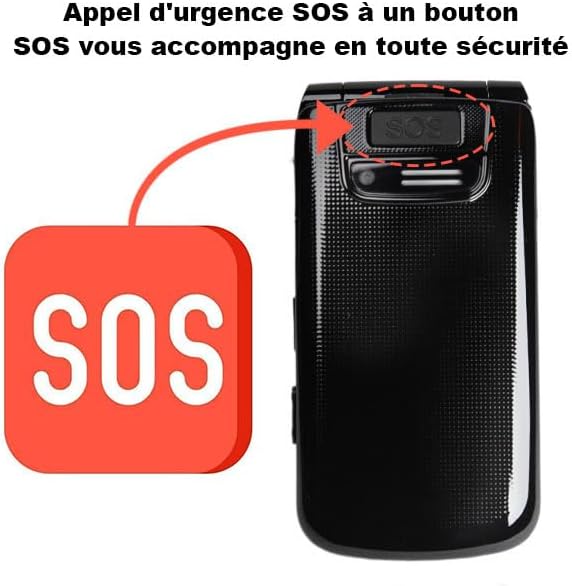
Image: A detailed view of the SOS emergency button located on the rear of the VOCA V340 flip phone, designed for quick access in critical situations.
Low Battery SMS Notification
- When the battery level drops to 15%, the phone automatically sends an SMS notification to up to three pre-set emergency contacts.
- This feature helps ensure that designated contacts are aware of the phone's low power status.

Image: The VOCA V340 flip phone illustrating the low battery SMS notification feature, showing an alert and the automatic message sending process.
Other Functions
- FM Radio: Press and hold the dedicated FM button on the side to activate the radio.
- Flashlight: Use the physical switch on the side of the phone to turn the flashlight on or off.
- Eye Protection Mode: This mode adjusts screen brightness and changes font color to green to reduce eye strain. Activate it through the phone's settings.

Image: The VOCA V340 flip phone screen showing the Eye Protection Mode activated, characterized by green text and reduced brightness for comfortable viewing.
Maintenance
- Keep the phone dry. Moisture can damage electronic circuits.
- Do not expose the phone to extreme temperatures.
- Clean the phone with a soft, dry cloth. Avoid using harsh chemicals.
- Handle the phone gently to prevent physical damage.
- Ensure the charging dock and phone contacts are clean for efficient charging.
Troubleshooting
| Problem | Possible Cause | Solution |
|---|---|---|
| Phone does not power on. | Low battery; battery not inserted correctly. | Charge the phone; ensure battery is properly seated. |
| Cannot make or receive calls. | No SIM card; SIM card not active; poor network signal. | Insert SIM card; contact your mobile carrier; move to an area with better signal. |
| Charging issues. | Loose connection; faulty charger/dock; dirty charging port. | Check connections; try a different charger/dock; clean the charging port. |
| SOS button not working. | Emergency contacts not set up; button malfunction. | Configure emergency contacts in settings; contact support if issue persists. |
Specifications
| Feature | Detail |
|---|---|
| Brand | VOCA |
| Model Name | V340 |
| Item Model Number | V340 |
| Form Factor | Foldable Screen (Flip) |
| Operating System | Android 4.0 (Note: This is a basic OS, not a full smartphone Android experience) |
| CPU Model | Snapdragon |
| Screen Size | 5.9 inches (Note: This refers to the display area, which is large for a flip phone) |
| Resolution | 720 x 1520 Pixels |
| Display Type | LCD |
| Color | Black |
| Cellular Technology | 4G |
| Connectivity Technology | 2G, 4G |
| Wireless Network Technology | GSM, LTE |
| Mobile Carrier | Unlocked |
| Number of SIM Card Slots | Single SIM |
| SIM Card Size | Nano SIM |
| Connector Type | USB Type C |
| Headphone Jack | 3.5 mm Headphone Jack |
| Special Features | SMS notification for low battery, SOS button, Photo contacts, High volume, Charging dock, FM Radio, Flashlight |
| Camera Description | Rear |
| Camera Flash | No flash |
| Battery Description | Lithium-ion |
| Battery Capacity | 1000 mAh |
| Item Weight | 90 Grams |
| Phone Talk Time | 6 Hours (approx. 300 minutes) |
| Standby Time | Approx. 370 hours |
| GPS | No |
| Water Resistance Level | Not water resistant |
| Included Components | Battery, Charging Dock, Power Adapter, USB-C Cable, User Manual |
| UPC | 840833104762 |
| GTIN | 840833104762 |
Warranty and Support
Warranty Information
The VOCA V340 4G Flip Phone comes with a 1-year warranty from the date of purchase. This warranty covers manufacturing defects under normal use. Please retain your proof of purchase for warranty claims.
Customer Support
For technical assistance, troubleshooting beyond this manual, or warranty inquiries, please contact VOCA customer support. Refer to the contact information provided with your product packaging or visit the official VOCA website for support details.
Online Resources: For additional information and FAQs, please visit the VOCA Store on Amazon.