Introduction
The TOHETO Rechargeable A2 Light Board is a versatile tool designed for various artistic and technical applications, including diamond painting, tracing, drawing, sketching, and more. This ultra-thin light pad features a large A2 working area, multiple light color modes, and adjustable brightness levels to suit different environments and tasks. Its built-in rechargeable battery provides portability, while USB-C connectivity offers flexible power options. This manual provides essential information for setting up, operating, and maintaining your light board.

Image: The TOHETO Rechargeable A2 Light Board, showcasing its large illuminated surface and slim design.
Product Features
- Rechargeable Battery & USB-C Powered: Equipped with a 5200mAh battery for up to 3 hours of wireless use at maximum brightness after a 4-hour charge. Supports both battery and USB working modes.
- Multiple Light Colors & Dimmable Brightness: Offers 3 light color modes (white, warm yellow, warm white) and stepless dimming with 6 preset brightness levels (15%, 30%, 45%, 60%, 80%, 100%). Color temperature ranges from 3000-6500K.
- Large A2 Size & Ultra-Thin Design: Measures 23.7" x 15.8" (60cm x 40cm) with a visible working area of 20.8" x 14" (52.9cm x 35.4cm). With a thickness of only 7mm (less than 0.3 inches), it is highly portable.
- Eye Protection Technology: Designed to provide even illumination without shadows or glare, reducing eye strain during extended use.
- Versatile Applications: Suitable for diamond painting, stenciling, 2D animation, calligraphy, embossing, scrapbooking, tattoo tracking, sketching, drawing, streaming, sewing projects, embroidery, fabric design, photography, film, and architecture.
- Multifunctional Clips: Includes two clips that can be used to secure paper, act as a stand for the light box, or function as a mobile phone holder.

Image: Examples of the light board's wide range of applications, from diamond painting to tracing and sketching.
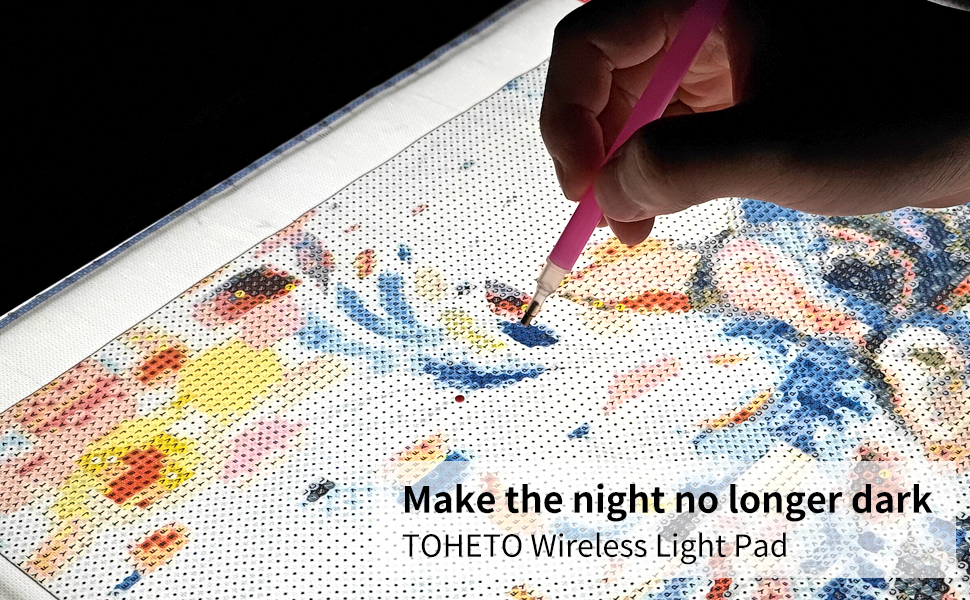
Image: The light board's versatility for different creative needs, such as diamond painting, vinyl weeding, watercolor, and sketching.
Package Contents
Please verify that all items listed below are included in your package:
- 1 x TOHETO A2 Light Tablet
- 1 x US Adapter
- 1 x Type-C Charging Cable
- 2 x Clips
- 1 x Pencil
- 1 x Pencil Sharpener
- 1 x Eraser
- 1 x User Manual (this document)
- 6 x Drawing Papers
- 4 x Blank Papers

Image: All items included in the TOHETO A2 Light Board package.
Setup
- Unpack: Carefully remove all components from the packaging.
- Initial Charge: Before first use, fully charge the light board using the provided USB-C cable and US adapter. Connect the USB-C end to the light board and the USB-A end to the adapter, then plug into a power outlet. A full charge takes approximately 4 hours.
- Placement: Place the light board on a flat, stable surface. The non-slip rubber feet on the bottom will help secure it.
- Optional Clips: The included multifunctional clips can be attached to the top edge of the light board to hold your drawing paper or diamond painting canvas in place. They can also serve as a stand or phone holder.

Image: Powering options for the light board, including its internal battery and external USB-C connections.

Image: The versatile clips included with the light board, demonstrating their various functions.
Operating Instructions
- Power On/Off: Press the power button (①) located on the top left corner of the light board to turn it on or off.
- Change Light Color Mode: Smoothly touch the light mode control button (②) to cycle through the three available light colors: white, warm yellow, and warm white.
- Adjust Brightness (6 Levels): Briefly press the light mode control button (②) to select one of the 6 preset brightness levels (15%, 30%, 45%, 60%, 80%, 100%).
- Adjust Brightness (Stepless Dimming): Long press the light mode control button (②) to activate stepless dimming. The brightness will gradually increase or decrease. Release the button when the desired brightness is reached.
- Using for Tracing/Drawing: Place your original image or design on the light board, then place a blank paper on top. The illumination from the light board will make the original visible through the top paper, allowing for easy tracing. Use the clips to secure the papers.
- Using for Diamond Painting: Place your diamond painting canvas on the light board. The illumination will help clarify symbols and ensure accurate placement of diamonds, especially in dimly lit areas or for canvases with faint markings.

Image: Demonstration of the three adjustable light color temperatures.

Image: Visual guide to the 6 preset brightness levels and stepless dimming feature.

Image: The effect of the light board on a diamond painting canvas, showing enhanced clarity of symbols.
Video: This video demonstrates the operation of the TOHETO A2 Rechargeable Light Pad, including turning it on, adjusting brightness and color temperature, and its application in diamond painting and tracing.
Maintenance
- Cleaning: Use a soft, dry cloth to wipe the surface of the light board. For stubborn marks, slightly dampen the cloth with water. Avoid abrasive cleaners or solvents.
- Storage: When not in use, store the light board in a dry, dust-free environment. Its slim design allows for easy storage.
- Battery Care: To prolong battery life, avoid fully discharging the battery frequently. If storing for an extended period, charge the battery to about 50% every few months.
- Handling: Handle the light board with care to prevent scratches or damage to the illuminated surface.
Troubleshooting
| Problem | Possible Cause | Solution |
|---|---|---|
| Light board does not turn on. | Battery is depleted or power cable is not connected properly. | Charge the light board using the provided adapter and USB-C cable. Ensure all connections are secure. |
| Light is too dim or too bright. | Brightness setting is not optimal for current task/environment. | Briefly press the light mode button to cycle through 6 brightness levels, or long press for stepless dimming. |
| Light color is not desired. | Incorrect color mode selected. | Smoothly touch the light mode button to cycle through white, warm yellow, and warm white light colors. |
| Light flickers or is uneven. | Low battery or power supply issue. | Ensure the light board is fully charged or connected to a stable power source. If issues persist, contact customer support. |
Specifications
| Attribute | Detail |
|---|---|
| Model Name | A2 Rechargeable Light Pad |
| Item Model Number | A2-D23 |
| Brand | TOHETO |
| Color | Black |
| Material | Acrylic, Plastic |
| Product Dimensions (L x W x H) | 23.62" x 15.75" x 0.28" (60cm x 40cm x 0.7cm) |
| Visible Working Area | 20.8" x 14" (52.9cm x 35.4cm) |
| Item Thickness | 0.7 Centimeters |
| Power Source | Battery Powered (5200mAh Lithium Polymer, included) |
| Light Source Type | Light Emitting Diode (LED) |
| Color Temperature | 3000-6500K (3 Light Colors Mode) |
| Battery Life (Max Brightness) | Approx. 3 hours (after 4 hours charge) |
| Item Weight | 3.56 pounds |
| Date First Available | August 2, 2024 |

Image: Detailed dimensions and key features of the Rechargeable A2 Lightbox.
Warranty & Support
TOHETO is committed to providing high-quality products. If you encounter any quality issues with your A2 Light Board, please do not hesitate to contact us for assistance or a replacement. Your satisfaction is our priority.
For support, please refer to the contact information provided with your purchase or visit the official TOHETO website.


