
Introduction
This manual provides detailed instructions for the installation, operation, and maintenance of your Scosche Qi2 MagSafe 15W Wireless Charging Car Mount. Please read this manual thoroughly before use to ensure proper functionality and safety.

Image: The Scosche Qi2 MagSafe 15W Wireless Charging Car Mount, showcasing its sleek design and magnetic charging pad.
What's in the Box
Verify that all components are present before proceeding with installation:
- MagicMount Elite Charge Elite Window/Dash Mount
- Dual Port 40W USB-C Power Adapter
- (2) Cable Management Clips
- Cleaning Wipe

Image: An illustration showing the MagicMount Elite Charge Elite, the 40W USB-C car charger, two cable management clips, and a cleaning wipe, representing the complete package contents.
Setup Instructions
1. Prepare the Mounting Surface
Ensure the chosen surface (windshield or dashboard) is clean and dry. Use the provided cleaning wipe to remove any dust or grease. Allow the surface to dry completely before proceeding.
2. Attach the Suction Cup Mount
Press the suction cup firmly against the desired clean, flat surface. Flip the lever down to create a secure vacuum seal. For dashboard mounting, ensure the surface is smooth and flat for optimal adhesion.

Image: The Scosche car mount securely attached to a car's windshield, holding a smartphone in landscape orientation.

Image: The Scosche car mount positioned on a car's dashboard, holding a smartphone in portrait orientation.
3. Connect Power
Plug the attached USB-C cable from the mount into the provided 40W USB-C car charger. Insert the car charger into your vehicle's 12V accessory outlet (cigarette lighter socket).
4. Cable Management
Utilize the integrated cable management system on the back of the magnetic mount head and the included cable management clips to neatly route and conceal the excess USB-C charging cord. This helps maintain a clutter-free environment.

Image: A close-up view of the back of the magnetic charging head, illustrating how the charging cable can be coiled and concealed within the mount for tidy cable management.
Operating Instructions
1. Attaching Your Device
Ensure your smartphone is MagSafe compatible or has a MagSafe-compatible case. Align your device with the magnetic charging pad on the mount. The powerful neodymium magnets will securely hold your phone in place.

Image: A hand holding a MagSafe-compatible iPhone, showing it being magnetically attached to the charging pad of the Scosche car mount, with a yellow glow indicating magnetic attraction.
2. Wireless Charging
Once your device is securely attached, wireless charging will begin automatically. The mount delivers up to 15W of power for fast charging compatible devices. Note that iPhone 12 Mini models charge at 12W per Apple specifications.
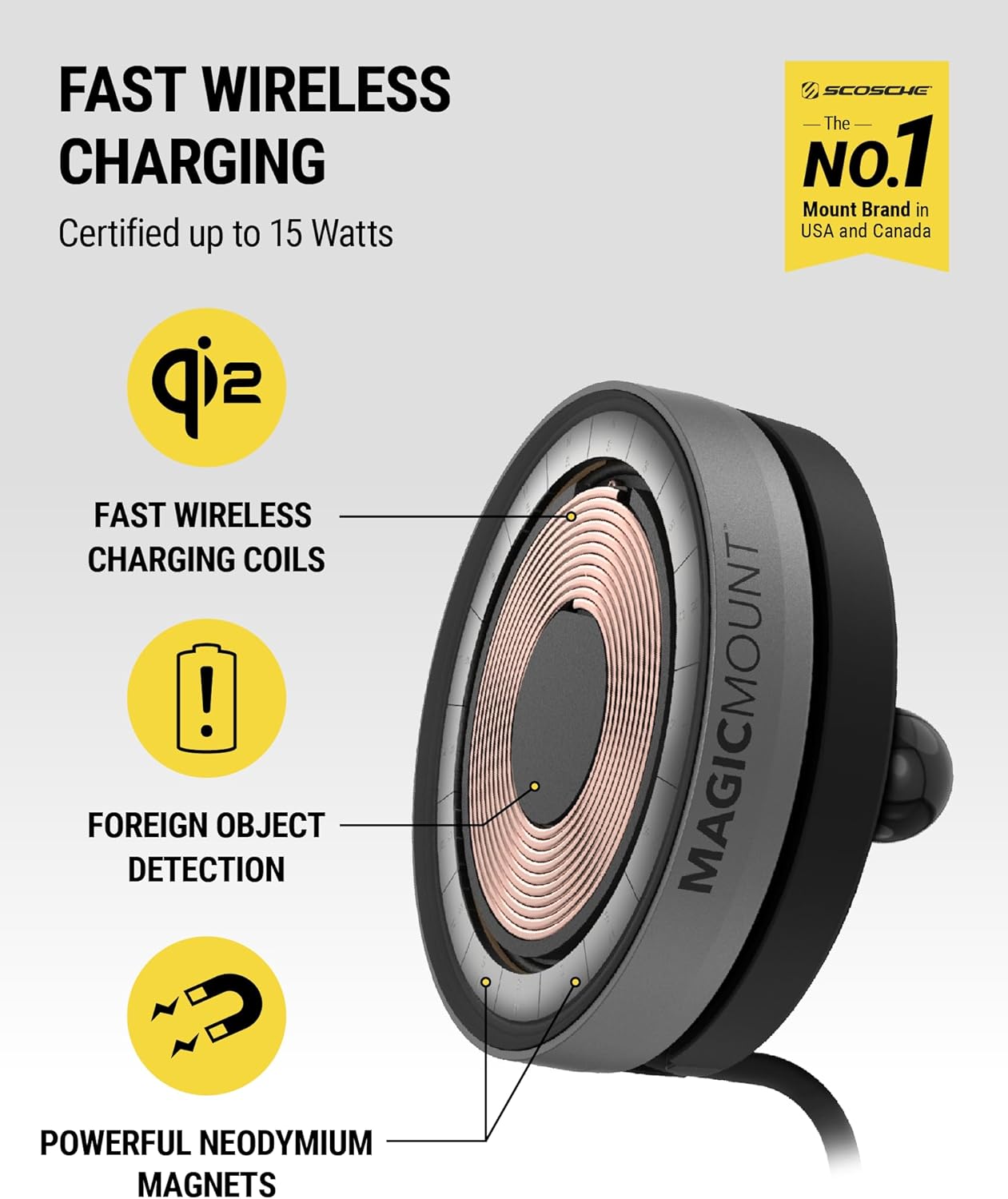
Image: A cutaway view of the charging pad, highlighting the fast wireless charging coils, foreign object detection capabilities, and powerful neodymium magnets.
3. Adjusting Viewing Angle
The mount features an adjustable lock nut and a ball joint, allowing for 360-degree rotation and tilt. Loosen the lock nut, adjust your device to the desired viewing angle (portrait or landscape), and then tighten the lock nut to secure it.

Image: A side view of the Scosche car mount holding a phone, with an arrow pointing to the adjustable lock nut, indicating its function for rotating or tilting the device.
Maintenance
Cleaning
To maintain optimal performance and appearance, regularly clean the mount. Use a soft, damp cloth to wipe down the surfaces. Avoid using abrasive cleaners or solvents, as these can damage the finish or electronic components. Ensure the suction cup and mounting surface are clean for a strong hold.
Storage
If storing the mount for an extended period, detach it from the vehicle and store it in a cool, dry place away from direct sunlight.
Troubleshooting
- Device not charging:
Ensure the USB-C cable is securely connected to both the mount and the car charger, and that the car charger is properly inserted into the vehicle's 12V accessory outlet. Verify your phone is correctly aligned on the magnetic pad. Check if your phone case is MagSafe compatible; non-MagSafe cases may interfere with charging. - Weak magnetic hold:
Confirm your phone or phone case is MagSafe compatible. The magnetic strength can be affected by non-MagSafe cases or improper alignment. Ensure the mounting surface is clean and the suction cup lever is fully engaged. - Mount detaches from surface:
Clean the mounting surface and the suction cup thoroughly. Reapply the suction cup, pressing firmly and engaging the lever. For dashboard mounting, ensure the surface is smooth and flat. - Overheating during charging:
Wireless charging can generate some heat. If your device or the charger feels excessively hot, ensure there are no foreign objects between the phone and the charging pad. Discontinue use if overheating persists and contact support.
Specifications
| Model Number | MEQMRWD-SP |
| Wireless Charging Output | Up to 15W (12W for iPhone 12 Mini) |
| Mounting Type | Window / Dash Suction |
| Connectivity | USB-C (integrated cable) |
| Car Charger Output | 40W Dual Port USB-C |
| Dimensions | 7.13 x 5.43 x 3.82 inches |
| Item Weight | 9.6 ounces |
Compatibility
Compatible with iPhone models with MagSafe (excluding 16e) and Qi2-Ready phones with magnetic cases, including iPhone 16/15/14/13/12 series and Samsung Galaxy S25 series with a magnetic case.

Image: An illustration showing three smartphones (an iPhone with MagSafe, an iPhone with a MagSafe case, and a Qi2-ready phone with a magnetic case) to demonstrate compatibility.
Warranty and Support
The Scosche Qi2 MagSafe 15W Wireless Charging Car Mount is backed by Scosche's Limited Lifetime Warranty. For technical assistance or warranty claims, please contact Scosche customer support. Lifetime technical support is available.
For more information, visit the official Scosche website or refer to the contact details provided with your product packaging.


