
Introduction
The Shark POWERDETECT ultra-light corded stick vacuum combines powerful suction with intelligent cleaning technologies. Featuring the DuoClean Detect nozzle with Intelli-Sense smart sensors, this vacuum automatically adjusts brushroll speed based on floor type and vacuuming direction. It is designed to effectively clean dirt, debris, large piles, fine dust, and pet hair from various surfaces. The integrated Odor Neutralizer Technology helps to freshen your home, while the Anti-Allergen Complete Seal with HEPA filtration traps 99.99% of dust, dander, and allergens inside the vacuum.

Image: The Shark POWERDETECT Ultra-Light Corded Stick Vacuum, showcasing its sleek design and corded operation.
Components Overview
Familiarize yourself with the main components of your Shark POWERDETECT vacuum for optimal use and maintenance.

Image: A detailed diagram highlighting key features and components of the Shark POWERDETECT vacuum, including the fingertip controls, Anti-Allergen Complete Seal, Odor Neutralizer Technology, Lift-Away Technology, LED headlights, DuoClean PowerFins, Self-Cleaning Brushroll, and Detect Technologies.
- Main Unit: Comprises the motor, dust cup, and handle.
- Wand: Connects the main unit to the floor nozzle.
- DuoClean Detect Nozzle: Features two brushrolls (PowerFins and Soft Roller) and Intelli-Sense sensors for adaptive cleaning.
- Odor Neutralizer Technology Cartridge: Guards against bad odors.
- HEPA Filter: Traps dust and allergens.
- Included Accessories: Pet Power Brush, Upholstery Tool, Crevice Tool, Onboard Storage Clip.
Setup
Your Shark POWERDETECT vacuum is designed for easy assembly. Follow these steps to get started:
- Insert the wand into the floor nozzle until it clicks securely into place.
- Insert the handheld vacuum into the top of the wand until it clicks securely into place.
- Ensure the Odor Neutralizer Technology cartridge is properly inserted into the nozzle.
- Wrap the power cord around the cord hooks for storage, ensuring the quick-release hook is rotated for easy access.
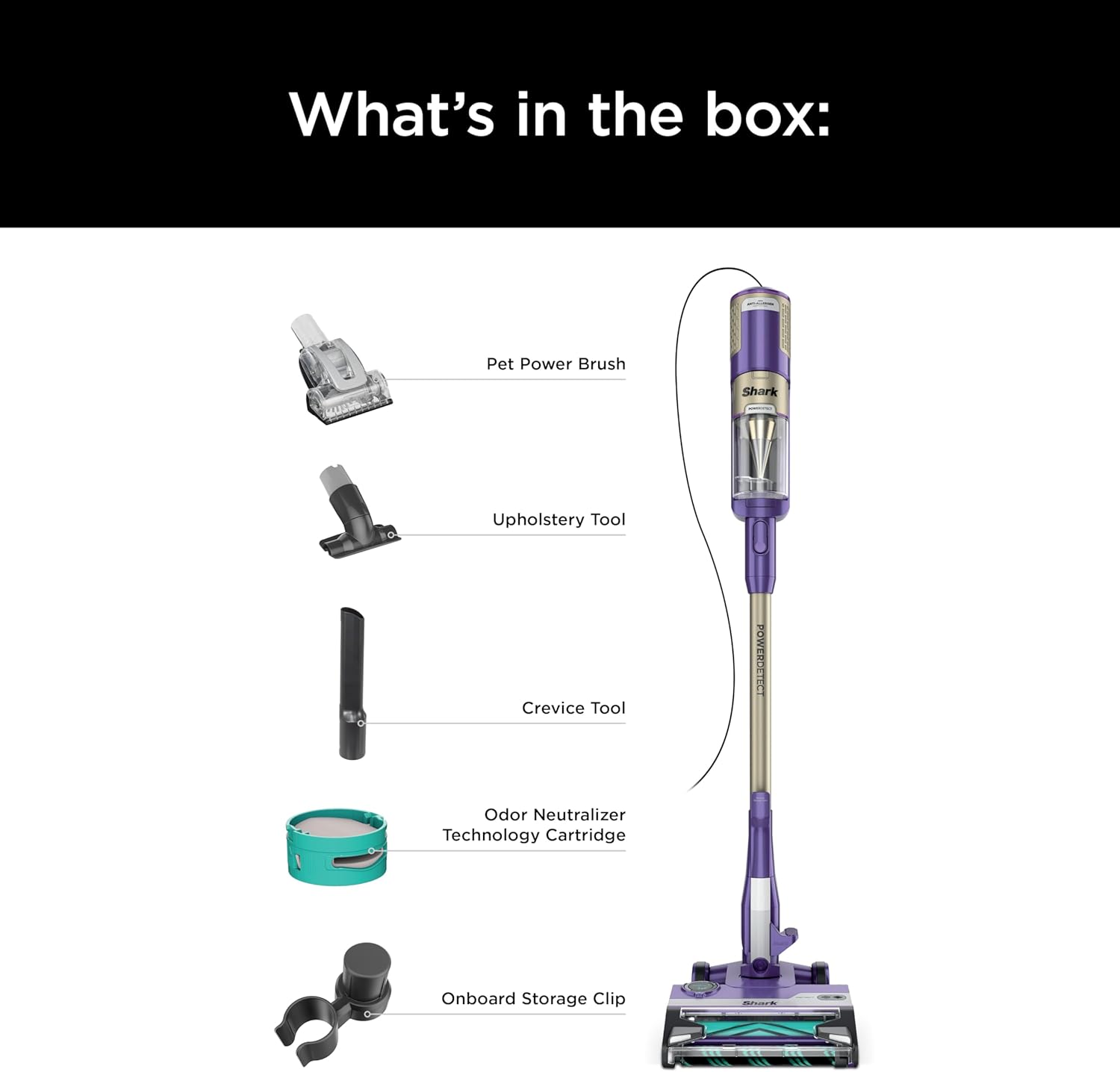
Image: Contents of the Shark POWERDETECT vacuum box, showing the main unit, pet power brush, upholstery tool, crevice tool, odor neutralizer technology cartridge, and onboard storage clip.
Operating Instructions
The Shark POWERDETECT vacuum offers versatile cleaning modes and intelligent features for optimal performance.
Powering On and Mode Selection
- Plug the power cord into a wall outlet.
- Press the Power button on the handle to turn the vacuum on.
- Select the desired surface mode (Hard Floor or Carpet) using the controls on the handle. The vacuum will automatically adjust brushroll speed based on the detected floor type.
Intelligent Cleaning with Detect Technologies
The POWERDETECT vacuum features advanced sensors for enhanced cleaning efficiency:
- Floor Detect: The Intelli-Sense ultrasonic sensor automatically detects the type of floor you are cleaning (hard floor or carpet) and adjusts the brushroll RPMs (revolutions per minute) up to 4x for optimal performance on all surfaces.

Image: An overhead view of the Shark POWERDETECT nozzle illustrating the Floor Detect technology, which senses floor type and boosts brushroll RPMs.
- Direction Detect: The Intelli-Sense directional sensor recognizes the direction you are vacuuming. POWERDETECT directs its powerful suction either forward or in reverse, ensuring maximum cleaning performance in both directions and saving you time.

Image: The Shark POWERDETECT vacuum cleaning a floor with debris, visually representing how Direction Detect optimizes suction for both forward and reverse movements.
Odor Neutralizer Technology
The integrated Odor Neutralizer Technology guards against bad odors inside your vacuum, helping to freshen your home as you clean. Adjust the intensity of the odor release using the dial on the nozzle.

Image: A close-up of the Shark POWERDETECT nozzle showing the Odor Neutralizer Technology dial, which allows users to adjust the fragrance intensity.
Versatile Cleaning
The ultra-lightweight design and detachable components allow for versatile cleaning throughout your home:
- Above-Floor Cleaning: Detach the hand vac from the wand to clean furniture, stairs, and other elevated surfaces.
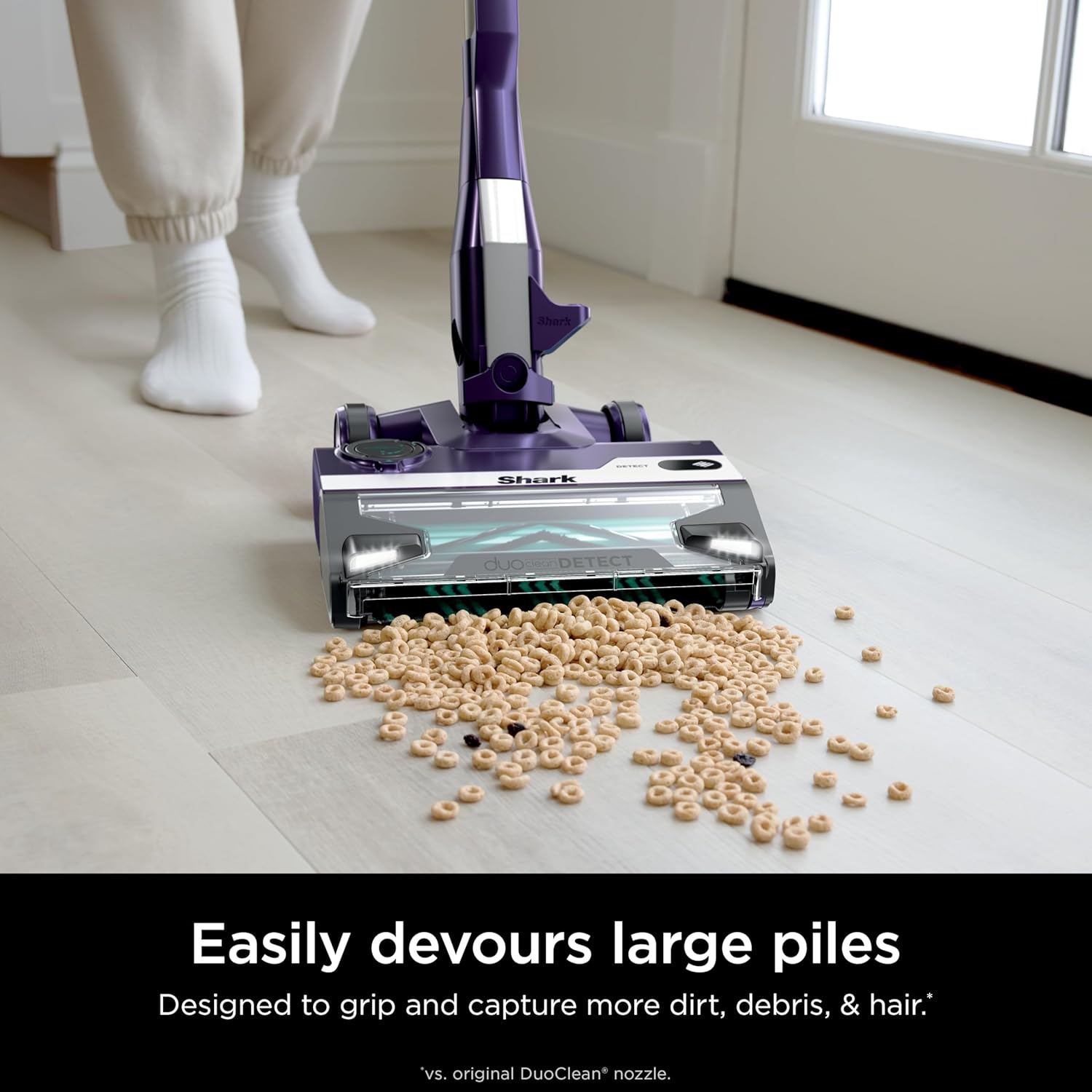
Image: A person using the Shark POWERDETECT vacuum in handheld mode to clean stairs, demonstrating its ease of use for elevated surfaces.
- Extended Reach: Detach the hand vac and wand from the nozzle to reach high areas like ceiling corners or window blinds using the crevice tool.

Image: A person using the Shark POWERDETECT vacuum with the wand and crevice tool to clean high window blinds, showcasing its extended reach capabilities.
- Under-Furniture Cleaning: The low-profile design of the nozzle allows for easy cleaning under furniture.

Image: The Shark POWERDETECT vacuum cleaning under a chair, demonstrating its low-profile design for easy access to tight spaces.
Self-Standing Feature
The vacuum is designed with precisely engineered rear wheels, allowing it to stand on its own without falling over, providing convenient storage and temporary pauses during cleaning.

Image: The Shark POWERDETECT vacuum standing upright on its own, illustrating its self-standing capability.
Maintenance
Regular maintenance ensures your Shark POWERDETECT vacuum operates at peak performance.
Emptying the Dust Cup
Empty the dust cup after each use or when debris reaches the MAX FILL line.
- Press the dust cup release latch to detach the dust cup from the handheld vacuum.
- Hold the dust cup over a trash bin and press the empty release button to open the bottom flap and empty debris.
- Close the dust cup flap until it clicks securely.
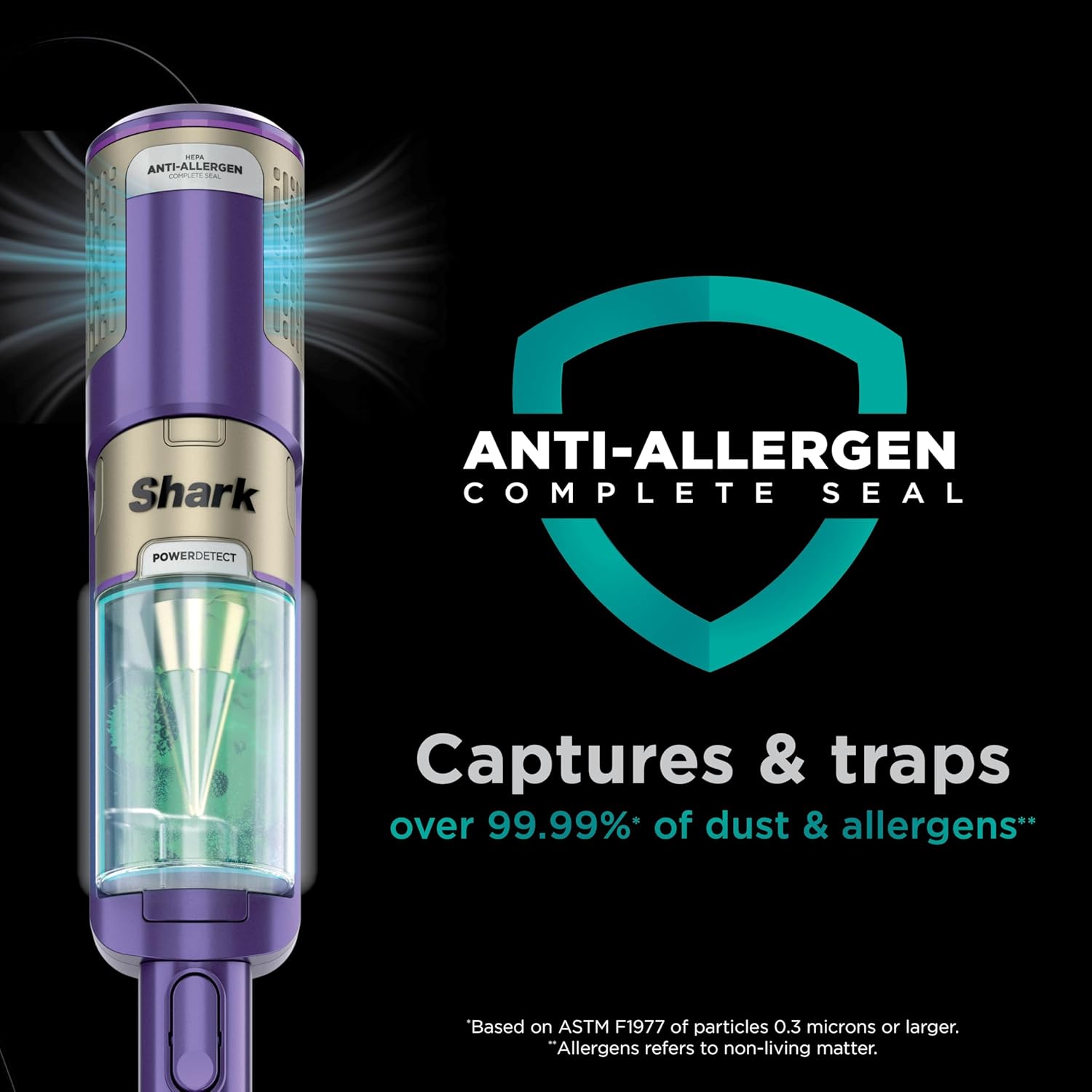
Image: A person demonstrating how to easily empty the dust cup of the Shark POWERDETECT vacuum into a trash bin.
Cleaning the Brushroll
The self-cleaning brushroll is designed to prevent hair wrap. However, periodically inspect the brushroll for any debris or blockages.
- Ensure the vacuum is unplugged before inspection.
- Remove any string, hair, or debris that may be wrapped around the brushroll or caught in the nozzle opening.

Image: The Shark POWERDETECT vacuum's brushroll effectively picking up pet hair, demonstrating its self-cleaning capability.
Filter Maintenance
The Anti-Allergen Complete Seal system with HEPA filtration captures and traps over 99.99% of dust and allergens. Regularly clean the filters to maintain suction power.
- Pre-Motor Filters: Rinse these filters every month. Tap loose dirt off between washes as needed.
- Post-Motor HEPA Filter: Rinse this filter once a year.
- Allow all filters to air-dry completely for at least 24 hours before reinstalling them. Do not use a hairdryer or other heating methods.
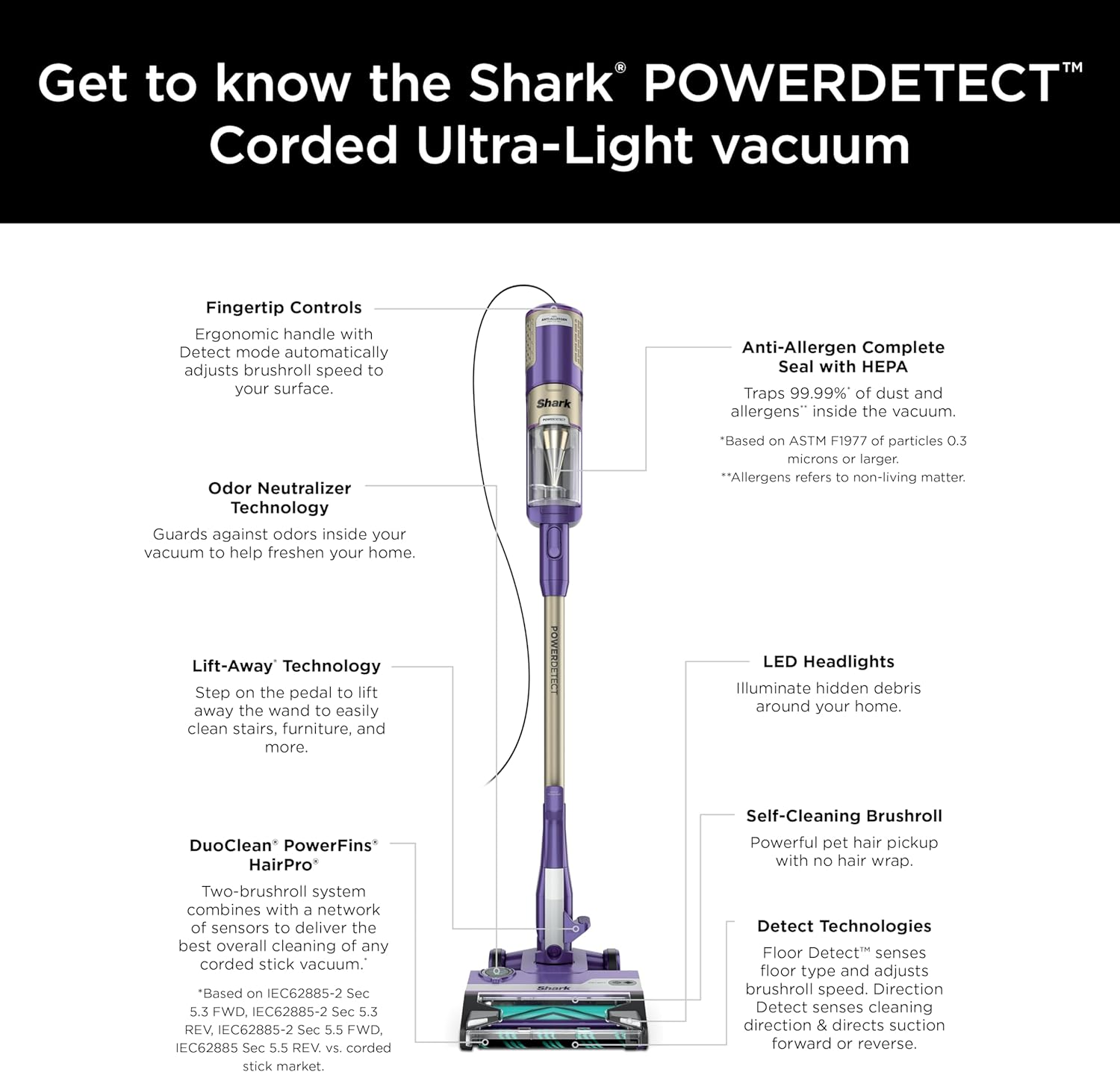
Image: A visual representation of the Shark POWERDETECT's Anti-Allergen Complete Seal and HEPA filtration system, highlighting its ability to capture and trap dust and allergens.
Troubleshooting
If you encounter issues with your vacuum, refer to the following common troubleshooting tips:
- Vacuum not picking up debris or no suction:
- Check if the dust cup is full and empty it.
- Inspect the filters and clean them if they are dirty or clogged.
- Check the nozzle, wand, and hose for any blockages. Clear any obstructions.
- Ensure all connections (wand to nozzle, hand vac to wand) are securely clicked into place.
- Brushroll not spinning:
- Ensure the vacuum is plugged in and powered on.
- Check for any obstructions in the brushroll area and remove them.
- Verify that the correct surface mode (Hard Floor or Carpet) is selected.
- Vacuum turns off on its own:
- The vacuum may have overheated. Turn off the vacuum and unplug it. Empty the dust cup and clean the filters. Allow the vacuum to cool for at least 45 minutes before restarting.
- Check for any large blockages in the nozzle or hose that might be causing the motor to strain.
Specifications
| Feature | Detail |
|---|---|
| Brand | Shark |
| Model Name | Shark HZ4002 |
| Special Feature | Compact, HEPA, Headlight, Lightweight, Portable |
| Filter Type | HEPA Filter |
| Is Cordless? | No |
| Capacity | 0.87 Quarts |
| Wattage | 600 watts |
| Recommended Uses | Pet Hair |
| Form Factor | Stick |
| Color | Eggplant |
| Product Dimensions | 9.8"L x 10.23"W x 46.15"H |
| Item Weight | 9.3 pounds |
| Amperage | 5 Amps |
| Manufacturer | SharkNinja |
| Number of Speeds | 3 |
| Control Method | Touch |
| UPC | 622356640558 |
Warranty and Support
For detailed warranty information, product registration, and customer support, please refer to the official SharkNinja website or contact their customer service directly. Keeping your proof of purchase is recommended for warranty claims.
You can visit the official Shark store for more information: Shark Official Store