Introduction
The Airvana Capri Series True HEPA Air Purifier with granular carbon insert is designed to enhance your indoor air quality. This compact and efficient unit features a 3-stage filtration system, digital controls, sleep mode, and a convenient timer, making it suitable for various home and office environments. Please read this manual thoroughly before operating your air purifier to ensure safe and optimal performance.
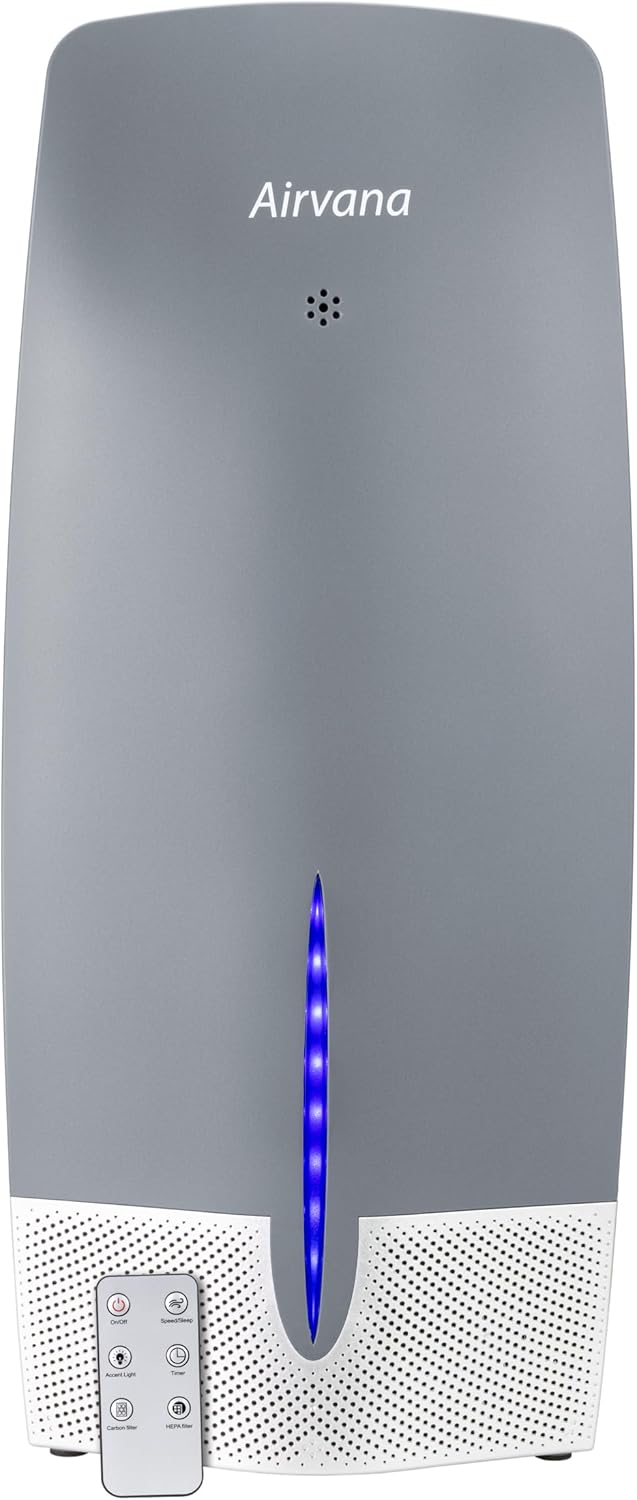
Image: The Airvana Capri True HEPA Air Purifier, graphite color, with its remote control.
Product Features
- Advanced Filtration System: Equipped with a powerful True HEPA filter and a permanent coconut carbon pre-filter. The coconut carbon pre-filter effectively captures household odors and Volatile Organic Compounds (VOCs).
- Multiple Fan Speeds: Offers Low, Medium, and High settings, along with a dedicated Sleep Mode for quiet operation.
- User-Friendly Controls: Features a soft-touch digital control panel for easy operation.
- Convenient Timer: Programmable timer settings for 2, 4, or 8 hours of operation.
- LED Accent Light: Provides ambient lighting for aesthetic appeal.
- Filter Cleaning Indicators: Dedicated lights for Carbon and HEPA filters remind you when cleaning is due.
- Remote Control: Full control over power, fan speed, timer, sleep mode, accent light, and filter resets from a distance.

Image: Diagram illustrating the key components of the Airvana Capri Air Purifier, including the permanent H13 True HEPA filter, coconut carbon permanent pre-filter, LED accent light, 3 fan speeds + sleep mode, and granular carbon filter.
Package Contents
Please check the package for the following items:
- Airvana Capri True HEPA Air Purifier (Model AV470THP)
- Granular Carbon Insert
- True HEPA Filter (pre-installed)
- Remote Control
- User Manual (this document)
Setup
- Unpack the Unit: Carefully remove the air purifier and all packaging materials from the box.
- Filter Installation: The True HEPA filter and granular carbon insert are typically pre-installed. Before first use, ensure all protective plastic packaging is removed from the filters. Refer to the "Maintenance" section for detailed filter access instructions.
- Placement: Place the air purifier on a firm, level surface. Ensure there is adequate space around the unit (at least 6 inches) for proper air circulation. Avoid placing it directly against walls or furniture.
- Power Connection: Plug the power cord into a standard electrical outlet.

Image: The Airvana Capri Air Purifier with its dimensions indicated: 8 inches wide and 18.9 inches tall.
Operating Instructions
Control Panel Overview

Image: Close-up view of the Airvana AV470THP Capri True HEPA Air Purifier control panel, highlighting buttons for On/Off (Power), Fan Speed & Sleep Mode, LED Accent Light, Timer, Carbon Filter Indicator, and HEPA Filter Indicator.
- Power On/Off: Press the On/Off button to turn the unit on or off.
- Fan Speed / Sleep Mode: Press the Speed/Sleep button to cycle through fan speeds: Low (1), Medium (2), High (3). Press and hold to activate Sleep Mode, which operates the unit at the lowest fan speed and dims the display lights for undisturbed rest.
- LED Accent Light: Press the Accent Light button to turn the blue LED accent light on or off.
- Timer: Press the Timer button to set the operating time for 2, 4, or 8 hours. The unit will automatically turn off after the selected time.
- Filter Reset: After cleaning or replacing filters, press and hold the respective Carbon Filter or HEPA Filter button for 3 seconds to reset the filter indicator light.
Remote Control
The included remote control allows you to operate all functions of the air purifier from a distance. Ensure the remote control has working batteries and is pointed towards the unit.
Maintenance
Regular maintenance ensures the longevity and efficiency of your Airvana air purifier.
Granular Carbon Filter Cleaning (AV-CF470)
The permanent granular carbon filter should be refreshed regularly to maintain its odor-absorbing capabilities.
- Unplug the air purifier from the power outlet.
- Lift up on the top lid of the unit to access the carbon filter.
- Remove the granular carbon filter.
- Place the filter in direct sunlight for at least one hour to refresh. This should be done at least once a month.
- Place the filter back into the air purifier and close the lid.
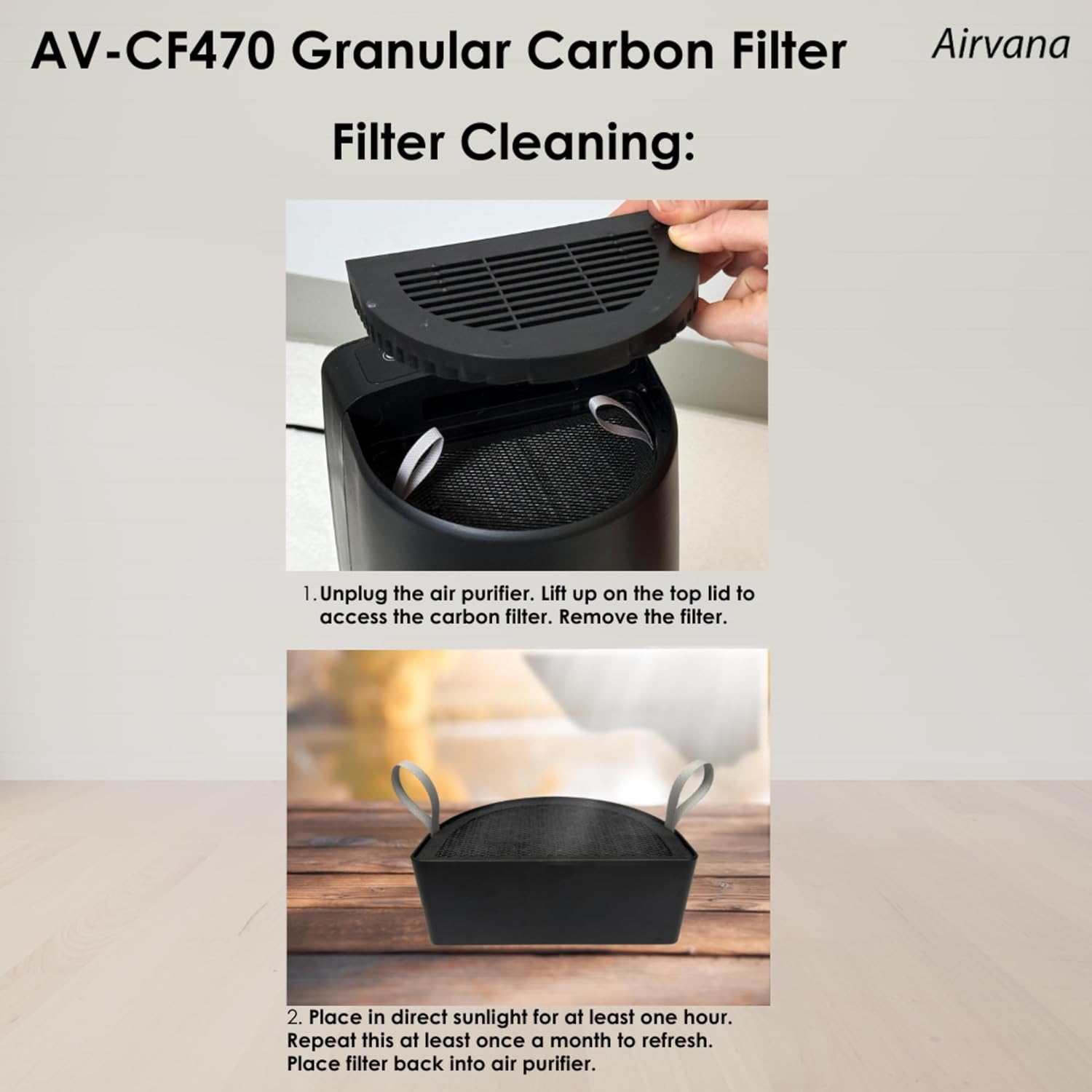
Image: Visual guide for cleaning the AV-CF470 Granular Carbon Filter, showing removal of the filter and placing it in sunlight for refreshing.
True HEPA Filter Cleaning (AV-HF470)
The True HEPA filter should be cleaned periodically to ensure efficient particle removal.
- Unplug the air purifier.
- Remove the front panel by pulling forward using the middle notch.
- Use a vacuum attachment to sweep any debris or dust from the pre-filter. It is recommended to do this every 3 months.
- Use a vacuum attachment to sweep any debris or dust from the HEPA filter. This should be done every 3 to 6 months, or more often depending on air quality and environmental factors.
- Insert the filter back into the air purifier.
- Place the front panel back on the unit.

Image: Visual guide for cleaning the AV-HF470 True HEPA Filter, showing removal of the front panel, vacuuming the pre-filter and HEPA filter, and reinstallation.
Note: The True HEPA filter should be cleaned every 6 months (approximately 4320 hours) under normal continuous use conditions, or more frequently based on air quality. The permanent granular carbon filter should be placed in direct sunshine for at least one hour once a month to refresh.
Troubleshooting
| Problem | Possible Cause | Solution |
|---|---|---|
| Unit does not turn on. | Not plugged in; power outage; unit malfunction. | Ensure power cord is securely plugged into a working outlet. Check household circuit breaker. Contact customer support if issue persists. |
| Airflow is weak or noisy. | Filters are dirty or clogged. | Clean or replace the True HEPA and Granular Carbon filters as per maintenance instructions. |
| Odor persists or is not reduced. | Carbon filter needs refreshing or replacement. | Refresh the Granular Carbon filter by placing it in direct sunlight. If odors persist, consider replacing the carbon filter. |
| Filter indicator light remains on after cleaning. | Filter reset not performed. | Press and hold the corresponding filter reset button on the control panel for 3 seconds. |
Specifications
- Model: AV470THP
- Brand: Airvana
- Product Dimensions: 8.07"D x 8.27"W x 18.9"H
- Weight: 7.27 Pounds
- Controller Type: Remote Control
- Filtration Type: True HEPA, Granular Carbon
- Color: Graphite
- UPC: 810067453950
- Manufacturer: Airvana
- First Available Date: August 1, 2024

Image: Room Size Chart for the Airvana AV470THP Capri True HEPA Air Purifier, indicating air exchange rates per hour for various room sizes (Bedroom, Kitchen, Bathroom, Living Room).
Official Product Video
Video: An official brand video from Airvana, showcasing various Airvana products including air purifiers, humidifiers, fans, and heaters. This video provides a general overview of the brand's product lines.
Warranty & Support
For warranty information, technical support, or any inquiries regarding your Airvana Capri True HEPA Air Purifier, please refer to the warranty card included with your product or visit the official Airvana website. Contact details for customer service are typically provided on the product packaging or the manufacturer's website.


