
Golden Technologies GB120-DT
Golden Tech GB120 Buzzaround Carry-On Travel Scooter Instruction Manual
Model: GB120-DT
Introduction
The Golden Tech GB120 Buzzaround Carry-On is a compact, fold-flat travel scooter designed for portability and ease of use. This manual provides essential information for the safe operation, maintenance, and care of your scooter, ensuring optimal performance and longevity. Please read this manual thoroughly before operating the device.
This portable, stylish scooter ensures comfortable travel with a 300 lb weight capacity and an infinitely adjustable tiller equipped with a handy USB port and drink holder. It boasts full front and rear lighting and flip-up armrests.
Safety Information
Adhering to safety guidelines is crucial for your well-being and the proper functioning of the scooter. Always operate the GB120 Buzzaround Carry-On with caution.
- MAXIMUM USER WEIGHT: Do not exceed the maximum user weight of 300 lbs (136 kg). Exceeding this limit can compromise the scooter's stability and performance.
- GROUND CLEARANCE: The scooter has a ground clearance of 4 inches (10 cm). Avoid operating on uneven, rough, or excessively sloped terrain to prevent tipping or damage.
- BATTERY SAFETY: Always follow the manufacturer's instructions for battery charging, handling, and storage. Use only the approved charger. Do not expose the battery to extreme temperatures or puncture it.
- OPERATE WITH CAUTION AT NIGHT: Utilize the integrated front and rear lights for enhanced visibility when operating the scooter in low-light conditions or at night.
- GENERAL OPERATION: Always ensure the scooter is fully unfolded and locked into position before use. Avoid sudden stops or turns.
Setup and Assembly
The Buzzaround Carry-On is designed for quick setup. Follow these steps to prepare your scooter for use.
Unfolding the Scooter
The scooter folds to a compact size for transport. To unfold:
- Place the folded scooter on a flat, stable surface.
- Gently lift the tiller assembly until it locks into the upright position.
- Unfold the seat frame and ensure it locks securely into place.
- Attach the seat by aligning it with the seat post and pressing down until it clicks.
- Adjust the tiller to your desired height and angle using the adjustment lever.
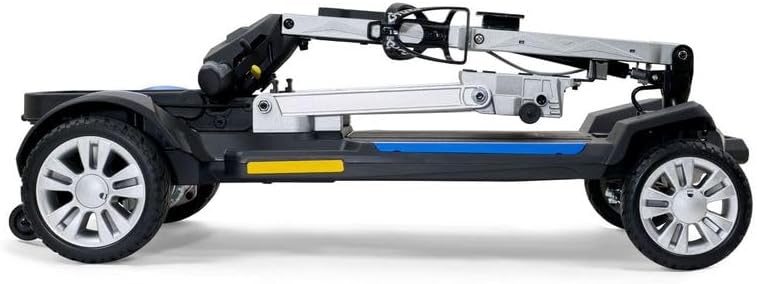
Image: The scooter in a partially unfolded state, illustrating the folding tiller and seat mechanism.

Image: The scooter fully folded and standing upright, demonstrating its space-saving design for storage or transport.
Battery Installation and Charging
The GB120 comes with a standard 12.5 AH lithium-ion battery pack. An optional 15 AH long-range battery is available separately.
- Ensure the battery pack is fully charged before first use.
- Locate the battery compartment, typically under the seat or deck.
- Insert the battery pack, ensuring it is securely connected.
- To charge, connect the charger to the charging port on the scooter or directly to the battery pack if removable. Plug the charger into a standard wall outlet.
- The charging indicator light will show the charging status. Disconnect once fully charged.

Image: The scooter disassembled into its primary components, including the battery pack, for easier transport or storage.
Operating Instructions
Familiarize yourself with the controls and operating procedures before driving your scooter.
Controls and Features
- Tiller: The steering column, which also houses the controls. It is infinitely adjustable for user comfort.
- Speed Control Dial: Adjusts the maximum speed of the scooter.
- Forward/Reverse Lever: Push forward to move forward, pull back to move in reverse.
- Battery Indicator: Displays the current battery charge level.
- Headlights/Taillights Switch: Activates the front and rear lighting system for visibility.
- USB Port: Located on the tiller for charging personal electronic devices.
- Drink Holder: Integrated into the tiller for convenience.
- Flip-up Armrests: Provide comfort and ease of access to and from the seat.

Image: Front view of the scooter, highlighting the tiller with controls, front basket, and LED headlights.

Image: Rear view of the scooter, showing the comfortable seat, rear storage basket, and taillights.
Driving the Scooter
- Ensure the scooter is fully assembled and the battery is charged.
- Sit comfortably on the seat with both feet on the footboard.
- Turn the key to the "ON" position (if applicable) or press the power button.
- Set the speed control dial to a comfortable speed, starting slow.
- Gently push the forward/reverse lever to begin moving. Release the lever to engage the electromagnetic brake and stop.
- Steer by turning the tiller in the desired direction.
- Be mindful of the scooter's operating range, which is approximately 14 miles with the standard battery.

Image: The Golden Tech GB120 Buzzaround Carry-On scooter ready for operation, showcasing its design and features.
Maintenance
Regular maintenance ensures the longevity and reliable performance of your Buzzaround Carry-On scooter.
- Cleaning: Wipe down the scooter regularly with a damp cloth. Avoid using abrasive cleaners or excessive water, especially near electrical components.
- Battery Care:
- Charge the battery after each use, even if only for a short period.
- Do not allow the battery to fully discharge.
- If storing the scooter for an extended period, charge the battery fully and then charge it once a month to maintain its health.
- Tire Inspection: Periodically check the tires for wear and tear, and ensure they are free of debris.
- Fasteners: Check all nuts, bolts, and fasteners regularly to ensure they are tight. Do not overtighten.
- Professional Service: For any complex repairs or issues, contact an authorized Golden Technologies service center.
Troubleshooting
This section addresses common issues you might encounter with your scooter. For problems not listed here, contact customer support.
| Problem | Possible Cause | Solution |
|---|---|---|
| Scooter does not turn on. | Battery not charged or not connected; power switch off; circuit breaker tripped. | Ensure battery is charged and properly connected. Turn power switch on. Check and reset circuit breaker if tripped. |
| Scooter moves slowly or intermittently. | Low battery charge; speed control set too low; motor/controller issue. | Charge the battery. Increase speed setting. If problem persists, contact service. |
| Brakes are not engaging properly. | Brake mechanism obstruction; electrical issue. | Check for obstructions around the brakes. Do not attempt to repair electrical issues; contact service. |
| Unusual noises during operation. | Loose components; motor issue; wheel bearing issue. | Inspect for loose parts. If noise persists or is severe, discontinue use and contact service. |
Specifications
Key specifications and features of the Golden Tech GB120 Buzzaround Carry-On Travel Scooter.
| Feature | Detail |
|---|---|
| Model Number | GB120-DT |
| Brand | Golden Technologies |
| Color | Desert Tan |
| Material | Aluminum, Vinyl |
| Maximum User Weight | 300 lbs (136 kg) |
| Ground Clearance | 4 inches (10 cm) |
| Folded Height (without seat) | 12 inches (30.5 cm) |
| Operating Range (Standard Battery) | Up to 14 miles (22.5 km) |
| Battery Type | 12.5 AH Lithium-Ion (Airline Approved) |
| Seat Depth | 13.75 inches (35 cm) |
| Tiller Features | Infinitely adjustable, USB port, drink holder |
| Lighting | Full front and rear lights |
| Portability | Folds flat, four carry handles, easily disassembles |
Additional Features:
- Ideal for space-saving storage.
- Folding tiller and self-locking seat frame for a compact size.
- Flip-up armrests for convenience.
- Optional long-range battery (15 ah, 18-mile range) available for purchase separately.
- Standard 12.5 AH lithium-ion battery pack with easy access.
- Airline-approved battery included with every GB120.

Image: An informational graphic detailing the scooter's features and available color options, including Desert Tan.
Warranty and Support
Golden Technologies provides a warranty for the GB120 Buzzaround Carry-On scooter. Specific warranty terms and conditions may vary. Please refer to the warranty card included with your product or visit the official Golden Technologies website for detailed information.
For technical support, spare parts, or warranty claims, please contact Golden Technologies customer service directly. It is recommended to have your model number (GB120-DT) and purchase date available when contacting support.
You can find contact information for Golden Technologies on their official website: www.goldentech.com
Related documentsGB120-DT


Ask a question about this manual
Ask about setup, troubleshooting, compatibility, parts, safety, or missing instructions. Manuals+ will review the question and use this page’s manual context to help answer it.