
1. Introduction
Thank you for choosing the Socool D22 20000mAh Camping Fan with Light. This portable and versatile device is designed to provide cooling and illumination in various settings, including camping, outdoor activities, and during power outages. Please read this manual carefully before use to ensure proper operation and to maximize the product's lifespan.
2. Safety Information
- Do not insert fingers or any objects into the fan grille when the fan is operating.
- Keep the fan away from water or other liquids to prevent electric shock.
- Do not disassemble, repair, or modify the fan yourself. Contact customer support if service is required.
- Keep out of reach of children.
- Use only the recommended charging cable and adapter to prevent damage to the battery.
- Avoid exposing the fan to extreme temperatures or direct sunlight for prolonged periods.
3. Package Contents
- Socool D22 Camping Fan with Light
- Remote Control
- USB-C Charging Cable
- User Manual
4. Product Overview
Familiarize yourself with the components of your Socool D22 Camping Fan:

Figure 1: Front view of the Socool D22 Camping Fan with Light, showing the fan blades, LED light ring, and control panel.
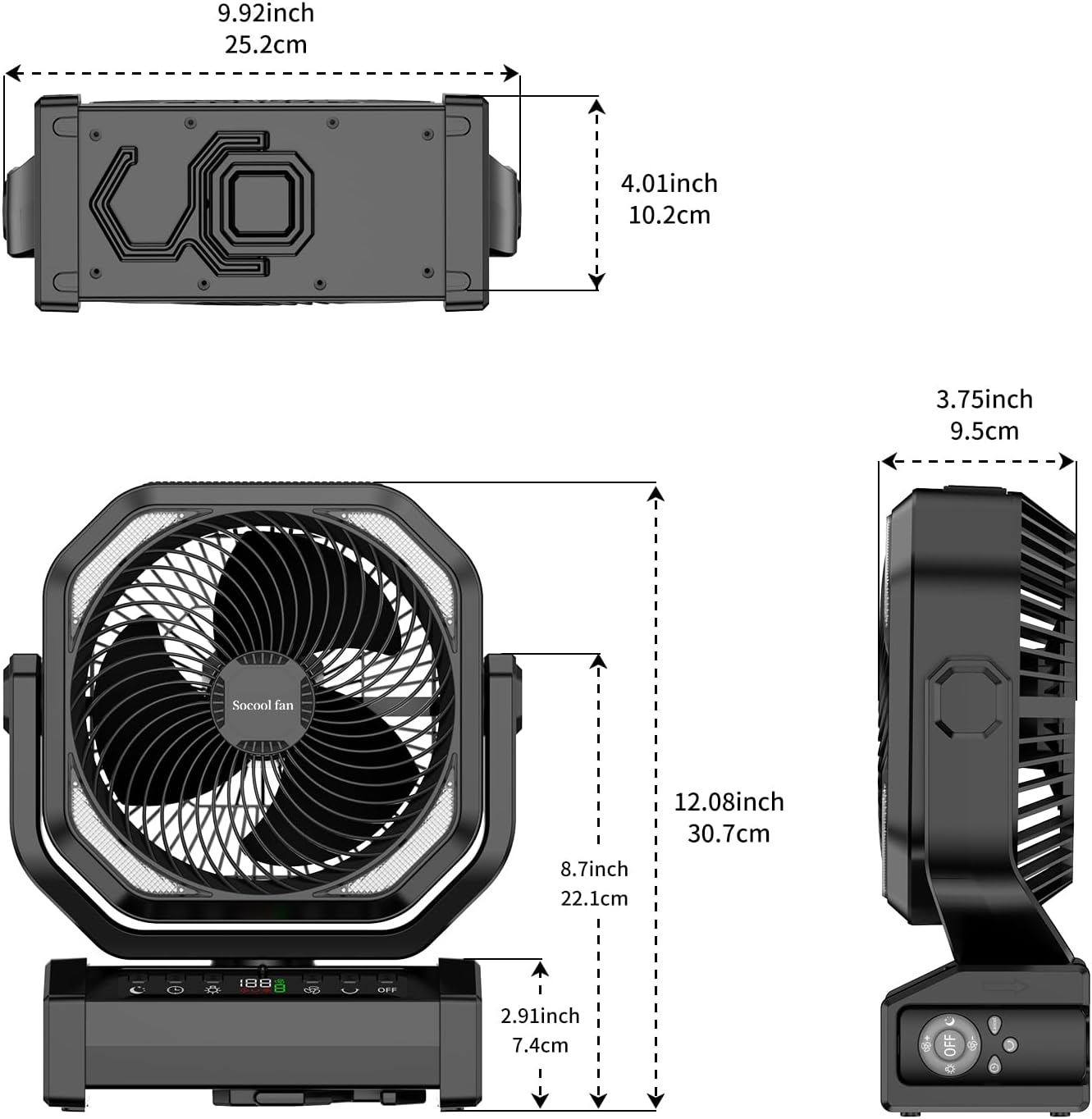
Figure 2: Dimensions of the Socool D22 Camping Fan, illustrating its compact and portable design.
Control Panel & Ports:
- Power Button: Turns the fan On/Off.
- Fan Speed Button: Adjusts between 9 wind speeds.
- Oscillation Button: Activates 45°/90° auto oscillation.
- Light Button: Cycles through 3 brightness levels for the LED light.
- Timer Button: Sets the timer for 1H, 2H, 4H, or 8H.
- Sleep Mode Button: Activates sleep mode, turning off the display and reducing fan noise.
- Digital Display: Shows battery percentage, fan speed, and timer settings.
- USB-C Input/Output Port: For charging the fan (5V/3A) and charging external devices (5V/2A).
- USB-A Output Port: For charging external devices (5V/2A).
- Remote Control Slot: Convenient storage for the remote control.
- Integrated Hook: For hanging the fan in tents or other elevated positions.
- 270° Pivot: Allows manual adjustment of the fan head angle.
5. Setup
5.1 Initial Charging
Before first use, fully charge the fan. Connect the provided USB-C cable to the fan's USB-C port and the other end to a compatible 5V/3A USB power adapter. The digital display will show the charging progress. A full charge can take approximately 9-10 hours.

Figure 3: The fan being charged via its Type-C port, highlighting its long-lasting battery and charging capabilities.
5.2 Placement Options
- Free Standing: Place the fan on a flat, stable surface.
- Hanging: Utilize the integrated hook to hang the fan from a tent ceiling, branch, or other suitable support.
- Portable Handle: Use the built-in handle for easy transport.
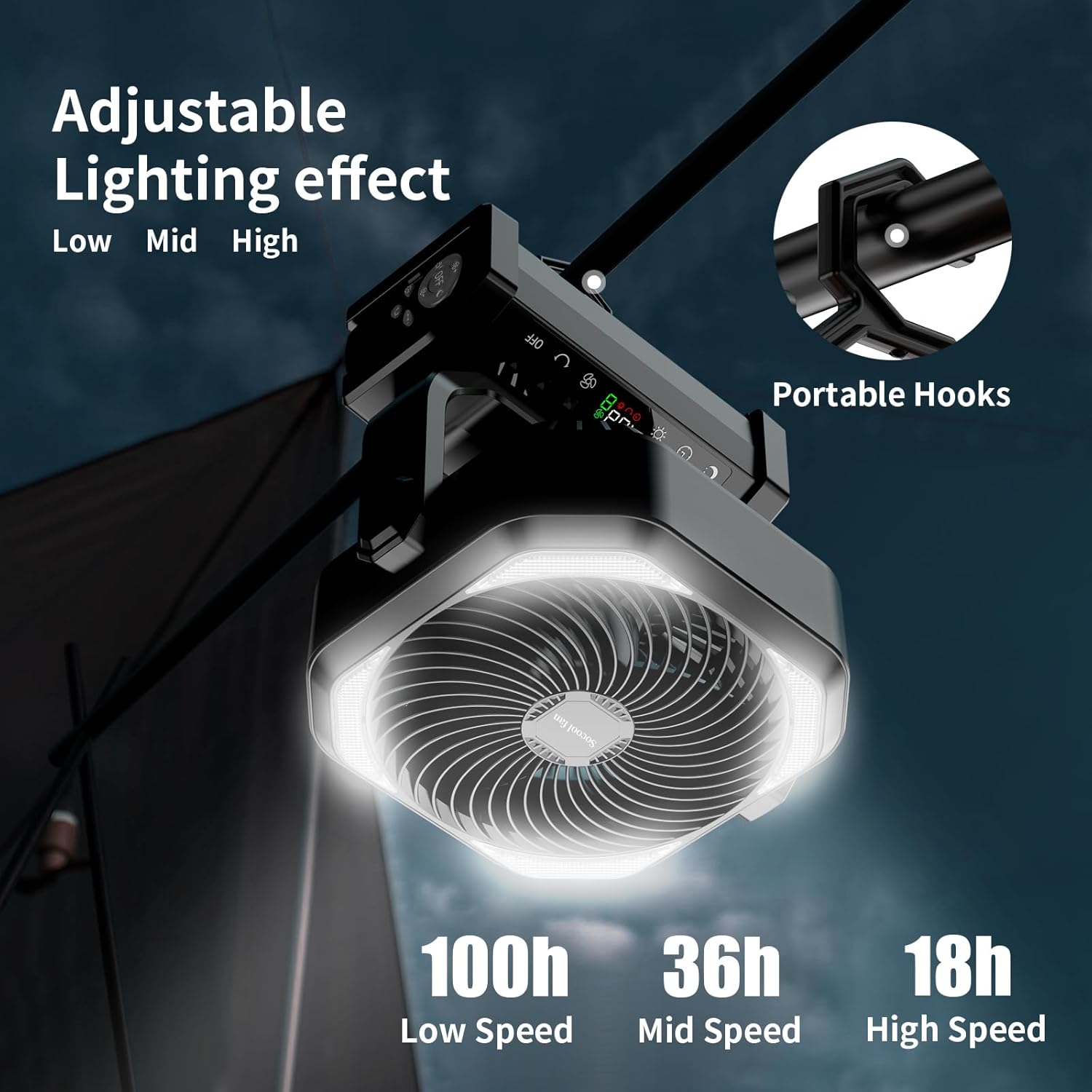
Figure 4: The fan demonstrating its portable hook for hanging, ideal for tent use.

Figure 5: The fan providing cooling and light inside a camping tent.
6. Operating Instructions
6.1 Power On/Off
Press the Power Button on the control panel or remote control to turn the fan on or off.
6.2 Adjusting Fan Speed
Press the Fan Speed Button repeatedly to cycle through 9 different wind speeds. The digital display will show the current speed level. Speed 9 simulates natural wind.

Figure 6: The fan operating at various speeds, indicating battery life at low, mid, and high settings.
6.3 Oscillation Function
Press the Oscillation Button to activate automatic oscillation. Press once for 45° oscillation, and press again for 90° oscillation. Press a third time to turn off oscillation. The fan head can also be manually pivoted up to 270° for precise airflow direction.
6.4 LED Light Control
Press the Light Button to turn on the LED light. Press repeatedly to cycle through 3 brightness settings (Low, Mid, High). Press a fourth time to turn off the light.
6.5 Timer Setting
Press the Timer Button to set an automatic shut-off timer. Options include 1 hour, 2 hours, 4 hours, and 8 hours. The selected time will be displayed on the screen.
6.6 Sleep Mode
Activate Sleep Mode to reduce fan noise to below 30dB and turn off the digital display, ensuring an undisturbed rest. Press the Sleep Mode button to toggle this feature.
6.7 Remote Control
The included remote control allows convenient operation from a distance. Ensure the remote is pointed towards the fan's control panel. Store the remote in the designated slot on the fan base when not in use to prevent loss.

Figure 7: The fan being operated with its remote control, showing the remote control storage slot.
6.8 Charging External Devices
The fan features USB-C and USB-A output ports (5V/2A) to charge your mobile phone or other USB-powered devices. Connect your device to the appropriate port using its charging cable.
Video 1: Demonstrates the various functions of the Socool D22 Camping Fan, including fan speeds, light settings, and charging capabilities.
7. Maintenance
7.1 Cleaning
- Ensure the fan is turned off and unplugged before cleaning.
- Wipe the exterior of the fan with a soft, damp cloth. Do not use abrasive cleaners or solvents.
- Use a soft brush or vacuum cleaner to remove dust from the fan grille and blades.
7.2 Storage
When not in use for an extended period, store the fan in a cool, dry place. Ensure the battery is partially charged (around 50%) before storage to prolong battery life. Recharge every 3-6 months if stored for long periods.
8. Troubleshooting
| Problem | Possible Cause | Solution |
|---|---|---|
| Fan does not turn on. | Low battery. | Charge the fan using the provided USB-C cable. |
| Fan is not blowing strongly. | Low fan speed setting. | Increase the fan speed using the Fan Speed Button. |
| LED light is dim or not working. | Low battery or incorrect brightness setting. | Charge the fan or adjust the light brightness using the Light Button. |
| Remote control is not working. | Remote battery depleted or not pointed correctly. | Ensure the remote is pointed at the fan. Replace remote battery if necessary. |
| Cannot charge external devices. | Fan battery is too low or device cable is faulty. | Ensure the fan has sufficient charge. Try a different charging cable for your device. |
9. Specifications
| Feature | Detail |
|---|---|
| Model Name | D22 |
| Battery Capacity | 20000mAh Lithium Polymer |
| Max Run Time (Fan) | Up to 112 hours (lowest speed) |
| Fan Speeds | 9 levels |
| Airflow Speed | Up to 14.7 ft./s |
| Oscillation | 45°/90° Auto Oscillation |
| Pivot Angle | 270° Manual Rotation |
| LED Light | 16 ultra-bright LED bulbs, 3 brightness settings (Max 400LM) |
| Timer Settings | 1H, 2H, 4H, 8H |
| Noise Level | <30dB (lowest speed) |
| Input/Output (USB-C) | 5V/3A |
| Output (USB-A) | 5V/2A |
| Product Dimensions | 4"D x 12"W x 10"H |
| Item Weight | 1.9 Pounds |
| Control Method | Buttons, Remote Control |
| UPC | 751314746466 |
10. Warranty & Support
The Socool D22 Camping Fan with Light comes with a standard manufacturer's warranty. For detailed warranty information, product support, or technical assistance, please refer to the warranty card included in your package or visit the official Socool fan website. You may also contact our customer service team directly via the contact information provided on our website.