
1. Introduction
This manual provides detailed instructions for the assembly, installation, operation, and maintenance of your Tangkula Farmhouse TV Stand, Model TV Stand-10630. Please read all instructions carefully before beginning assembly and retain this manual for future reference. This TV stand is designed to accommodate televisions up to 65 inches and features ample storage with adjustable shelves and glass door cabinets.
2. Safety Information
WARNING: Failure to follow these safety instructions could result in injury or damage to the product.
- Use this product only on a stable and level surface to prevent tipping.
- Keep small parts and assembly hardware away from children during assembly.
- Ensure all connections are securely fastened before placing any items on the stand.
- Do not exceed the maximum weight capacity of 200 pounds for the tabletop.
- Avoid placing hot items directly on the surface; use coasters or protective pads.
- Regularly check all fasteners to ensure they remain tight.
3. Package Contents
Before beginning assembly, verify that all components listed below are present and undamaged. If any parts are missing or damaged, please contact customer support.
- 1 x TV Stand (disassembled components)
- 1 x Instruction Manual
- All necessary assembly hardware (screws, dowels, cam locks, etc.)
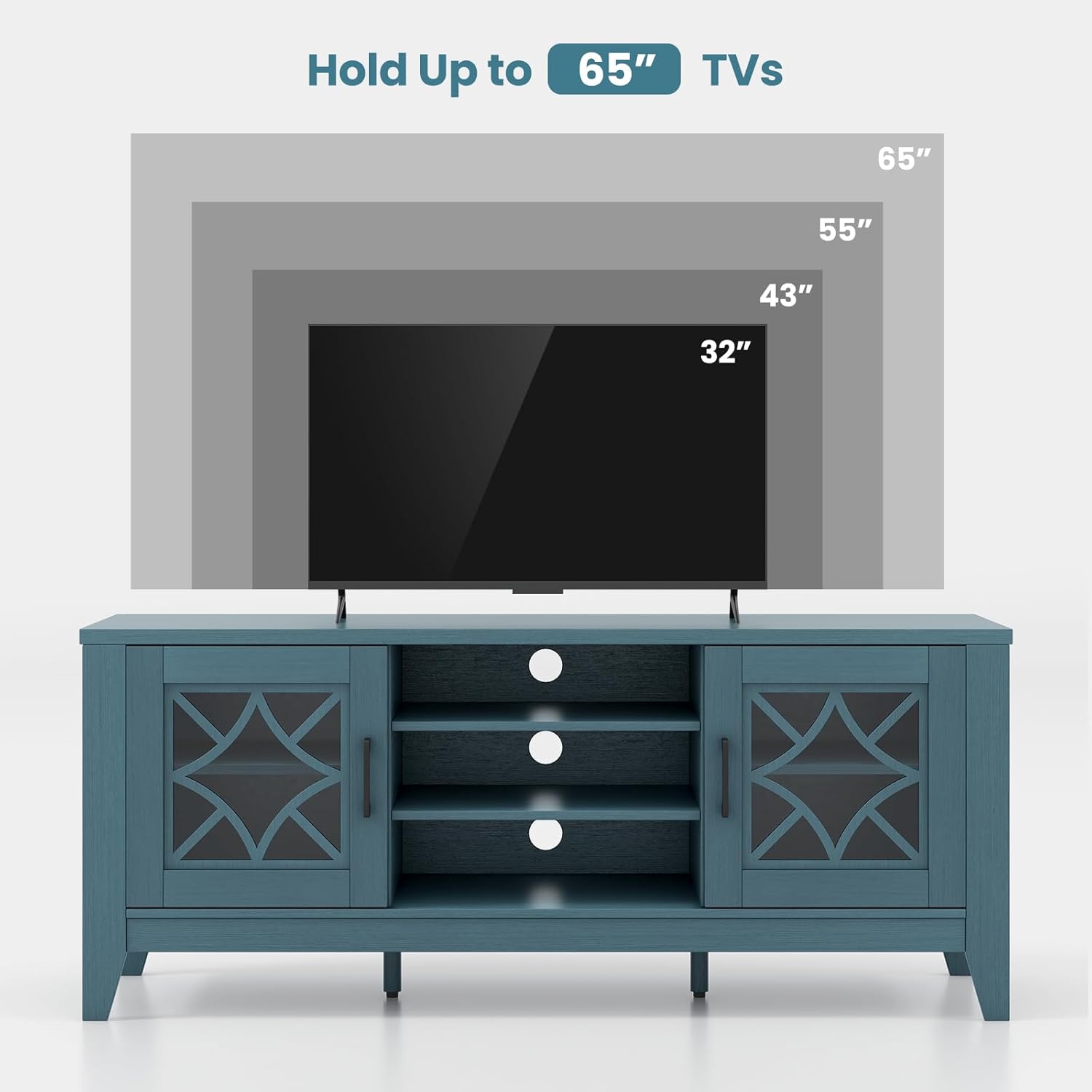
Image: Overview of included components and hardware for assembly.
4. Assembly Instructions
Assembly typically requires two adults. Please follow the steps sequentially for optimal results. A Phillips head screwdriver and a hammer (not included) may be required.
- Prepare the Workspace: Clear a spacious, clean, and level area for assembly. Lay out all parts and hardware, organizing them by type.
- Assemble the Base and Side Panels: Attach the bottom panel to the side panels using the provided cam locks and dowels. Ensure the pre-drilled holes align correctly.
- Install Support Legs: Secure the additional support legs to the underside of the TV stand base. These legs feature adjustable foot pads for enhanced stability on uneven surfaces.

Image: Detail of the extra support legs with adjustable foot pads.
- Attach the Back Panel: Secure the back panel to the assembled frame. Ensure the cable management holes are correctly oriented.
- Install Interior Shelves: Insert the fixed and adjustable shelves into their designated slots. The adjustable shelves can be positioned at various heights to suit your storage needs.

Image: Interior storage space with adjustable shelves.
- Mount the Glass Doors: Attach the tempered glass doors to the side cabinets using the provided smooth metal hinges. Adjust hinges as necessary for proper door alignment and smooth operation.

Image: Details of the tempered glass doors and hinges.
- Attach the Top Panel: Carefully place and secure the thickened top panel to the assembled structure.
- Final Checks: Ensure all screws and fasteners are tightened. Gently move the stand to its desired location.
5. Setup
Once assembled, follow these steps to set up your TV stand:
- Placement: Position the TV stand in your desired location, ensuring it is on a flat, stable surface. Adjust the foot pads on the support legs if the floor is uneven.
- TV Placement: Carefully place your television on the center of the tabletop. This stand is designed for TVs up to 65 inches. Ensure the TV's base is fully supported within the tabletop dimensions.

Image: The Tangkula Farmhouse TV Stand with a television.
- Device Connection: Place media devices (gaming consoles, media players, soundbars) on the open shelves or inside the glass door cabinets. Utilize the three cable management holes located at the rear of the stand to route and organize power and signal cables, maintaining a tidy appearance.
6. Operating the TV Stand
Your Tangkula Farmhouse TV Stand offers versatile storage and display options:
- Adjustable Shelves: The central compartment and side cabinets feature adjustable shelves. To change a shelf's height, remove any items, lift the shelf, and reposition the shelf pins into the desired holes.
- Glass Door Cabinets: The two side cabinets with tempered glass doors provide enclosed storage. The glass allows for display while protecting contents from dust. Open and close doors gently using the handles.
- Cable Management: The three rear cable holes are designed to pass cables through, reducing clutter and improving the aesthetic of your entertainment area.

Image: TV stand with doors open, showcasing storage flexibility.
7. Maintenance
Proper care will ensure the longevity and appearance of your TV stand:
- Cleaning: Wipe surfaces with a soft, damp cloth. Avoid harsh chemicals or abrasive cleaners, which can damage the finish. For glass doors, use a standard glass cleaner.
- Dusting: Regularly dust with a dry, soft cloth.
- Spills: Clean spills immediately with a soft, dry cloth to prevent staining or damage to the wood.
- Hardware Check: Periodically check all screws and fasteners to ensure they are tight. Re-tighten if necessary.
8. Troubleshooting
If you encounter any issues, refer to the following common problems and solutions:
- Wobbly Stand: Ensure the stand is on a level surface. Adjust the foot pads on the support legs until the stand is stable. Check that all assembly hardware is securely tightened.
- Doors Not Aligning: Adjust the hinges on the glass doors. Most hinges allow for minor adjustments to align the doors horizontally, vertically, and in depth.
- Missing Parts: If you discover missing parts during assembly, refer to the package contents list and contact Tangkula customer support with the specific part numbers.
9. Specifications
| Feature | Specification |
|---|---|
| Brand | Tangkula |
| Model Name | TV Stand-10630 |
| Color | Teal Blue |
| Product Dimensions | 59"W x 15.5"D x 25"H |
| Weight Limit (Tabletop) | 200 Pounds |
| Material | Engineered Wood, MDF |
| Number of Shelves | 4 (adjustable) |
| Door Style | Tempered Glass |
| Special Feature | Adjustable Shelf, Cable Management Holes |
| Assembly Required | Yes |

Image: Detailed dimensions of the TV stand.
10. Warranty and Support
For warranty information or customer support, please refer to the purchase documentation or contact Tangkula directly through their official website or the retailer where the product was purchased. Please have your model number (TV Stand-10630) and purchase date available when contacting support.


