
1. Introduction
Thank you for choosing the KSADBOSSBO Mini Body Camera 850-FA. This compact and versatile device is designed for various recording needs, offering high-definition video, night vision capabilities, and convenient operation. Please read this manual thoroughly to understand its features and ensure proper usage.
2. What's in the Box
- Body Camera x 1
- Magnetic Lanyard x 1
- USB Cable x 1
- Type-C Adapter x 1
- 128GB TF Card (Built-in Camera) x 1
- Card Pin & Card Reader x 1
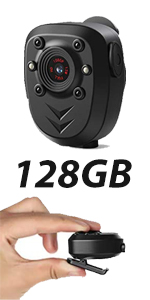
Image: Accessories included with the KSADBOSSBO Mini Body Camera.
3. Product Overview
The Mini Body Camera 850-FA features a compact design with a 360-degree rotatable clip and magnetic attachment for versatile placement. It records in HD 1080P at 30fps and includes a built-in 128GB memory card with loop recording. Night vision is supported by 4 high-intensity infrared LEDs.
Key Features:
- HD 1080P Video Recording: Captures clear and fluent videos at 30 frames per second.
- 90-Degree Lens: Provides a broad field of view.
- Night Vision: Equipped with 4 IR LEDs, offering visibility up to 15 feet in complete darkness.
- Built-in 128GB Memory: Eliminates the need for additional memory cards, storing approximately 12.6 hours of video.
- Loop Recording: Automatically overwrites the oldest files when the memory is full, ensuring continuous recording.
- Long Battery Life: 800mAh rechargeable battery provides about 4 hours of recording or up to 6 hours of standby time. Can record while charging.
- One-Button Operation: Simple controls for power, recording, and night vision.
- 360-Degree Rotatable Clip & Magnetic Lanyard: Allows for flexible mounting on clothing, bikes, or other surfaces.

Image: Detailed view of the camera's components and features.
4. Setup
4.1 Charging the Camera
Before first use, fully charge the camera. Connect the camera to a USB power source (e.g., computer, wall adapter) using the provided USB cable. The charging indicator light will show the charging status. A full charge takes approximately 3.5 hours.
4.2 Memory Card
The camera comes with a built-in 128GB TF card. No additional memory card purchase is required. The camera supports loop recording, automatically managing storage space.
4.3 Connecting to Phone/Computer
To access recorded files, connect the camera to your phone or computer using the provided USB cable and adapters (Type-C adapter for Android, or a compatible adapter for iOS). For iOS, open the


