1. Product Overview
This manual provides instructions for the Tjyuze BN39-02903A One Connect Cable, designed for specific Samsung OLED 4K TV models. This cable facilitates the connection between your compatible Samsung TV and its One Connect Box, transmitting both video and audio signals, as well as power.

Image 1: The Tjyuze BN39-02903A One Connect Cable, coiled for display. This cable is 2.5 meters (8.2 feet) in length and features distinct connectors at each end for specific ports on compatible Samsung TVs and One Connect Boxes.
2. Compatibility and Important Notes
The BN39-02903A One Connect Cable is specifically designed for certain Samsung OLED 4K TV models. It is crucial to verify compatibility before installation.
2.1 Compatible TV Models
- QN55S95CAFXZA
- QN65S95CAFXZA
- QN77S95CAFXZA
- QN65S95CAW
- QN55S95CAW
- QA55S95CAWXY
- QA65S95CAWXXY
- QA77S95CAWXXY
- QN55S95CAT
- QN65S95CAT
- QN77S95CAT
Note: Not all Samsung TVs can use this cable. This cable is only compatible with the models listed above and the specific One Connect Box shown in the compatibility images.
2.2 Verifying Your TV Model
To confirm your TV model, locate the sticker on the back of your television or navigate to the "About TV" option within your TV's settings menu.

Image 2: Illustration showing how to locate the TV model sticker on the back of a Samsung TV and a visual comparison of the BN39-02903A cable connector with incompatible cable types (BN39-02688A, BN39-02688B). Ensure your TV model matches the compatible series and your existing cable (if any) matches the BN39-02903A design.
2.3 Connector Shape Verification
The two plugs on this cable have distinct shapes. It is essential to compare these shapes with the ports on your TV and One Connect Box to ensure a correct fit.
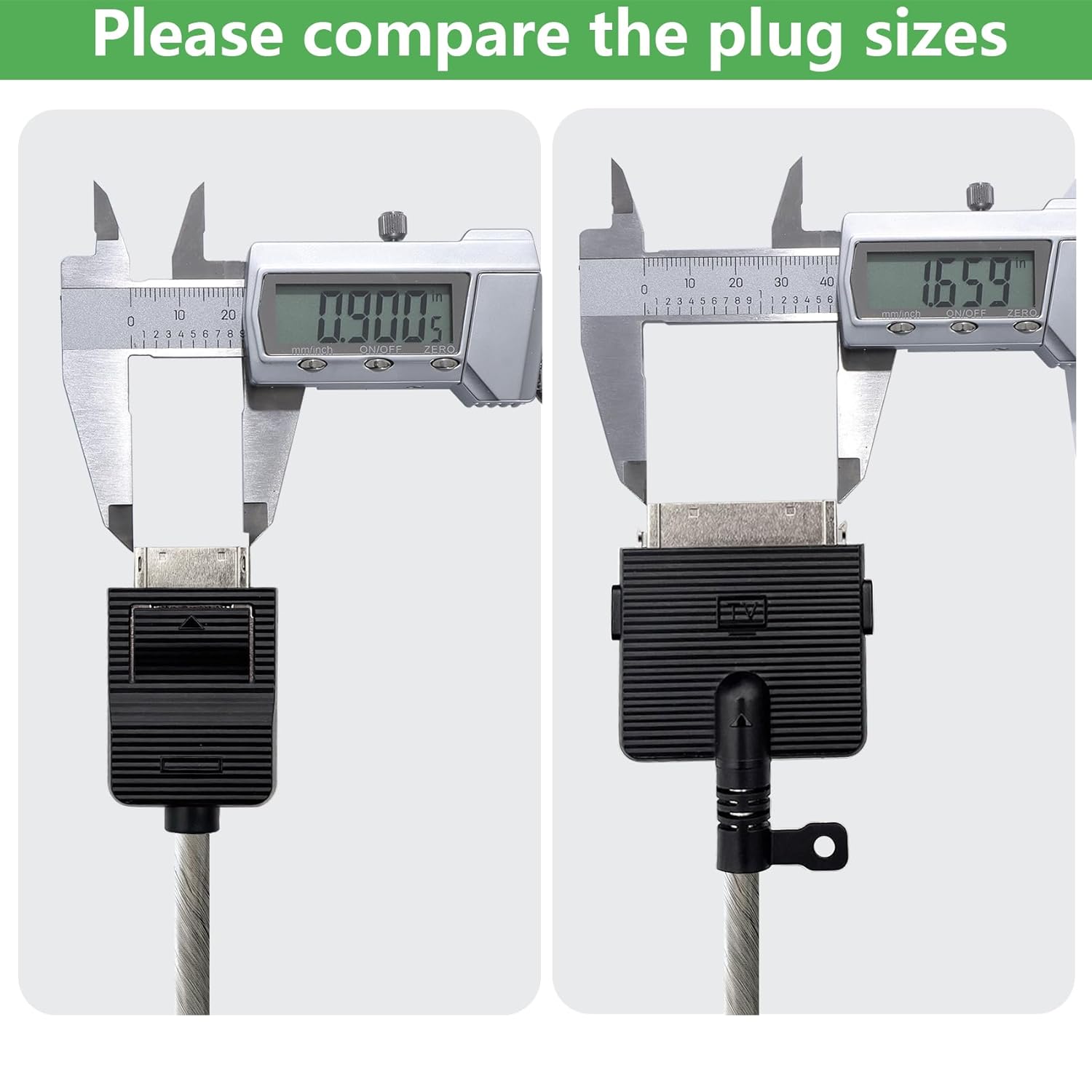
Image 3: A visual comparison of the two distinct plug sizes and shapes of the One Connect Cable, measured with calipers. This image helps users verify that the cable's connectors will fit their specific TV and One Connect Box ports.

Image 4: This image illustrates the correct TV and One Connect Box configuration for the BN39-02903A cable (top panel, marked with a green checkmark). The bottom panel shows examples of incompatible TV backs and One Connect Boxes (marked with red 'X's), highlighting that the cable is not universally compatible.
3. Setup Instructions
Follow these steps to properly connect your Tjyuze BN39-02903A One Connect Cable:
- Power Off: Ensure both your Samsung TV and the One Connect Box are powered off and unplugged from the electrical outlet before beginning the connection process.
- Identify Ports: Locate the One Connect port on the back of your Samsung TV and the corresponding port on your One Connect Box. Refer to your TV's user manual for exact port locations if needed.
- Connect Cable to TV: Carefully insert one end of the BN39-02903A cable into the One Connect port on your TV. Ensure it is fully seated and secure.
- Connect Cable to One Connect Box: Insert the other end of the cable into the One Connect port on your One Connect Box. Ensure it is fully seated and secure.
- Power On: Once the cable is securely connected at both ends, plug in your TV and One Connect Box, then power them on.

Image 5: The 2.5m (8.2ft) One Connect Cable properly installed, connecting a compatible Samsung TV to its One Connect Box. This demonstrates the typical setup and the cable's length in a practical application.
4. Operating Considerations
As an interconnect cable, the BN39-02903A does not require active operation. Its function is to reliably transmit signals and power between your TV and One Connect Box. Ensure the cable is not subjected to excessive bending or tension, which could compromise its performance or cause damage.
5. Maintenance and Care
To ensure the longevity and optimal performance of your One Connect Cable, follow these maintenance guidelines:
- Cleaning: Gently wipe the cable and connectors with a dry, soft cloth. Avoid using liquid cleaners or abrasive materials.
- Storage: When not in use, store the cable in a cool, dry place, away from direct sunlight and extreme temperatures. Avoid tightly coiling or kinking the cable.
- Handling: Always grasp the connector housing when plugging or unplugging the cable. Avoid pulling directly on the cable itself.
- Inspection: Periodically inspect the cable for any signs of damage, such as cuts, fraying, or bent pins on the connectors. If damage is observed, discontinue use and replace the cable.
6. Troubleshooting
If you experience issues with your TV's display or functionality after connecting the cable, consider the following troubleshooting steps:
- Verify Connections: Ensure the cable is securely and fully inserted into both the TV and the One Connect Box ports.
- Power Cycle: Unplug both the TV and the One Connect Box from the power outlet for a few minutes, then plug them back in and power them on.
- Check TV Model: Reconfirm that your TV model is listed as compatible with the BN39-02903A cable (refer to Section 2.1).
- Isolate the Issue: Before assuming the cable is faulty, ensure that the TV's failure is indeed a cable problem. If you are uncertain about the source of the TV's malfunction, it is recommended to contact a qualified TV repair technician for diagnosis.
7. Specifications
| Model Number | BN39-02903A |
| Cable Length | 2.5 meters (8.2 feet) |
| Connector Type | Proprietary HDMI-based One Connect |
| Compatible Devices | Specific Samsung OLED 4K TVs (S95CAW, S95CAF, S95D, 77S95D Series) |
| Features | High-quality plug (anti-oxidation/corrosion-resistant), Reinforced interface, Upgraded thickened wire |

Image 6: Detailed diagram illustrating the 2.5m (8.2ft) length of the cable and the precise dimensions of its two distinct connectors. This provides critical information for verifying fit and compatibility.

Image 7: Close-up views highlighting key features of the cable: a high-quality, anti-oxidation/corrosion-resistant plug, a reinforced interface designed for durability, and an upgraded thickened wire to prevent breakage.
8. Warranty and Support
For warranty information or technical support, please refer to the documentation provided with your purchase or contact Tjyuze customer service. Keep your purchase receipt as proof of purchase.


