
1. Introduction
Thank you for choosing the Ariete 1399 Espresso Coffee Machine. This manual provides essential information for the safe and efficient operation, maintenance, and troubleshooting of your new appliance. Please read all instructions carefully before first use and retain this manual for future reference.
2. Safety Information
- Always ensure the machine is unplugged before cleaning or maintenance.
- Do not immerse the appliance, cord, or plug in water or other liquids.
- Keep out of reach of children.
- Use only cold, fresh water in the water tank.
- Beware of hot surfaces and steam during operation.
3. Product Overview
Familiarize yourself with the components of your Ariete 1399 Espresso Coffee Machine.

Figure 3.1: Overview of the Ariete 1399 Espresso Coffee Machine, highlighting key features such as the 1-cup and 2-cup buttons, the steam dispensing knob, and compatibility with ground coffee and ESE pods. The machine has a compact width of 14 cm.
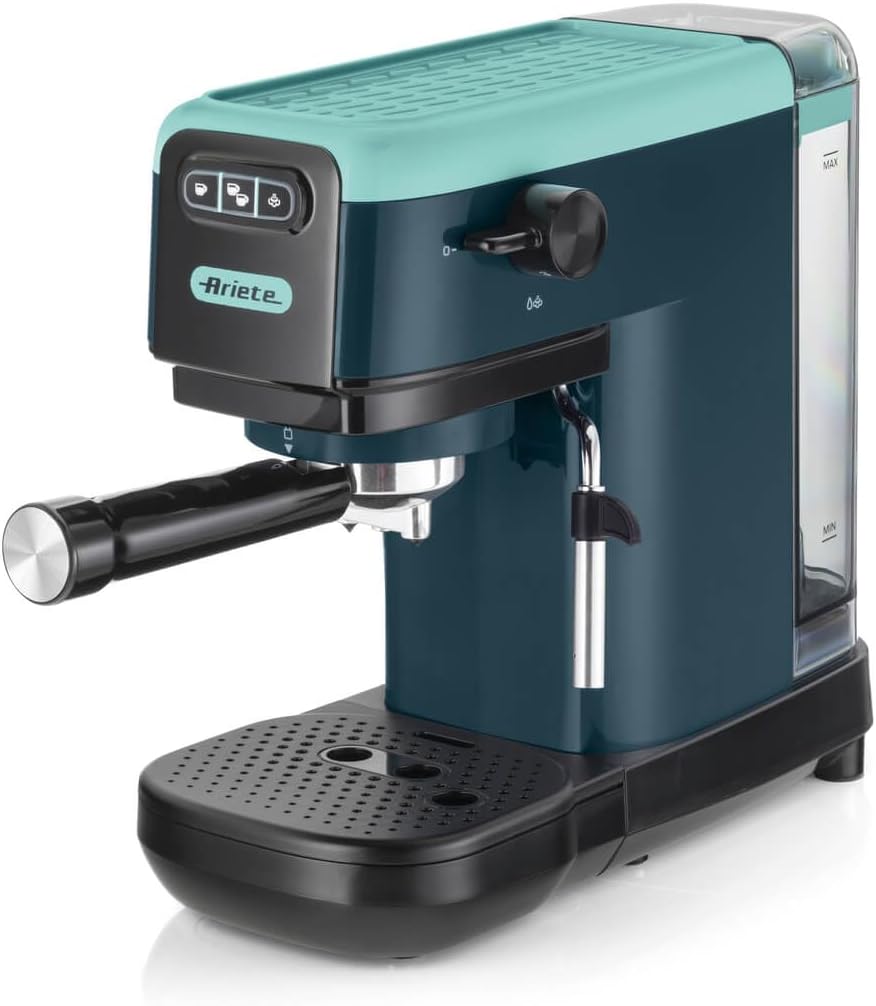
Figure 3.2: Side view of the coffee machine, illustrating the transparent water tank located at the back, with clear MAX and MIN indicators for water levels.
4. Setup
- Unpacking: Carefully remove all packaging materials and ensure all components are present.
- Placement: Place the machine on a stable, flat, heat-resistant surface, away from water sources and heat.
- Water Tank Filling: Remove the water tank from the back of the machine. Fill it with fresh, cold water up to the 'MAX' level.

Figure 4.1: Illustration of how to remove and reinsert the water tank for filling or cleaning. Ensure the tank is securely in place before operation.
- First Use Cycle: Before making coffee, perform a rinsing cycle. Fill the water tank, place a cup under the coffee spout, and press the 1-cup button. Repeat this process with the steam wand to flush out any manufacturing residues.
5. Operating Instructions
5.1 Making Espresso
Your machine is compatible with both ground coffee and ESE (Easy Serving Espresso) pods.
Using Ground Coffee:
- Insert the appropriate filter for ground coffee into the portafilter.
- Add desired amount of finely ground coffee (e.g., 1 scoop for single, 2 for double).
- Tamp the coffee evenly.
- Attach the portafilter to the group head and lock it into place.
- Place your cup(s) on the adjustable drip tray.
- Press the 1-cup or 2-cup button to start brewing.
Using ESE Pods:
- Insert the ESE pod filter into the portafilter.
- Place one ESE pod into the filter.
- Attach the portafilter to the group head and lock it into place.
- Place your cup(s) on the adjustable drip tray.
- Press the 1-cup button to start brewing.

Figure 5.1: The adjustable drip tray allows for various cup sizes, ensuring a perfect fit for your preferred mug or espresso cup.
5.2 Preparing Cappuccino and Hot Water
The machine features a dedicated knob for steam and hot water dispensing.
- Ensure the machine is heated and ready for steam (indicator light on).
- For steam, turn the steam knob to the steam icon. Position the steam wand into a pitcher of cold milk.
- For hot water, turn the steam knob to the hot water icon. Place a cup under the steam wand.

Figure 5.2: Detail of the control panel showing the steam/hot water button and the corresponding knob for activation. This feature allows for the creation of creamy cappuccinos or dispensing hot water for teas and infusions.

Figure 5.3: A hand demonstrating the use of the steam wand to froth milk in a metal pitcher, essential for preparing cappuccinos and lattes.

Figure 5.4: The coffee machine positioned with two cups of tea, demonstrating its capability to dispense hot water for various hot beverages.
6. Maintenance
6.1 Daily Cleaning
- Empty and clean the drip tray after each use.
- Rinse the portafilter and filter basket under running water.
- Wipe down the steam wand immediately after use with a damp cloth to prevent milk residue buildup.
- Wipe the exterior of the machine with a soft, damp cloth.
6.2 Descaling
Regular descaling is crucial for optimal performance and longevity. The machine has a cleaning indicator light.
- Use a suitable descaling solution as per the manufacturer's instructions.
- Follow the descaling procedure outlined in the full product manual (not included here).
- Rinse thoroughly after descaling.
7. Troubleshooting
| Problem | Possible Cause | Solution |
|---|---|---|
| No coffee dispenses | No water in tank; Clogged filter; Machine not primed. | Fill water tank; Clean filter; Perform first use cycle. |
| Coffee too weak/watery | Coffee too coarse; Insufficient coffee; Too much water. | Use finer grind; Increase coffee amount; Stop brewing earlier. |
| Steam wand not producing steam | Clogged wand; Not heated to steam temperature. | Clean steam wand; Wait for steam indicator light. |
| Machine leaks water | Water tank not seated correctly; Seal issues. | Re-seat water tank; Contact customer support if problem persists. |
For issues not listed here, please refer to the complete product manual or contact customer support.
8. Specifications
- Brand: Ariete
- Model: 1399/17
- Color: Light Aquamarine (Green)
- Product Dimensions: 34P x 15L x 29H cm
- Weight: 3.85 kg
- Power: 1300 W
- Pressure: 15 bar
- Water Tank Capacity: 1.1 L
- Special Features: Automatic shutdown (after 25 minutes), Cleaning indicator, Adjustable drip tray, Maxi-cappuccino device.
- Compatibility: Ground coffee, ESE pods
9. Warranty and Support
Your Ariete 1399 Espresso Coffee Machine comes with a standard manufacturer's warranty. Please refer to the warranty card included in your product packaging for specific terms and conditions.
For technical support, spare parts, or warranty claims, please contact Ariete customer service through their official website or the contact information provided in your product documentation. Always have your model number (1399/17) and purchase date ready when contacting support.