
1. Introduction
The Douk Audio IR240 is a versatile device functioning as a sound level meter, music spectrum visualizer, and digital LCD clock. It is designed to enhance your audio experience and provide practical time-keeping features for various environments such as home, office, studio, or car audio systems.

Image 1.1: The Douk Audio IR240 displaying current time, date, and other information.
2. Package Contents
Please verify that all items listed below are included in your package:
- 1x Douk Audio IR240 Clock & Music Spectrum Unit
- 1x Remote Control (Note: Batteries for the remote control are not included.)
- 1x USB & 3.5mm AUX Cable
- 1x 1:2 3.5mm Headphone Jack Splitter
- 1x User Manual

Image 2.1: Visual representation of the Douk Audio IR240 unit, its dimensions, and included accessories.
3. Features Overview
- Music Spectrum Display: Offers 6 distinct music spectrum display modes and 6 processing effects.
- Sound Level Display: Provides 4 different sound level display modes.
- Digital Clock Functionality: Displays time and date with 3 font styles and 4 digit change effects. Supports 12H/24H format switching and manual time/date adjustment.
- High-Speed Processor: Utilizes a 32-bit high-speed processor for accurate display.
- Audio Inputs: Supports both wired (shared with USB interface) and wireless microphone pickup.
- Adjustable Settings: User-defined width and spacing distance in music spectrum mode.
- Remote Control: Full control over settings via an infrared remote.
- User Interface: Supports Chinese/English language switching and 6-level brightness adjustment.
- Automatic Gain Control (AGC): Software amplification with 6 levels.

Image 3.1: The IR240 unit showcasing its music spectrum display with customizable color schemes.
4. Setup
4.1 Power Connection
Connect the device to a 5V power source using the provided Micro-USB cable. The unit will power on automatically.
4.2 Audio Input Connection
- Wired Input: Use the 3.5mm AUX cable to connect your audio source (e.g., mobile phone, computer, CD player) to the device. This input shares the USB interface.
- Microphone Pickup: The device features a built-in microphone for wireless sound level and spectrum visualization.
4.3 Remote Control Preparation
Insert two AAA batteries (not included) into the remote control. Ensure the remote control is pointed towards the infrared receiving window, located on the left side of the screen display, for proper operation.

Image 4.1: Internal view of the IR240, highlighting the battery compartment for the internal clock (CR1220 3V) and the Micro-USB port for power and wired audio input.
5. Operation
The Douk Audio IR240 can be operated using the buttons on the device or the included remote control.

Image 5.1: The IR240 unit in operation, demonstrating its music spectrum display, with the remote control shown for reference.
5.1 Music Spectrum Mode
The device offers 6 different music spectrum display modes. Use the 'MODE' button on the remote or device to cycle through these modes. Adjust brightness, AGC software amplification, and processing effects as desired using the remote control buttons.

Image 5.2: Examples of the six distinct music spectrum visualization modes available on the IR240.
5.2 Sound Level Display Mode
There are 4 sound level display modes available. Switch between these modes using the appropriate button on the remote control.
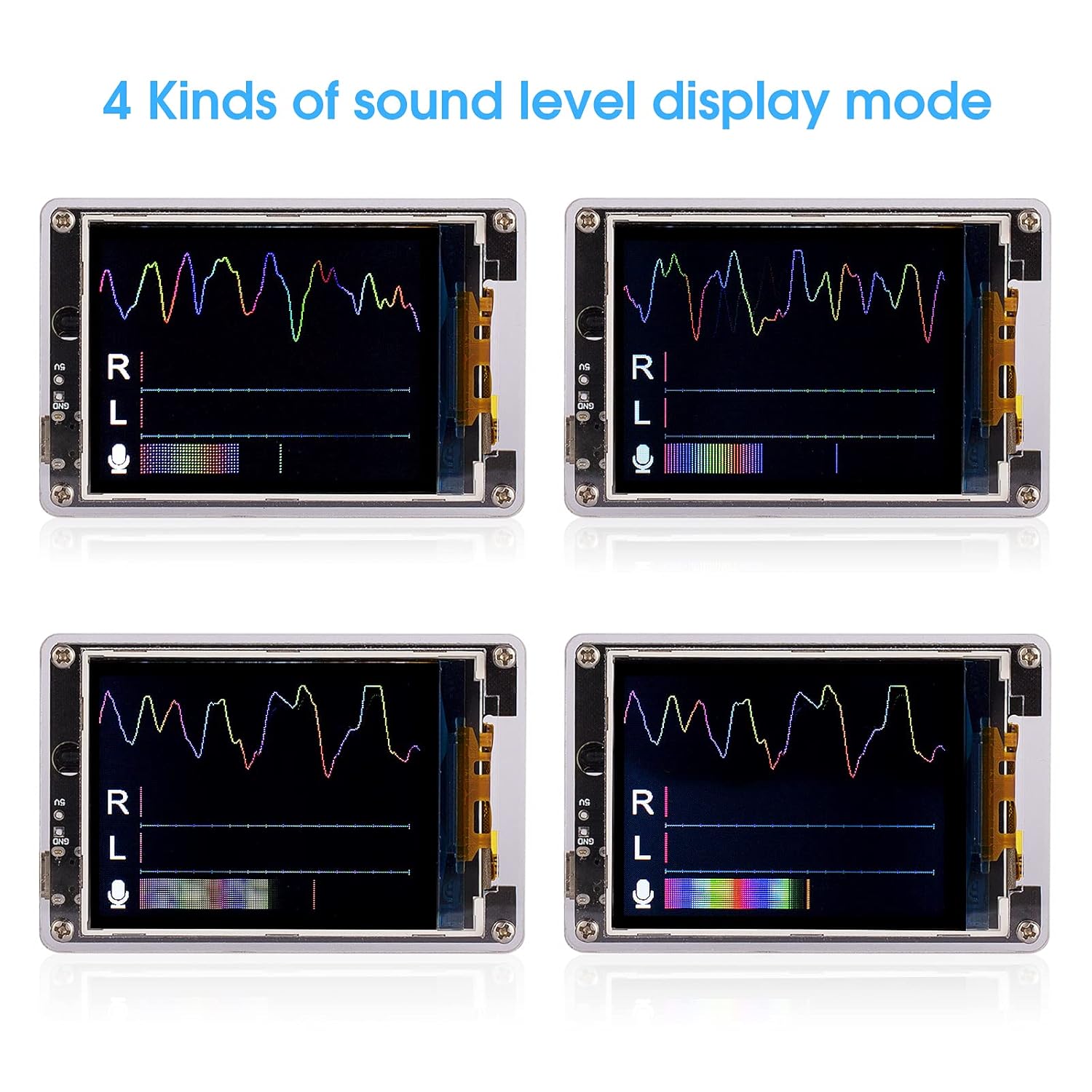
Image 5.3: Illustrations of the four sound level display modes provided by the IR240.
5.3 Digital Clock Mode
The IR240 functions as a digital clock, displaying time and date. It supports 12-hour and 24-hour formats. You can select from 3 font styles and 4 digit change effects. Manual adjustment of time and date is also possible via the remote control.

Image 5.4: The IR240 unit showcasing various display options for its clock function, including different font styles for time and date.
5.4 General Settings
- Brightness Adjustment: The display brightness can be adjusted across 6 levels to suit different lighting environments.
- Language Selection: Switch between Chinese and English display languages.
- User-Defined Parameters: In music spectrum mode, you can adjust the width and spacing distance of the spectrum bars.
6. Specifications
| Parameter | Value |
|---|---|
| Display Screen | LCD (Liquid Crystal Display) |
| Screen Dimensions (W*D) | 52mm * 40mm (2.05in * 1.57in) |
| Audio Input | Wired (shared with USB interface) / Microphone pickup |
| Working Voltage | Micro-USB 5V |
| Working Current | 200mA |
| Remote Control | Supported |
| Language Options | Chinese / English |
| Dimensions (W*D*H) | 73mm * 14mm * 48mm (2.87in * 0.55in * 1.88in) |
| Net Weight | 85g (0.18lb) |
| Material | Acrylic |
| Item Model Number | IR240 |
7. Maintenance
To ensure the longevity and optimal performance of your Douk Audio IR240, please follow these maintenance guidelines:
- Keep the device clean by wiping it with a soft, dry cloth. Avoid using abrasive cleaners or solvents.
- Protect the device from direct sunlight, high temperatures, and excessive humidity.
- Avoid dropping the device or subjecting it to strong impacts.
- Do not attempt to disassemble or repair the device yourself, as this may void the warranty and cause damage.
8. Troubleshooting
8.1 Remote Control Not Responding
- Ensure that the remote control has fresh batteries and they are inserted with correct polarity.
- Point the remote control directly towards the infrared receiving window, which is located on the left side of the device's screen. Obstructions can block the signal.
- Ensure there is no strong light source interfering with the infrared signal.
8.2 No Audio Spectrum/Sound Level Display
- Wired Input: Verify that the 3.5mm AUX cable is securely connected to both the audio source and the IR240. Ensure the audio source is playing sound.
- Microphone Pickup: Ensure there is ambient sound for the microphone to pick up. Check if the microphone input is enabled in the device settings (if applicable).
- Confirm that the device is in the correct display mode (Music Spectrum or Sound Level).
8.3 Incorrect Time Display
- Access the clock settings via the remote control to manually adjust the time and date.
- Check if the internal clock battery (CR1220 3V, visible in Image 4.1) needs replacement if time is consistently inaccurate after setting.
9. Warranty and Support
Specific warranty information for the Douk Audio IR240 is typically provided at the point of purchase or within separate documentation. For detailed warranty terms, technical support, or service inquiries, please refer to the seller or manufacturer's official website.


