
1. Introduction
The Inateck BCST-35 is a versatile 2D barcode scanner designed for efficient and reliable data capture across various environments. Featuring advanced decoding capabilities, multiple connection options, and a robust design, it is an ideal solution for retail, warehousing, libraries, and more. This manual provides detailed instructions for setup, operation, and maintenance to ensure optimal performance.

Figure 1.1: Inateck BCST-35 2D Barcode Scanner with its intelligent stand and 2.4G wireless dongle.
2. Key Features
- Super Decoding Capability: Utilizes a 300,000-pixel 2D module, supporting most 1D and 2D barcodes, including special types like GS1-128, 2 OF 5, La Poste Code 128, USPS, and FedEx. It can read blurry, damaged, dirty, wrinkled, and distorted barcodes under various lighting conditions.

Figure 2.1: The scanner's ability to read diverse and challenging barcodes.
- Inateck APP for Easy Configuration: Configure scanner settings effortlessly via the dedicated Inateck app. Functions such as barcode type recognition, Bluetooth connection management, battery level display, and alert preferences are easily accessible.

Figure 2.2: Configuring the scanner using the Inateck mobile application.
- Support for Inateck SDK: Seamless integration with ERP systems is possible through the Inateck SDK, enhancing productivity. Supported languages include Python, Kotlin, Java, C, JavaScript/TypeScript, Objective-C, Swift, compatible with Windows, Android, Mac OS/iOS, and platforms like Ionic React, React Native.
- Super Durable Design: Equipped with a 2600mAh battery and Inateck's advanced battery algorithm for extended life. The outer casing is wrapped in soft yellow rubber, providing resistance to drops within 1.2 meters and normal impacts.

Figure 2.3: The scanner's robust construction for enhanced durability.
- Wide Range of Applications: Includes a stand for automatic scanning mode switching when placed. Supports three notification methods (light, vibration, beep) and manual, continuous, and hands-free scanning modes. Ideal for warehouses, convenience stores, and libraries. Inventory mode can store up to 270,000 barcodes (13 characters each).
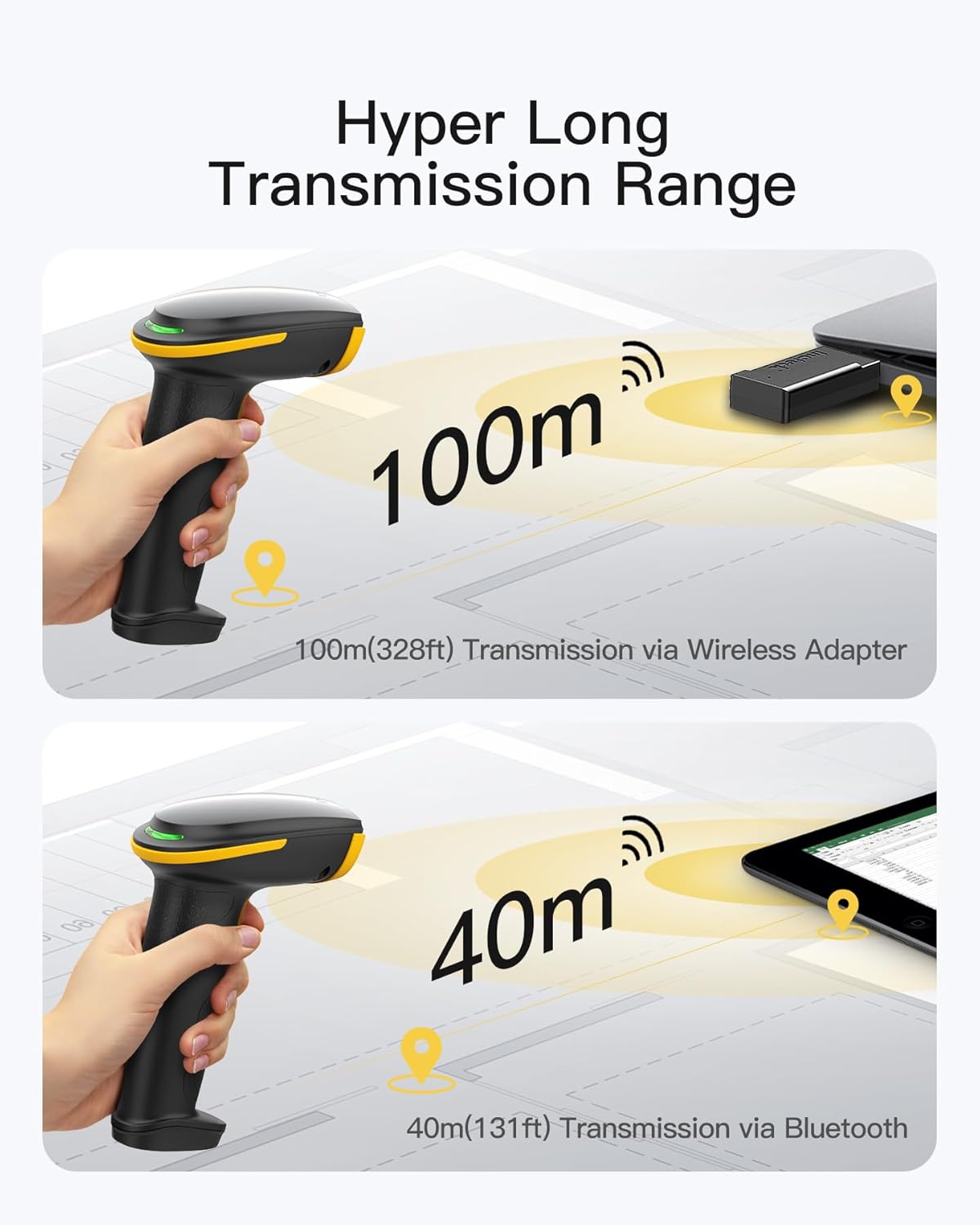
Figure 2.4: The scanner's intelligent stand enabling hands-free operation.
- Superb Compatibility: Offers three connection modes: 2.4G wireless, Bluetooth, and wired. Compatible with Windows, Mac OS, iOS, Android, iPad OS, and Linux, catering to diverse scanning needs.

Figure 2.5: The three versatile connection modes of the scanner.
3. Package Contents
Please verify that all items are present in the package:
- Inateck BCST-35 2D Barcode Scanner
- Intelligent Stand
- 2.4G Wireless USB Dongle
- USB Charging/Data Cable
- Quick Start Guide (not included in this digital manual)
4. Setup Guide
4.1 Connection Modes
The BCST-35 scanner offers three primary connection methods:
- 2.4G Wireless Mode:
Insert the 2.4G wireless USB dongle into an available USB port on your computer. The scanner will automatically pair with the dongle. This mode offers a transmission range of up to 100 meters (328 ft) in open areas.
- Bluetooth Mode:
Enable Bluetooth on your host device (smartphone, tablet, or computer). Put the scanner into Bluetooth pairing mode (refer to the quick start guide for specific steps, usually by scanning a specific configuration barcode). Select "Inateck BCST-35" from your device's Bluetooth list to connect. This mode provides a transmission range of up to 40 meters (131 ft).
- Wired Mode:
Connect the scanner directly to your computer using the provided USB cable. The scanner will function as a wired device and also charge its internal battery. This mode is plug-and-play and requires no additional setup.

Figure 4.1: Wireless transmission ranges for 2.4G and Bluetooth connections.
4.2 App Configuration
The Inateck APP simplifies the configuration process for your BCST-35 scanner. Download the official Inateck Scanner APP from your device's app store (available for Android and iOS). Once installed and connected via Bluetooth, you can easily adjust settings such as:
- Barcode type recognition (enable/disable specific barcode formats)
- Bluetooth connection and management
- Battery level display
- Alert preferences (sound, vibration, light)
- Volume control
5. Operating Instructions
5.1 Scanning Modes
The BCST-35 supports multiple scanning modes to suit different operational needs:
- Manual Scanning Mode:
Press the trigger button to activate the scanner and read a barcode. Release the button to stop scanning. This mode is suitable for individual item scanning.
- Continuous Scanning Mode:
In this mode, the scanner continuously emits its scanning beam, reading barcodes as they pass through its field of view without needing to press the trigger for each scan. This is useful for high-volume scanning tasks.
- Hands-Free Mode (with Stand):
When the scanner is placed on its intelligent stand, it automatically switches to hands-free mode. Simply present barcodes to the scanner, and it will automatically detect and read them, allowing for efficient workflow without holding the device.
5.2 Data Upload Modes
The scanner offers two methods for data transmission:
- Instant Upload Mode:
In this mode, scanned barcode data is immediately transmitted to the connected device (computer, smartphone, tablet) as soon as it is read. This is the default and most common mode for real-time data entry.
- Storage Mode (Inventory Mode):
When operating out of range or offline, the scanner can store barcode data internally. The BCST-35 can store up to 270,000 barcodes, each with a length of 13 characters. Data can be uploaded to the host device later when a connection is re-established.

Figure 5.1: Instant upload vs. storage mode for barcode data.
6. Maintenance and Care
6.1 Battery Management
The Inateck BCST-35 is equipped with a 2600mAh battery and an advanced power management algorithm to ensure extended battery life. To maximize battery longevity:
- Charge the scanner fully before first use.
- Avoid completely draining the battery regularly.
- Store the scanner in a cool, dry place when not in use for extended periods.
- Use the provided USB cable for charging.

Figure 6.1: The scanner's 2600mAh battery for extended operation.
6.2 Durability and Cleaning
The scanner's outer casing is designed with a soft rubber wrap to protect it from accidental drops up to 1.2 meters and general impacts. To maintain the device:
- Wipe the scanner with a soft, dry cloth.
- Do not use harsh chemicals or abrasive cleaners.
- Keep the scanning window clean and free of dust or smudges for optimal performance.
7. Troubleshooting
If you encounter issues with your Inateck BCST-35 scanner, please refer to the table below for common problems and their solutions.
| Problem | Possible Cause | Solution |
|---|---|---|
| Scanner not connecting via Bluetooth. | Scanner not in pairing mode; Bluetooth disabled on host device; interference. | Ensure scanner is in Bluetooth pairing mode (scan pairing barcode if necessary). Enable Bluetooth on your device. Move closer to the device. Try re-pairing. |
| Scanner not reading barcodes. | Barcode damaged/blurry; incorrect barcode type enabled; scanning window dirty; insufficient lighting. | Ensure barcode is clear. Check app settings to enable required barcode types. Clean scanning window. Adjust lighting conditions. |
| Data not transmitting to computer in 2.4G mode. | Dongle not properly inserted; scanner not paired with dongle; out of range. | Re-insert USB dongle. Ensure scanner is paired (scan pairing barcode if necessary). Move scanner closer to the dongle. |
| Scanner not charging. | USB cable faulty; power source issue; scanner port damaged. | Try a different USB cable or USB port. Ensure power source is active. Contact customer support if issue persists. |
| Scanner beeps but no data output. | Incorrect keyboard language setting on host device; application not ready for input. | Ensure keyboard language matches scanner output. Click into a text field or application ready to receive input. |
8. Technical Specifications
| Specification | Detail |
|---|---|
| Model Number | BCST-35 |
| Product Dimensions | 3.58 x 2.69 x 6.5 inches |
| Item Weight | 15 ounces |
| Battery | 1 Lithium Ion battery (2600mAh, included) |
| Connectivity Technology | 2.4G Wireless, Bluetooth, Wired (USB) |
| Compatible Devices | Desktop, Laptop, Smartphone, Tablet |
| Supported Operating Systems | Windows, Mac OS, iOS, Android, iPad OS, Linux |
| Decoding Capability | Most 1D and 2D barcodes (e.g., Codabar, Code 11, Code 128, Code 39, Code 93, EAN-8, EAN-13, ISBN, ISSN, MSI, UPC-A, UPC-E, Industrial 25 / Standard 25, Interleaved 25, Matrix 25, FedEx, USPS, QR Code, Data Matrix, PDF-417, Aztec) |
| Wireless Range (2.4G) | Up to 100 meters (328 ft) in open areas |
| Wireless Range (Bluetooth) | Up to 40 meters (131 ft) |
| Drop Resistance | 1.2 meters |
| Inventory Mode Storage | 270,000 barcodes (13 characters each) |
9. Warranty and Customer Support
Inateck products are designed for reliability and performance. For information regarding warranty coverage, please refer to the warranty card included with your product or visit the official Inateck website.
For technical assistance, troubleshooting, or any inquiries about your Inateck BCST-35 barcode scanner, please contact Inateck Customer Support. You can find contact details on the Inateck website or through the Inateck Scanner APP.
Extended protection plans may also be available for purchase to provide additional coverage beyond the standard warranty period. Please check product listings or contact your retailer for details on available protection plans.


