
1. Product Overview
The YITAHOME Commercial Ice Maker Machine is designed for high-volume ice production, suitable for restaurants, bars, and other business establishments. This robust unit features a stainless steel construction, an advanced control panel, and efficient ice-making capabilities, producing up to 400 LBS of ice per 24 hours with a 250 LBS storage bin.

Image: The YITAHOME Commercial Ice Maker Machine shown with its various components and accessories, including the main unit, control panel, water filter, ice scoop, and ice bucket.
2. Safety Instructions
Please read all safety warnings and instructions carefully before operating the appliance to prevent injury or damage. Keep this manual for future reference.
- Electrical Safety: Ensure the power supply matches the appliance's requirements. Do not operate with a damaged power cord or plug. Always unplug the machine before cleaning or servicing.
- Water Connection: Connect to a potable water supply only. Ensure all water connections are secure to prevent leaks.
- Placement: Place the machine on a stable, level surface. Allow adequate ventilation around the unit (at least 6 inches from walls) to ensure proper heat dissipation. Do not install near heat sources or in direct sunlight.
- Cleaning: Use only recommended cleaning agents. Do not spray water directly onto the machine's electrical components.
- Children and Pets: Keep children and pets away from the appliance during operation and maintenance.
3. Product Components and Dimensions
The YITAHOME Commercial Ice Maker Machine comes with essential accessories for immediate use and maintenance.
- Commercial Ice Machine Unit
- Ice Storage Bin (integrated)
- Ice Scoop
- Ice Bucket
- Water Filter
- Water Inlet Hose
- Drain Hose
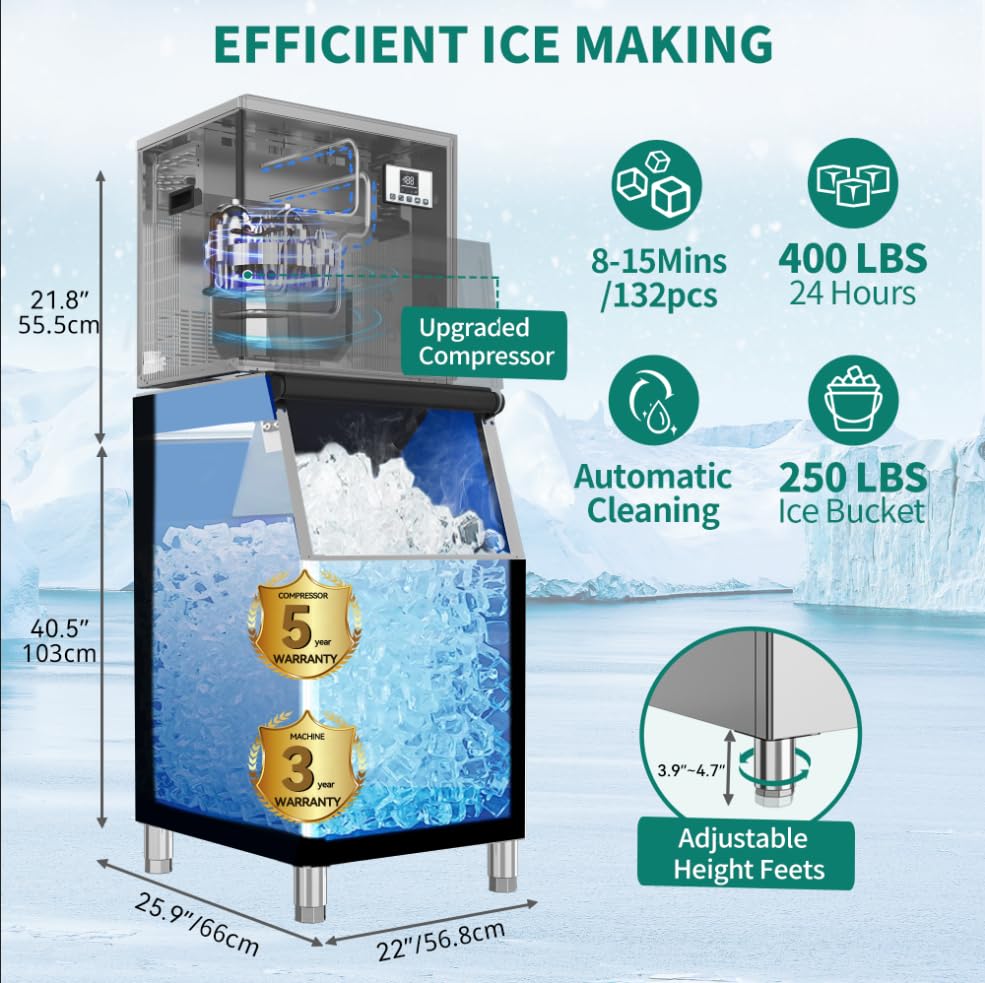
Image: Detailed view of the ice maker's dimensions (21.8" H for top unit, 40.5" H for bottom unit, 25.9" D, 22" W) and key features like 400 LBS/24H production, 250 LBS ice bucket, automatic cleaning, and adjustable height feet.

Image: A stainless steel ice bucket and scoop, demonstrating their inclusion with the ice maker for convenient ice handling.
4. Setup and Installation
Proper installation is crucial for the optimal performance and longevity of your ice maker.
- Unpacking: Carefully remove all packaging materials. Inspect the machine for any shipping damage.
- Placement: Choose a location with sufficient space for ventilation. The machine requires a stable, level surface. Ensure the ambient temperature is within the recommended operating range (typically 50°F to 90°F / 10°C to 32°C).
- Water Connection:
- Connect the water inlet hose to a potable water supply with a shut-off valve.
- Install the provided water filter in line with the water inlet.
- Connect the drain hose to a suitable drain. Ensure the drain hose has a continuous downward slope to prevent water backup.
- Electrical Connection: Plug the machine into a grounded electrical outlet that meets the specified voltage and current requirements. Do not use extension cords.
- Initial Cleaning: Before first use, perform a thorough cleaning cycle as described in the Maintenance section.

Image: An illustrative diagram detailing the connections for power, compressor water outlet, ice-making inlet, water filter, and drain hose for easy installation.
5. Operation
Operating your YITAHOME ice maker is straightforward with its advanced control panel.
5.1 Control Panel Overview

Image: Close-up of the ice maker's advanced control panel, highlighting buttons for On/Off, Clean/De-icing, Timer, Timer +, Timer -, and indicators for Power, Compressor, Light, De-icing, Water shortage, and Fault.
- On/Off Button: Powers the machine on or off.
- Clean/De-icing Button: Initiates the self-cleaning cycle or de-icing process.
- Timer Button: Sets a timer for scheduled operation.
- Timer +/- Buttons: Adjusts timer settings and ice thickness.
- Temperature Display: Shows the current temperature.
- Indicators: Lights for Power, Compressor, Light, De-icing, Water shortage, and Fault provide operational status.
5.2 Ice Production
Once connected to water and power, press the "On/Off" button to start ice production. The machine will automatically begin the ice-making cycle. The ice thickness can be adjusted using the "Timer +/-" buttons. Longer cycles result in thicker ice cubes.
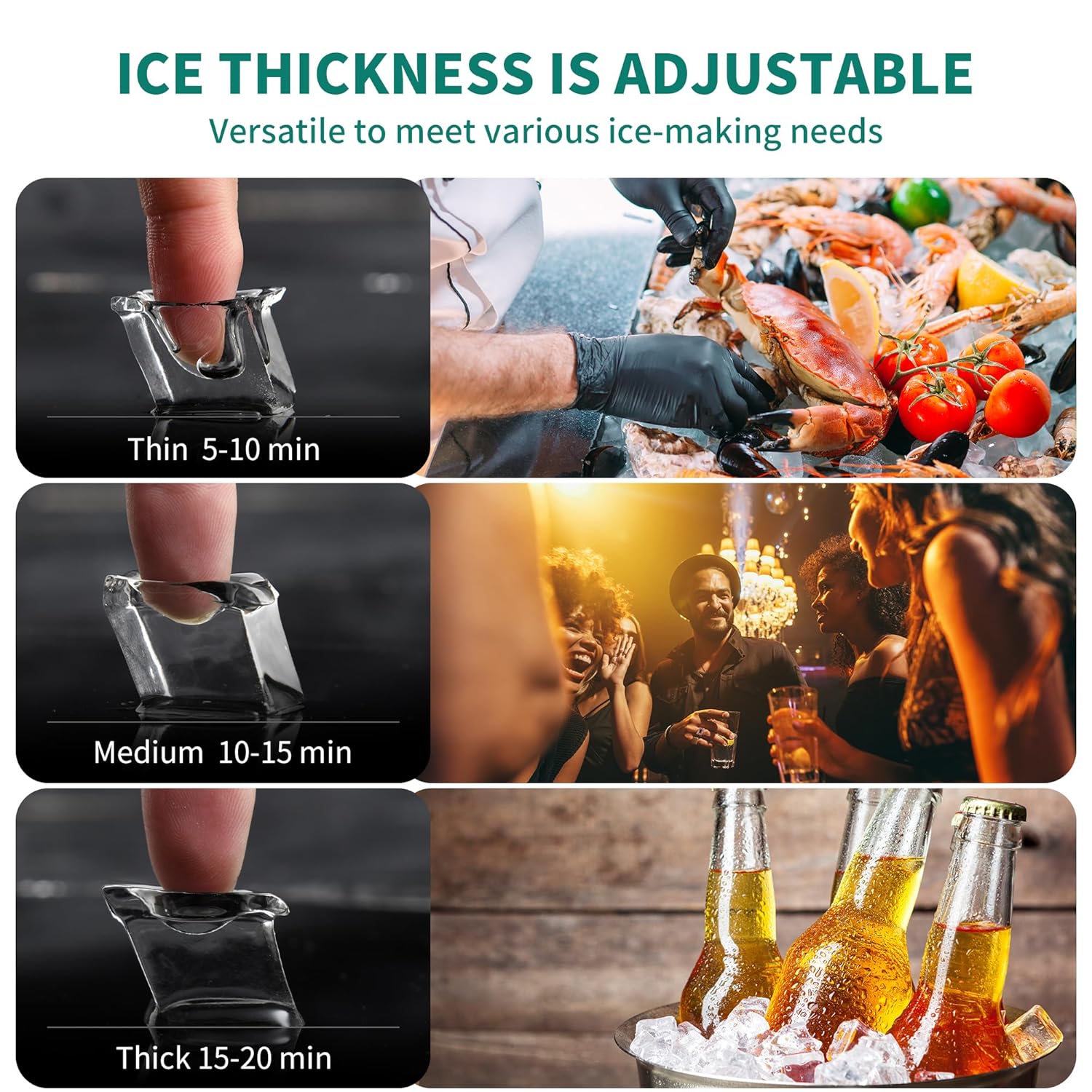
Image: Visual representation of different ice cube thicknesses (Thin: 5-10 min, Medium: 10-15 min, Thick: 15-20 min) and their versatility for various uses.
5.3 Ice Storage
The integrated ice bin stores the produced ice. The machine features a foam layer insulation, thickened by 20%, to prevent ice from melting for up to 8 hours, maximizing ice retention.

Image: Cross-section diagram illustrating the thickened foam insulation layer and food-grade PP injection liner, designed to prevent ice melting for up to 8 hours compared to other models.
5.4 Product Demonstration Video
Watch this video for a visual guide on the YITAHOME Commercial Ice Maker Machine's features and operation. Please note that this video demonstrates a 550 LBS capacity model, but the general features and operation are similar to the 400 LBS model.
Video: A 3D display video showcasing the YITAHOME Industrial Ice Machine, demonstrating its design, control panel, ice production process, and ice bin. This video is provided by the seller.
6. Maintenance
Regular maintenance ensures the efficiency and longevity of your ice maker.
- Self-Cleaning Function: Utilize the "Clean/De-icing" button on the control panel to initiate the automatic cleaning cycle. This helps prevent mineral buildup and maintains ice quality.
- Water Filter Replacement: The included water filter should be replaced periodically based on water quality and usage to ensure clean ice and protect the machine.
- Exterior Cleaning: Wipe down the stainless steel exterior with a soft cloth and mild detergent. Avoid abrasive cleaners.
- Ice Bin Cleaning: Periodically empty and clean the ice storage bin with a food-grade sanitizer.
7. Troubleshooting
Refer to the table below for common issues and their solutions.
| Problem | Possible Cause | Solution |
|---|---|---|
| Machine does not turn on | No power supply; Power cord loose | Check power outlet; Ensure power cord is securely plugged in |
| No ice production | No water supply; Water filter clogged; Compressor issue | Check water connection; Replace water filter; Contact customer support |
| Ice production is slow | High ambient temperature; Poor ventilation; Water quality issue | Ensure proper ventilation; Check water filter; Adjust ice thickness setting |
| Water leakage | Loose water connections; Clogged drain hose | Tighten all water connections; Clear any blockages in the drain hose |
| Error indicator light on | Specific system fault | Refer to the control panel's fault codes (if available) or contact customer support |
8. Specifications
| Feature | Detail |
|---|---|
| Brand | YITAHOME |
| Model Number | MAYIHMzf9G |
| Ice Production Capacity | Up to 400 LBS per 24 hours |
| Ice Storage Bin Capacity | 250 LBS |
| Product Dimensions (Overall) | 25.9"D x 22"W x 62.3"H |
| Wattage | 980 watts |
| Material | Stainless Steel |
| Country of Origin | China |
9. Warranty and Support
YITAHOME products are built with quality and durability in mind. This ice maker typically includes a 5-year warranty on the compressor and a 3-year warranty on the machine itself, covering manufacturing defects under normal use.
For warranty claims, technical assistance, or any questions regarding your YITAHOME Commercial Ice Maker Machine, please contact YITAHOME customer support through their official website or the retailer where the product was purchased. Please have your model number (MAYIHMzf9G) and purchase information ready when contacting support.


