1. Introduction
Thank you for purchasing the Samsung HW-S810D Soundbar. This 3.1.2 channel sound system, featuring a wireless subwoofer, is designed to enhance your audio experience with immersive Dolby Atmos and DTS:X technologies. This manual provides essential information for setting up, operating, and maintaining your soundbar. Please read these instructions carefully before use to ensure proper operation and safety.
2. Safety Information
To reduce the risk of electric shock, fire, or damage to the unit, observe the following safety precautions:
- Do not expose this apparatus to rain or moisture.
- Do not block any ventilation openings. Install in accordance with the manufacturer's instructions.
- Do not install near any heat sources such as radiators, heat registers, stoves, or other apparatus (including amplifiers) that produce heat.
- Protect the power cord from being walked on or pinched, particularly at plugs, convenience receptacles, and the point where they exit from the apparatus.
- Only use attachments/accessories specified by the manufacturer.
- Refer all servicing to qualified service personnel. Servicing is required when the apparatus has been damaged in any way.
3. Package Contents
Verify that all components are present in your package:
- Samsung HW-S810D Soundbar
- Wireless Subwoofer
- Remote Control with Batteries
- Power Cords (for Soundbar and Subwoofer)
- HDMI Cable
- Wall Mount Kit (optional, may vary by region)
- Table Mount
- User Manual (this document)
4. Product Overview
The Samsung HW-S810D is a slim, elegant soundbar designed to deliver powerful and immersive audio.
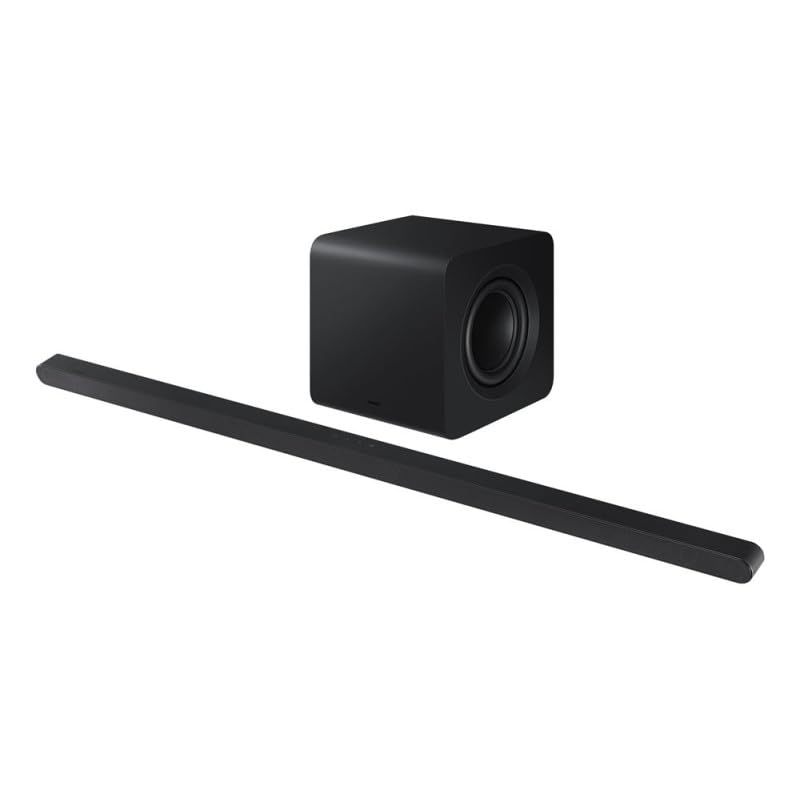
Image 1: Samsung HW-S810D Soundbar and Wireless Subwoofer. The soundbar is a long, slender black unit, and the subwoofer is a compact black cube.
4.1. Key Features
- 3.1.2 Channel Audio: Delivers a rich sound experience with dedicated center and up-firing speakers.
- Dolby Atmos & DTS:X: Object-based audio formats for a truly immersive, three-dimensional sound.
- Wireless Subwoofer: Provides deep, powerful bass without the clutter of cables.
- Slim Design: At only 3.8 cm (1.5 inches) in height, it fits seamlessly under most TVs.
- Multiple Connectivity Options: Wi-Fi, Bluetooth, and HDMI for versatile connection to your devices.
- Voice Control: Compatible with voice assistants for hands-free operation.
4.2. Soundbar Components
- Front Panel: Speaker grille, LED indicator.
- Top Panel: Touch controls (Power, Volume, Input).
- Rear Panel: Power input, HDMI (eARC) port, Optical input, USB port (for service only).
4.3. Wireless Subwoofer
The wireless subwoofer automatically connects to the soundbar. It features a power input and a pairing button (usually on the rear) for manual connection if needed.
5. Setup
5.1. Placement
- Soundbar: Place the soundbar centrally below your TV. Ensure no objects block the front or top speakers.
- Subwoofer: Place the wireless subwoofer anywhere in the room, preferably near the soundbar, for optimal bass distribution. Avoid placing it directly against a wall or in a corner, which can cause excessive resonance.
5.2. Connections
Choose the connection method that best suits your TV and other devices.
5.2.1. HDMI (eARC/ARC) Connection (Recommended)
- Connect one end of the HDMI cable to the HDMI OUT (TV-eARC/ARC) port on the soundbar.
- Connect the other end of the HDMI cable to the HDMI IN (ARC/eARC) port on your TV.
- Power on the soundbar and TV. Select the correct HDMI input on your TV.
5.2.2. Optical Connection
- Connect an optical cable (not always included) from the DIGITAL AUDIO OUT port on your TV to the OPTICAL IN port on the soundbar.
- Power on the soundbar and TV. Select the Optical input on the soundbar.
5.2.3. Bluetooth Connection
- Press the Bluetooth button on the remote or soundbar to enter Bluetooth pairing mode.
- On your mobile device, search for "Samsung HW-S810D" in the Bluetooth settings and select it to pair.
5.2.4. Wi-Fi Connection (SmartThings App)
- Download and install the Samsung SmartThings app on your smartphone or tablet.
- Open the app and follow the on-screen instructions to add your HW-S810D soundbar to your network.
- This connection enables features like AirPlay 2, Spotify Connect, and firmware updates.
5.3. Power Connection
- Connect the power cord to the soundbar's power input, then plug it into a wall outlet.
- Connect the power cord to the wireless subwoofer's power input, then plug it into a wall outlet.
- The subwoofer should automatically pair with the soundbar. If not, refer to the troubleshooting section.
6. Operating Instructions
6.1. Basic Functions
- Power On/Off: Press the Power button on the remote or soundbar.
- Volume Control: Use the Volume +/- buttons on the remote or soundbar.
- Input Selection: Press the Source button on the remote to cycle through HDMI, Optical, Bluetooth, and Wi-Fi inputs.
- Mute: Press the Mute button on the remote to temporarily silence the sound.
6.2. Sound Modes
The HW-S810D offers various sound modes to optimize your listening experience:
- Standard: Original sound delivery.
- Surround: Expands the soundstage for a more immersive experience.
- Game: Optimized for gaming audio.
- Adaptive Sound: Analyzes content and optimizes sound settings in real-time.
6.3. Voice Control
The soundbar supports voice control through compatible voice assistants (e.g., Bixby, Alexa, Google Assistant) when connected via Wi-Fi and configured through the SmartThings app. Follow the app's instructions to enable and customize voice commands.
7. Maintenance
Proper maintenance ensures the longevity and performance of your soundbar.
- Cleaning: Use a soft, dry cloth to wipe the surfaces of the soundbar and subwoofer. Do not use liquid cleaners or abrasive materials.
- Ventilation: Ensure that the ventilation openings are not blocked to prevent overheating.
- Storage: If storing the unit for an extended period, disconnect it from the power outlet and store it in a cool, dry place.
8. Troubleshooting
If you encounter issues with your soundbar, refer to the following common problems and solutions:
| Problem | Possible Solution |
|---|---|
| No power | Check if the power cords are securely connected to the soundbar/subwoofer and the wall outlet. Try a different outlet. |
| No sound |
|
| Subwoofer not connecting |
|
| Bluetooth connection issues |
|
9. Specifications
| Feature | Detail |
|---|---|
| Model Name | HW-S810D |
| Brand | Samsung |
| Speaker Type | Soundbar with Wireless Subwoofer |
| Channel Configuration | 3.1.2 Channel |
| Audio Output Mode | Dolby Atmos, DTS:X |
| Connectivity Technology | Bluetooth, HDMI (eARC), Wi-Fi |
| Max Speaker Output Power | 200 Watts |
| Control Method | Remote, Touch Controls, Voice |
| Weight | 10.53 Kilograms (total package weight) |
| Color | Black Titanium |
| Included Components | Soundbar, Wireless Subwoofer, Remote Control, Power Cords, HDMI Cable, Table Mount |
| Mounting Type | Table Mount (Wall Mount optional) |
| Compatible Devices | TVs, Computers, Smartphones, Tablets |
10. Warranty and Support
This Samsung HW-S810D Soundbar comes with a limited warranty. For specific warranty terms and conditions, please refer to the warranty card included in your package or visit the official Samsung support website.
For technical support, service requests, or to download the latest firmware updates, please visit: www.samsung.com/support
When contacting support, please have your model number (HW-S810D) and serial number ready.


