
HONOR NDL-W09
HONOR Pad X8a User Manual
Model: NDL-W09
Introduction
The HONOR Pad X8a is an 11-inch Wi-Fi tablet designed for versatile use, offering a blend of performance and portability. It features an 11-inch TFT LCD display with a 90 Hz refresh rate, powered by a Qualcomm Snapdragon 680 chipset. The tablet includes an 8300mAh battery and four speakers with HONOR Histen algorithm for enhanced audio. Its slim metal design ensures durability and ease of handling.

Figure 1: Front view of the HONOR Pad X8a tablet.
Setup
Unboxing and Initial Inspection
Upon opening the package, ensure all components are present and undamaged. The standard package includes:
- HONOR Pad X8a Tablet
- Charger
If any items are missing or damaged, please contact customer support.
Charging the Device
Before first use, fully charge your HONOR Pad X8a. Connect the provided charger to the tablet's charging port (located on the side). The tablet features an 8300mAh battery, providing approximately 14 hours of local video playback on a full charge.
A charging indicator will typically appear on the screen. Once fully charged, disconnect the charger.
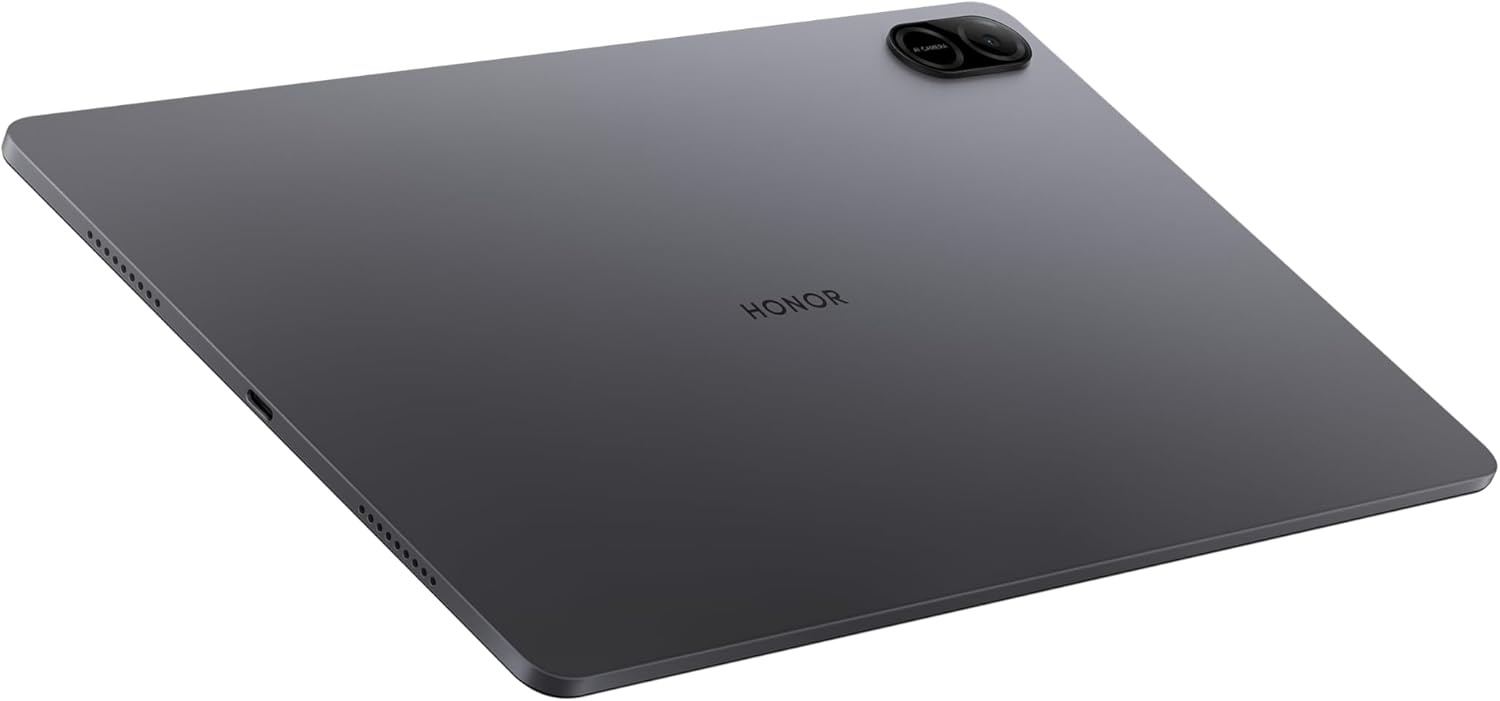
Figure 2: Side view of the HONOR Pad X8a, highlighting ports.
Powering On and Off
To power on the tablet, press and hold the power button located on the side until the HONOR logo appears.
To power off, press and hold the power button until the power options menu appears, then select "Power off".
Initial Software Setup
Upon first power-on, the tablet will guide you through the initial setup process. This includes:
- Selecting your language.
- Connecting to a Wi-Fi network.
- Signing in with your Google account (required for Google Mobile Services).
- Setting up screen lock and other security features.
The tablet runs on MagicOS 8.0, based on Android 14, offering smooth performance and multi-task management.
Operating the Tablet
Display and Navigation
The HONOR Pad X8a features an 11-inch TFT LCD display with a resolution of 1200 x 1920 pixels and a 90Hz refresh rate. This provides a smooth visual experience with eye protection technology.
Navigate the tablet using touch gestures: tap to select, swipe to scroll, pinch to zoom.
Audio Features
Experience superior sound with the large amplitude four-speaker layout, powered by the HONOR Histen algorithm. This ensures excellent sound quality, rich musical details, and enhanced human voice clarity for online learning. It also filters ambient noise during communication.

Figure 3: Detail of the HONOR Pad X8a's speaker grilles.
Connectivity
The tablet supports Wi-Fi connectivity (802.11ac) for internet access. To connect to a Wi-Fi network:
- Go to Settings > Network & internet > Wi-Fi.
- Turn on Wi-Fi.
- Select your desired network and enter the password if prompted.
Bluetooth connectivity is also available for connecting wireless accessories such as headphones or keyboards.
Camera Usage
The HONOR Pad X8a is equipped with a 5 MP rear camera. To use the camera, open the Camera application from the home screen or app drawer. You can switch between photo and video modes and adjust settings as needed.

Figure 4: Rear view of the HONOR Pad X8a, showing the camera.
Storage Management
The tablet comes with 128 GB of internal flash memory. To manage your storage, go to Settings > Storage. Here you can view used space, free up space, and manage applications.
Maintenance
Cleaning Your Tablet
To clean the screen, use a soft, lint-free cloth specifically designed for electronics. For the body, a slightly damp cloth can be used. Avoid using harsh chemicals or abrasive materials.
Software Updates
Regularly check for and install software updates to ensure optimal performance and security. Go to Settings > System > Software update to check for available updates.
Battery Care
To prolong battery life, avoid exposing the tablet to extreme temperatures. It is recommended to keep the battery charge between 20% and 80% for long-term health, though occasional full charges and discharges are acceptable.
Troubleshooting
Common Issues and Solutions
- Tablet not turning on: Ensure the battery is charged. Connect the charger and wait a few minutes before attempting to power on again.
- Screen frozen or unresponsive: Press and hold the power button for approximately 10-15 seconds to force a restart.
- Wi-Fi connectivity issues: Check if Wi-Fi is enabled in settings. Restart your Wi-Fi router. Forget the network and reconnect.
- Apps crashing: Clear the cache of the problematic app (Settings > Apps > [App Name] > Storage > Clear cache). If the issue persists, reinstall the app.
- Slow performance: Close unnecessary background apps. Clear system cache. Check for available storage space.
Specifications
| Feature | Specification |
|---|---|
| Model Name | HONOR Pad X8a |
| Model Number | NDL-W09 |
| Display Size | 11 Inches |
| Screen Resolution | 1200 x 1920 Pixels |
| Processor | 2.4 GHz Octa-core (Qualcomm Snapdragon 680) |
| Operating System | Android 14 (MagicOS 8.0) |
| Internal Storage | 128 GB Flash Memory |
| Wireless Type | 802.11ac (Wi-Fi) |
| Battery Capacity | 8300mAh |
| Average Battery Life | 14 Hours (local video playback) |
| Rear Camera Resolution | 5 MP |
| Audio | Four Speaker with HONOR Histen algorithm |
| Item Weight | 1.09 pounds (approx. 494 grams) |
| Product Dimensions (LxWxH) | 10.12 x 6.63 x 0.29 inches |
| Color | Space Grey |
Warranty and Support
Warranty Information
For detailed warranty information, please refer to the warranty card included with your product or visit the official HONOR website. Keep your proof of purchase for warranty claims.
Customer Support
If you encounter issues not covered in this manual or require further assistance, please contact HONOR customer support. Support contact details can typically be found on the official HONOR website or on the product packaging.
Related Documents - NDL-W09
 |
HONOR Pad X8a User Guide: Setup, Features, and Operation This comprehensive user guide provides detailed instructions for the HONOR Pad X8a tablet, covering initial setup, navigation, connectivity options (Wi-Fi, Mobile Network), app management, system settings, and advanced features. |
 |
HONOR Pad X8a User Guide - Setup, Features, and Settings Comprehensive user guide for the HONOR Pad X8a tablet. Learn about device setup, navigation, network connectivity, app management, system settings, and troubleshooting to maximize your tablet experience. |
 |
Honor Pad X8a Кратко ръководство Кратко ръководство за потребителя за Honor Pad X8a, обхващащо първи стъпки, информация за безопасност, регулаторна информация и технически спецификации. |
 |
Guía de Reparación Profesional para HONOR Pad X8a 11" Este documento técnico está diseñado para profesionales de la reparación y detalla los procedimientos necesarios para el mantenimiento y servicio del dispositivo HONOR Pad X8a 11". La guía abarca desde precauciones esenciales de uso y mantenimiento hasta un análisis exhaustivo de los componentes del dispositivo, incluyendo desmontaje, montaje y pruebas. |
 |
HONOR NDL-W09: სწრაფი დაწყება და უსაფრთხოების სახელმძღვანელო სწრაფი დაწყების სახელმძღვანელო HONOR NDL-W09 მოწყობილობისთვის. შეიცავს მოწყობილობის დაყენების ინსტრუქციებს, უსაფრთხოების მნიშვნელოვან რჩევებს, ინფორმაციას გადაგდებისა და რეგულაციების შესახებ. |
 |
HONOR NDL-W09 Quick Start Guide - Setup and Safety Information Get started with your HONOR NDL-W09 device. This Quick Start Guide provides essential setup instructions, safety precautions, and regulatory compliance details from HONOR. |