
Introduction
This manual provides detailed instructions for the safe and effective operation of your Godox LA300R RGB Video Light. Please read this manual thoroughly before use to ensure optimal performance and longevity of the product. Keep this manual for future reference.
Safety Information
- Do not disassemble or modify the product. Unauthorized repairs may cause damage and void the warranty.
- Keep the product dry. Do not handle with wet hands or immerse in water.
- Do not use in the presence of flammable gases or liquids.
- Ensure the power supply voltage matches the product's requirements.
- Avoid direct eye exposure to the light source.
- Keep out of reach of children.
- Ensure proper ventilation during operation to prevent overheating.
Product Overview
The Godox LA300R is a 330W full-color RGB LED video light designed for professional photography and videography. It features a wide CCT range, adjustable GM value, film-grade GEL mode, NFC for seamless device addition, and smooth app control. Its universal Bowens mount ensures compatibility with various light modifiers.
Components

Figure 1: Godox LA300R RGB Video Light and its accessories.
The package includes the light body, a reflector, an AC power cord, and a wire rope. An adapter is also included for power connection.
Key Features
- Colorful Lighting Excellence: Broad CCT range of 1800K-10000K, adjustable GM value, and film-grade GEL mode.
- Premium Beads for Exceptional Brightness: High illuminance output for various lighting needs.
- NFC Addition: Instant device pairing with the Godox Light app.
- DC & V-Mount Battery Power Supply: Flexible power options for studio and on-location use (V-mount battery plate sold separately).
- Smooth App Control: Comprehensive lighting adjustments and scene switching via the Godox Light App.
- Bowens Mount Compatibility: Universal mount for a wide range of light control accessories.
Setup
1. Attaching the Reflector
Align the reflector with the Bowens mount on the front of the light. Insert the reflector and twist clockwise until it locks securely. To remove, press the release button and twist counter-clockwise.

Figure 2: The Godox LA300R with a Bowens mount accessory attached, demonstrating compatibility.
2. Mounting the Light
Attach the light to a compatible light stand using the integrated mounting bracket. Secure it by tightening the knob on the bracket.
3. Power Connection
Connect the AC power cord to the adapter, then plug the adapter into the DC input port on the light. Plug the AC cord into a wall outlet. For mobile setups, the light is compatible with V-mount batteries when used with the Godox DBP-V Dual Battery Plate (purchased separately).

Figure 3: Illustrates the DC power supply interface and V-mount battery compatibility for mobile lighting setups.
Video 1: An overview of the Godox LA series video lights, demonstrating various features including setup and application in different scenarios. This video is provided by Mivitar Official Store.
Operating Instructions
1. Powering On/Off
Press the power button located on the rear panel of the light to turn it on or off.
2. Control Panel Navigation
The rear panel features an easy-to-read display and intuitive controls for adjusting settings. Use the navigation buttons and dial to select and modify parameters.
3. Color Modes and Effects
The LA300R offers a variety of lighting modes:
- CCT Mode: Adjust color temperature from 1800K to 10000K.
- HSI Mode: Control hue, saturation, and intensity for a full spectrum of colors.
- GEL Mode: Simulate various film-grade color gels.
- RGBW Mode: Direct control over Red, Green, Blue, and White LEDs.
- FX Effects: Access special effects like TV, Fire, Lightning, etc.

Figure 4: Illustrates the diverse color modes and wide CCT range available on the Godox LA series lights.
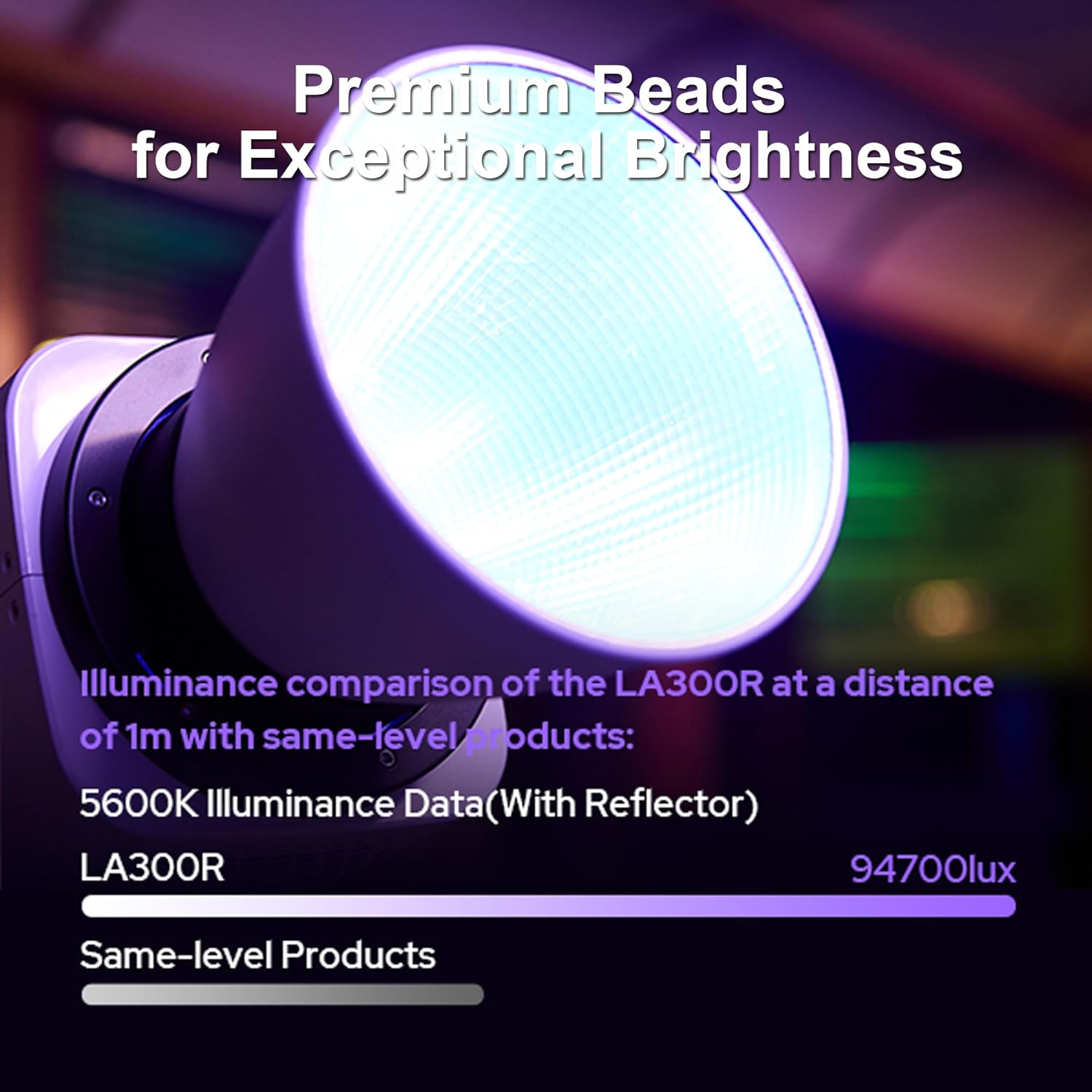
Figure 5: Highlights the high illuminance of the LA300R, showing 94700 lux at 1m with a reflector.
4. App Control (Godox Light App)
Download the Godox Light App from your device's app store. The app allows for remote control and advanced settings adjustments.
- NFC Pairing: Open the Godox Light app and tap your phone near the NFC chip on the light to instantly add it. This facilitates quick setup for multiple lights.
- Bluetooth Connection: Once added via NFC or manually, the app connects via Bluetooth for control.
- Smooth Adjustments: Adjust brightness, color temperature, hue, saturation, and apply FX effects.
- Scene Switching: Utilize the new scene-switching feature for quick changes between pre-configured lighting setups.
- Synchronized Control: Connect and control multiple lights simultaneously for complex lighting designs.

Figure 6: Demonstrates the NFC feature for quickly adding the light to the Godox Light App.

Figure 7: The Godox Light App interface, allowing smooth adjustments and synchronized control of multiple lights.
Video 2: This video, provided by Mivitar Official Store, showcases the Godox LA300R RGB Video Light's NFC and APP control features, demonstrating how to seamlessly add devices and manage lighting setups.
Maintenance
- Regularly clean the light body with a soft, dry cloth.
- Avoid using harsh chemicals or abrasive materials.
- Store the light in a dry, dust-free environment when not in use.
- Ensure all cables are properly coiled and stored to prevent damage.
Troubleshooting
| Problem | Possible Cause | Solution |
|---|---|---|
| Light does not power on | Power cable not connected; Power outlet faulty; Light damaged. | Check power connections; Try a different outlet; Contact customer support. |
| App cannot connect to light | Bluetooth/NFC off; Light too far; App not updated. | Ensure Bluetooth/NFC is enabled; Move closer to the light; Update the Godox Light App. |
| Inconsistent light output | Overheating; Faulty power supply. | Ensure proper ventilation; Check power supply for damage; Contact customer support. |
Specifications
| Specification | Value |
|---|---|
| Model | LA300R |
| Input Power | 330W |
| Power Supply | 100V-240V ~ 50/60Hz |
| CCT Range | 1800K-10000K (LA150R/200R/300R) |
| GM Adjust | -100%~100% |
| Brightness Range | 0%-100% |
| CRI | Average ≥95 |
| TLCI | Average ≥94 |
| Bluetooth Control Distance | Max. 30m |
| Working Environment Temperature | ~20℃ ~ 40℃ |
| Dimension (without reflector) | ≈9.09"L x 6.14"W x 9.37"H |
| Net Weight (without reflector) | ≈2.5kg |
Warranty and Support
Specific warranty details and support contact information are not available in the provided product data. Please refer to the product packaging or the manufacturer's official website for the most current warranty policy and customer support contacts.