
1. Introduction and Overview
The Cinnado B6 2K Wireless Outdoor Solar Security Camera is designed to provide comprehensive surveillance for your home. This camera features 2K resolution, 360° pan and tilt capabilities, human detection, color night vision, and flexible storage options. Powered by both solar and battery, it offers true wireless operation for continuous protection. This manual provides detailed instructions for setup, operation, maintenance, and troubleshooting to ensure optimal performance of your security camera system.

Image 1.1: Cinnado B6 2K Wireless Outdoor Solar Security Cameras.
2. Product Features
- Crystal 2K Resolution: Equipped with 2K resolution (2304x1296p) for clear video. Automatically switches to 768x432p SD resolution in cases of limited network connectivity.
- Color Night Vision: Offers multiple night vision modes including Full Color Night, Intelligent Light, and Auto Infrared mode for enhanced visibility in low-light conditions.
- Solar/Battery Power: Can be charged by the included solar panel, eliminating the need for constant power outlets. A backup battery ensures uninterrupted monitoring during bad weather or low-light conditions.
- True Wireless Operation: Designed for easy installation without complex wiring.
- IP65 Waterproof Rating: Built to withstand rain, snow, and harsh weather conditions, suitable for outdoor use.
- 360° PTZ Function: Remotely pan, tilt, and zoom the camera lens to achieve a comprehensive view of your surroundings (345° pan, 60° tilt).
- PIR Human Detection: Advanced PIR and AI detection technology identifies human movement, reducing false alarms. Sensitivity is adjustable in three levels, ranging from 16-29 feet.
- Two-Way Audio: Engage in real-time two-way communication with individuals at the camera's location using your mobile device.
- Local/Cloud Storage: Supports both Micro SD card storage (up to 128GB, not included) and cloud storage options. Cloud storage is optional and not mandatory.
- Works with Alexa: Integrates with Alexa for smart home compatibility.

Image 2.1: Key features of the Cinnado B6 camera.

Image 2.2: 2K Resolution provides superior clarity.

Image 2.3: Color Night Vision for enhanced detail at night.
3. What's in the Box
Upon opening your Cinnado B6 package, you should find the following components:
- Solar camera (quantity as per pack, e.g., 3 for 3-pack)
- Solar panel (quantity matching cameras)
- Installation guide
- Screw pack for mounting
- Type-C power cord (quantity matching cameras)
4. Setup Guide
Follow these steps to set up your Cinnado B6 security camera:
- Charge the Camera: Before initial use, fully charge the camera's internal battery using the provided Type-C power cord.
- Download the App: Download the Wansview app from your smartphone's app store (available on Apple App Store and Google Play Store).
- Create an Account: Open the Wansview app and follow the on-screen instructions to create a new user account or log in if you already have one.
- Add Device: In the app, select the option to add a new device. Follow the prompts to connect your camera to your 2.4G Wi-Fi network. Note: This camera only supports 2.4G Wi-Fi; 5G Wi-Fi is not supported.
- Mount the Camera: Choose a suitable outdoor location with ample sunlight for the solar panel. Use the provided hole positioning stickers to mark and drill holes. Secure the camera base with the screws from the screw pack. Important: Do not drill into the camera itself.
- Connect Solar Panel: Connect the solar panel to the camera. Ensure the solar panel is positioned to receive maximum direct sunlight throughout the day for optimal charging.

Image 4.1: Camera mounting steps.
5. Operating Instructions
Once your camera is set up, you can begin using its features via the Wansview app:
- Live View: Open the app and select your camera to view the live feed.
- Pan-Tilt-Zoom (PTZ): Use the controls within the app to remotely adjust the camera's viewing angle (pan 345°, tilt 60°).
- Two-Way Audio: Tap the microphone icon in the app to speak through the camera's speaker, and listen through your phone.
- Night Vision Modes: Switch between Full Color Night, Intelligent Light, and Auto Infrared modes in the app settings based on your preference and lighting conditions.
- PIR Human Detection: Adjust the PIR detection sensitivity (low, medium, high) in the app settings to optimize motion alerts and reduce false triggers.
- Notifications: Enable push notifications in the app to receive instant alerts when human motion is detected.
- Storage: Access recorded footage from the Micro SD card (if installed) or through your cloud storage plan directly within the app.
- Alexa Integration: Follow the instructions in the Wansview app or Alexa app to link your camera for voice control and viewing on compatible Alexa devices.
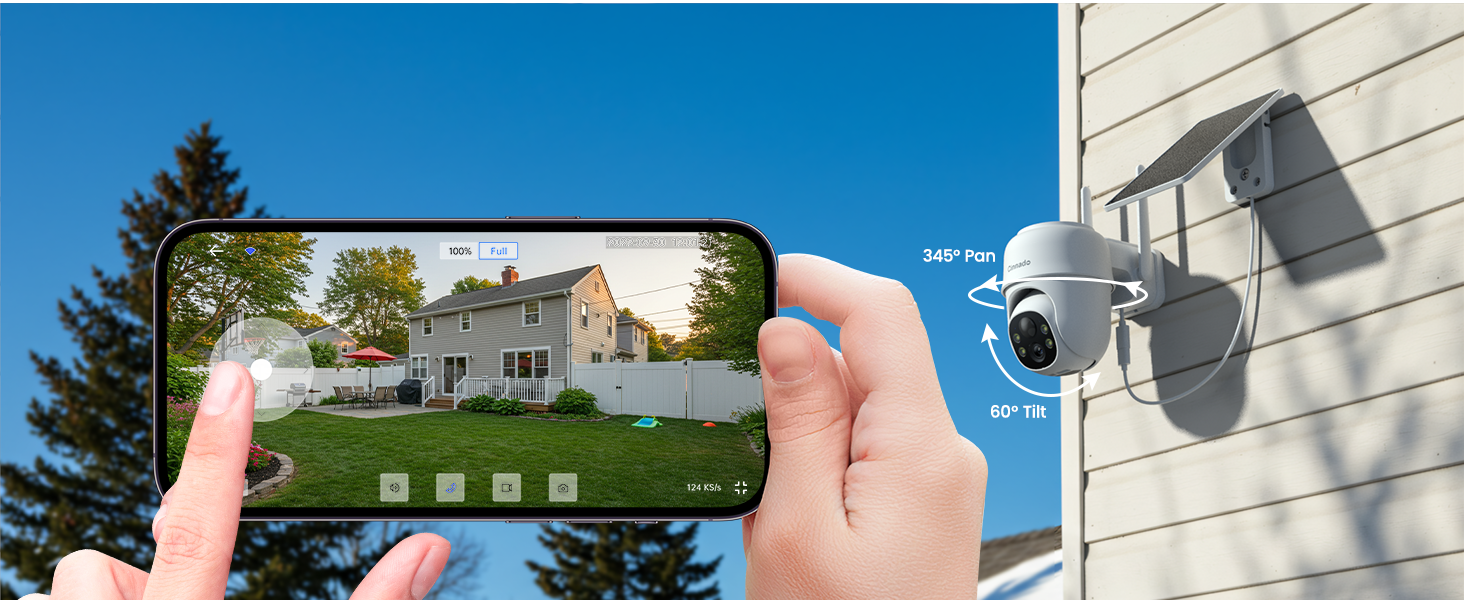
Image 5.1: Remote PTZ control via smartphone app.
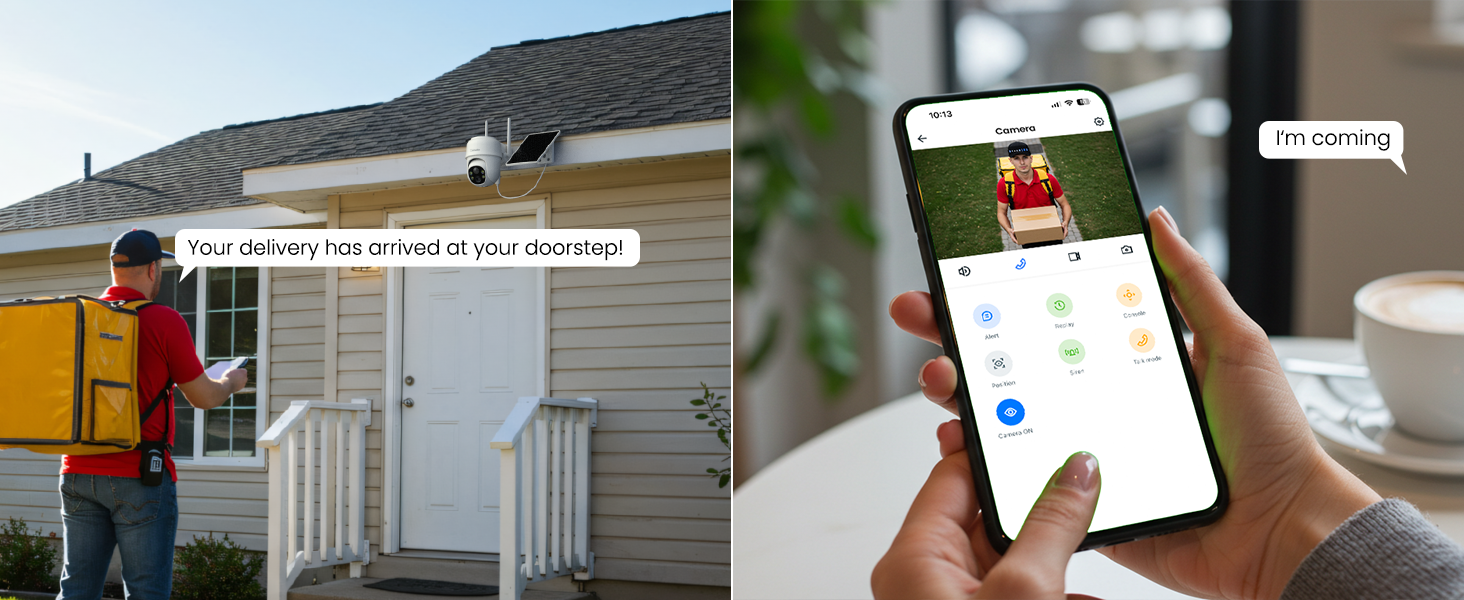
Image 5.2: Using two-way audio for real-time interaction.
6. Maintenance
Proper maintenance ensures the longevity and optimal performance of your Cinnado B6 camera:
- Cleaning: Periodically wipe the camera lens and solar panel with a soft, damp cloth to remove dust, dirt, or debris that may obstruct vision or reduce charging efficiency. Avoid abrasive cleaners.
- Weather Resistance: While the camera is IP65 waterproof, extreme weather conditions (e.g., prolonged heavy snow accumulation on the solar panel) may temporarily affect performance. Ensure the solar panel is clear of obstructions.
- Battery Health: The solar panel is designed to keep the battery charged. If the camera is in a consistently shaded area, manual charging via the Type-C port may be occasionally necessary.
- Firmware Updates: Check the Wansview app regularly for any available firmware updates for your camera. Updates often include performance improvements and bug fixes.
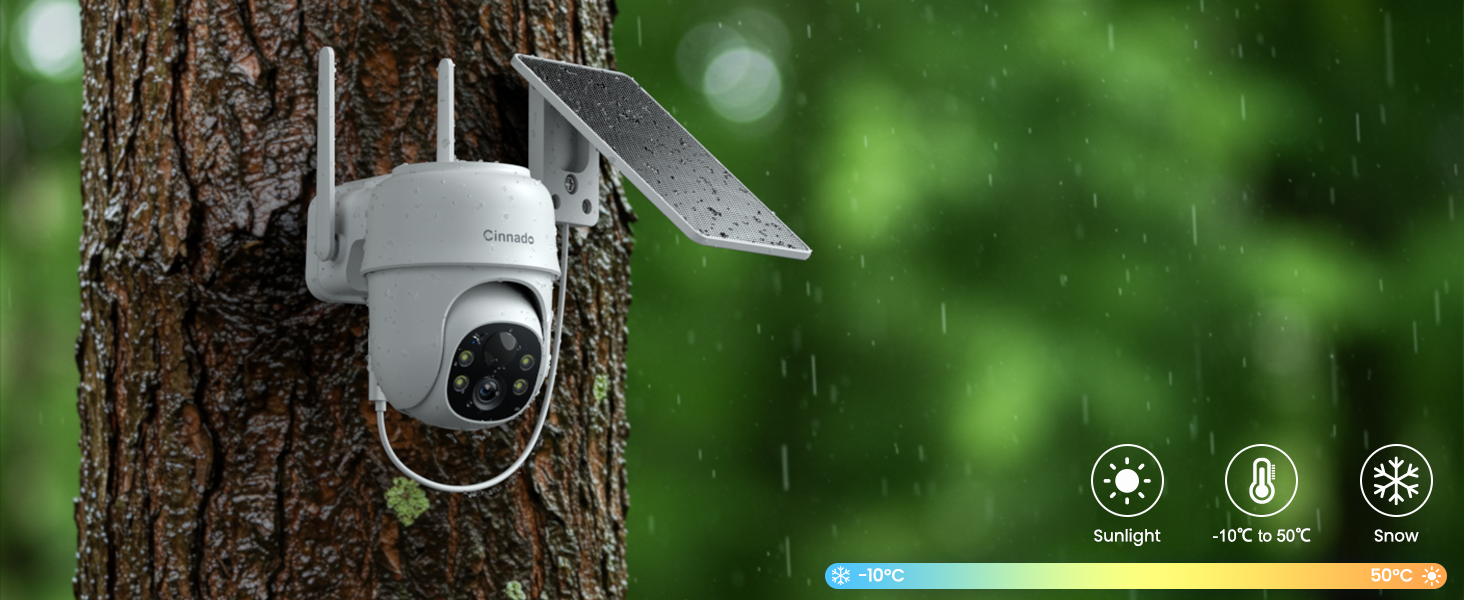
Image 6.1: IP65 Weather Resistance.
7. Troubleshooting
If you encounter issues with your Cinnado B6 camera, refer to the following common problems and solutions:
| Problem | Possible Cause | Solution |
|---|---|---|
| Camera not connecting to Wi-Fi | Incorrect Wi-Fi band (5G not supported); weak signal; incorrect password. | Ensure you are connecting to a 2.4G Wi-Fi network. Move the camera closer to the router. Double-check your Wi-Fi password. |
| Battery not charging or low battery | Insufficient sunlight on solar panel; dirty solar panel; prolonged cloudy weather. | Ensure solar panel is in direct sunlight. Clean the solar panel. Manually charge the camera using the Type-C cable if needed. |
| Motion alerts are too frequent or not triggering | PIR sensitivity setting is too high/low; non-human motion (vehicles, pets) triggering alerts. | Adjust PIR detection sensitivity in the app settings. The camera focuses on human detection; vehicle/pet detection is not supported. |
| Poor video quality | Weak Wi-Fi signal; dirty lens; app resolution setting. | Ensure strong Wi-Fi signal. Clean the camera lens. Check the resolution setting in the app (2K is max). |
| No 24/7 continuous recording | This model does not support 24/7 continuous recording. | The camera is designed for event-based recording (motion detection). |
8. Specifications
Detailed technical specifications for the Cinnado B6 camera:
| Feature | Detail |
|---|---|
| Model Name | B6 |
| Indoor/Outdoor Usage | Outdoor |
| Video Capture Resolution | 1296p (2K) |
| Power Source | Battery Powered, Solar Powered |
| Connectivity Technology | Wireless (Wi-Fi 2.4G only) |
| Compatible Devices | Alexa, Google Home, Smartphone |
| Controller Type | Android (and iOS via Wansview app) |
| Mounting Type | Wall Mount |
| International Protection Rating | IP65 |
| Item Dimensions (L x W x H) | 5.09 x 3.8 x 5.8 inches |
| Item Weight | 4.1 Pounds |
| Battery Power | 5000 Milliamp Hours (Lithium Ion, included) |
| Alert Type | Motion Only (Human Detection) |
| Special Features | 2-Way Audio, HD Resolution, Local Recording, Night Vision, PTZ Technology |
9. Warranty and Support
Cinnado is committed to providing high-value security surveillance products and excellent customer support. For any technical assistance, warranty claims, or product inquiries, please refer to the contact information provided with your product packaging or visit the official Cinnado website. Ensure you retain your proof of purchase for warranty purposes.


