
Setup
Follow these steps to prepare your roborock Qrevo Slim for its first cleaning task.
Unboxing and Placement
Carefully remove all components from the packaging. Place the Multifunctional Dock 3.0 on a hard, flat surface against a wall, ensuring adequate space around it for the robot to maneuver. Connect the power cable to the dock and a power outlet.
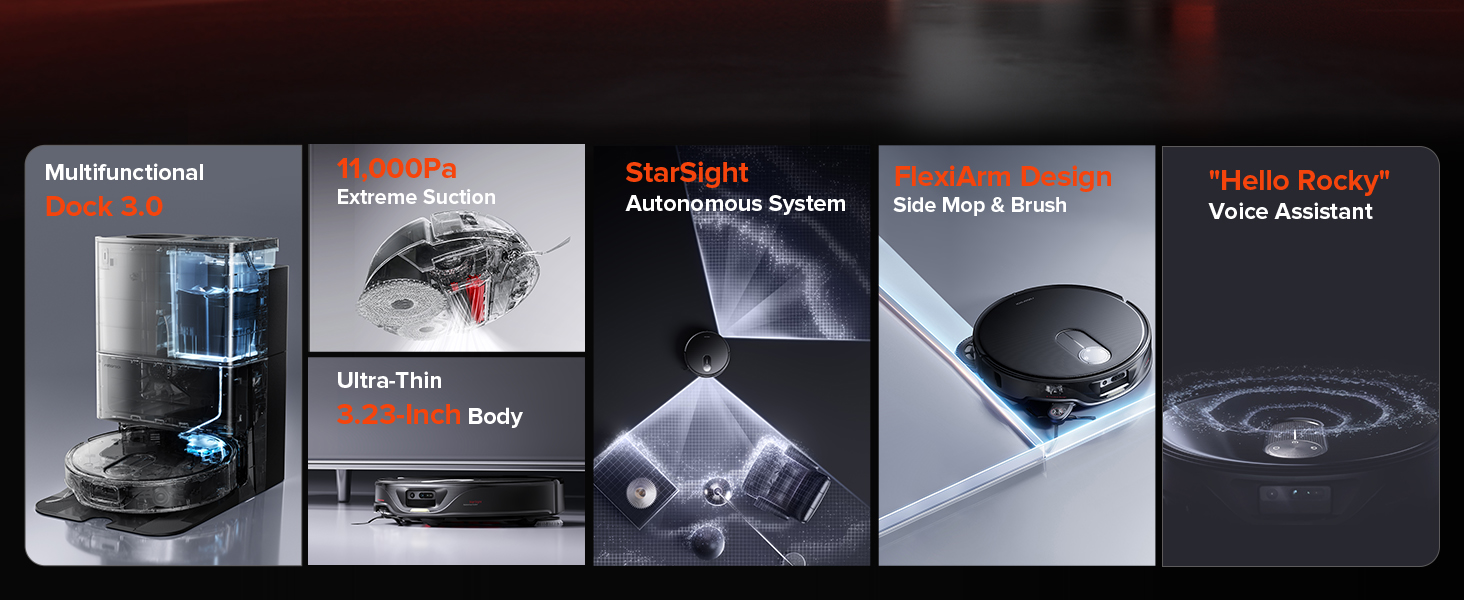
Image: Roborock Qrevo Slim robot vacuum and its docking station placed against a wall, illustrating proper setup for optimal performance.
Initial Charging and App Installation
Place the robot vacuum onto the dock to begin charging. Download the Roborock app on your smartphone and follow the in-app instructions to connect your device. This will enable advanced control features and mapping capabilities.
Operating Instructions
The roborock Qrevo Slim offers various cleaning modes and smart navigation features.
Cleaning Modes
- Vacuuming: Utilizes Extreme suction power at Max+ for maximum removal of dirt, hair, and debris across various floor types.
- Mopping: Dual Spinning Mops with 30 levels of water flow options and 200 RPM spinning speed effectively remove stains.
- Combined Vacuum & Mop: The robot can vacuum and mop simultaneously. The 10mm Auto Mop Lifting feature automatically lifts the mops when vacuuming carpets or returning to the dock, preventing dirty streaks.

Image: Roborock Qrevo Slim robot vacuum lifting its mop pads by 10mm as it transitions from a hard floor to a carpeted area, showcasing the auto mop lifting feature.
Smart Navigation and Obstacle Avoidance
The StarSight Dual Light Solid-State LiDAR system provides comprehensive 3D understanding for precise navigation and accurate mapping. Powered by 3D sensors and an RGB camera, the Roborock Qrevo Slim recognizes and evades 73 types of objects.

Image: Roborock Qrevo Slim robot vacuum cleaning under a low-profile sofa, highlighting its 3.23-inch slim design for accessing hard-to-reach areas.
App and Voice Control
Control your robot via the Roborock app for cleaning settings, map settings, and dock settings. Use voice commands with Amazon Echo, Google Home, or the built-in "Hello Rocky" intelligent voice assistant.

Image: A smartphone displaying the Roborock app interface, showing various cleaning and map settings for advanced control of the robot vacuum.
Maintenance
Regular maintenance ensures your roborock Qrevo Slim operates efficiently and extends its lifespan.
Multifunctional Dock 3.0 Maintenance
- Auto Mop Washing & Air Drying: The dock automatically washes mops with hot water and air-dries them to prevent odors.
- Auto Tank Refilling: Ensures the robot's water tank is always full for continuous mopping.
- Auto Dust Emptying: The dock automatically empties the robot's dustbin into a disposable bag, allowing up to 7 weeks of hands-free dust collection.
- Detachable Dock Base: The base can be easily removed for cleaning to prevent stain buildup.

Image: A visual representation of the Roborock Multifunctional Dock 3.0, highlighting its features such as hot water mop washing, dock self-cleaning, and warm air drying.
Robot Vacuum Components Maintenance
- DuoRoller Riser Brush: The dual counter-rotating all-rubber brushes reduce hair twisting. Periodically check and clean for any entangled debris.
- Dual Spinning Mops: Mop pads should be regularly checked for wear and tear. While the dock washes them, occasional manual cleaning or replacement may be necessary.
- Washable Filter: The robot's filter is washable. Rinse it with water and allow it to air dry completely before reinserting.
Troubleshooting
If you encounter any issues with your roborock Qrevo Slim, refer to the Roborock app for specific error messages and troubleshooting steps. Common issues include:
- Robot stuck: Ensure the cleaning area is free of small obstacles, loose cables, or rugs that might entangle the robot.
- Poor cleaning performance: Check the dustbin, brushes, and filters for clogs or damage. Ensure water tanks are filled and mop pads are clean.
- App connectivity issues: Verify your Wi-Fi connection and ensure the robot is within range. Restarting the robot and router may resolve the issue.
Product Specifications
| Brand | roborock |
| Model Name | Roborock Qrevo Slim |
| Color | Black |
| Product Dimensions | 13.78"L x 19.21"W x 20.51"H |
| Item Weight | 28.2 pounds |
| Battery Life | 180 minutes |
| Capacity | 2.7 Liters |
| Filter Type | Washable |
| Control Method | App |
| Compatible Devices | Amazon Echo, Google Home, Smartphones, Smartwatches |
Warranty Information
For detailed warranty information regarding your roborock Qrevo Slim Robot Vacuum and Mop Combo, please refer to the official roborock website or the warranty card included in your product packaging. Warranty terms and conditions may vary by region and purchase date.
Customer Support
Should you require further assistance or have questions about your roborock Qrevo Slim, please visit the official roborock support page or contact their customer service team through the Roborock app. You can find additional resources, FAQs, and contact options on their website.


