
1. Introduction
The PARKVISION F80 Semi Truck Camera System is designed to enhance safety and monitoring for large vehicles. This system features a 10.36-inch IPS touch monitor and four HD 1080P cameras, providing a comprehensive 360° view to eliminate blind spots. It integrates wireless Apple CarPlay and Android Auto for seamless connectivity and offers advanced features like built-in DVR with loop recording and 24-hour parking monitoring. The robust IP69K waterproof cameras ensure reliable performance in various weather conditions.

Image: The PARKVISION F80 Semi Truck Camera System, showcasing the 10.36-inch touch monitor and four 1080P cameras.
2. Package Contents
Please verify that all items listed below are included in your package:
- 10.36-inch Host Monitor
- AHD 1080P Camera (x4)
- Car Charger
- 64GB TF Card
- Extension Cables (5 cables: 1x 15M, 2x 10M, 2x 5M)
- Installation Kit (screws, tools)
- User Manual

Image: A visual representation of all items included in the PARKVISION F80 product package.
3. Product Features
- 10.36-inch IPS Touch Screen: A large, high-sensitivity touch screen for clear viewing and easy navigation, supporting various split-screen modes for safer driving.
- 4-Channel HD 1080P Wired Cameras: Equipped with four 1080p cameras for front, back, left, and right installation, providing a 360° view without blind spots. Wired connection ensures stable signal transmission, even in inclement weather.
- Wireless Apple CarPlay & Android Auto: Supports wireless/wired connection to Apple CarPlay and Android Auto, allowing mirroring of videos, music, and navigation. Features three audio outputs: monitor speaker, Bluetooth audio, and FM.
- Built-in DVR with Loop Recording: The monitor includes a built-in microphone and speakers. Advanced DVR function supports loop recording of all four cameras simultaneously, saving videos in 1, 5, or 10-minute segments. A 64GB memory card is included, supporting up to 256GB.
- 24-Hour Parking Monitoring: When connected via the accompanying ACC voltage reduction line, the system provides continuous 24-hour parking monitoring.
- IP69K Waterproof & Night Vision Cameras: All four cameras are IP69K waterproof, capable of withstanding extreme temperatures (-4℉ to 149℉) and harsh weather. Equipped with the latest light sensors for enhanced night vision.
- Adjustable Parking Guide Lines & Image Mirror Switch: Parking guide lines can be adjusted for width and height directly on the touch screen. The image can be flipped to a "mirror" view for easier reversing.

Image: The 10.36-inch IPS touch screen monitor, highlighting its size and split-screen capabilities.
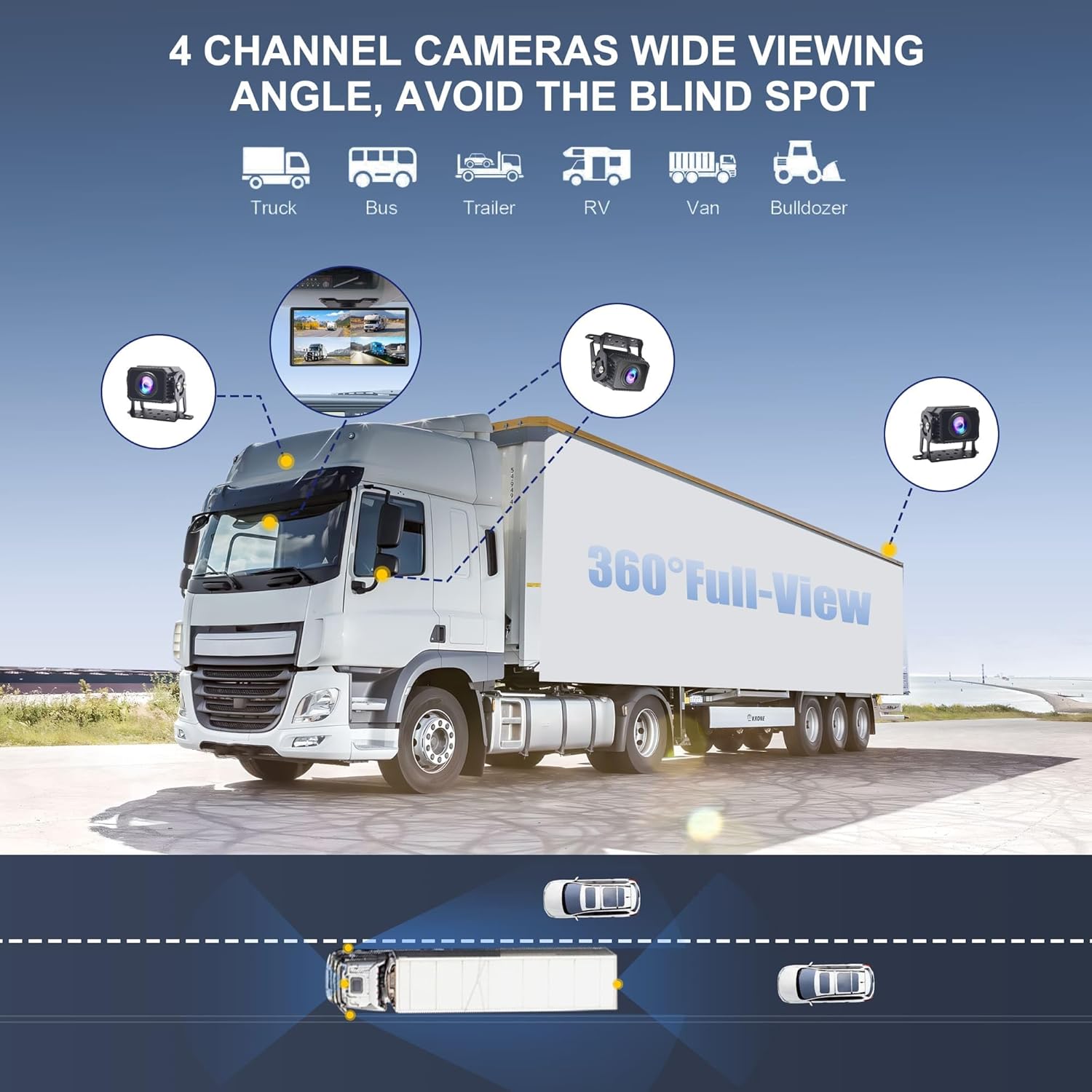
Image: A semi-truck illustrating the strategic placement of four cameras to achieve a 360-degree wide viewing angle.

Image: The monitor screen showing both Apple CarPlay and Android Auto interfaces, demonstrating smartphone integration.
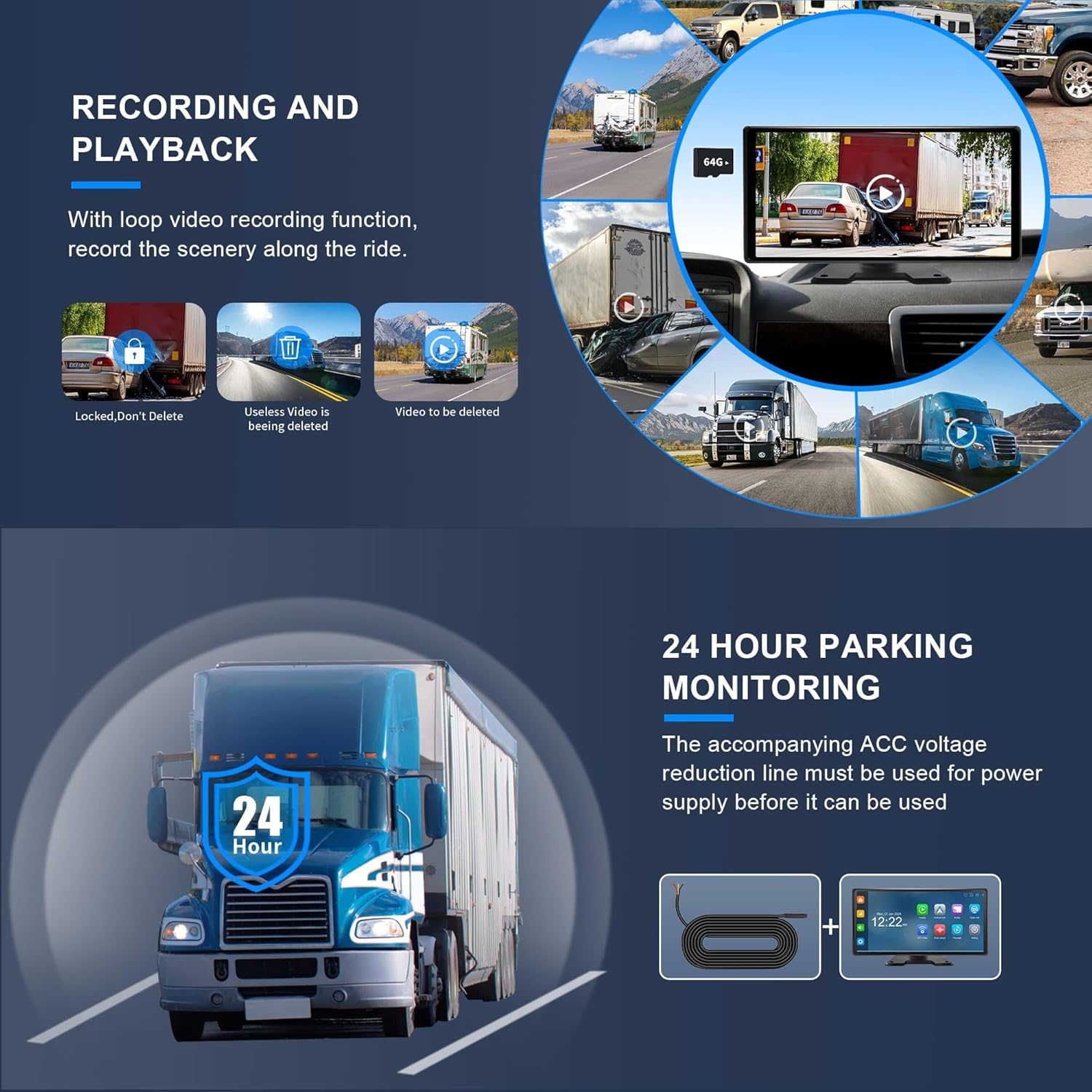
Image: The monitor interface showing options for recording, playback, and 24-hour parking monitoring.

Image: A graphic depicting a truck under 24-hour parking monitoring, indicating continuous surveillance.
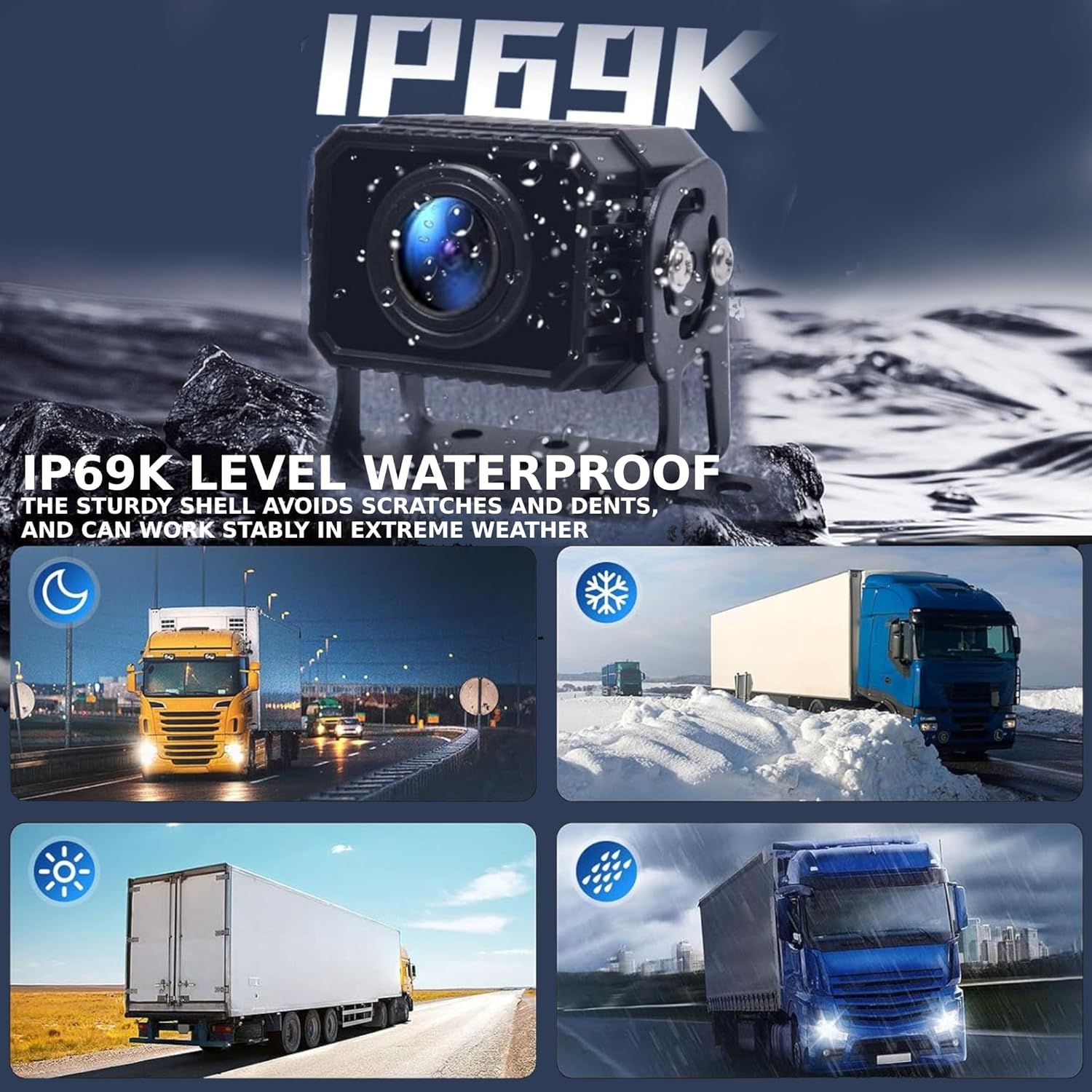
Image: A close-up of an IP69K waterproof camera, illustrating its durability in diverse weather and its night vision feature.

Image: The monitor displaying adjustable parking guide lines and the image mirror function for reversing assistance.
4. Setup and Installation
The PARKVISION F80 system offers two primary installation methods for power supply:
- Plug and Play (Cigarette Lighter): Simply insert the cigarette lighter adapter into your vehicle's cigarette lighter socket to power the system. This is the quickest method for basic operation.
- Auto Power On with Vehicle Ignition (Hardwired): For continuous power and 24-hour parking monitoring, connect the system directly to your vehicle's electrical system.
4.1 Wiring Instructions (Hardwired Installation)
Follow these steps for hardwired installation:
- Connect the Red wire to ACC (Accessory power).
- Connect the Yellow wire to the battery (constant power).
- Connect the Black wire to the Metal (Ground) of your vehicle.
- Connect the four 4-pin wires from the main harness to the respective cameras (Front, Back, Left, Right) using the provided extension cables.
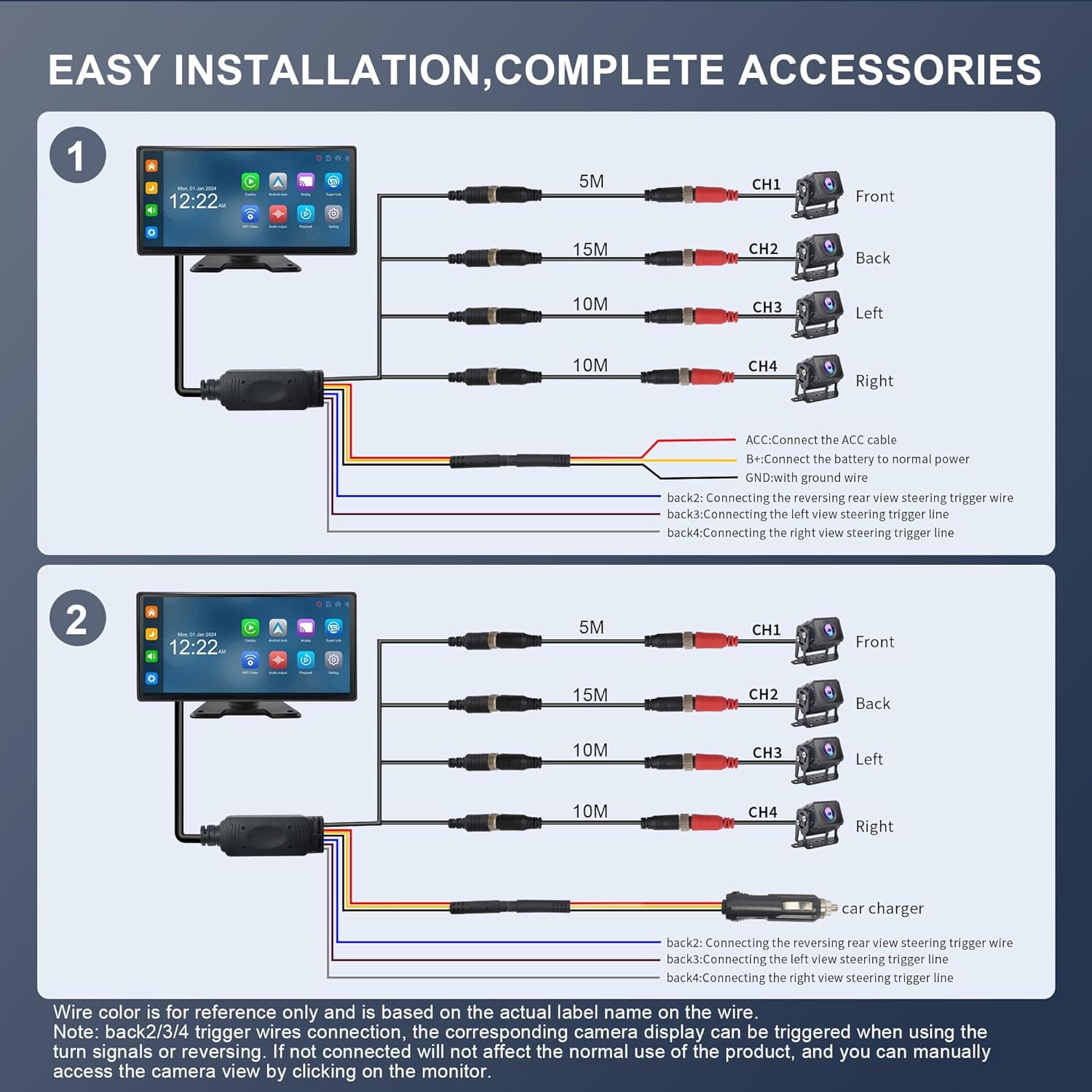
Image: Detailed wiring instructions for connecting the PARKVISION F80 system to the vehicle's power and cameras.
4.2 Camera Placement
Strategically mount the four cameras on the front, back, left, and right sides of your vehicle to achieve optimal 360° coverage. Ensure cameras are securely fastened and cables are routed safely.
4.3 Monitor Mounting
The monitor can be mounted on the dashboard or hung from the ceiling using the provided brackets. Choose a position that offers clear visibility without obstructing your view of the road.
Video: A demonstration of the installation process for a car camera monitoring system, including wiring and mounting.
5. Operating Instructions
5.1 Monitor Navigation
The 10.36-inch IPS touch screen allows intuitive navigation. Tap icons to access various functions like Music, Video, Radio, Bluetooth, Playback, Parking, and Settings. Double-tap a camera view to switch to full-screen display for that channel.

Image: The monitor showcasing various split-screen configurations for simultaneous viewing of multiple camera feeds and applications.
5.2 CarPlay and Android Auto
Connect your smartphone wirelessly or via USB to enable Apple CarPlay or Android Auto. This allows you to use navigation, play music, make calls, and access other apps directly from the monitor. Audio can be output through the monitor's speaker, Bluetooth, or FM transmission.

Image: The monitor displaying both Apple CarPlay and Android Auto interfaces, illustrating seamless smartphone integration.
5.3 Recording and Playback
The built-in DVR supports loop recording, continuously capturing footage from all four cameras. Videos are saved in 1, 5, or 10-minute segments. Access recorded videos through the 'Playback' menu on the monitor. Locked videos are protected from being overwritten.

Image: The monitor interface showing options for recording, playback, and 24-hour parking monitoring.
5.4 Parking Assistance
When reversing, the system automatically displays the rear camera view with adjustable parking guide lines. You can adjust the width and height of these lines directly on the touch screen. An image mirror function is also available for convenience.
Image: The monitor displaying adjustable parking guide lines and the image mirror function for reversing assistance.
5.5 Night Vision
The cameras are equipped with advanced light sensors to provide enhanced night vision capabilities, ensuring clear visibility even in low-light conditions.

Image: A side-by-side comparison of the monitor's display during daytime and nighttime, highlighting the night vision feature.
Video: A comprehensive overview of the PARKVISION RV Backup Camera System, demonstrating its features and functionality.
6. Maintenance
To ensure the longevity and optimal performance of your PARKVISION F80 system, follow these maintenance guidelines:
- Cleaning: Regularly clean the monitor screen with a soft, dry cloth. For cameras, gently wipe lenses with a damp cloth to remove dirt or debris. Avoid harsh chemicals.
- Cable Inspection: Periodically check all wiring and connections for any signs of wear, damage, or loose contacts. Secure any loose connections immediately.
- Software Updates: Check the manufacturer's website for any available firmware updates to ensure your system has the latest features and bug fixes.
- Memory Card: Format the memory card regularly (e.g., once a month) to maintain optimal recording performance and prevent data corruption.
7. Troubleshooting
If you encounter any issues with your PARKVISION F80 system, refer to the following common troubleshooting tips:
- No Power to Monitor: Ensure the power cable is securely connected to the monitor and the power source (cigarette lighter or hardwired connection). Check vehicle's fuse if hardwired.
- No Camera Signal: Verify that all camera cables are securely connected to the main harness and the cameras themselves. Check for any damaged cables.
- Poor Image Quality: Clean camera lenses. Ensure connections are secure. Check monitor settings for display adjustments.
- Recording Issues: Ensure the memory card is inserted correctly and has sufficient space. Try formatting the card.
- CarPlay/Android Auto Not Connecting: Ensure Bluetooth and Wi-Fi are enabled on your phone and the monitor. Try restarting both devices. Check for any software updates for your phone or the monitor.
For further assistance, please consult the full user manual or contact PARKVISION customer support.
8. Specifications
| Feature | Detail |
|---|---|
| Product Dimensions | 10.5 x 5 x 3 inches |
| Item Weight | 7.04 pounds |
| Item Model Number | F80 |
| Batteries | 1 Lithium Ion batteries required. (included) |
| Connectivity Technologies | Bluetooth, USB, Wi-Fi |
| Special Features | Dash cam, Apple CarPlay, Android Auto, Touch Screen |
| Other Display Features | Wireless |
| Vehicle Service Type | Bus, Car, RV, Tractor, Truck |
| Video Capture Resolution | 1080p |
| Mounting Type | Dashboard Mount, Surface Mount |
| Field Of View | 360 Degrees |
| Screen Size | 10.36 Inches |
| Auto Part Position | Top |
9. Warranty and Support
For warranty information and customer support, please refer to the documentation included in your product package or visit the official PARKVISION website. Keep your purchase receipt for warranty claims.