
CLY FLB060
CLY 60W Security Light with Motion Sensor Instruction Manual
Model: FLB060
Product Overview
The CLY 60W Security Light with Motion Sensor is a high-performance LED floodlight designed for outdoor use. It features an intelligent PIR motion sensor, energy-efficient LED technology, and a durable, waterproof design, making it ideal for enhancing security and illumination in various outdoor environments.
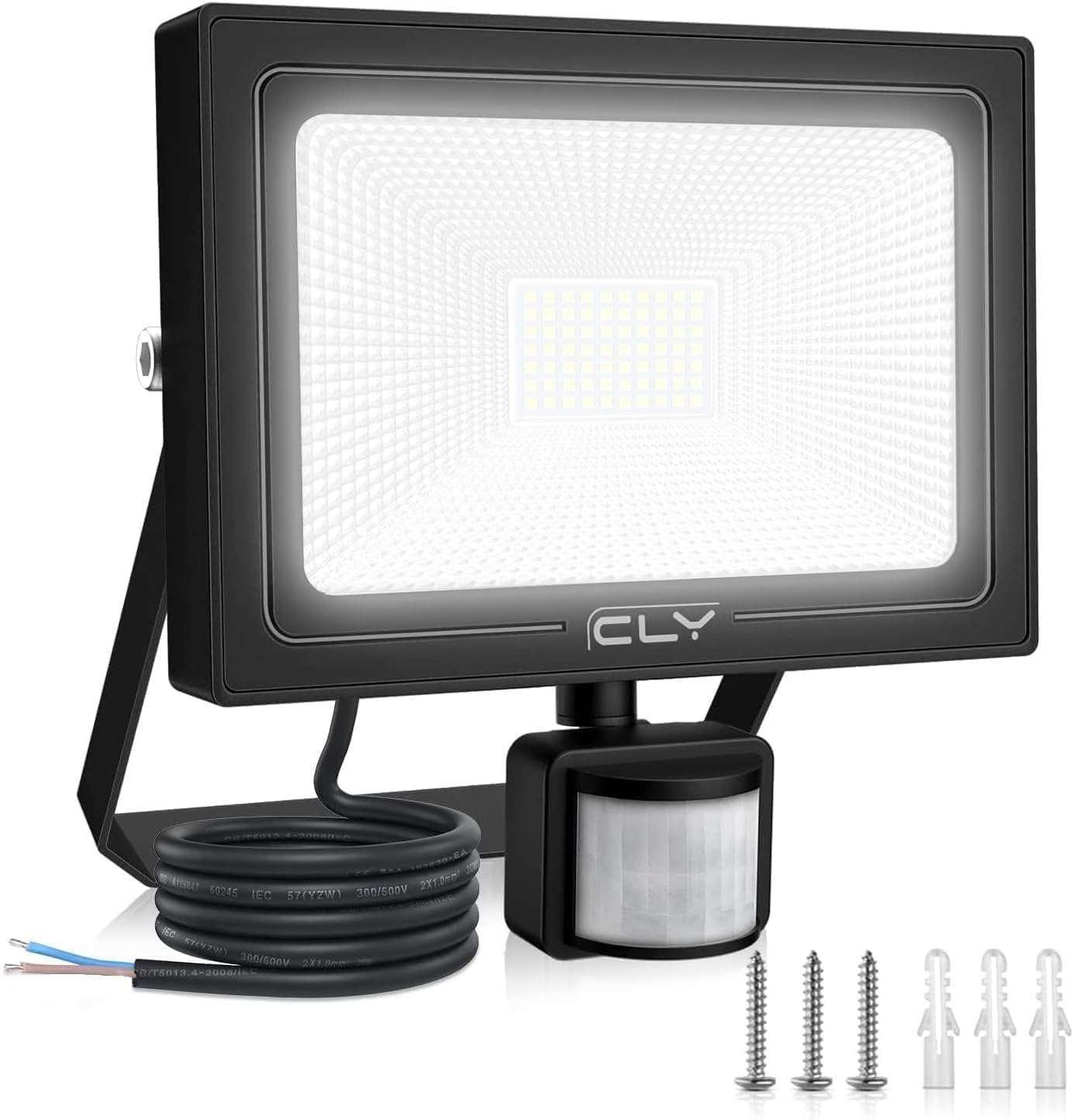
Figure 1: Overview of the CLY 60W Security Light with Motion Sensor, showing the main light unit, integrated motion sensor, power cable, and mounting hardware.
Key Features
- Upgraded Smart Motion Sensor: Features a 0-12 meter sensing distance with precise button controls for lighting duration (10s/45s/120s/600s) and sensitivity (day/night). Offers a 180° sensing range for comprehensive coverage.
- Super Bright & Energy Efficient: A 60W LED floodlight providing 5200 lumens, equivalent to a 350W traditional incandescent bulb, resulting in over 85% electricity savings. Emits 6500K cold white light with 70 SMD beads for superior brightness and a 120° lighting range.
- Durable & Waterproof Design: Equipped with IP66 waterproof technology for the light unit and IP65 for the sensor head, ensuring reliable operation in all weather conditions, including rain and snow.
- Easy Installation: Comes with a 180° adjustable bracket for flexible mounting. Recommended installation height is 5-7 meters. Features a 1-meter power cable (1mm² thickness) and a plastic-clad aluminum body for insulation and heat dissipation.
- Versatile Application: The adjustable stand (up to 180°) and rotatable sensor head (360° horizontal, 180° vertical) allow for wide application in gardens, garages, doorways, yards, docks, and fences.
What's in the Box
Upon opening the package, please verify that all components are present and undamaged.
- 1 x CLY 60W Security Light with Motion Sensor
- 1 x Instruction Manual
Setup and Installation
Before beginning installation, ensure the power supply is disconnected to prevent electrical shock. It is recommended to have installation performed by a qualified electrician if you are unsure.
Mounting Location Considerations
- Choose a location that provides the desired lighting coverage and motion detection area.
- The recommended installation height is between 5 to 7 meters (16.40 to 22.97 feet) for optimal motion sensing and light distribution.
- Ensure the mounting surface is stable and can support the weight of the light fixture.
- Avoid mounting near heat sources or objects that might cause false triggers for the motion sensor (e.g., rapidly moving trees, reflective surfaces).
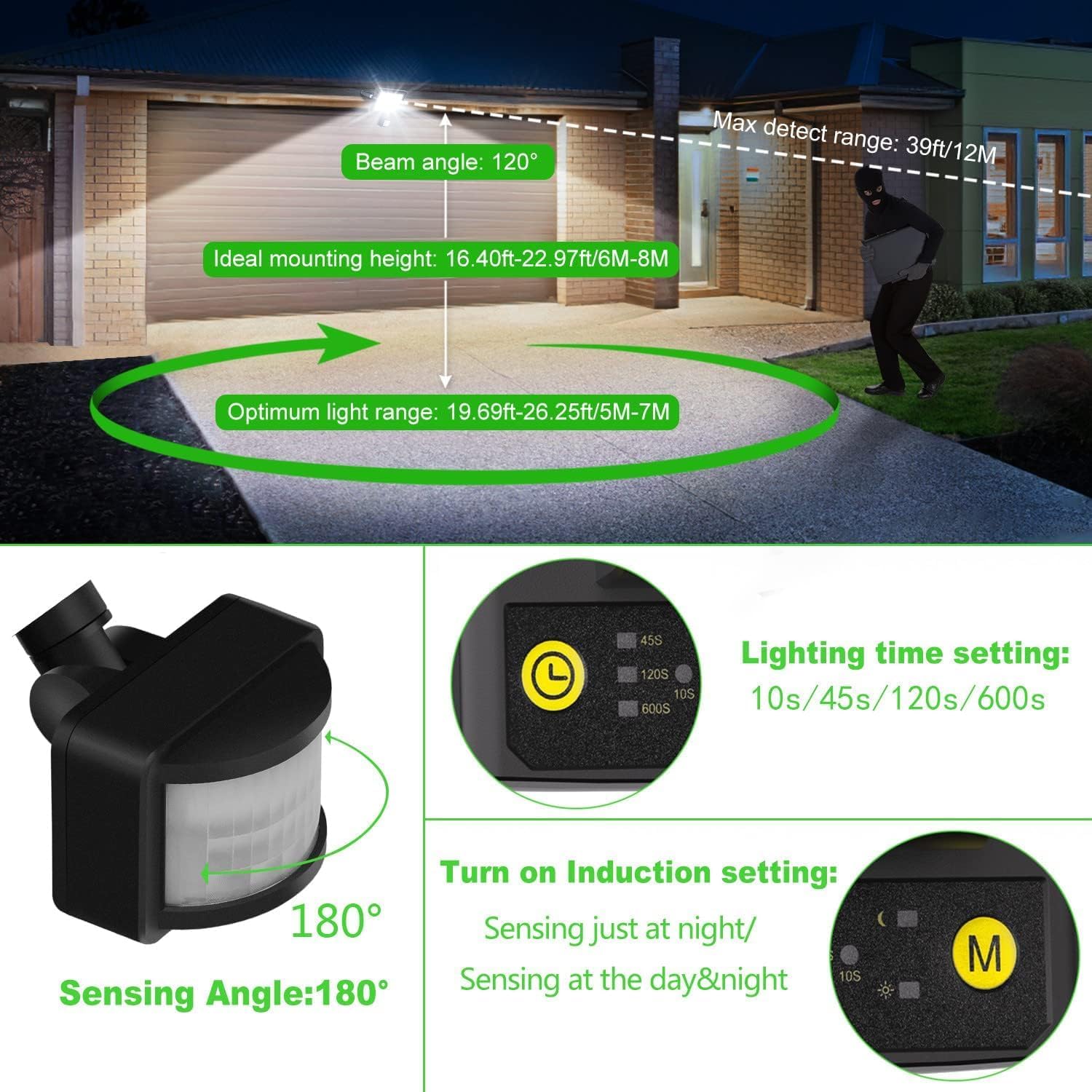
Figure 2: Illustration of ideal mounting height (5-7 meters) and the 180° sensing angle for the motion sensor, showing the maximum detection range of 12 meters.
Installation Steps
- Prepare the Mounting Surface: Mark the drilling points on the wall or ceiling using the light's bracket as a template.
- Drill Holes: Use an appropriate drill bit to create holes at the marked points. Insert wall plugs if necessary for secure mounting.
- Attach the Bracket: Secure the adjustable mounting bracket to the surface using the provided screws.
- Wire the Light: Connect the light's power cable to your mains electrical supply. The light features a 1-meter cable with two wires (Live and Neutral). Ensure proper electrical connections are made according to local wiring regulations. Note: This light does not require an earth wire as it is double insulated.
- Mount the Light Fixture: Attach the light fixture to the secured bracket. The bracket allows for 180° adjustment.
- Adjust Sensor and Light Angle: Once mounted, adjust the light head and the motion sensor to the desired angles. The sensor head can rotate 360° horizontally and 180° vertically.

Figure 3: Visual guide for installation, showing drilling, inserting wall plugs, and securing the bracket. Also illustrates the 180° adjustable bracket and the 360° horizontal and 180° vertical rotation of the motion sensor.
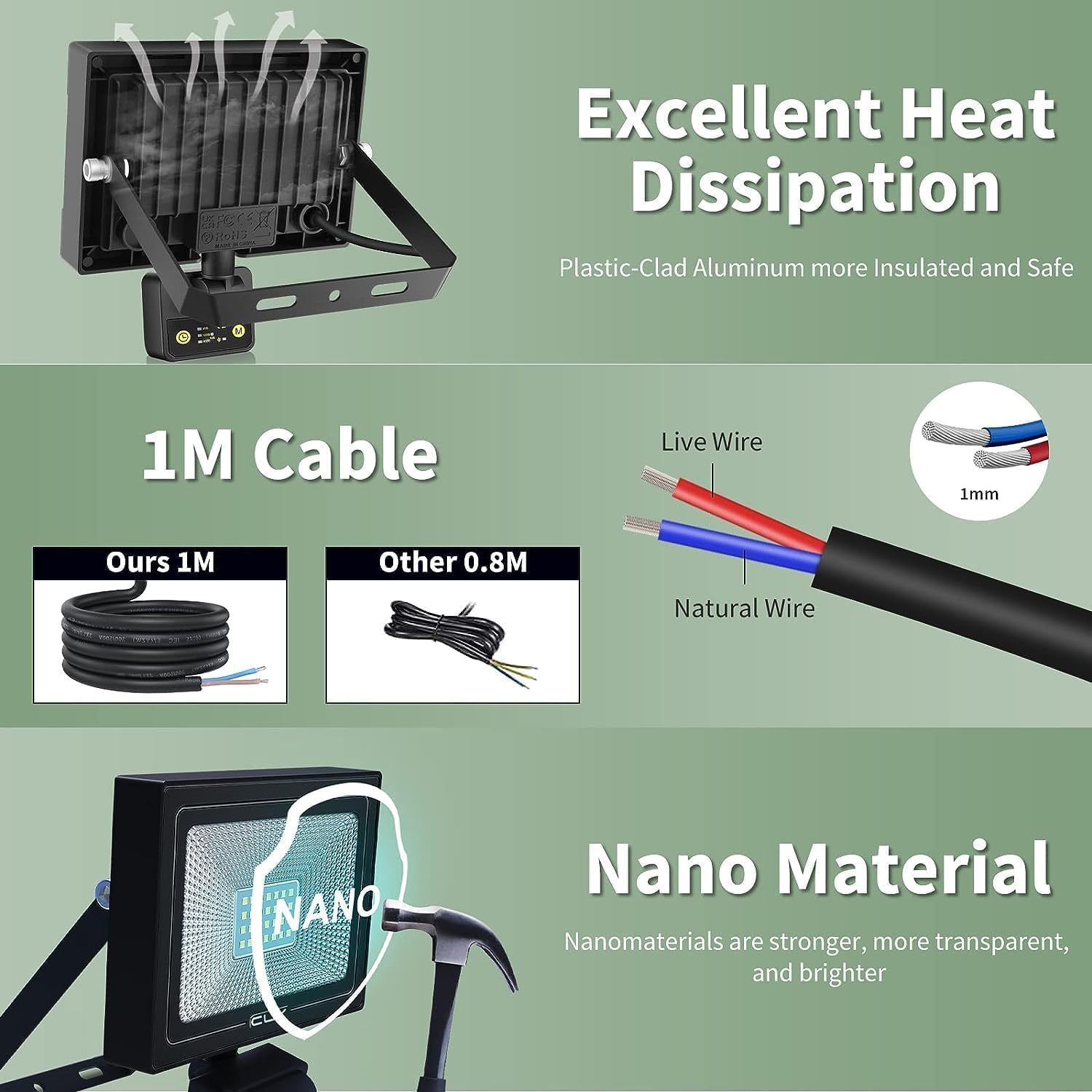
Figure 4: Detail of the 1-meter power cable (Live and Neutral wires) and the heat dissipation design of the light fixture, highlighting the plastic-clad aluminum construction for safety and durability.
Operating Instructions
The CLY Security Light features an intuitive motion sensor with adjustable settings for optimal performance.
Motion Sensor Settings
The motion sensor unit has two primary adjustment buttons: one for lighting time duration (L) and one for sensitivity/operating mode (M).

Figure 5: Close-up of the motion sensor unit showing the 'L' button for lighting time settings and the 'M' button for sensitivity/mode settings.
- Lighting Time Setting (L Button):
Press the 'L' button to cycle through the available lighting durations after motion is detected:
- 10 seconds: Short illumination period.
- 45 seconds: Standard illumination period.
- 120 seconds (2 minutes): Extended illumination period.
- 600 seconds (10 minutes): Longest illumination period.

Figure 6: Detailed view of the 'L' button and its corresponding time settings (10s, 45s, 120s, 600s).
- Sensitivity Setting / Operating Mode (M Button):
Press the 'M' button to select the desired operating mode based on ambient light conditions:
- Moon Symbol (Night Mode): The motion sensor will only activate the light when it is dark (nighttime). This mode conserves energy by preventing activation during daylight hours.
- Sun Symbol (Day & Night Mode / 24H Mode): The motion sensor will activate the light whenever motion is detected, regardless of ambient light conditions (day or night).

Figure 7: Comparison of the 'Sensing just at night' (Moon symbol) and 'Sensing at day & night' (Sun symbol) modes, illustrating when the light will activate based on ambient light.
The motion sensor has a detection distance of 0-12 meters. The sensitivity is pre-adjusted for optimal performance, requiring no further user operation for distance.
Maintenance
Regular maintenance ensures the longevity and optimal performance of your CLY Security Light.
- Cleaning: Periodically clean the light fixture and the motion sensor lens with a soft, damp cloth. Do not use abrasive cleaners or solvents, as these can damage the surface or the sensor.
- Inspection: Regularly inspect the power cable for any signs of damage, fraying, or wear. Ensure all mounting screws remain tight and secure.
- Obstruction Check: Ensure that the motion sensor's field of view is not obstructed by growing plants, new structures, or debris. Clear any obstructions to maintain effective detection.
- Weather Resistance: While the light is IP66 waterproof and the sensor is IP65, extreme weather conditions (e.g., severe storms, prolonged heavy snow accumulation) may temporarily affect performance. Ensure proper drainage around the installation area.
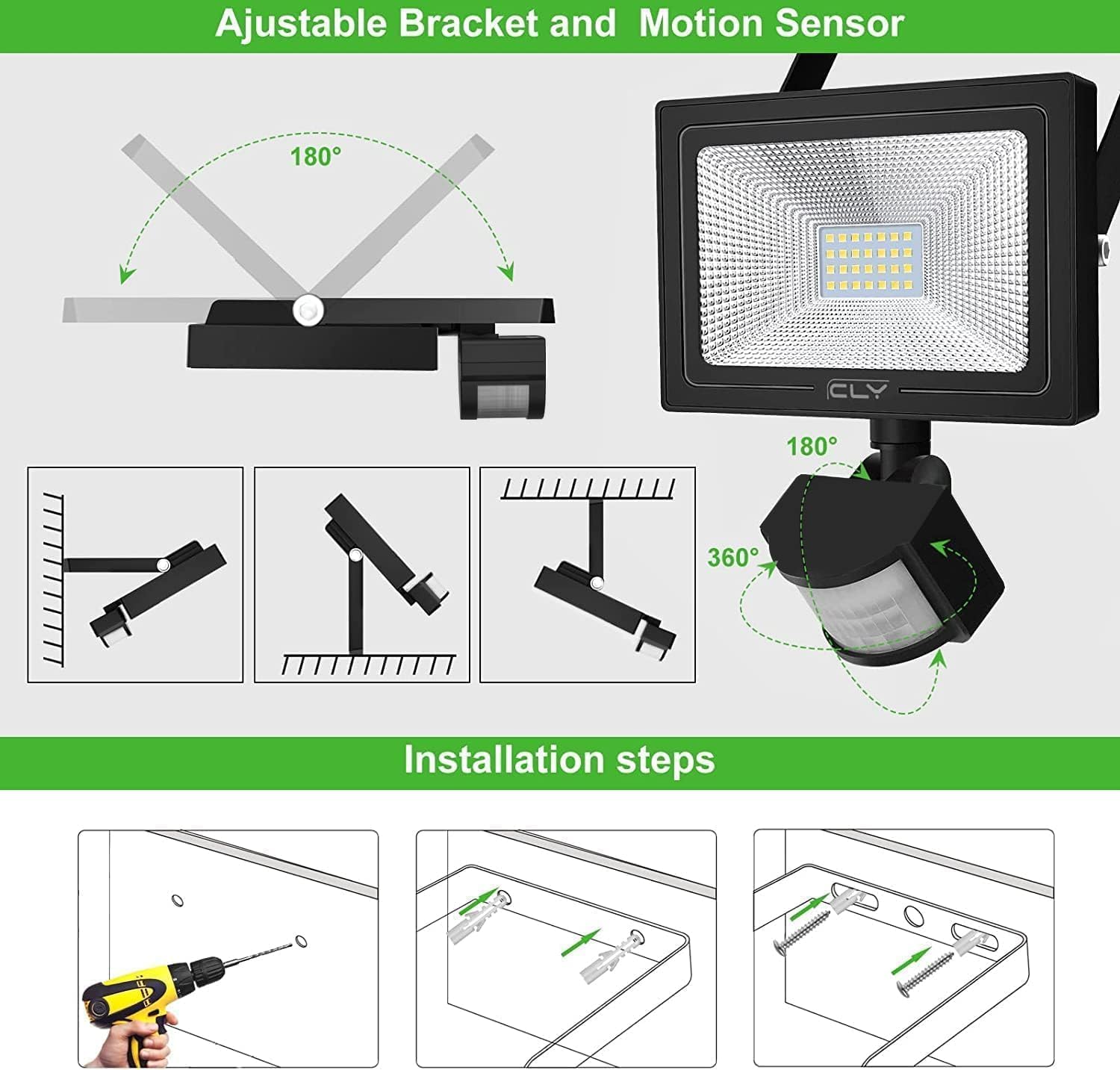
Figure 8: Illustration of the light's IP66 waterproof rating, demonstrating its ability to withstand rain, and its heat and cold resistance for reliable outdoor performance.
Troubleshooting
If you encounter issues with your CLY Security Light, refer to the following common problems and solutions:
| Problem | Possible Cause | Solution |
|---|---|---|
| Light does not turn on when motion is detected. |
|
|
| Light stays on continuously. |
|
|
| Light flashes or flickers. |
|
|
| Light turns on randomly. |
|
|
Specifications
| Attribute | Detail |
|---|---|
| Brand | CLY |
| Model Number | FLB060. |
| Product Dimensions | 18.2 x 3.5 x 19 cm |
| Item Weight | 730 g |
| Colour | Black |
| Wattage | 60 watts |
| Luminous Flux | 5200 lumen |
| Colour Temperature | 6500K (Cold White) |
| Type of Bulb | LED (70 SMD beads) |
| Voltage | 2.3E+2 Volts (AC) |
| Power Source | Corded Electric |
| Motion Sensor Range | 0-12 meters |
| Motion Sensor Angle | 180° |
| Adjustable Lighting Time | 10s / 45s / 120s / 600s |
| Operating Modes | Day & Night (Sun) / Night Only (Moon) |
| Waterproof Rating | Light: IP66, Sensor Head: IP65 |
| Light Direction | LED |
| Switch Style | Motion Sensor |
| Installation Type | Wall Mount, Ceiling Mount |
| Cable Length | 1 meter |
| Material | Plastic-clad aluminum |
| Indoor/Outdoor Usage | Outdoor |
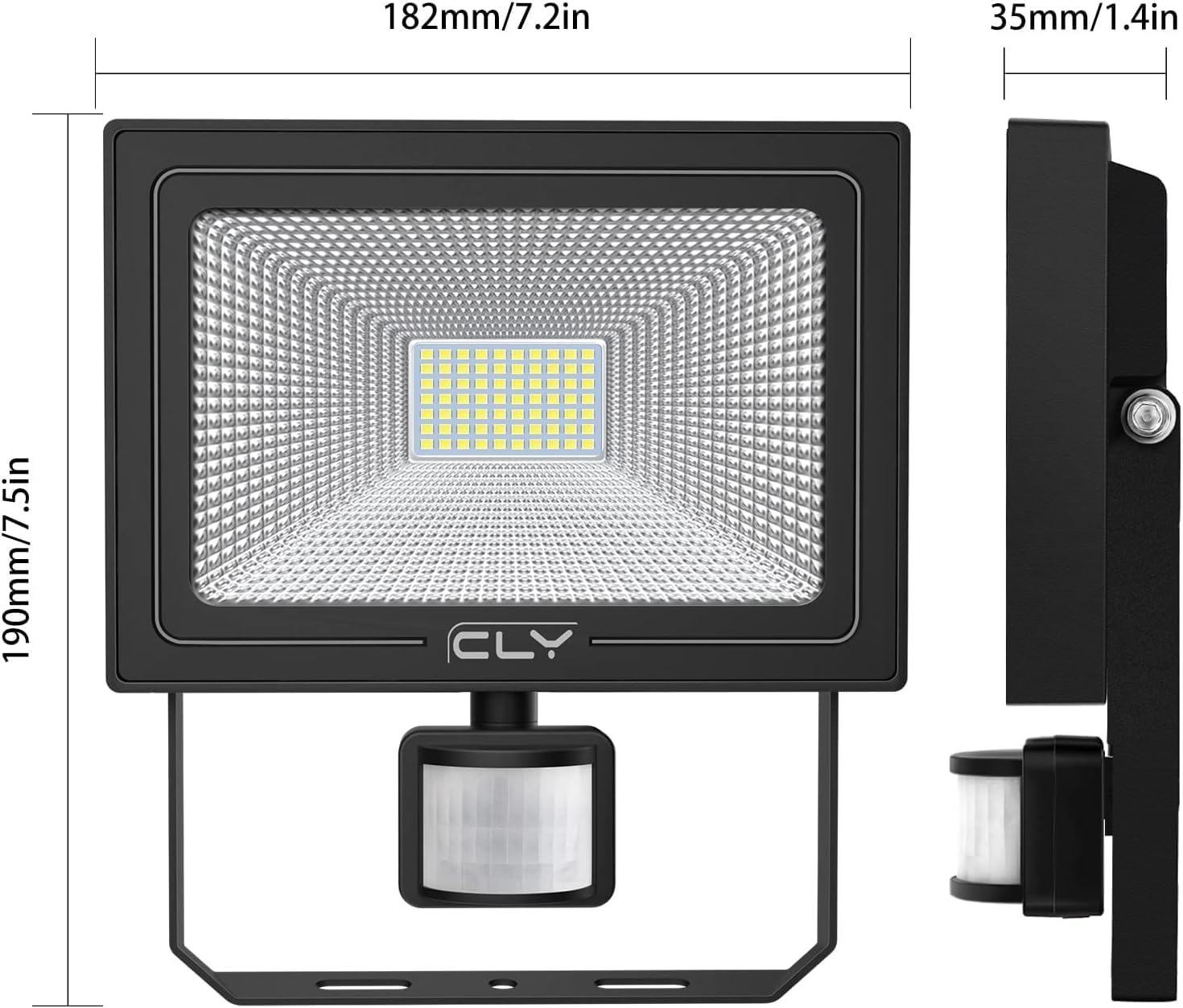
Figure 9: Dimensional drawing of the CLY 60W Security Light, showing its length (182mm/7.2in), height (190mm/7.5in), and depth (35mm/1.4in).
Warranty and Support
CLY provides comprehensive support for its products.
Warranty Information
This product comes with a 2-year replacement service from the date of purchase. Please retain your proof of purchase for warranty claims.
Customer Support
For any questions, technical assistance, or warranty claims, please contact our customer service team. You can find our service email address in the physical manual included with your product. Alternatively, you can reach us through Amazon's messaging system, and we aim to reply within 24 hours.
We are committed to providing reliable and satisfactory high-quality lighting products and excellent customer service.
Related documentsFLB060


Ask a question about this manual
Ask about setup, troubleshooting, compatibility, parts, safety, or missing instructions. Manuals+ will review the question and use this page’s manual context to help answer it.