
Product Overview
The OffiGo 63 Inch L Shaped Electric Standing Desk is designed to provide a versatile and ergonomic workspace. This height-adjustable desk features a robust industrial-grade steel frame, a spacious L-shaped desktop, and integrated storage solutions. It includes built-in power outlets for convenient device charging and a reversible design to adapt to various room layouts.
- More Storage Space: Equipped with 4 fabric drawers for organizing office and study accessories, keeping your desktop tidy.
- L-Shaped Workspace: Designed to fit into room corners, optimizing space utilization. Includes a cable management tray for an aesthetically pleasing setup.
- Electric Height Adjustment: Customize desk height from 29.9" to 46.1" using 3 preset electric buttons. Features 3 AC outlets, 1 USB, and 1 Type-C port for charging.
- Reversible Design: The sub-table panel can be installed on either the left or right side to suit user preference. The 15" extra board expands workspace.
- Durable Construction: The frame is made of industrial-grade steel for long-lasting performance.
Safety Information
- Always keep hands and objects away from moving parts when adjusting the desk height.
- Do not overload the desk with items heavier than the specified weight limit.
- Unplug the desk from the power source before assembly, disassembly, or when not in use.
- Always follow the manufacturer's instructions for proper use and maintenance.
Setup Instructions
For ease and safety, two people are recommended for assembly. Ensure all parts are included and in good condition before starting. The entire assembly process typically takes about 45 minutes to 1 hour.

Image: Detailed dimensions of the OffiGo L-Shaped Electric Standing Desk, showing the main desk area and the extended L-shaped section. The height is adjustable from 29.9 inches to 46.1 inches.
Assembly Video Guide
Video: A comprehensive assembly guide for the OffiGo L Shaped Electric Standing Desk. This video provides visual step-by-step instructions for putting together all components of the desk, including the frame, desktop panels, drawers, and electronic controls.
Key Assembly Steps:
- Prepare Components: Unpack all parts and verify against the parts list in the manual.
- Assemble Main Desktop Frame: Attach the support bars to the main desktop panel using the provided screws.
- Assemble L-Shaped Extension: Secure the L-shaped extension panel to its frame. Note the reversible design allows installation on either side.
- Attach Table Legs: Connect the electric table legs to the main frame. Ensure the table legs are pressed to the lowest position before installation.
- Connect Drive Rods: Insert the hexagonal drive rods into the motor and table legs, ensuring they are fully seated and nuts are tightened.
- Install Control Panel and Power Adapter: Attach the control panel to the underside of the desk and connect the motor cord. Secure the power adapter in a chosen location using the provided brackets.
- Integrate Power Strip: Install the power strip with AC outlets, USB, and Type-C ports into the designated hole on the tabletop. Connect it to the main power cord.
- Assemble Drawers: Unfold the fabric drawers and insert the bottom plate, then attach the handles.
- Final Placement: Carefully flip the assembled desk upright with assistance and place it in your desired location.

Image: Illustration demonstrating the reversible installation design of the L-shaped desk. It shows how the extended section with integrated power outlets can be configured on either the left or right side of the main desk, offering flexibility for different office layouts.
Operating Instructions
Electric Height Adjustment
The desk features an electric height adjustment system allowing seamless transitions between sitting and standing positions. The height can be adjusted from 29.9 inches to 46.1 inches.
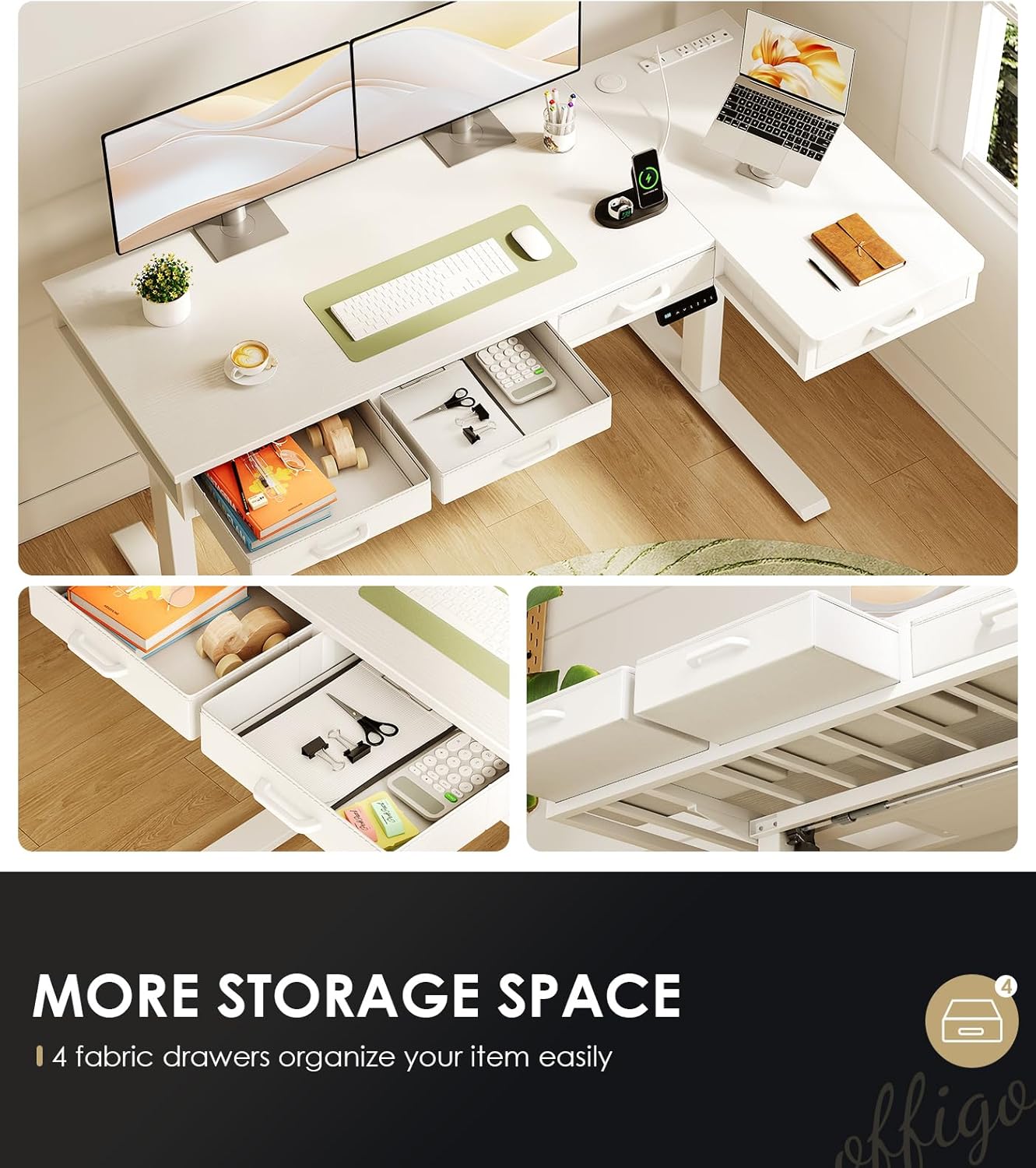
Image: Two individuals demonstrating the adjustable height feature of the OffiGo L-Shaped Electric Standing Desk. One person is seated at the lowest height (29.9 inches), and the other is standing at the highest height (46.1 inches), illustrating the ergonomic flexibility.
Control Panel Functions
- Up/Down Arrows: Press and hold to manually adjust the desk height.
- Preset Buttons (1, 2, 3): Save your preferred sitting and standing heights. To set a preset, adjust the desk to the desired height, then press 'S' (Set) followed by the desired number (1, 2, or 3).
- Integrated Power Outlets: Use the 3 AC outlets, 1 USB port, and 1 Type-C port located on the desktop for convenient charging of your devices.

Image: Close-up view of the integrated power strip on the OffiGo L-Shaped Electric Standing Desk, showing 1 USB port, 1 Type-C port, and 3 AC sockets. Below, a cable organizer tray is visible, demonstrating effective cable management.
Maintenance
- Cleaning: Wipe the desktop surface with a soft, damp cloth. Avoid harsh chemicals or abrasive cleaners that could damage the engineered wood finish.
- Frame Care: The steel frame can be cleaned with a damp cloth. Ensure no moisture enters the electronic components.
- Drawer Maintenance: The fabric drawers can be spot cleaned with a mild detergent and water. Allow to air dry completely.
- Regular Checks: Periodically check all screws and connections to ensure they remain tight.
Troubleshooting
If you encounter any issues with the desk's lifting mechanism, refer to the troubleshooting video below for common problems and solutions.
Video: This video provides solutions for common lifting problems encountered with the electric standing desk. It covers scenarios such as one table leg being higher than the other and issues with the hexagonal rod not fully engaging the motor, offering step-by-step visual guidance to resolve these problems.
Common Issues & Solutions:
- Uneven Lifting (One Leg Higher): The video demonstrates how to reset the desk to its lowest height and adjust the hexagonal rods to synchronize the leg movements.
- Motor Not Engaging: Instructions are provided on how to ensure the hexagonal rod is fully inserted into the motor mechanism.
- Reset Procedure: After any adjustments or if the desk is not functioning correctly, press and hold the down arrow button on the control panel until 'rES' appears on the screen to reset the system.
Product Specifications
| Feature | Detail |
|---|---|
| Brand | OffiGo |
| Model | 63 Inch L Shaped Electric Standing Desk |
| Product Dimensions | 31.5"D x 63"W x 30.7"H |
| Adjustable Height Range | 29.9" to 46.1" (Minimum Height: 30 Inches, Maximum Height: 47.6 Inches) |
| Color | White |
| Top Material Type | Engineered Wood |
| Base Material | Alloy Steel |
| Number of Drawers | 4 (fabric drawers) |
| Special Features | Adjustable Height, Built-In USB Outlet, Power outlet |
| Power Outlets | 3 AC Outlets, 1 USB Port, 1 Type-C Port |
| Item Weight | 86 Pounds |
| Required Assembly | Yes |
Warranty and Support
- Warranty Type: Limited Warranty.
- Returns: 30-day easy returns.
- Customer Support: For any questions or assistance, please contact OffiGo-US customer support.