1. Introduction
Thank you for choosing the Mepplzian Lighted Bathroom Medicine Cabinet. This product is designed to enhance your bathroom with integrated LED lighting, an anti-fog mirror, and convenient storage. Constructed from E1 grade particle board and a copper-free silver mirror, it is built for durability in a bathroom environment.

Figure 1.1: Mepplzian Lighted Bathroom Medicine Cabinet (Front View)
This image displays the Mepplzian Lighted Bathroom Medicine Cabinet mounted above a sink, showcasing its sleek design and integrated LED lighting around the mirror. The cabinet is white and blends seamlessly with modern bathroom decor.
Key features include:
- Integrated LED lighting with adjustable color temperature (3000K, 4500K, 6000K) and brightness.
- Smart touch sensor controls for lighting and defogger functions.
- Anti-fog mirror for clear reflection after showers.
- Three layers of internal storage space for organizing bathroom essentials.
- Durable E1 grade particle board and copper-free silver mirror construction.
2. Important Safety Information
Please read all instructions carefully before assembly and installation. Failure to follow these instructions may result in injury or product damage.
- Assembly is required and must be done according to the provided instructions for safety.
- The LED lights are intended for mood lighting only and should not be relied upon for primary bathroom illumination.
- Always ensure the cabinet is securely mounted to a sturdy wall structure. Overloading the cabinet can lead to detachment and potential injury.
- Keep electrical connections dry and away from water sources.
- Do not attempt to modify the electrical components of the cabinet.
- Exercise caution when handling glass components to prevent cuts.
3. Package Contents
Before beginning assembly, please verify that all components are present and undamaged. If any parts are missing or damaged, contact customer service immediately.
| Item | Description | Quantity |
|---|---|---|
| Medicine Cabinet Unit | Pre-assembled mirror door and cabinet frame | 1 |
| Assembly Boards | Internal shelves and other structural panels | As required |
| Hardware Accessories | Screws, anchors, hinges, mounting brackets, etc. | 1 set |
| Instruction Manual | This document | 1 |
4. Assembly Instructions
The Mepplzian Lighted Bathroom Medicine Cabinet requires assembly. Follow these steps carefully.

Figure 4.1: Assembly Overview and Hardware
This diagram illustrates the various components of the medicine cabinet in an exploded view, showing how they fit together. It also displays the different types of hardware included for assembly, such as screws, hinges, and mounting accessories.
- Unpack Components: Carefully remove all parts from the packaging. Lay them out on a clean, soft surface to prevent scratches.
- Assemble Cabinet Body: Follow the detailed diagrams in the included paper manual to connect the side panels, top, and bottom panels using the provided screws and fasteners. Ensure all connections are secure.
- Install Shelves: Insert the internal shelves into the designated slots or attach them using shelf pins. The shelves are adjustable to accommodate items of various heights.
- Attach Door Hinges: Secure the hinges to the cabinet frame and the mirror door as per the instructions. Ensure the hinges are aligned correctly for smooth door operation.
- Connect Electrical Wiring: If the LED mirror door is separate, carefully connect its electrical wiring to the main cabinet unit's power supply, following the color-coded wires. Ensure connections are tight and insulated.
- Mount Mirror Door: Attach the mirror door to the cabinet body via the hinges. Adjust the hinges as needed to ensure the door closes flush and operates smoothly.
5. Installation (Wall Mounting)
This medicine cabinet is designed for wall-mounted installation. Proper installation is crucial for safety and stability.
- Choose Location: Select a suitable wall location in your bathroom, ensuring it is free from electrical wires or plumbing within the wall. Measure the desired height and position.
- Mark Drilling Points: Use a level and pencil to mark the precise drilling points for the mounting brackets on the wall. Ensure the marks are level and correspond to the cabinet's mounting points.
- Drill Holes: Drill pilot holes at the marked points. Use appropriate drill bits and wall anchors suitable for your wall type (e.g., drywall, tile, concrete). It is recommended to use robust wall anchors, as some users have reported the included ones may not be sufficient for the cabinet's weight.
- Secure Mounting Brackets: Attach the mounting brackets securely to the wall using the provided screws and anchors. Ensure they are firmly fixed and can support the cabinet's weight (up to 15 kg / 33 lbs).
- Hang Cabinet: Carefully lift the assembled cabinet and align its rear mounting points with the wall brackets. Gently lower the cabinet onto the brackets, ensuring it locks into place.
- Connect Power: If not already done, connect the cabinet's power cord to a suitable electrical outlet. Ensure the cord is routed safely and discreetly.
- Adjust Door (if needed): If the door is not perfectly aligned after installation, use a screwdriver to adjust the cross screws on the back of the hinges (refer to Figure 5.1).

Figure 5.1: Door Adjustment Mechanism
This image illustrates how to adjust the cabinet door using the screws on the hinges. It shows the process of moving the door horizontally, vertically, and in depth to achieve perfect alignment after installation.
6. Operating Instructions
Your Mepplzian medicine cabinet features smart touch controls for its LED lighting and defogger functions.
6.1 LED Lighting Control

Figure 6.1: Touch Control Panel
This image provides a close-up view of the touch-sensitive control panel located on the mirror surface, showing the icons for light control and defogger activation.
- Power On/Off: Lightly touch the LED sensor icon (usually a light bulb symbol) to turn the LED lights on or off.
- Adjust Color Temperature: With the lights on, short press the LED sensor icon repeatedly to cycle through the three available color temperatures:
- 3000K (Warm Light): For a cozy, inviting ambiance.
- 4500K (Natural Light): A balanced, neutral light suitable for daily tasks.
- 6000K (Daylight): A bright, cool light ideal for detailed grooming.
- Adjust Brightness (Dimming): With the lights on, long press the LED sensor icon to adjust the brightness. The light will gradually dim or brighten. Release your finger when the desired brightness level is reached. The cabinet has a memory function that will recall the last brightness setting.

Figure 6.2: LED Light Adjustment Guide
This graphic demonstrates how to use the LED touch sensor switch to change the light color temperature (3000K, 4500K, 6000K) with short presses and adjust brightness (5% to 100%) with a long press.
6.2 Anti-Fog Function
- Activate Defogger: Lightly touch the anti-fog sensor icon (usually a fan or steam symbol) to activate the defogging function. The defogger will heat a portion of the mirror surface to prevent condensation.
- Deactivate Defogger: Touch the anti-fog sensor icon again to turn off the defogger. It is recommended to turn off the defogger when not in use to conserve energy.
Figure 6.3: Anti-Fog Demonstration
This visual comparison shows a mirror before and after the anti-fog function is activated, clearly demonstrating its effectiveness in clearing condensation for a clear reflection.
7. Maintenance and Care
Proper care will ensure the longevity and optimal performance of your medicine cabinet.
- Cleaning the Mirror: Use a soft, lint-free cloth and a non-abrasive glass cleaner. Spray the cleaner onto the cloth, not directly onto the mirror, to avoid liquid seeping into the electrical components.
- Cleaning the Cabinet Body: Wipe the exterior and interior surfaces with a soft, damp cloth. For stubborn marks, use a mild, non-abrasive cleaner. Dry thoroughly immediately after cleaning.
- Avoid Harsh Chemicals: Do not use abrasive cleaners, ammonia-based products, or solvents, as these can damage the finish and mirror coating.
- Electrical Safety: Always ensure the cabinet is unplugged or the power supply is turned off before performing any cleaning or maintenance involving electrical components.
- Regular Inspection: Periodically check all screws and connections to ensure they remain tight. Re-tighten if necessary.
8. Troubleshooting
If you encounter issues with your medicine cabinet, refer to the following common problems and solutions.
| Problem | Possible Cause | Solution |
|---|---|---|
| LED lights do not turn on. | No power supply; loose connection; faulty LED driver. | Check if the cabinet is properly plugged into a working outlet. Ensure all internal electrical connections are secure. If the issue persists, contact customer support. |
| LED lights are not bright enough. | Brightness setting is too low; expectation mismatch. | Long press the LED sensor icon to increase brightness. Note that LED lights are designed as mood lighting and may not fully illuminate the entire bathroom. |
| Anti-fog function not working. | Defogger not activated; electrical issue. | Ensure you have touched the anti-fog sensor icon to activate it. Verify power supply. If still not working, contact customer support. |
| Cabinet feels unstable or wobbly after installation. | Improper wall anchors; insufficient mounting. | Ensure the cabinet is mounted to wall studs or use heavy-duty wall anchors appropriate for your wall type. Re-tighten all mounting screws. If necessary, consult a professional for installation. |
| Door is misaligned or does not close properly. | Hinge adjustment needed. | Adjust the hinges using a screwdriver as shown in Figure 5.1 in the Installation section. |
9. Product Specifications
Detailed technical specifications for the Mepplzian Lighted Bathroom Medicine Cabinet.
| Feature | Detail |
|---|---|
| Brand | Mepplzian |
| Model Name | LED Medicine Cabinet |
| Product Dimensions | 5"D x 15.7"W x 26"H |
| Size (Current Variant) | 1 Door-White 16x26 |
| Mounting Type | Wall Mount |
| Material (Frame) | Engineered Wood (E1 grade particle board) |
| Mirror Type | Copper-free silver mirror with LED light |
| Number of Shelves | 3 |
| Weight Limit | 15 Kilograms (approx. 33 Pounds) |
| Special Features | Illuminated, Anti-Fog, Dimmable, 3 Adjustable Color Temperatures, Memory Function |
| Assembly Required | Yes |
| Item Weight | 19.36 Pounds |
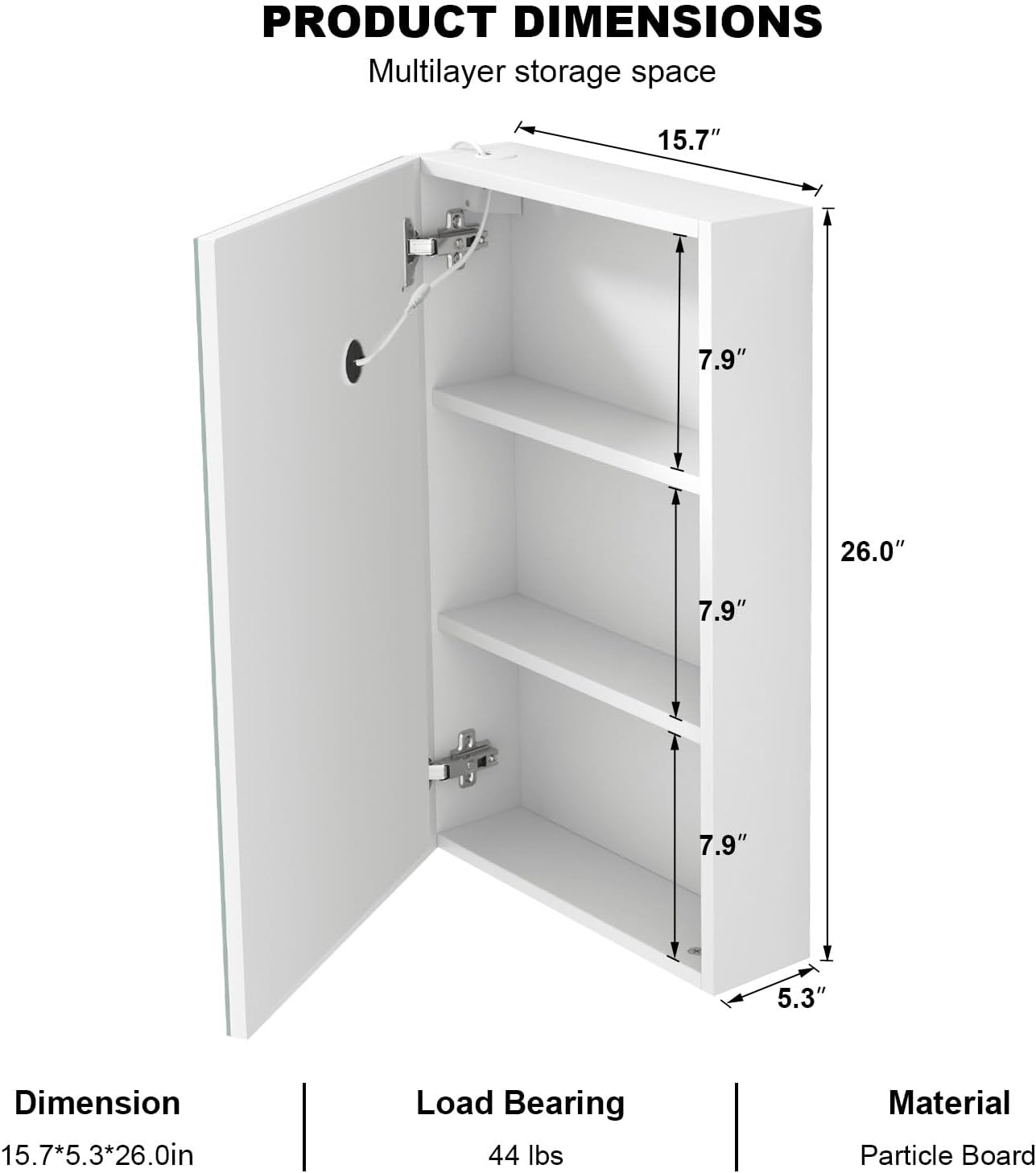
Figure 9.1: Product Dimensions
This diagram provides detailed measurements of the medicine cabinet, including its height, width, and depth, as well as the internal shelf spacing.
10. Warranty and Customer Support
Mepplzian is committed to providing high-quality products and excellent customer service. While specific warranty details are not provided in this manual, we encourage you to contact us directly for any issues or inquiries.
If you have any problems with your product, require assistance with assembly or installation, or have questions about its operation, please do not hesitate to reach out to our customer service team. We are dedicated to helping you resolve any concerns promptly.
Contact Information:
- For support, please refer to the contact details provided on your purchase receipt or the Mepplzian official website.
- You can also visit the Mepplzian Store on Amazon for more information and support resources.


