Product Overview
This manual provides instructions for the UNINELL HOME UV3 replacement battery, designed for use with the UNINELL HOME UV3 Cordless Cane Vacuum Cleaner. Please read this manual thoroughly before installation and use to ensure proper function and longevity of your battery.
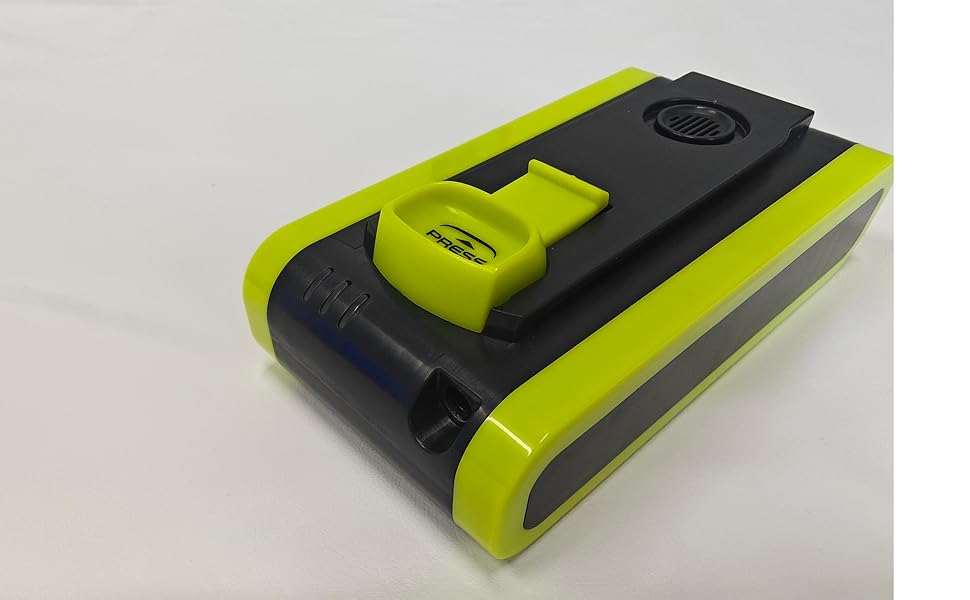
Image: UNINELL HOME UV3 Replacement Battery. This image shows the battery pack with its green and black casing, featuring a "PRESS" button for release.
Setup and Installation
Follow these steps to safely install the replacement battery into your UNINELL HOME UV3 Cordless Vacuum Cleaner.
- Power Off: Ensure the vacuum cleaner is completely powered off and unplugged from any charging source.
- Locate Battery Compartment: Identify the battery compartment on your UNINELL HOME UV3 vacuum cleaner. This is typically located on the main body of the vacuum.
- Remove Old Battery: Press the battery release button (if present) and slide the old battery out of its slot. Refer to your vacuum cleaner's original manual for specific instructions on battery removal.
- Insert New Battery: Align the new UNINELL HOME UV3 replacement battery with the battery slot. Gently slide the battery into place until it clicks securely. Ensure it is fully seated.
- Initial Charge: It is recommended to fully charge the new battery before its first use. Connect the vacuum cleaner to its charger and allow it to charge until the indicator light shows a full charge.
Operating Instructions
Proper operation ensures optimal performance and battery life.
- Charging: Always use the original UNINELL HOME charger provided with your vacuum cleaner. Do not use third-party chargers unless explicitly approved by UNINELL HOME.
- Charging Time: A full charge typically takes approximately 4-5 hours. Refer to your vacuum cleaner's manual for exact charging times and indicator light behavior.
- Usage: The battery provides power for the vacuum cleaner's operation. Runtime will vary depending on the power mode (e.g., standard, turbo) and the type of surface being cleaned.
- Avoid Deep Discharge: For best battery health, avoid completely draining the battery before recharging. Recharge when the vacuum's power indicator shows low battery.
Maintenance
Follow these guidelines to maintain your battery's performance and extend its lifespan.
- Storage: If storing the battery for an extended period, ensure it is charged to approximately 50-60%. Store in a cool, dry place away from direct sunlight and extreme temperatures.
- Cleaning: Keep the battery contacts clean and free from dust or debris. Use a dry cloth to wipe the battery exterior if necessary. Do not use liquids or abrasive cleaners.
- Temperature: Operate and charge the battery within the recommended temperature range (typically 0°C to 40°C or 32°F to 104°F). Extreme temperatures can degrade battery performance and safety.
- Disposal: Do not dispose of the battery in household waste. Follow local regulations for proper disposal of lithium-ion batteries. Many retailers and recycling centers offer battery recycling programs.
Troubleshooting
If you encounter issues with your replacement battery, refer to the following common problems and solutions.
| Problem | Possible Cause | Solution |
|---|---|---|
| Battery not charging |
|
|
| Shortened runtime |
|
|
| Vacuum not powering on with new battery |
|
|
Specifications
- Model: UV3 Replacement Battery
- Compatibility: Specifically designed for UNINELL HOME UV3 Cordless Cane Vacuum Cleaner
- Dimensions (L x W x H): 5 x 3 x 2 inches (approximate)
- Battery Type: Lithium-Ion
- Voltage: 26 Volts
- Manufacturer: UNINELL HOME
Warranty Information
UNINELL HOME provides a warranty for this replacement battery. Please refer to the details below:
- Warranty Period: 24-Month Extended Warranty.
- Return Policy: 30-Day Hassle-Free Return.
- This warranty covers defects in materials and workmanship under normal use. It does not cover damage caused by misuse, accident, unauthorized modification, or normal wear and tear.
- To claim warranty service, please retain your proof of purchase and contact UNINELL HOME customer support.
Customer Support
For technical assistance, warranty claims, or any questions regarding your UNINELL HOME UV3 replacement battery, please contact our customer support team.
- Technical Support: 24/7 availability.
- Contact Information: Please visit the official UNINELL HOME website or refer to the contact details provided with your original vacuum cleaner purchase for the most up-to-date support information.
- Online Resources: Check the UNINELL HOME brand store on Amazon for FAQs and additional product information: UNINELL HOME Store


