
ULTIMEA U3700
Contents
ULTIMEA Apollo S80 User Manual
5.1ch Dolby Atmos Soundbar System
1. Introduction
Thank you for choosing the ULTIMEA Apollo S80 5.1ch Dolby Atmos Soundbar System. This manual provides detailed instructions for setting up, operating, and maintaining your new sound system. Please read this manual thoroughly before use to ensure optimal performance and safety.
2. What's in the Box
- 1 x Left Subunit & Right Subunit
- 1 x Center Unit
- 1 x Wired Subwoofer
- 1 x Power Adaptor
- 1 x Remote Control (Batteries Not Included)
- 1 x User Manual
- 1 x HDMI-eARC Cable
- 1 x Digital Optical Cable
- 1 x Stereo 3.5mm to RCA Audio Cable
- 1 x Subwoofer Connection Cable (3m)
- 1 x Front Right Cable for Soundbar Connection (2m)
- 1 x Front Left Cable for Soundbar Connection (2m)
- 1 x Front Right Cable for Soundbar Connection (9cm)
- 1 x Front Left Cable for Soundbar Connection (19cm)
- 8 x Wall Mounting Kit
- 4 x Wall Bracket
- 2 x Base
3. Setup
3.1 Detachable Design for Flexible Placement
The Apollo S80 features a unique 3-in-1 detachable design, allowing for versatile placement options to suit your home theater setup. You can configure the soundbar as a single long unit or as three separate components (center, left, and right subunits).
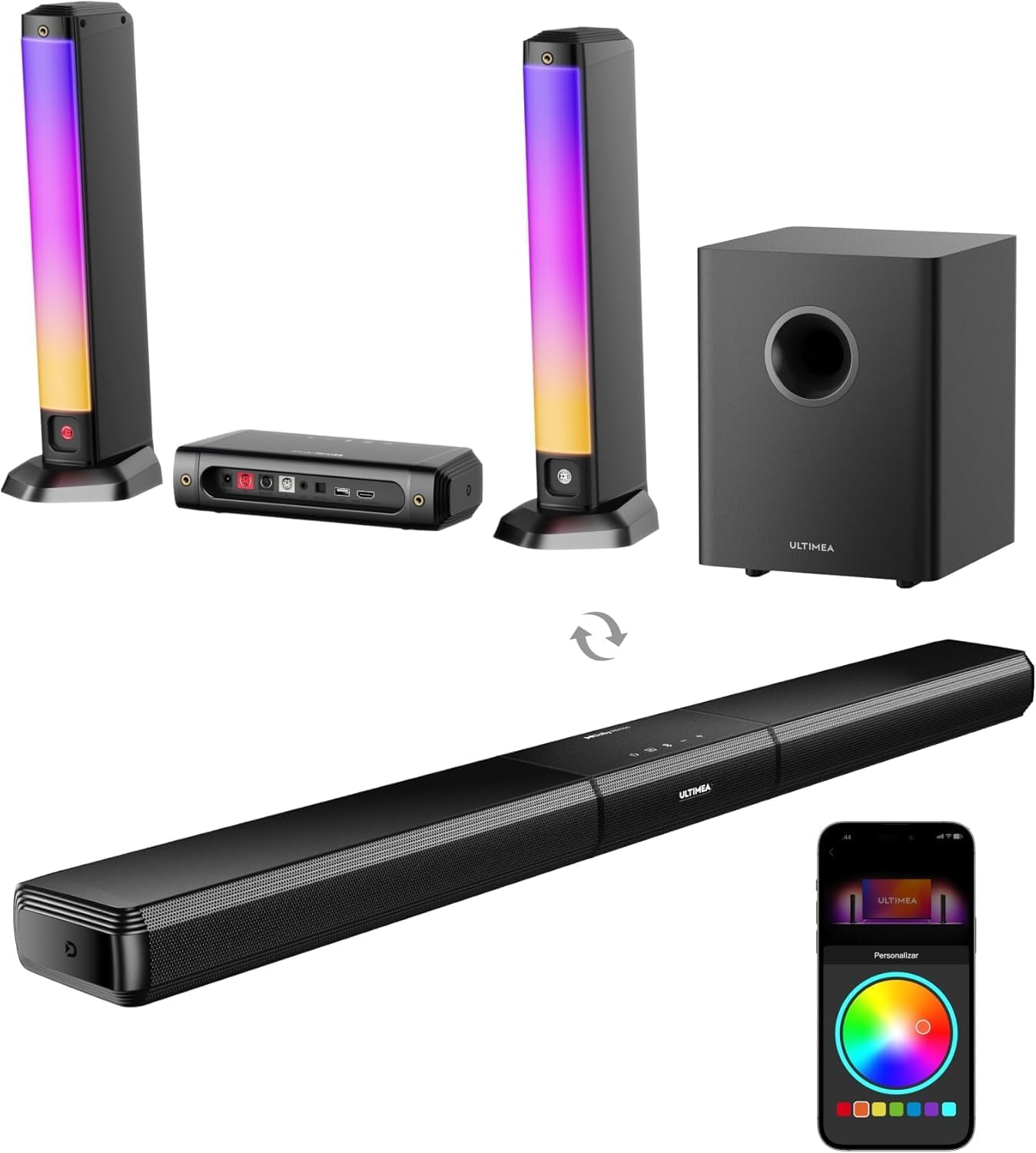
Image: The ULTIMEA Apollo S80 showcasing its modular design, allowing it to be used as a single soundbar or split into three separate units with two vertical speakers and a central control unit, alongside the subwoofer.

Image: Visual guide demonstrating the three possible setup configurations: desktop placement, wall mount as a single bar, and wall mount with left/middle/right separated units.
3.2 Connecting the Components
Ensure all components are connected securely before powering on the system.

Image: Detailed view of the soundbar's rear connection panel, labeling each port for power, speaker outputs, subwoofer output, and various audio inputs.
3.3 Connecting to Your TV
The Apollo S80 offers multiple connectivity options for your television or other audio sources.
HDMI eARC Connection (Recommended)
For the highest quality audio and Dolby Atmos support, use the HDMI eARC connection.
- Insert one end of the HDMI cable into your TV's "ARC/eARC" port.
- Insert the other end of the HDMI cable into the soundbar's "HDMI TO TV (eARC)" port.
- Press the "eARC" button on the remote control to select the "eARC" input.

Image: Step-by-step visual guide for connecting the soundbar to a TV using the HDMI eARC port.
Optical Connection
Use the Optical connection for digital audio transmission.
- Insert one end of the optical cable into your TV's "OPT" port.
- Insert the other end of the optical cable into the soundbar's "OPTICAL" port.
- Press the "OPT" button on the remote control to select the "OPT" input.
Image: Step-by-step visual guide for connecting the soundbar to a TV using the Optical port.
AUX Connection
Use the AUX connection for analog audio transmission.
- Insert the red and white ends of the 3.5mm RCA audio cable to the corresponding red and white ports on the TV.
- Insert the other end of the cable into the soundbar's "AUX" port.
- Press the "AUX" button on the remote control to select the "AUX" input.

Image: Step-by-step visual guide for connecting the soundbar to a TV using the AUX port.
Bluetooth Connection
To connect via Bluetooth:
- Ensure the soundbar is powered on.
- Press the "BT" button on the remote control or the soundbar to enter Bluetooth pairing mode. The indicator light will flash.
- On your device (smartphone, tablet, etc.), enable Bluetooth and search for "ULTIMEA Apollo S80".
- Select the soundbar to pair. Once connected, the indicator light will be solid.

Image: A smartphone displaying a successful Bluetooth connection to the Apollo S80, with the soundbar's RGB lighting illuminated.
4. Operating Your Soundbar
4.1 Immersive Audio with Dolby Atmos
The ULTIMEA Apollo S80 supports Dolby Atmos, creating a three-dimensional sound experience that places you in the center of the action. Built-in DSP technology converts stereo audio to 5.1 channels for enhanced immersion.

Image: A visual representation of Dolby Atmos immersive sound in a home theater setting, showing sound waves filling the room from the soundbar and subwoofer.
4.2 5.1 Surround Sound System
Featuring 5 full-range drivers and a 5.25-inch wired subwoofer, the system delivers powerful and balanced audio with crystal-clear dialogue and deep bass.

Image: An exploded view diagram illustrating the internal speaker components of the soundbar's left, center, and right channels, along with the subwoofer, emphasizing the 5.1 channel configuration.
4.3 BassMX Technology
The 5.25-inch wired subwoofer incorporates BassMX technology to deliver powerful, heart-pounding bass, enhancing your audio experience.

Image: The subwoofer positioned on the floor, visually demonstrating the powerful bass output with radiating blue sound waves and the BassMX logo.
4.4 Smart RGB Lighting
Elevate your entertainment space with 6 dynamic RGB modes and millions of colors. The lights can sync with audio for an immersive experience.

Image: A soundbar speaker illuminated with colorful RGB lighting, accompanied by a smartphone screen showing the Ultimea app's color selection interface.
Image: The Ultimea app interface on a smartphone, displaying options for various RGB lighting modes such as Rhythm, Cycle, Movie, Party, Christmas, and Halloween.

Image: A smartphone screen displaying the Ultimea app's circular color wheel, allowing users to select from millions of hues for the RGB lighting.
4.5 Ultimea Smart APP Control
The Ultimea App provides comprehensive control over your sound system, including 121 EQ presets, 10-band customization, and 6 optimized modes (Movie/Music/Voice/Sport/Game/Night). Regular OTA updates ensure peak performance.
Image: A smartphone displaying the Ultimea app's 10-band equalizer settings, allowing for precise audio customization.

Image: A smartphone displaying the Ultimea app's interface for 121 preset EQ matrices, offering various audio styles like Bass, Rock, Pop, and Classical.
4.6 Official Product Video
Video: An official product video showcasing the ULTIMEA Apollo S80 5.1ch Dolby Atmos Soundbar with RGB lighting, demonstrating its features and capabilities.
5. Maintenance
To ensure the longevity and optimal performance of your ULTIMEA Apollo S80 soundbar, follow these maintenance guidelines:
- Cleaning: Use a soft, dry cloth to wipe down the surfaces of the soundbar and subwoofer. Avoid using abrasive cleaners, waxes, or solvents as they may damage the finish.
- Ventilation: Ensure that the soundbar and subwoofer have adequate ventilation. Do not block any ventilation openings.
- Placement: Avoid placing the unit in direct sunlight, near heat sources, or in areas with high humidity or dust.
- Cables: Periodically check all cable connections to ensure they are secure and free from damage.
6. Troubleshooting
If you encounter any issues with your ULTIMEA Apollo S80, please refer to the following common troubleshooting steps:
| Problem | Possible Cause | Solution |
|---|---|---|
| No Power | Power cable not connected; Power outlet not working. | Ensure power cable is securely plugged in; Try a different power outlet. |
| No Sound | Incorrect input source selected; Cables not connected properly; TV audio settings. | Select the correct input source (e.g., HDMI eARC, Optical, AUX, BT); Check all audio cable connections; Ensure TV audio output is set to external speakers. |
| Bluetooth Disconnection | Device out of range; Interference. | Move device closer to the soundbar; Avoid placing soundbar near other wireless devices. |
| Remote Control Not Working | Batteries depleted; Obstruction between remote and soundbar. | Replace batteries; Remove any obstructions. |
| RGB Lights Not Working | RGB feature disabled in app; App malfunction. | Check RGB settings in the Ultimea App; Restart the app and soundbar. |
If the problem persists after trying these steps, please contact ULTIMEA customer support.
7. Specifications
| Feature | Description |
|---|---|
| Model Name | Apollo S80 |
| Speaker Type | 5.1ch Dolby Atmos Soundbar with RGB Light |
| Special Features | 5.1 Channel with Dolby Atmos, 5.25″ Wired Subwoofer with BassMX Technology, Adjustable Bass&Midrange&Treble, Detachable Design, 6 Preset RGB Modes, Ultimea Smart App Control, 10 Band Equalizer Settings, 121 Preset Equalizer Matrices, CEC Synchronization, Upgraded DSP Chip |
| Recommended Uses | For Surround Sound Systems, For Computers, For Televisions, For Smartphones or Tablets |
| Compatible Devices | Projector, PC, Television, Tablet, Smartphone |
| Subwoofer Diameter | 5.25 Inches |
| Controller Type | App, Remote |
| Surround Sound Channel Configuration | 5.1 |
| Color | Black |
| Product Dimensions | 4.33"D x 38.46"W x 2.28"H |
| Is Waterproof | FALSE |
| Warranty Type | Limited |
| Control Method | App, Remote |
| Wireless Communication Technology | Bluetooth |
| Speaker Size | 2 Inches |
| Power Source | Corded Electric |
| Woofer Diameter | 5.25 Inches |
| Audio Encoding | Dolby Atmos |
| Audio Driver Type | Dynamic Driver |
| Bluetooth Range | 15 Meters |
| Subwoofer Connectivity Technology | Wired |
| Connectivity Protocol | HDMI-eARC, Bluetooth 5.3, Optical, AUX, USB |
| Specific Uses For Product | Home Theatre |
| Style | Modern |
| Manufacturer | ULTIMEA |
| Item Weight | 16.02 pounds |
| Item model number | U3700 |
| Speaker Maximum Output Power | 320 Watts |
| Audio Output Mode | Surround |
| Mounting Type | Tabletop Mount, Wall Mount |
8. Warranty and Support
The ULTIMEA Apollo S80 comes with a Limited Warranty. For specific details regarding warranty coverage and duration, please refer to the warranty card included in your product packaging or visit the official ULTIMEA website.
For technical support, troubleshooting assistance beyond this manual, or any inquiries regarding your product, please contact ULTIMEA Direct customer service. Contact information can typically be found on the ULTIMEA website or on your purchase receipt.
Ask a question about this manual
Ask about setup, troubleshooting, compatibility, parts, safety, or missing instructions. Manuals+ will review the question and use this page’s manual context to help answer it.