
1. Introduction
This manual provides essential information for the safe and effective use of your VERPAL Lightweight Electric Wheelchair (Model: B0FSD91PQ2). Please read it thoroughly before operating the device to ensure proper function, safety, and longevity of your wheelchair. This electric wheelchair is designed to provide mobility assistance for adults and seniors, featuring a lightweight, foldable design suitable for various terrains and travel.
2. Safety Information
Your VERPAL electric wheelchair is equipped with multiple safety features. Always prioritize safety during operation.
- Electromagnetic Brakes: The wheelchair automatically parks when the controller is released, ensuring stability.
- Rear Anti-Skid Wheels: Designed to prevent tipping backward, enhancing stability on inclines.
- Seat Belt: Always use the seat belt to secure yourself in the wheelchair during operation.
- Tires: Equipped with 9-inch tires for stable movement.
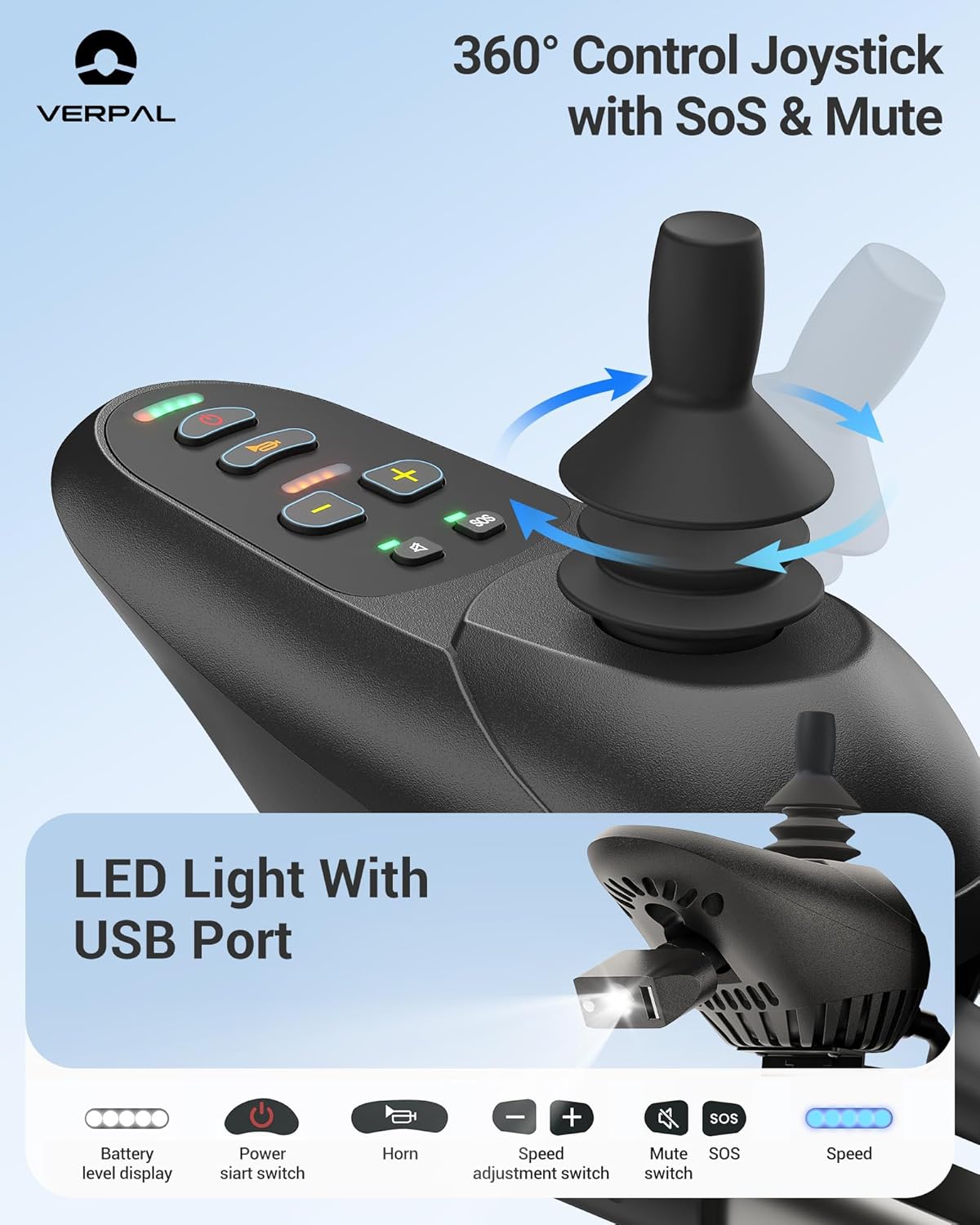
- Voice Button: Includes call for help, horn, and reverse warning. This feature can be disabled if preferred.
- LED Night Light: A 10-watt LED light is integrated for improved visibility in low-light conditions.
- Battery Level Indicator: Monitor battery status to avoid unexpected power loss.
Legal Disclaimer: Statements regarding dietary supplements have not been evaluated by the FDA and are not intended to diagnose, treat, cure, or prevent any disease or health condition.


3. Package Contents
Upon unpacking, please verify that all the following items are included:
- 1 x VERPAL Electric Wheelchair
- 1 x Lithium Battery (6Ah)
- 1 x Charger
- 1 x User Manual
- 1 x LED Night Light

4. Setup
4.1 Unfolding the Wheelchair
The VERPAL electric wheelchair features a one-step folding design for easy portability. To unfold, simply release the locking mechanism and extend the frame until it clicks into place.

4.2 Attaching the Controller
The controller can be mounted on either the left or right armrest for user convenience. Secure it firmly using the provided attachment mechanism.
4.3 Battery Installation
Insert the 6Ah lithium battery into its designated slot under the seat. Ensure it is securely latched. The battery can be charged while installed or removed for external charging.
4.4 Footrest and Armrest Adjustment
Adjust the footrests to a comfortable position. The armrests can be lifted for easier ingress and egress from the wheelchair.

5. Components Overview
5.1 Joystick Controller
The 360° control joystick allows for precise maneuverability. It includes buttons for power on/off, acceleration, deceleration, horn, LED light, and SOS/Mute functions.

5.2 Battery
The wheelchair is powered by a 6Ah lithium battery, offering a range of 10-12.5 miles and a lifespan of over 1,500 charge cycles. It provides enhanced safety and durability.

6. Operating Instructions
6.1 Powering On/Off and Driving
Press the power button on the joystick to turn the wheelchair on. Use the joystick to control direction and speed. The acceleration and deceleration buttons allow for fine-tuning of speed up to 3.5 MPH.
6.2 Switching Between Manual and Electric Modes
The wheelchair can be operated in both electric and manual push modes. To switch to manual mode, disengage the motors using the levers near the rear wheels. This allows an attendant to push the wheelchair from behind when the power is off.

6.3 Charging the Battery
The battery can be charged in three ways: directly on the wheelchair via the controller, by connecting the charger to the battery while it's installed, or by removing the battery and charging it separately. A full charge takes approximately 4 hours.

7. Maintenance
- Regularly inspect tires for wear and proper inflation.
- Keep the wheelchair clean by wiping with a damp cloth. Avoid harsh chemicals.
- Check all screws and fasteners periodically to ensure they are tight.
- Store the wheelchair in a dry, cool place when not in use.
- Charge the battery regularly, even if not in frequent use, to maintain its lifespan.
8. Troubleshooting
8.1 Wheelchair Not Powering On
- Check if the battery is properly installed and fully charged.
- Ensure all electrical connections are secure.
- Verify the power button on the joystick is pressed.
8.2 Difficulty Maneuvering
- Ensure the joystick is functioning correctly and not obstructed.
- Check if the wheelchair is in electric mode and not manual push mode.
- Inspect wheels for any obstructions or damage.
8.3 Unusual Noises
- Stop operation immediately and inspect the motors and wheels for any foreign objects.
- If the noise persists, contact customer support.
9. Specifications
| Feature | Detail |
|---|---|
| Model | B0FSD91PQ2 |
| Product Dimensions (Unfolded) | 16.1"D x 17.3"W x 19.7"H (Seat Width: 15.75") |
| Product Dimensions (Folded) | 21.46"D x 9.84"W x 29.13"H |
| Item Weight | 35 Pounds |
| Motor Power | 360W Dual Motor |
| Battery Type | 6Ah Lithium Battery |
| Max Speed | 3.5 MPH |
| Driving Range | 10-12.5 Miles |
| Max Climbing Angle | 12° |
| Max Obstacle Clearance | 2 inches |
| Load Capacity | Up to 220 lbs |
| Frame Material | Aluminum Alloy and Carbon Fiber |

10. Warranty & Support
VERPAL is committed to providing high-quality products and services. Your positive experience is our highest priority. If you have any questions about our products, please feel free to contact us. We are available 24/7 and will respond as soon as possible.
For support, please refer to the contact information provided in your purchase documentation or visit the official VERPAL store online: VERPAL Store.