
1. Introduction
This manual provides detailed instructions for the VILTROX DC-X3 2000 Nits SDI Camera Field Monitor. It covers essential information regarding product components, setup procedures, operational guidelines, advanced monitoring features, power options, maintenance, and troubleshooting. Please read this manual thoroughly before using the device to ensure optimal performance and longevity.
2. Product Overview
The VILTROX DC-X3 is a 6-inch touchscreen camera field monitor designed for professional video production. It features a high-brightness IPS display with 2000 Nits, 4K HDMI and 3G-SDI input/output, and a comprehensive suite of monitoring tools.
2.1. What's in the Box
- VILTROX DC-X3 2000 Nits Camera Field Monitor
- Portable Hard Carrying Case
- Detachable Sunshade Hood
- Custom Cold Shoe Adapter
- 1pcs NP-F550 Battery
- HDMI Cable *2
- USB-C Charging Cable *1
- Monitor Screen HD Protective Film
- User Manual
2.2. Monitor Components and Ports

This image displays the VILTROX DC-X3 monitor with numbered labels indicating various ports and buttons for easy identification and understanding of its layout.
- 1. Back/Menu Button: Used to navigate back in menus or access the main menu.
- 2. Shortcut Keys (F1-F4): Customizable function buttons for quick access to frequently used features.
- 3. Display Screen: The 6-inch IPS FHD touchscreen display.
- 4. Fan Exhaust Vent: For heat dissipation.
- 5. Indicator Light: Shows power status or other operational indicators.
- 6. Power Button: To turn the monitor on or off.
- 7. HDMI Input: Connects to a camera or video source via HDMI.
- 8. HDMI Output: Loops out the HDMI signal to another monitor or device.
- 9. Headphone Jack (3.5mm): For audio monitoring.
- 10. Cooling Air Intake: Air intake for the cooling system.
- 11. 1/4 Screw Hole: Mounting point for accessories (side).
- 12. Cooling Air Intake: Additional air intake for cooling.
- 13. DC Port: For external DC power input (12-18V/2A).
- 14. Type-C Port: For power supply (≥9V/3A) and firmware updates.
- 15. Cooling Air Intake: Another air intake for cooling.
- 16. 1/4 Screw Hole: Mounting point for accessories (bottom).
- 17. Cooling Air Intake: Final air intake for cooling.
- 18. USB Interface: For custom 3D LUT import and firmware updates.
- 19. Battery Release Button: Releases the NP-F series battery.
- 20. Battery Slot: Accommodates NP-F series batteries.
- 21. SDI IN & SDI OUT: 3G-SDI input and loop out ports.

This image shows the VILTROX DC-X3 camera field monitor alongside its essential accessories, including the sunshade hood, cold shoe adapter, NP-F550 battery, hard carrying case, and various cables.
3. Setup
3.1. Powering the Monitor
The DC-X3 offers multiple power options:
- NP-F Series Battery: Insert a compatible NP-F series lithium battery (e.g., NP-F550, NP-F570, NP-F750, NP-F770, NP-F960, NP-F970) into the battery slot on the rear of the monitor. Ensure it clicks into place.
- DC IN: Connect a 12-18V/2A DC power adapter (not included) to the DC port.
- Type-C: Use a Type-C cable with a power supply of ≥9V/3A to power the monitor.

This image illustrates the various power input options for the VILTROX DC-X3 monitor, including the NP-F battery slot, DC IN port, and Type-C port.
3.2. Connecting to a Camera/Video Source
The DC-X3 supports both HDMI and SDI connections:
- HDMI: Connect an HDMI cable from your camera's HDMI output to the HDMI IN port on the monitor. The monitor supports up to 4K@30Hz signal input. An HDMI OUT port is available for looping the signal to another display.
- SDI: Connect an SDI cable from your camera's SDI output to the SDI IN port on the monitor. The monitor supports 3G-SDI. An SDI OUT port is available for looping the signal.
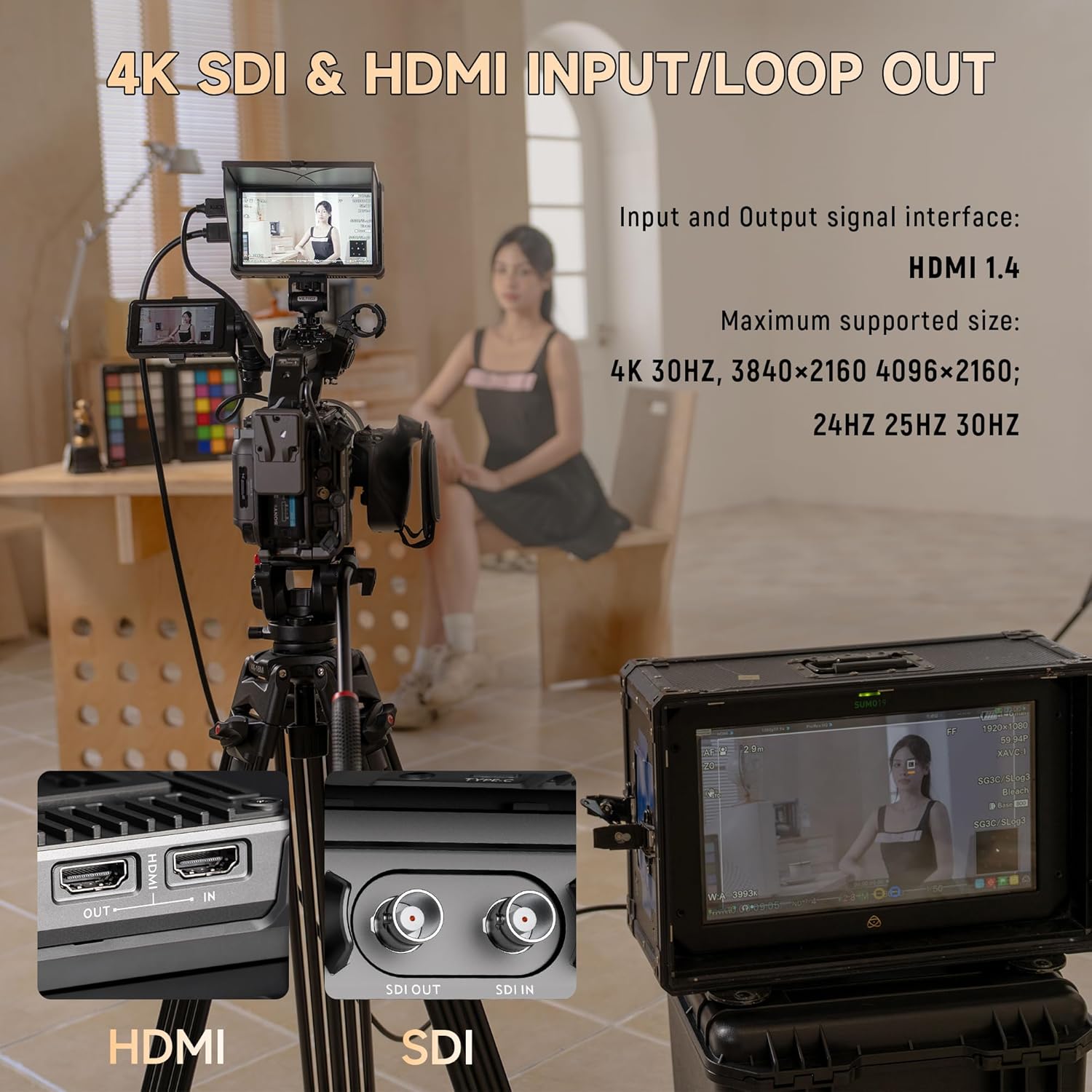
This image demonstrates the connectivity of the VILTROX DC-X3 monitor, showing its 4K HDMI and 3G-SDI input/loop out ports connected to a camera setup.
3.3. Mounting the Monitor
The monitor features multiple 1/4 screw interfaces and a cold shoe adapter for versatile mounting options on cameras, rigs, or stabilizers. This allows for both horizontal and vertical mounting configurations.
4. Operating Instructions
4.1. Power On/Off
Press and hold the Power Button (6) on the top right side of the monitor to turn it on or off.
4.2. Touchscreen Control
The DC-X3 features an intuitive touchscreen interface for easy navigation and control of settings. Simply tap or swipe on the screen to adjust brightness, contrast, zoom, and other functions.

This image highlights the convenient touchscreen control and customizable shortcut keys (F1-F4) on the VILTROX DC-X3 monitor, allowing for efficient operation during shooting.
4.3. Custom Shortcut Keys
The monitor includes four customizable shortcut keys (F1, F2, F3, F4) on the top panel. These keys can be assigned to up to 22 different functions for quick, one-click access, significantly improving shooting efficiency. Refer to the on-screen menu for assigning specific functions to each key.
5. Monitoring Features
The VILTROX DC-X3 is equipped with a wide array of professional monitoring tools to assist with accurate focus, exposure, and color grading.
- True 2000 Nit Brightness: The upgraded 2000 Nits high-bright IPS display ensures clear and delicate picture quality even in strong outdoor light, with a 1920x1080 resolution, 1000:1 contrast ratio, and 160° ultra-wide viewing angle.
- Professional Color Gamut: Supports SRGB/Rec.709 professional color gamut coverage for precise calibration and intricate detail preservation.
- Custom 3D LUT: Import custom 3D LUTs via the USB interface to instantly preview different color effects.
- Exposure Tools: Includes Full Waveform, Parada(Y), Vectorscope, RGB & Brightness Histogram, and Zebra for accurate exposure analysis.
- Focus Assist: Features Focus Peaking to highlight in-focus areas.
- Audio Monitoring: Monitor audio levels with the VolumeBar and through the 3.5mm headphone jack.
- Image Analysis: Monochrome, False Color, Center Mark, Safe Area, Aspect Ratio, Scan Mode, Image Freeze, Auto Flip, and Pixel to Pixel functions are available.
- Camera Mode: Specific display modes tailored for various camera outputs.

This image highlights the key features of the VILTROX DC-X3's 6-inch IPS FHD display, including its 2000 Nits brightness, 1920x1080 resolution, 1000:1 contrast ratio, 160° ultra-wide angle, and 60Hz refresh rate.

This image showcases the high dynamic HDR monitoring capabilities of the VILTROX DC-X3, detailing various professional tools such as Y Histogram, RGB Histogram, VolumeBar, Vectorscope, Full Waveform, and 3D Lut.

This image demonstrates the custom 3D LUT feature of the VILTROX DC-X3 monitor, allowing users to preview different color effects before and after applying LUTs via the USB interface.
6. Maintenance
6.1. Cleaning the Monitor
Use a soft, dry cloth to clean the monitor screen and body. For stubborn smudges, a slightly damp microfiber cloth can be used. Avoid abrasive cleaners or solvents that may damage the screen or finish.
6.2. Sunshade Hood
The quick-detachable sunshade hood can be opened and closed in seconds. It effectively blocks light interference when shooting outdoors, ensuring good monitoring effects. When closed, it provides comprehensive four-corner protection, preventing screen scratches.

This image illustrates the portable and lightweight design of the VILTROX DC-X3, showcasing its included sunshade hood, 3.5mm audio monitoring port, and efficient cooling fan system.
6.3. Heat Dissipation
The all-aluminum body with multiple heat dissipation designs and an intelligent fan cooling system greatly improve heat dissipation efficiency, ensuring stability during long-term operation.
7. Troubleshooting
If you encounter issues with your VILTROX DC-X3 monitor, please refer to the following common troubleshooting tips:
- No Signal: Ensure all HDMI or SDI cables are securely connected to both the camera/video source and the monitor. Verify that the camera's output settings match the monitor's input capabilities (e.g., resolution, frame rate).
- No Power: Check the battery level or ensure the external power adapter is properly connected and providing sufficient power. Try a different power source if available.
- Screen Flickering/Distortion: Check the cable connections. Try a different cable. Ensure the monitor's firmware is up to date.
- Touchscreen Unresponsive: Restart the monitor. If the issue persists, check for firmware updates.
- Overheating: Ensure the cooling vents are not obstructed. The intelligent fan system should manage heat effectively. If the fan is not operating, contact support.
For persistent issues not resolved by these steps, please contact VILTROX customer support.
8. Specifications
| Feature | Specification |
|---|---|
| Display Screen | 6-inch IPS Touch Screen |
| Resolution | 1920x1080 |
| Aspect Ratio | 16:9 |
| Contrast | 1000:1 |
| Refresh Rate | 60Hz |
| Screen Brightness | 2000cd/m² |
| Viewing Angle | 160° |
| Pixel Density | 360 PPI |
| Color Gamut | 100%±3% sRGB/Rec.709 |
| Color Depth | 8 Bit |
| Input Interface | HDMI IN, SDI IN |
| Output Interface | HDMI OUT, SDI OUT |
| Cooling Fan | Yes |
| Weight (Monitor) | ≈350g |
| Dimensions | 155.4 x 98.4 x 30mm |
| USB Interface | Support USB upgrade and 3D Lut file input |
| Audio Output | Headphone Jack Φ3.5mm |
| Power Interface | DC 12-18V/2A, Type-C ≥9V/3A |
| Applicable Battery | Lithium Battery NP-F550/F570/F750/F770/F960/F970 |
| Temperature (Working) | 0℃~65℃ |
| Temperature (Storage) | 0℃~75℃ |
9. Warranty and Support
For warranty information, technical support, or service inquiries, please visit the official VILTROX website or contact their customer service directly. Keep your purchase receipt as proof of purchase for warranty claims.