1. Introduction
This manual provides essential information for the safe and effective operation, maintenance, and troubleshooting of your Ingco CAGLI21154 Cordless Angle Grinder. Before using the tool, please read and understand all instructions and safety warnings. Keep this manual for future reference.
2. General Safety Instructions
Always follow basic safety precautions to reduce the risk of fire, electric shock, and personal injury. Failure to follow these instructions may result in serious injury.
Work Area Safety
- Keep the work area clean and well-lit. Cluttered or dark areas invite accidents.
- Do not operate power tools in explosive atmospheres, such as in the presence of flammable liquids, gases, or dust. Power tools create sparks which may ignite the dust or fumes.
- Keep children and bystanders away while operating a power tool. Distractions can cause you to lose control.
Personal Safety
- Always wear eye protection. Use safety glasses or goggles.
- Wear hearing protection when operating power tools for extended periods.
- Dress properly. Do not wear loose clothing or jewelry. Keep hair and clothing away from moving parts.
- Stay alert, watch what you are doing, and use common sense when operating a power tool.
- Do not overreach. Keep proper footing and balance at all times.
Power Tool Use and Care
- Do not force the power tool. Use the correct power tool for your application.
- Disconnect the battery pack from the power tool before making any adjustments, changing accessories, or storing power tools.
- Store idle power tools out of the reach of children and do not allow persons unfamiliar with the power tool or these instructions to operate the power tool.
- Maintain power tools. Check for misalignment or binding of moving parts, breakage of parts, and any other condition that may affect the power tool’s operation.
- Use the power tool, accessories, and tool bits in accordance with these instructions, taking into account the working conditions and the work to be performed.
3. Product Overview
The Ingco CAGLI21154 is a cordless angle grinder designed for cutting, grinding, and polishing various materials. It features a brushless motor for enhanced efficiency and durability, and offers three speed settings for versatile applications.
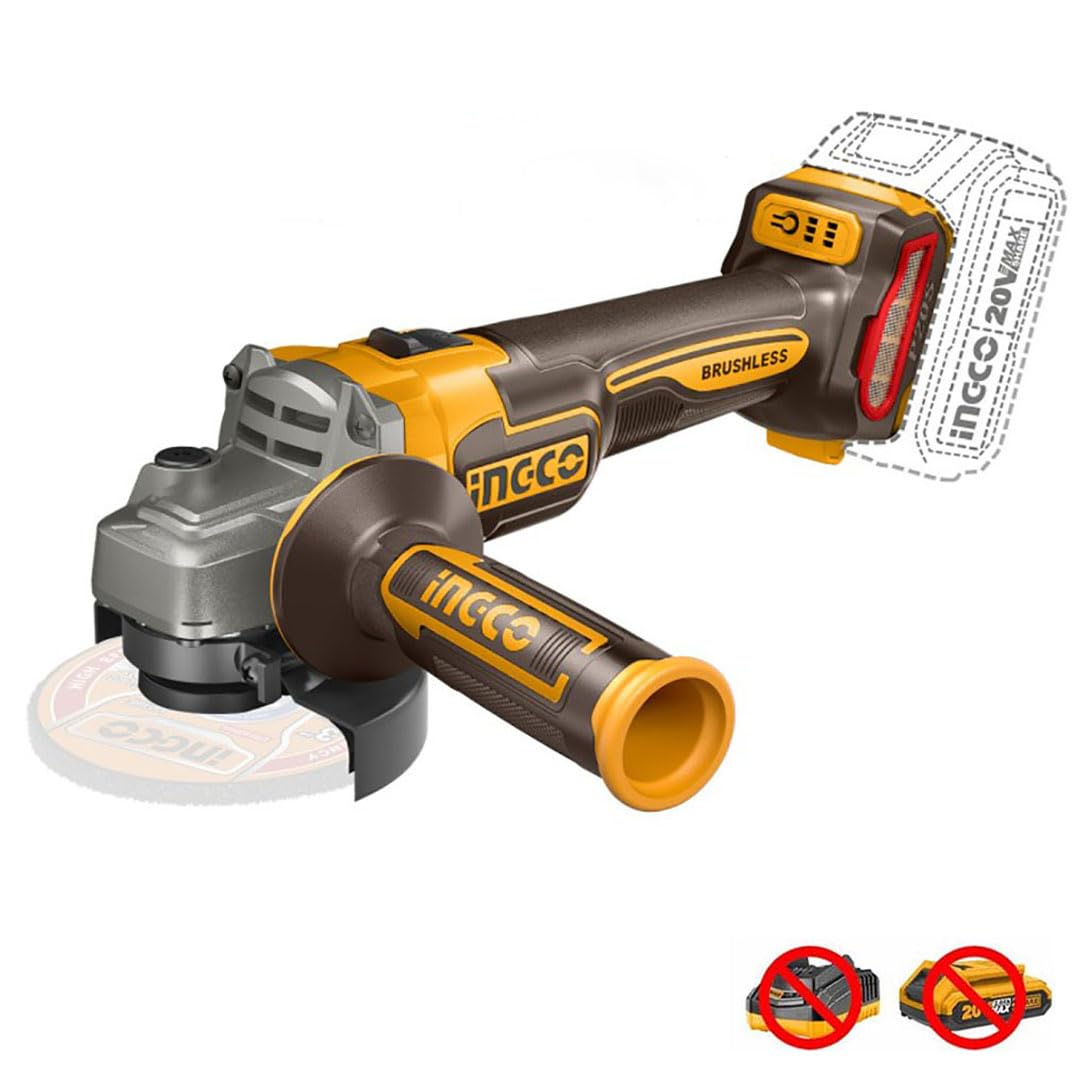
This image displays the Ingco CAGLI21154 cordless angle grinder, highlighting its 115mm disc capacity and brushless motor technology. It also indicates that the battery and charger are sold separately.
Key Components:
- Grinder Body: Main housing containing the motor and gears.
- Spindle Lock Button: Used to lock the spindle for disc changes.
- Auxiliary Handle: Provides additional grip and control during operation.
- Safety Guard: Protects the user from sparks and debris.
- On/Off Switch: Controls power to the tool.
- Speed Selector: Adjusts the rotational speed of the disc.
- Battery Compartment: For inserting the 20V battery pack (sold separately).
4. Setup
Proper setup ensures safe and efficient operation of your angle grinder.
4.1 Attaching the Auxiliary Handle
- Screw the auxiliary handle into one of the threaded holes on the grinder head.
- Ensure it is tightened securely. The handle can be positioned on either side for left or right-handed use.
4.2 Adjusting the Safety Guard
- Loosen the guard clamping screw or lever.
- Rotate the guard to a position that provides maximum protection from sparks and debris for your specific application.
- Tighten the clamping screw or lever firmly to secure the guard.
4.3 Installing/Changing Grinding Discs
Warning: Always ensure the battery is removed before changing discs.
- Press and hold the spindle lock button.
- Using the provided spanner wrench, loosen and remove the outer flange nut by turning it counter-clockwise.
- Remove the old disc (if applicable).
- Place the new 115mm grinding or cutting disc onto the inner flange, ensuring it is centered.
- Replace the outer flange nut and tighten it clockwise with the spanner wrench while holding the spindle lock button. Do not overtighten.
4.4 Installing the Battery Pack

This image illustrates the Ingco P20S 20V MAX+SHARE battery system, showcasing various compatible tools that can utilize the same battery platform.
- Ensure the battery pack is fully charged (battery and charger sold separately).
- Align the battery pack with the battery compartment on the grinder.
- Slide the battery pack into the compartment until it clicks securely into place.
- To remove, press the battery release button and slide the battery out.
5. Operating Instructions
Always wear appropriate personal protective equipment (PPE) including safety glasses, hearing protection, and gloves before operating the angle grinder.
5.1 Powering On and Off
- To turn on: Slide the On/Off switch forward.
- To turn off: Slide the On/Off switch backward to the OFF position.
5.2 Selecting Speed
The CAGLI21154 features 3 speed settings. Use the speed selector switch to choose the appropriate speed for your application. Lower speeds are generally for polishing or lighter grinding, while higher speeds are for aggressive grinding and cutting.
5.3 Grinding and Cutting Techniques

This image shows the Ingco CAGLI21154 cordless angle grinder in operation, powered by a 20V battery, cutting a metal pipe and generating sparks.
- Secure Workpiece: Always clamp or secure the workpiece to prevent movement during operation.
- Starting the Tool: Turn on the grinder before bringing the disc into contact with the workpiece.
- Angle of Approach: For grinding, hold the disc at a 15-30 degree angle to the workpiece. For cutting, hold the disc perpendicular (90 degrees) to the workpiece.
- Even Pressure: Apply light, even pressure. Do not force the tool, as this can cause kickback or damage the disc and motor.
- Direction of Cut/Grind: Always direct sparks away from yourself and bystanders.
- Cooling: Allow the tool to cool periodically during extended use.
6. Maintenance
Regular maintenance ensures the longevity and safe operation of your angle grinder. Always remove the battery pack before performing any maintenance.
6.1 Cleaning
- Keep the ventilation openings clear to prevent overheating.
- Regularly clean the tool housing with a soft, damp cloth. Do not use solvents.
- Remove dust and debris from the disc guard and spindle area.
6.2 Disc Inspection and Replacement
- Inspect discs before each use for cracks, chips, or excessive wear. Replace damaged discs immediately.
- Ensure discs are rated for the maximum RPM of the grinder (9000 RPM).
6.3 Battery Care
- Store battery packs in a cool, dry place away from direct sunlight and extreme temperatures.
- Do not store battery packs in a discharged state for extended periods.
- Use only Ingco P20S compatible chargers for your battery packs.
6.4 Storage
When not in use, store the angle grinder in a dry, secure location out of reach of children.
7. Troubleshooting
This section addresses common issues you might encounter. For problems not listed here, contact customer support.
| Problem | Possible Cause | Solution |
|---|---|---|
| Tool does not start. | Battery not charged or improperly installed. | Ensure battery is fully charged and correctly inserted. |
| Reduced power or speed. | Low battery charge; excessive pressure applied. | Recharge battery; reduce pressure on the workpiece. |
| Excessive vibration. | Damaged or improperly installed disc; loose auxiliary handle. | Inspect and replace disc if damaged; ensure disc is correctly installed; tighten auxiliary handle. |
| Tool overheats. | Blocked ventilation openings; continuous heavy use. | Clean ventilation openings; allow tool to cool down. |
8. Specifications
| Feature | Detail |
|---|---|
| Brand | Ingco |
| Model Number | CAGLI21154 |
| Voltage | 20 Volts |
| Disc Diameter | 115 mm |
| Max Rotational Speed | 9000 RPM |
| Number of Speeds | 3 |
| Motor Type | Brushless |
| Power Source | Battery Powered |
| Material | Metal |
| Item Weight | 209 g |
| Product Dimensions | 10 x 20 x 37 cm |
9. Warranty and Support
Ingco products are manufactured to high-quality standards. For information regarding warranty coverage, service, or technical support, please refer to the warranty card included with your purchase or visit the official Ingco website. Keep your proof of purchase for warranty claims.


