
Introduction
The INTEX Krystal Clear Saltwater System offers an advanced and convenient solution for maintaining clean and clear above-ground pool water. This system utilizes dissolved salt molecules to naturally sanitize the water, providing a more pleasant swimming experience compared to traditional chlorine-based methods. It is designed for above-ground pools up to 8,500 gallons, reducing the need for harsh chemicals and simplifying pool maintenance.
Key benefits include improved circulation and filtration, enhanced water clarity, and an increase in negative ions at the water surface, all contributing to a fresher and cleaner pool environment.
Safety Information
Always read and follow all instructions in this manual carefully before installing, operating, or maintaining the INTEX Krystal Clear Saltwater System. Failure to do so may result in serious injury or property damage. Keep this manual in a safe place for future reference.
- Ensure the system is properly grounded.
- Do not operate the system if the power cord or plug is damaged.
- Keep children away from the system during operation.
- Always disconnect power before performing any maintenance or service.
- Use only the recommended type and amount of pool salt.
Setup
Setting up your Krystal Clear Saltwater System is a straightforward process. It integrates seamlessly with your existing pool filter pump.
- Placement: Position the saltwater system on a stable, level surface near your above-ground pool and filter pump. Ensure it is protected from direct sunlight and harsh weather conditions.

Figure 1: The INTEX Krystal Clear Saltwater System, a white unit with a control panel on top, connected to pool hoses.
- Connections: Connect the saltwater system to your existing pool filter pump using the provided hoses and connectors. Ensure all connections are secure and watertight to prevent leaks.

Figure 2: Rear view of the saltwater system showing the hose connections for water input and output, and power cables.
- Add Salt: Add the recommended amount of pure, non-iodized pool salt directly to your pool water. Refer to the system's manual for specific salt concentration guidelines based on your pool's volume. Allow the salt to dissolve completely before starting the system.
- Power On: Once all connections are made and salt is dissolved, plug the system into a grounded electrical outlet. The control panel will illuminate, indicating it is ready for operation.
Operating Instructions
The intuitive control panel allows for easy management of your saltwater system.
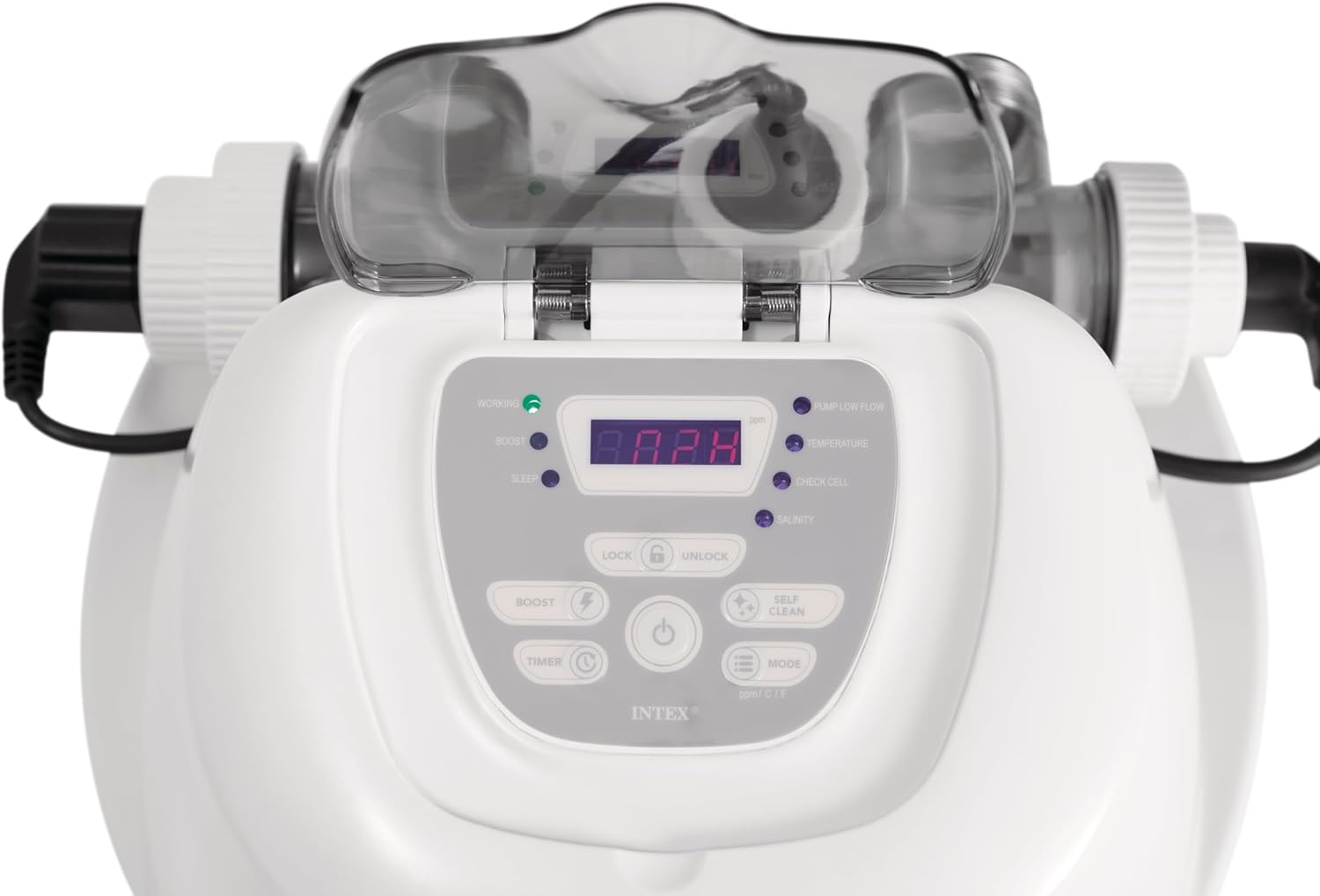
Figure 3: Close-up of the control panel with various buttons and indicator lights for operation and status.
- Power Button: Press to turn the system ON or OFF.
- Timer Button: Use to set the desired operating hours for the system. The system will automatically run for the programmed duration each day.
- Boost Button: Activates a temporary boost cycle for increased chlorine generation, useful during heavy pool usage or after rain.
- Self-Clean Button: Initiates the self-cleaning cycle for the electrolytic cell, helping to prevent mineral buildup.
- Lock/Unlock Buttons: Locks the control panel to prevent accidental changes to settings.
- Indicator Lights: Monitor the status of the system, including "Working," "Boost," "Sleep," "Pump Low Flow," "Low Salt," "High Salt," and "Service."
The system's HydroAeration Technology enhances water circulation and clarity by introducing tiny air bubbles, making the pool water feel fresher and look cleaner.
Maintenance
Regular maintenance ensures optimal performance and longevity of your saltwater system.
- Salt Level Check: Periodically test your pool's salt level using a salt test strip or digital tester. Maintain the salt concentration within the recommended range (typically 2500-3500 ppm for this system) to ensure efficient chlorine generation.
- Cell Cleaning: The system features a self-clean function. Run this cycle regularly as indicated by the system or if you notice reduced chlorine output. For manual cleaning, refer to the detailed instructions in the full product manual.
- Filter Pump Maintenance: Ensure your filter pump is clean and operating efficiently, as it is crucial for the saltwater system's performance. Clean or replace filter cartridges/sand as recommended by your filter pump's manual.
- Winterization: Before winter, disconnect and drain the saltwater system. Store it in a dry, protected area where temperatures will not drop below freezing.
Troubleshooting
If you encounter issues with your INTEX Krystal Clear Saltwater System, refer to the following common problems and solutions:
| Problem | Possible Cause | Solution |
|---|---|---|
| "Low Salt" Indicator | Insufficient salt level in the pool. | Add recommended amount of pool salt. Allow time for dissolution and re-test. |
| "High Salt" Indicator | Excessive salt level in the pool. | Partially drain pool water and refill with fresh water until salt level is within range. |
| "Pump Low Flow" Indicator | Insufficient water flow through the system. | Check filter pump, clean filter, ensure hoses are not kinked, and skimmer/return lines are clear. |
| "Service" Indicator | Electrolytic cell needs cleaning or is faulty. | Run self-clean cycle. If issue persists, manually clean the cell or contact customer support. |
| No Chlorine Output | Low salt, dirty cell, or insufficient run time. | Check salt level, clean cell, increase operating hours. |
For more complex issues or if troubleshooting steps do not resolve the problem, please contact Intex customer support.
Specifications
- Model: 26687EG QS700
- Brand: Intex
- Pool Capacity: Up to 8,500 Gallons (32,175 Liters)
- Item Weight: 15.6 Pounds (7.08 kg)
- Product Dimensions: 15 x 10 x 12 inches (38.1 x 25.4 x 30.5 cm)
- UPC: 078257266876
- Country of Origin: China
- Product Benefits: Kills Bacteria, Prevents Stains
Warranty and Support
For warranty information, technical support, or to purchase replacement parts, please contact Intex customer service. Refer to the original product packaging or the Intex website for the most current contact details and warranty terms applicable to your region.
You can visit the official Intex Store for more information: Intex Store