
1. Introduction and Overview
The Ernie Ball ProTune USB-C Rechargeable Clip-on Tuner is designed for musicians seeking precision and reliability in instrument tuning. It features a high-visibility color display and five distinct tuning modes, making it suitable for a variety of instruments. The tuner's USB-C rechargeable battery ensures extended performance, complemented by an auto power-off function to conserve energy. Its versatile mount allows for optimal placement on any headstock.

Figure 1: Ernie Ball ProTune USB-C Clip-on Tuner in its retail packaging, highlighting key features.
2. Setup
2.1 Charging the Tuner
The ProTune tuner is equipped with a USB-C rechargeable battery. Before initial use, or when the battery indicator shows low power, connect the tuner to a power source using the included USB-C charging cable. The display will indicate charging status.
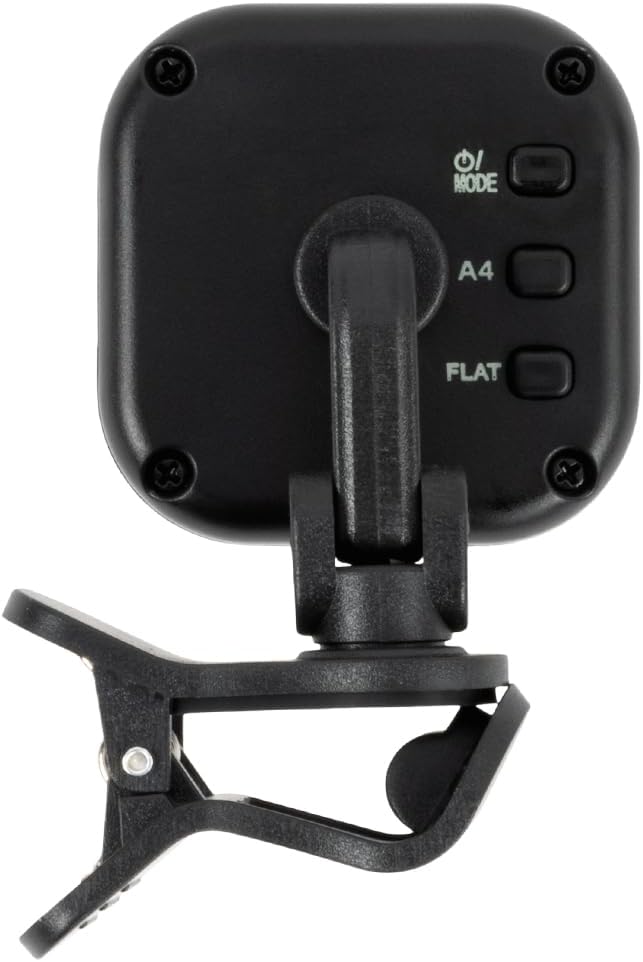
Figure 2: The Ernie Ball ProTune tuner connected to its USB-C charging cable for recharging.
2.2 Attaching to Your Instrument
Securely attach the ProTune tuner to the headstock of your instrument using its clip mechanism. The versatile mount allows for optimal viewing angles. Ensure the tuner is firmly attached to prevent accidental detachment during use.

Figure 3: A side view of the ProTune tuner, illustrating the robust clip designed for secure attachment to instrument headstocks.
3. Operating Instructions
3.1 Power On/Off
- To power on the tuner, press and hold the power/mode button located on the back of the unit.
- To power off, press and hold the power/mode button again.
- The tuner features an auto power-off function to conserve battery life if no input is detected for a period of time.
3.2 Selecting Tuning Modes
The ProTune tuner offers five tuning modes:
- Chromatic (C): For tuning any instrument to any note.
- Guitar (G): Optimized for standard guitar tuning.
- Bass (B): Optimized for standard bass guitar tuning.
- Violin (V): Optimized for standard violin tuning.
- Ukulele (U): Optimized for standard ukulele tuning.
To cycle through the tuning modes, short press the power/mode button while the tuner is on.

Figure 4: The rear of the ProTune tuner, featuring the power/mode button and calibration controls.
3.3 Tuning Your Instrument
Once the tuner is attached and the correct mode is selected:
- Pluck a single string on your instrument.
- Observe the tuner's display. The note name will appear, and a visual indicator will show if the note is flat (too low), sharp (too high), or in tune.
- Adjust the corresponding tuning peg on your instrument until the visual indicator on the tuner's display is centered and shows a stable, in-tune reading. The display will typically change color (e.g., green) when the note is in tune.
- Repeat for all strings.

Figure 5: The ProTune tuner actively displaying tuning information while securely clipped to a guitar headstock.
3.4 Calibration
The ProTune tuner may offer calibration settings to adjust the reference pitch (A4 frequency). Refer to the detailed product manual for specific instructions on how to adjust calibration, if this feature is available on your model. Typically, calibration buttons (often shaped like triangles or arrows) are used to increase or decrease the A4 reference frequency.
4. Maintenance
4.1 Battery Care
To maximize the lifespan of your USB-C rechargeable battery, avoid completely draining it regularly. Recharge the tuner as needed. The auto power-off feature helps conserve battery when not in use.
4.2 Cleaning
Wipe the tuner with a soft, dry cloth to remove dust or smudges. Avoid using abrasive cleaners or solvents, as these may damage the display or casing.
5. Troubleshooting
- Tuner not turning on: Ensure the battery is charged. Connect to a USB-C power source.
- Inaccurate tuning readings: Ensure the tuner is securely clipped to the instrument's headstock. Verify that the correct tuning mode (Chromatic, Guitar, Bass, Violin, Ukulele) is selected for your instrument. Pluck strings clearly and individually.
- Tuner not holding charge: If the tuner consistently loses charge quickly, ensure it is fully charged. If the issue persists, contact customer support.
- Physical damage to clip: Handle the tuner with care. Avoid excessive force when attaching or removing it from the instrument.
6. Specifications
| Feature | Detail |
|---|---|
| Item Weight | 2.11 ounces |
| Product Dimensions | 3.43 x 2.68 x 1.57 inches |
| ASIN | B0DBNTLP12 |
| Item model number | P09627 |
| Batteries | 1 Lithium Ion batteries required. (included) |
| Battery type | Lithium Ion |
| Tuning Modes | Chromatic, Guitar, Bass, Violin, Ukulele |
| Display | High-visibility color display |
| Additional Features | USB-C Rechargeable Battery, Auto Power-Off, Charging Cable Included |
7. Warranty and Support
For warranty information, technical support, or further assistance with your Ernie Ball ProTune tuner, please refer to the official Ernie Ball website or contact their customer service department. Keep your proof of purchase for warranty claims.


