1. Introduction
Thank you for purchasing the Samsung WW11T Digital Inverter 11kg Washing Machine. This manual provides essential information for the safe and efficient operation, installation, and maintenance of your appliance. Please read it thoroughly before use and keep it for future reference.
This washing machine features Digital Inverter technology for enhanced performance and energy efficiency, a 15-minute quick wash cycle for small loads, and steam hygiene for deep cleaning, eliminating 99.9% of bacteria. The Diamond Drum design ensures gentle care for your fabrics.
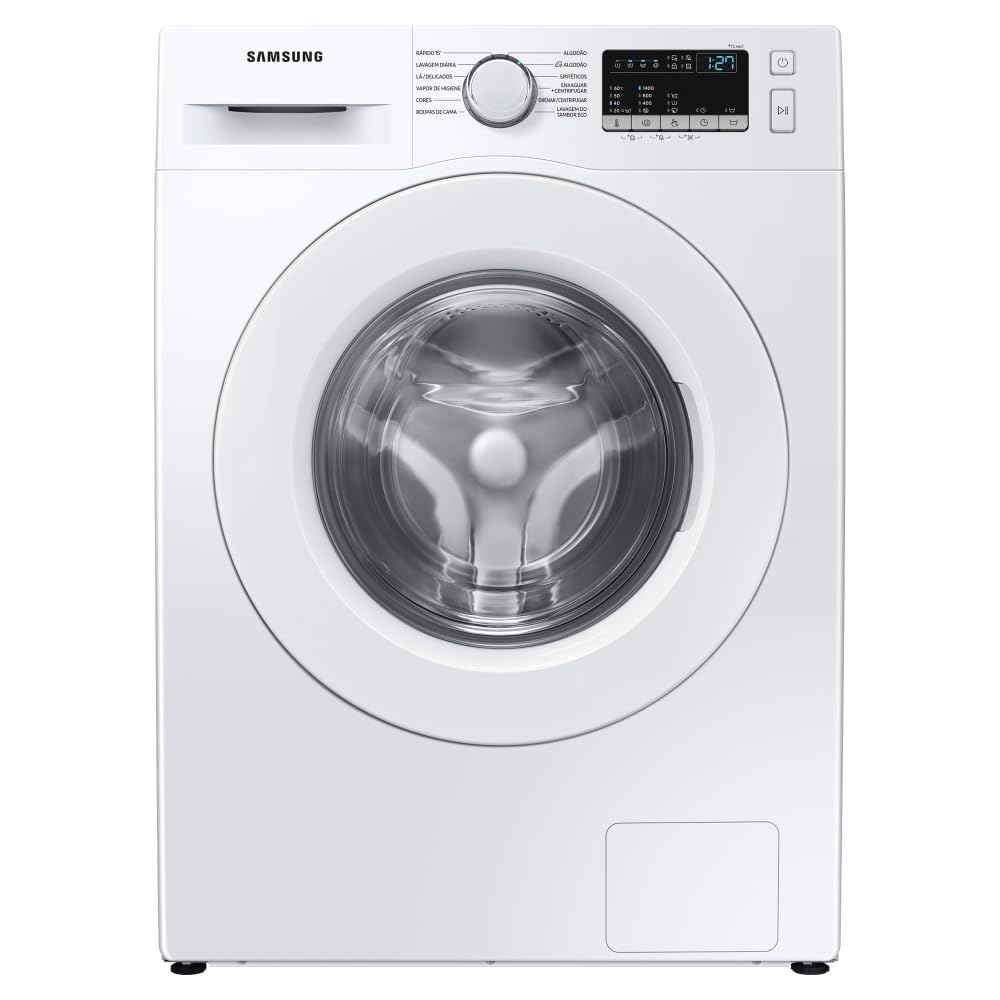
Figure 1: Front view of the Samsung WW11T 11kg Washing Machine. Note the label indicating it is a washing machine only, not a washer-dryer combination.
2. Safety Information
To reduce the risk of fire, electric shock, or injury when using your appliance, follow these basic precautions:
- Read all instructions before using the appliance.
- Do not wash articles that have been previously cleaned, washed, soaked, or spotted with gasoline, dry-cleaning solvents, or other flammable or explosive substances, as they emit vapors that could ignite or explode.
- Do not allow children to play on or in the appliance. Close supervision of children is necessary when the appliance is used near children.
- Do not reach into the appliance if the tub or agitator is moving.
- Do not install or store this appliance where it will be exposed to the weather or freezing temperatures.
- Do not tamper with controls.
- Do not repair or replace any part of the appliance or attempt any servicing unless specifically recommended in this manual or in published user-repair instructions that you understand and have the skills to carry out.
- Always disconnect the appliance from the power supply before attempting any service.
3. Setup and Installation
3.1 Unpacking
Carefully remove all packaging materials. Check for any damage during transit. Ensure all accessories are present.
3.2 Location Requirements
Install the washing machine on a firm, level surface. Ensure there is adequate space for water inlet and drain hoses, and power connection. Avoid direct sunlight or areas prone to freezing.

Figure 2: Washing machine dimensions for proper placement.
3.3 Removing Shipping Bolts
Before operating the washing machine, you must remove the shipping bolts located at the rear of the appliance. Failure to do so will cause severe vibration and damage.
3.4 Connecting Water and Drain Hoses
Connect the water inlet hose to the cold water tap and the corresponding inlet on the machine. Securely attach the drain hose to a standpipe or laundry tub, ensuring it is properly routed to prevent kinks.

Figure 3: Rear view illustrating water and drain hose connections.
3.5 Leveling the Machine
Adjust the leveling feet at the bottom of the washing machine to ensure it is perfectly level. Use a spirit level to verify. A level machine reduces noise and vibration during operation.
4. Operating Instructions
4.1 Control Panel Overview
The control panel allows you to select wash cycles, adjust settings, and start/pause the machine. Familiarize yourself with the buttons and display.

Figure 4: Detailed view of the control panel.
4.2 Loading Laundry
Open the door and load laundry into the drum. Do not overload the machine. Ensure items are evenly distributed.

Figure 5: Inside the Diamond Drum, designed for gentle washing.
4.3 Adding Detergent and Softener
Pull out the detergent drawer and add the appropriate amount of detergent to the main wash compartment. Add fabric softener to its designated compartment if desired.

Figure 6: Detergent and water mixing during a wash cycle.
4.4 Selecting a Wash Cycle
Turn the cycle selector knob or press the cycle buttons to choose the desired wash program. Common cycles include:
- Cotton: For cotton garments, bed linens, and towels.
- Synthetics: For synthetic fabrics like polyester and nylon.
- Quick Wash 15': For lightly soiled items or small loads requiring a fast wash.
- Steam Hygiene: For deep cleaning and sanitization, eliminating 99.9% of bacteria.
- Delicates: For sensitive items requiring gentle care.
4.5 Adjusting Options and Starting the Cycle
After selecting a cycle, you can adjust options such as temperature, spin speed, and rinse count using the corresponding buttons on the control panel. Press the Start/Pause button to begin the wash cycle.
5. Maintenance
5.1 Cleaning the Exterior
Wipe the exterior of the washing machine with a soft, damp cloth. Do not use abrasive cleaners or solvents.
5.2 Cleaning the Detergent Drawer
Periodically remove the detergent drawer and rinse it under running water to remove any detergent residue. Use a brush if necessary.
5.3 Cleaning the Drum
Run an 'Eco Drum Clean' cycle (if available) regularly to clean the drum and remove bacteria. If not available, run a hot wash cycle with no laundry and a cup of white vinegar or a specialized washing machine cleaner.

Figure 7: Water circulating to clean the drum and door seal.
5.4 Cleaning the Drain Filter
Locate the drain filter at the bottom front of the machine. Open the cover, drain any residual water, and unscrew the filter. Clean any lint or debris and rinse thoroughly before reinserting.
6. Troubleshooting
If you encounter issues with your washing machine, refer to the following common problems and solutions. For more complex issues or error codes not listed, please consult the full user manual or contact customer support.
| Problem | Possible Cause | Solution |
|---|---|---|
| Machine does not start | Power cord unplugged, door not closed, Start/Pause button not pressed. | Check power connection, ensure door is securely latched, press Start/Pause. |
| Water not filling | Water tap closed, inlet hose kinked, water pressure too low. | Open water tap, straighten hose, check household water pressure. |
| Excessive vibration/noise | Shipping bolts not removed, machine not level, uneven load. | Remove shipping bolts, level the machine, redistribute laundry. |
| Water not draining | Drain hose kinked, drain filter clogged. | Straighten drain hose, clean the drain filter. |
7. Specifications
- Model: WW11T4040EE/AZ
- Capacity: 11 Kilograms
- Voltage: 127 Volts
- Dimensions (D x W x H): 55 cm x 60 cm x 85 cm
- Special Features: Digital Inverter, Steam Hygiene
- Installation Type: Freestanding
- Control Panel: Touch
- Access Type: Front Load
- Color: White
8. Warranty Information
Your Samsung WW11T washing machine comes with a comprehensive warranty. Specifically, the Digital Inverter Compressor is covered by a 20-year warranty, reflecting its durability and advanced technology.

Figure 8: Digital Inverter Compressor with 20-year warranty.
For detailed terms and conditions regarding the full product warranty, please refer to the warranty card included with your appliance or visit the official Samsung website.
9. Support
If you require further assistance, technical support, or service, please contact Samsung customer service:
- Online: Visit the official Samsung website for support resources, FAQs, and service requests.
- Phone: Refer to your product documentation for local customer service contact numbers.