
1. Introduction
Thank you for choosing the Bloomfold BF021 Mobile Air Conditioner. This manual provides essential information for the safe and efficient operation, installation, and maintenance of your appliance. Please read this manual thoroughly before use and keep it for future reference.

Figure 1.1: Bloomfold BF021 Mobile Air Conditioner.
2. Safety Information
To prevent injury to the user or others and property damage, the following instructions must be followed. Incorrect operation due to ignoring instructions may cause harm or damage.
- Always operate the unit on a flat, stable surface.
- Do not block the air inlets or outlets. Maintain a minimum distance of 20 cm from walls or other objects.
- Do not insert fingers or foreign objects into the air inlets or outlets.
- Ensure the power cord is not damaged or pinched. Do not operate the unit with a damaged cord or plug.
- Always unplug the unit before cleaning or servicing.
- Do not use the unit in wet environments such as bathrooms or laundries.
- This appliance is not intended for use by persons (including children) with reduced physical, sensory or mental capabilities, or lack of experience and knowledge, unless they have been given supervision or instruction concerning use of the appliance by a person responsible for their safety.
- The appliance contains R-290 refrigerant. Do not puncture the refrigerant circuit.
3. Product Overview
3.1 Key Functions
The Bloomfold BF021 Mobile Air Conditioner offers multiple functions for your comfort:
- Cooling: Provides powerful cooling for rooms up to 35 m².
- Dehumidifying: Reduces excess moisture in the air.
- Ventilating: Circulates air without cooling.
- Sleep Mode: Adjusts cooling for comfortable sleep.
- WiFi Control: Allows control via a mobile application.
- Child Lock: Prevents unintended operation.

Figure 3.1: Overview of the Bloomfold Mobile Air Conditioner's functions.
3.2 Control Panel
The control panel on top of the unit allows for direct operation.
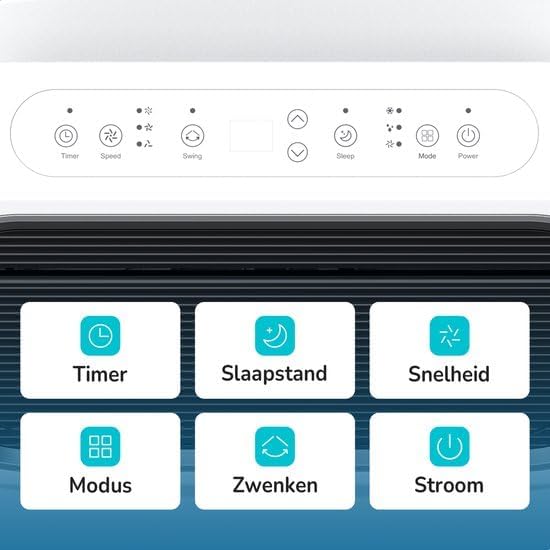
Figure 3.2: Control Panel Layout.
- Timer: Sets the automatic on/off time.
- Speed: Adjusts fan speed (Low, Medium, High).
- Swing: Activates or deactivates the automatic louver swing.
- Sleep: Engages sleep mode for quiet, energy-efficient operation.
- Mode: Selects operating mode (Cool, Fan, Dry).
- Power: Turns the unit on or off.
3.3 Remote Control
The included remote control provides convenient operation from a distance.
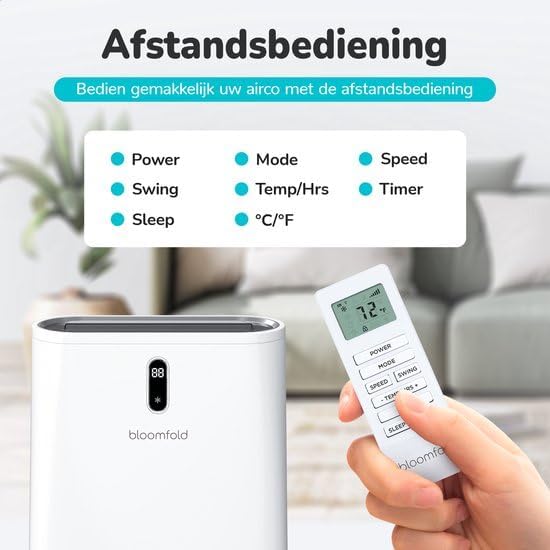
Figure 3.3: Remote Control.
- Power: Turns the unit on or off.
- Mode: Selects operating mode.
- Speed: Adjusts fan speed.
- Swing: Activates or deactivates louver swing.
- Temp/Hrs: Adjusts temperature or timer settings.
- Timer: Sets the automatic on/off time.
- Sleep: Engages sleep mode.
- °C/°F: Toggles between Celsius and Fahrenheit.
4. Setup and Installation
The Bloomfold BF021 is designed for easy installation and relocation.
4.1 Unpacking
Carefully remove the air conditioner and all accessories from the packaging. Check for any damage during transit. Keep the packaging for future storage or transport.
4.2 Placement
Place the unit on a firm, level surface. Ensure there is at least 20 cm of clear space around the unit for proper airflow. Do not place near heat sources or in direct sunlight.
4.3 Exhaust Hose and Window Kit Installation
The unit requires an exhaust hose to vent hot air outside. Connect the exhaust hose to the unit and then to the included window sealing kit. Install the window kit in a suitable window opening to ensure efficient heat exhaust.

Figure 4.1: Easy operation and mobility with integrated wheels.
5. Operating Instructions
Operate your Bloomfold BF021 using either the control panel or the remote control.
5.1 Power On/Off
Press the Power button to turn the unit on or off.
5.2 Mode Selection
Press the Mode button repeatedly to cycle through the available modes: Cool, Fan, Dry (Dehumidify).
5.3 Temperature Adjustment (Cooling Mode)
In Cooling mode, use the Temp/Hrs buttons (up/down arrows) on the remote or control panel to set your desired temperature.
5.4 Fan Speed Selection
Press the Speed button to select between Low, Medium, or High fan speeds.
5.5 Timer Function
Press the Timer button to set a specific time for the unit to automatically turn on or off. Use the temperature adjustment buttons to set the desired hours.
5.6 Sleep Mode
Activate Sleep Mode for quieter operation and optimized temperature adjustments during the night. The unit will gradually increase the set temperature by 1°C after 1 hour, and another 1°C after 2 hours, maintaining this temperature for 6 hours before turning off or returning to the original setting.

Figure 5.1: Smart Sleep Mode for enhanced comfort.
5.7 Swing Function
Press the Swing button to activate or deactivate the automatic louver swing, which helps distribute air evenly.
5.8 App Control (WiFi)
The unit supports control via a mobile application. Refer to the separate WiFi setup guide for instructions on connecting your device to the app.
6. Maintenance
Regular maintenance ensures optimal performance and extends the lifespan of your air conditioner. Always unplug the unit before performing any maintenance.
6.1 Filter Cleaning
The unit is equipped with an active carbon filter. Clean the air filter every two weeks or more frequently depending on usage. Remove the filter, wash it with lukewarm water and mild detergent, rinse thoroughly, and allow it to air dry completely before reinserting.
6.2 Water Drainage
During cooling and dehumidifying operations, water condensation will occur. The unit has a drainage port. Regularly check and drain the water reservoir to prevent overflow. For continuous drainage, connect the provided drain hose to the drainage port.
6.3 Exterior Cleaning
Wipe the exterior of the unit with a soft, damp cloth. Do not use harsh chemicals, abrasives, or solvents, as these may damage the surface.
6.4 Storage
If the unit will not be used for an extended period, drain all water, clean the filters, and store it in a dry, cool place, preferably in its original packaging.
7. Troubleshooting
Before contacting customer support, please refer to the following troubleshooting guide for common issues.
| Problem | Possible Cause | Solution |
|---|---|---|
| Unit does not turn on | No power supply; Power cord not plugged in; Fuse blown; Water tank full. | Check power connection; Plug in power cord; Replace fuse; Empty water tank. |
| No cooling or weak cooling | Air filter dirty; Air inlet/outlet blocked; Room too large; Doors/windows open; Temperature setting too high. | Clean air filter; Clear blockages; Ensure room size is within limits; Close doors/windows; Lower temperature setting. |
| Unusual noise | Unit not on a level surface; Foreign object inside. | Place on a flat surface; Turn off and inspect for foreign objects. |
| Water leakage | Drainage plug loose; Drain hose blocked; Water tank full. | Secure drainage plug; Clear drain hose; Empty water tank. |
8. Specifications
Technical specifications for the Bloomfold BF021 Mobile Air Conditioner.
| Feature | Specification |
|---|---|
| Model Number | BF021 |
| Brand | Bloomfold |
| Cooling Capacity | 12,000 BTU |
| Room Coverage | Up to 35 m² |
| Product Dimensions (D x W x H) | 31.5 x 31 x 70 cm |
| Weight | 33.5 kg |
| Wattage | 1337 W |
| Refrigerant | R-290 |
| Noise Level | <65 dB |
| Energy Efficiency | A+++ |
| Filter Type | Activated Carbon Filter |
| Control Method | Remote Control, App |
| Included Components | Mobile Air Conditioner (1x), Remote Control (1x), Manual (1x), Exhaust Hose (1x), Drain Hose (1x), Hose Connector (2x), Window Sealing Kit (1x) |

Figure 8.1: Energy Label for BF021.
9. Warranty and Support
This Bloomfold BF021 Mobile Air Conditioner comes with a limited warranty. Please refer to the warranty card included in the packaging for specific terms and conditions.
For technical support, service, or warranty claims, please contact your retailer or the Bloomfold customer service department. Contact information can typically be found on the Bloomfold official website or your purchase documentation.
