
1. Introduction
Thank you for choosing the DaranEner SP100 100W Portable Solar Panel. This manual provides essential information for the safe and efficient use of your solar panel. Please read it thoroughly before operation and retain it for future reference.
The DaranEner SP100 is a high-efficiency, foldable solar panel designed to provide portable power for various applications, including charging power stations, camping equipment, RVs, and emergency power needs. Its robust design and versatile output options make it an ideal solution for off-grid power.
2. Product Features
- High Efficiency: Converts up to 22% of sunlight into solar energy, providing 100W 20V power output.
- Versatile Outputs: Equipped with USB-C (max. 60W), USB-A (max. 18W), and MC4 output ports for charging multiple devices simultaneously.
- Portable and Foldable: Compact folded size of approximately 54.9 x 56.6 cm (21.6 x 22.3 inches) and a lightweight design (3.2 kg / 5.88 lbs) for easy transport.
- Durable Construction: Features an IP54 waterproof rating for protection against dust and splashing water, and an ETFE film coating for enhanced UV protection and extended lifespan.
- Integrated Stand: Flexible and stable stand allows for optimal angle adjustment to maximize sunlight absorption.
- Compatibility: Designed to be compatible with DaranEner NEO300 power stations and other solar generators.
3. Package Contents
Please check the package for the following items:
- DaranEner SP100 Portable Solar Panel
- MC4-DC5521 Cable
- User Manual (this document)
4. Safety Instructions
To ensure safe operation and prolong the life of your solar panel, please observe the following safety precautions:
- Do not bend, drop, or puncture the solar panel. This can damage the solar cells and reduce efficiency.
- Avoid exposing the panel to open flames or extreme heat.
- Do not attempt to disassemble or modify the solar panel. Unauthorized modifications can be dangerous and will void the warranty.
- Keep the panel away from corrosive substances.
- Ensure proper ventilation when operating, especially when connected to a power station.
- Keep out of reach of children and pets.
- Handle the panel with care to avoid damage to the surface or frame.
5. Setup Guide
5.1 Unfolding and Positioning the Solar Panel
- Carefully unfold the DaranEner SP100 solar panel on a flat, stable surface.
- Extend the integrated kickstands on the back of the panel.
- Adjust the angle of the panel to face the sun directly. Optimal performance is achieved when the panel is perpendicular to the sun's rays.

Image: The DaranEner SP100 solar panel unfolded and positioned with its kickstands in a natural outdoor setting, demonstrating its readiness for use.

Image: A detailed view of the solar panel's flexible and stable stand, highlighting its ability to absorb more sunlight by adjusting the angle.
5.2 Connecting to a Power Station
- Locate the MC4 output cable from the solar panel.
- Connect the MC4-DC5521 cable (included) to the MC4 output of the solar panel.
- Plug the DC5521 connector into the DC input port of your compatible power station (e.g., DaranEner NEO300).
- Ensure all connections are secure. The power station should indicate that it is receiving a charge.

Image: Several DaranEner SP100 solar panels are shown connected to a power station in a camping setting, illustrating how multiple panels can be used together for increased charging capacity.
5.3 Charging USB Devices Directly
The DaranEner SP100 features USB-C and USB-A output ports for direct charging of compatible devices.
- With the solar panel exposed to sunlight, connect your USB-C or USB-A compatible device (e.g., smartphone, tablet) to the corresponding port on the solar panel.
- The device should begin charging automatically.
6. Operating Instructions
6.1 Optimal Charging Conditions
For best charging performance:
- Ensure the solar panel is placed in direct sunlight, free from shadows from trees, buildings, or other obstructions.
- Adjust the panel's angle periodically throughout the day to maintain direct exposure to the sun.
- Clear skies and midday sun generally provide the highest charging rates.
6.2 Parallel Connection (Optional)
To achieve maximum performance and faster charging, you can connect two DaranEner SP100 solar panels in parallel using a compatible parallel cable (sold separately). Refer to your power station's manual for specific instructions on parallel solar input.

Image: An overhead view showing a DaranEner solar panel placed on a vehicle's roof, connected to a power station, demonstrating its use for mobile charging.
7. Maintenance
Regular maintenance ensures optimal performance and longevity of your solar panel:
- Cleaning: Periodically wipe the surface of the solar panel with a soft, damp cloth to remove dust, dirt, or debris. Avoid abrasive cleaners or harsh chemicals that could damage the ETFE coating.
- Inspection: Regularly check the panel for any physical damage, such as cracks, dents, or frayed cables. Ensure all connections are secure and free from corrosion.
- Storage: When not in use, fold the solar panel and store it in a dry, cool place away from direct sunlight and extreme temperatures. Use the integrated straps to secure it in its folded position.

Image: A person is shown carrying the folded DaranEner SP100 solar panel while hiking, highlighting its compact and portable design for outdoor adventures.

Image: Water droplets are shown splashing across the surface of the solar panel, illustrating its IP54 waterproof capability.
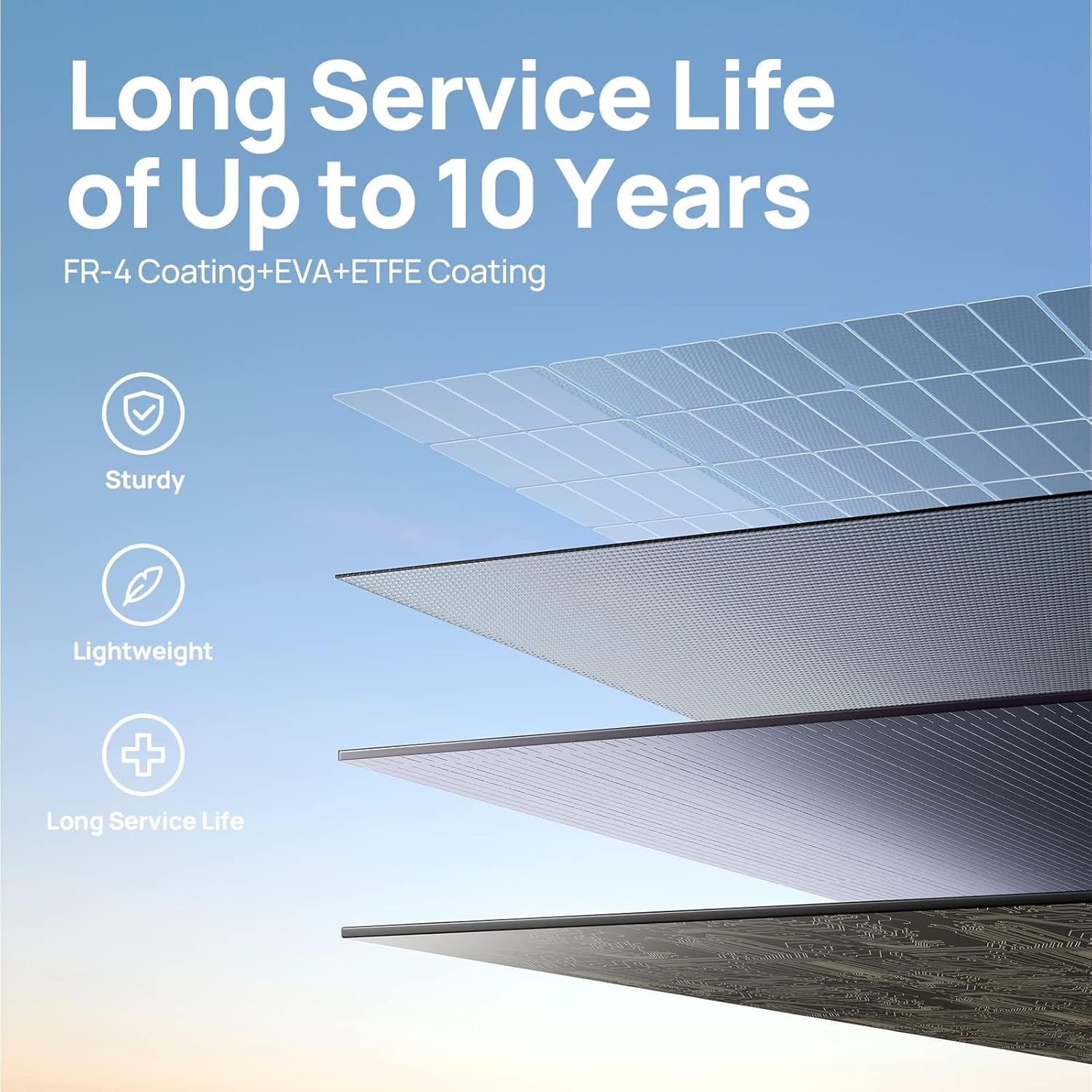
Image: A cutaway diagram of the solar panel's construction, detailing the FR-4, EVA, and ETFE layers that contribute to its sturdy, lightweight, and long-lasting design.
8. Troubleshooting
If you encounter issues with your DaranEner SP100 solar panel, refer to the following common problems and solutions:
- Panel Not Charging / Slow Charging:
- Check Sunlight Exposure: Ensure the panel is in direct, unobstructed sunlight. Shadows, even partial ones, can significantly reduce output.
- Adjust Angle: Re-position the panel to face the sun directly.
- Clean Surface: Dust or dirt on the panel surface can hinder efficiency. Clean it as described in the Maintenance section.
- Secure Connections: Verify that all cables (MC4, DC5521, USB) are firmly connected to both the solar panel and the charging device/power station.
- Power Station Compatibility: Confirm that your power station is compatible with the solar panel's voltage and current output.
- Avoid Simultaneous Use: If charging a power station, avoid using the power station to power other devices simultaneously, as this can lead to slower charging or even battery depletion.
- No Power Output from USB Ports:
- Sufficient Sunlight: Ensure the panel is receiving adequate sunlight. USB outputs require a certain level of power generation to activate.
- Device Connection: Reconnect your USB device to ensure a proper connection.
- Cable Integrity: Try a different USB cable to rule out a faulty cable.
If the problem persists after trying these steps, please contact DaranEner customer support for assistance.
9. Specifications
| Feature | Specification |
|---|---|
| Model | SP100 |
| Maximum Power | 100 Watts |
| Efficiency | Up to 22% |
| Output Ports | MC4, USB-C (max. 60W), USB-A (max. 18W) |
| Folded Dimensions | Approx. 54.9 x 56.6 cm (21.6 x 22.3 inches) |
| Weight | 3.2 kg (5.88 pounds) |
| Waterproof Rating | IP54 |
| Coating Material | ETFE |
10. Warranty and Support
The DaranEner SP100 Portable Solar Panel comes with a 12-month service warranty from the date of purchase. This warranty covers manufacturing defects and workmanship under normal use.
For warranty claims, technical support, or any inquiries, please contact DaranEner customer service through the retailer where you purchased the product or visit the official DaranEner website for contact information.
Please have your purchase receipt and product model number (SP100) ready when contacting support.