
1. Introduction
This manual provides essential information for the safe and efficient operation, maintenance, and troubleshooting of your PowerSmart 4450W Gas Powered Portable Inverter Generator. This generator is designed to provide reliable power for various applications, including home backup, RV use, camping, and job site tools. It features a 223cc 4-stroke gas engine, a 2.7-gallon fuel tank, and a CO-Sensor for enhanced safety. Please read this manual thoroughly before operating the generator to ensure proper use and to prevent injury or damage.

Figure 1: PowerSmart 4450W Portable Inverter Generator. This image shows the overall design of the generator, highlighting its compact and robust frame.
Intended Use
The PowerSmart 4450W Inverter Generator is suitable for:
- Home Emergency Backup: Powering essential appliances during outages.
- Recreational Vehicles (RVs): Providing power for RV systems while camping or traveling.
- Camping: Supplying electricity for lights, small appliances, and charging devices in outdoor settings.
- Job Sites: Operating various tools and equipment.
- Outdoor Events: Powering tailgating activities or other outdoor gatherings.

Figure 2: Illustration of various applications for the PowerSmart generator, including home use, tailgating, hunting, DIY projects, camping, and emergency backup.
2. Safety Information
Your safety and the safety of others are very important. This manual contains important safety messages. Please read them carefully. Failure to follow these instructions can result in serious injury or death.
General Safety Precautions
- Carbon Monoxide Hazard: Generators produce carbon monoxide, a colorless, odorless, poisonous gas. Operate the generator outdoors only, far away from windows, doors, and vents. Never operate indoors, in a garage, or in any enclosed space.
- Electrical Shock Hazard: Never operate the generator in wet conditions. Ensure all electrical connections are dry and secure. Do not touch the generator with wet hands.
- Fire Hazard: Gasoline is highly flammable. Refuel in a well-ventilated area with the engine off and cool. Do not smoke or allow open flames near the generator. Store fuel in an approved container.
- Hot Surfaces: The generator's engine and muffler become very hot during operation and remain hot for some time after shutdown. Avoid touching hot surfaces to prevent burns.
- Moving Parts: Keep hands, feet, hair, and clothing away from moving parts to prevent injury.
- Children and Pets: Keep children and pets away from the generator at all times.
- CO-Sensor: This generator is equipped with a CO-Sensor that automatically shuts down the engine if carbon monoxide levels become dangerously high. Do not disable or tamper with this safety feature.
Personal Protective Equipment (PPE)
Always wear appropriate PPE when operating or maintaining the generator:
- Eye Protection: Safety glasses or goggles.
- Hearing Protection: Earplugs or earmuffs, especially during prolonged operation.
- Gloves: To protect hands during handling and maintenance.
3. Components Overview
Familiarize yourself with the main components and controls of your PowerSmart Inverter Generator.

Figure 3: Detailed diagram of the PowerSmart generator control panel, labeling key components such as the Run/Stop switch, ECO switch, VFT meter, AC outlets, DC outlet, and circuit breakers.
Control Panel Features:
- ENG. SW (Engine Switch): Used to turn the engine ON or OFF.
- ECO Switch: Engages ECO mode for fuel efficiency and quieter operation under light loads.
- LED Alarm Indicators: Lights for CO Self-Test, CO Alarm, Overload, and Low Oil.
- V.F.T. Meter: Displays Voltage, Frequency, and Run Time.
- AC Breaker 20A: Overload protection for 120V 20A outlets.
- AC Reset: Button to reset the AC breaker.
- AC120V 20A Outlets: Standard household outlets.
- AC120V 30A Outlet: Twist-lock outlet for higher power demands.
- Parallel Operation Outlets: Connectors for linking two compatible generators for increased power output (Parallel Kit sold separately).
- DC Breaker: Overload protection for the DC 12V outlet.
- DC 12V Outlet: For charging 12V batteries.
- Ground Terminal: For connecting a ground wire.
4. Setup
Before starting your generator for the first time, perform the following setup steps.
4.1 Unpacking and Inspection
- Carefully remove the generator from its packaging.
- Inspect for any shipping damage. If damage is found, contact customer support immediately.
- Ensure all included accessories are present.
4.2 Adding Engine Oil
The generator is shipped without engine oil. You must add the recommended oil before first use.
- Place the generator on a level surface.
- Locate the oil fill cap/dipstick.
- Remove the dipstick and wipe it clean.
- Pour the recommended engine oil (e.g., SAE 10W-30) into the oil fill opening until it reaches the upper mark on the dipstick. Do not overfill. The oil capacity is approximately 0.6 liters.
- Reinstall the dipstick securely.
4.3 Adding Fuel
Use only fresh, unleaded gasoline with an octane rating of 87 or higher. Do not use E85 fuel.
- Ensure the generator engine is OFF and cool.
- Move the generator to a well-ventilated outdoor area for refueling.
- Remove the fuel cap.
- Carefully pour gasoline into the fuel tank, filling it to about 1 inch below the filler neck to allow for expansion. The tank capacity is 2.7 gallons.
- Securely replace the fuel cap.
- Wipe up any spilled fuel immediately.

Figure 4: A person performing initial setup of the PowerSmart generator in an outdoor setting, demonstrating its portability and ease of deployment.
4.4 Grounding the Generator
For safety, it is recommended to ground the generator. Connect a heavy-gauge copper wire from the generator's ground terminal to a suitable ground rod driven into the earth.
5. Operation
5.1 Starting the Engine
- Ensure the generator is on a level surface, outdoors, and away from any combustible materials.
- Make sure the fuel tank is filled and the oil level is correct.
- Turn the Engine Switch (ENG. SW) to the "ON" position.
- If the engine is cold, move the choke lever to the "CHOKE" position.
- Pull the recoil starter handle firmly and smoothly until the engine starts.
- Once the engine starts, slowly move the choke lever back to the "RUN" position.
- Allow the engine to warm up for a few minutes before connecting electrical loads.
5.2 Connecting Electrical Loads
- Ensure the generator is running stably.
- Plug in your appliances or extension cords into the appropriate AC outlets.
- Do not overload the generator. The total running wattage should not exceed 3680W.
- If an overload occurs, the AC breaker will trip. Reduce the load and press the AC Reset button.
5.3 ECO Mode Operation
The ECO switch allows the engine speed to automatically adjust to the load, improving fuel efficiency and reducing noise levels.
- To activate ECO mode, press the ECO switch to the "ON" position.
- To deactivate ECO mode, press the ECO switch to the "OFF" position.
- It is recommended to use ECO mode for light loads to conserve fuel.
5.4 Parallel Operation (Optional)
This generator is parallel-ready, allowing you to connect two compatible PowerSmart inverter generators using a separately sold parallel kit to double your power output.

Figure 5: Two PowerSmart generators shown connected in parallel, illustrating the capability to combine power output for higher demands. A parallel kit is required and sold separately.
Refer to the parallel kit's instruction manual for detailed connection procedures.
5.5 Stopping the Engine
- Disconnect all electrical loads from the generator.
- Allow the engine to run for a few minutes without load to cool down.
- Turn the Engine Switch (ENG. SW) to the "OFF" position.
- Turn the fuel valve to the "OFF" position (if applicable).
6. Maintenance
Regular maintenance is crucial for the longevity and reliable operation of your generator. Always ensure the engine is OFF and cool before performing any maintenance.
6.1 Maintenance Schedule
| Item | Every Use | Every 25 Hours / Monthly | Every 100 Hours / Annually |
|---|---|---|---|
| Check Engine Oil Level | ✓ | ||
| Clean Air Filter | ✓ | ||
| Change Engine Oil | (First 20 hours, then) | ✓ | |
| Inspect Spark Plug | ✓ | ||
| Inspect Fuel Filter | ✓ |
6.2 Storage
If storing the generator for more than 30 days:
- Drain the fuel tank and carburetor. Run the engine until it stops from lack of fuel.
- Change the engine oil.
- Remove the spark plug and pour a small amount of engine oil into the cylinder. Pull the recoil starter a few times to distribute the oil, then reinstall the spark plug.
- Clean the exterior of the generator.
- Store in a clean, dry, well-ventilated area, away from direct sunlight and heat sources.
7. Troubleshooting
This section provides solutions to common problems you might encounter with your generator.
| Problem | Possible Cause | Solution |
|---|---|---|
| Engine will not start | No fuel Low oil level Engine switch OFF Choke not set correctly Spark plug issue | Add fresh fuel Add engine oil Turn engine switch ON Adjust choke Inspect/clean/replace spark plug |
| No power output | AC breaker tripped Overload Faulty appliance/cord | Press AC Reset button Reduce connected load Test appliance/cord separately |
| Engine runs, then stops | Low oil level Out of fuel CO-Sensor activated Clogged fuel filter | Add engine oil Add fresh fuel Move generator to open air, allow to cool, restart Clean/replace fuel filter |
| Engine runs rough | Stale fuel Clogged air filter Spark plug issue | Drain and refill with fresh fuel Clean/replace air filter Inspect/clean/replace spark plug |
If you are unable to resolve an issue using this troubleshooting guide, please contact PowerSmart customer support.
8. Specifications
Technical specifications for the PowerSmart 4450W Gas Powered Portable Inverter Generator.
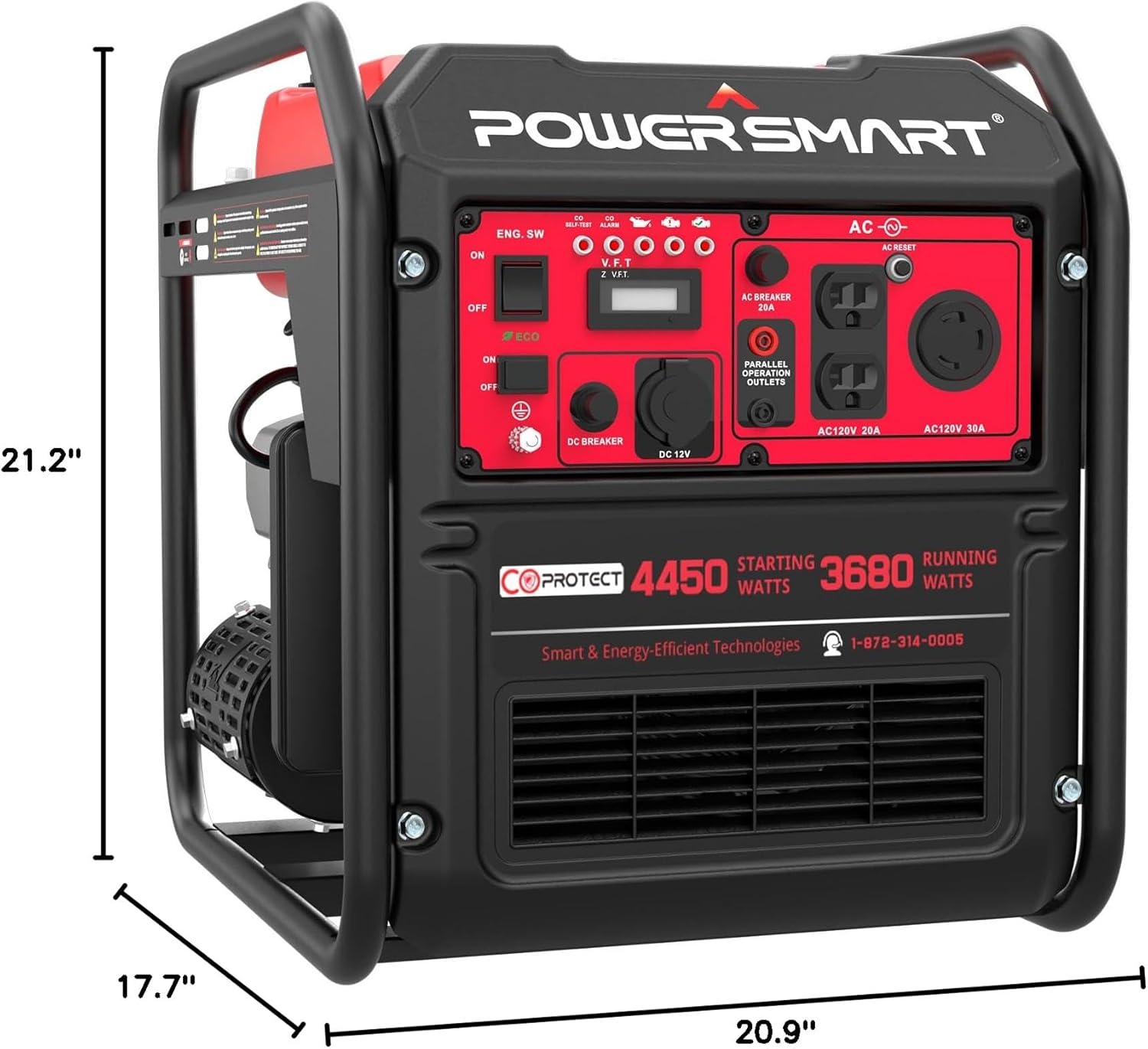
Figure 6: Diagram showing the dimensions of the PowerSmart generator: 21.2"H x 17.7"W x 20.9"L.
| Feature | Detail |
|---|---|
| Model Name | MB5040C |
| Starting Wattage | 4450 Watts |
| Running Wattage | 3680 Watts |
| Engine Type | 223cc 4-Stroke, EPA Certified |
| Fuel Type | Unleaded Gasoline (87+ Octane) |
| Fuel Tank Capacity | 2.7 Gallons |
| Runtime (50% Load) | Up to 11 Hours |
| Voltage | 120 Volts (AC) |
| Outlets | 2x AC120V 20A, 1x AC120V 30A, 1x DC 12V |
| Sound Level | 76dB(A) at 23 feet |
| Item Weight | 68.8 Pounds |
| Product Dimensions (L x W x H) | 20.9" x 17.7" x 21.2" |
| Special Features | CO-Sensor, Portable, ECO Mode, Parallel Ready |
9. Warranty & Support
9.1 Warranty Information
The PowerSmart 4450W Gas Powered Portable Inverter Generator comes with a 2-year limited warranty. This warranty covers defects in materials and workmanship under normal use. Please retain your proof of purchase for warranty claims. For full warranty terms and conditions, please refer to the warranty card included with your product or visit the official PowerSmart website.
9.2 Customer Support
If you have any questions, require technical assistance, or need to report an issue, please contact PowerSmart customer support. Our expert team is available to provide professional assistance.
- Email: support2@powersmartusa.com
- Phone: 1-872-314-0005
- Website: www.powersmartusa.com (Note: This is a placeholder URL, please verify the actual website)

Figure 7: Image depicting a customer support team, symbolizing PowerSmart's commitment to providing assistance to its users.
PowerSmart is headquartered in Itasca, Illinois, and provides support through its IL headquarters and a network of 500+ certified repair centers in the U.S.