
Introduction
Thank you for choosing the Retevis RB48 Plus GMRS Walkie Talkie. This heavy-duty, IP67 waterproof 2-way radio is designed for reliable long-range communication in various environments, including construction sites, warehouses, and outdoor activities. This manual provides essential information for setup, operation, maintenance, and troubleshooting to ensure optimal performance of your device.

The Retevis RB48 Plus is engineered for robust performance in challenging conditions.
What's in the Box
Ensure all items are present upon unboxing:
- RB48 Plus two way radio x4
- 2000mAh (Li-ion) battery x4
- Charging base x4
- Type-C charging cable x4
- Adapter x4
- User manual x4
- Belt clip x4

Included components in the Retevis RB48 Plus package.
Product Overview
The Retevis RB48 Plus features a robust design with intuitive controls for ease of use in demanding environments.

A set of four Retevis RB48 Plus walkie talkies.
Key Components & Controls
- Antenna: For signal transmission and reception.
- Volume Knob: Rotate to power on/off and adjust volume.
- Display: Shows channel number, battery status, and feature icons.
- PTT (Push-to-Talk) Button: Large central button for transmitting voice.
- Side PTT Button: Additional PTT button on the side for convenient use.
- Call Button: Initiates a call tone or activates NOAA weather alert (long press).
- Menu Button: Accesses and navigates through radio settings.
- Monitor/Scan Button: Short press for monitor, long press for scan.
- Up/Down Buttons: Used for channel adjustment and menu navigation.
- USB-C Charging Port: Located on the side for direct charging.
- 2.5mm Port: For external audio accessories like earpieces.
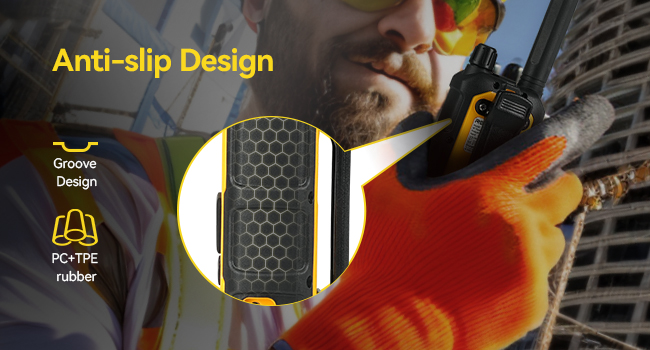
Anti-slip design for secure handling.
Setup
1. Attaching the Antenna
Carefully screw the antenna onto the top connector of the radio until it is finger-tight. Do not overtighten.
2. Charging the Battery
The RB48 Plus radios come with a 2000mAh Li-ion battery. You can charge the radio using two methods:
- Desktop Charging: Place the radio in the provided charging base. Connect the Type-C cable to the base and the adapter to a power source.
- Direct USB-C Charging: Plug the Type-C cable directly into the USB-C port on the side of the radio. Ensure the port cover is fully sealed for waterproof integrity.
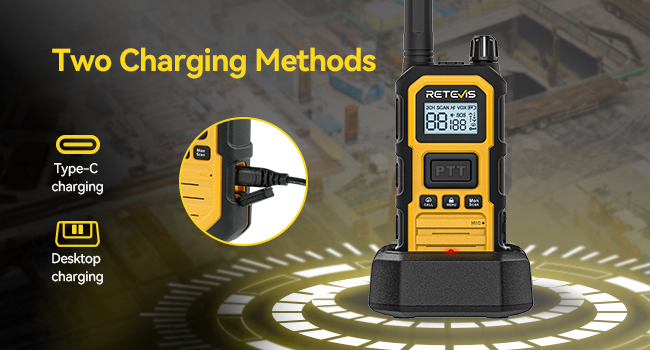
Flexible charging options for your convenience.
3. GMRS License Requirement
To operate the RB48 Plus GMRS radio in the United States, a GMRS license is required. This license costs $35 and is valid for 10 years, with no exam required. Obtaining a GMRS license unlocks higher power and repeater capabilities, ensuring stronger, longer-range communication.

GMRS license is essential for full functionality in the US.
Operating Instructions
1. Power On/Off & Volume Adjustment
Rotate the volume knob clockwise to power on the radio. Continue rotating to increase the volume. Rotate counter-clockwise to decrease the volume and power off.
2. Channel Adjustment
To change channels, press the Menu button once. The channel number will flash. Use the Up/Down buttons to select your desired channel. Press PTT to confirm and exit. The radio will announce the channel number.
3. Push-to-Talk (PTT)
To transmit, press and hold the PTT button (either the central or side button) and speak into the microphone. Release the PTT button to receive.
4. Call Function & Vibration Alert
Short press the Call button to send a call tone to other radios on the same channel. The RB48 Plus also features a vibration alert for incoming calls, useful in noisy environments.

VOX hands-free and Call Vibration features.
5. NOAA Weather Alert
Long press the Call button to activate the NOAA weather alert function. The radio will scan NOAA channels and alert you to severe weather conditions.

NOAA Weather Channels and Emergency Alarm.
6. Group Call
The RB48 Plus supports one-key group call. Press the group call button to send your voice to all group members regardless of their current channel, improving communication efficiency.
7. VOX Hands-free Operation
Activate VOX (Voice Operated Exchange) through the menu to enable hands-free communication. You can transmit by speaking into the microphone without pressing PTT.
8. Key Lock
Long press the Menu button to lock/unlock the keypad, preventing accidental changes to settings.
Instructional Videos:
Quick introduction to RB48P heavy duty GMRS radio. This video provides an overview of the radio's features and basic operation.
Function operation guide for RB48P two way radio - group call, cancel ctcss/dcs, etc. This video details specific operational functions.
Outdoor Testing - RB48P walkie talkie's call function. Demonstrates the radio's performance in an outdoor setting.
Key Features
1. Long Range Communication
The RB48 Plus offers high power output, providing smooth communication over 350,000 sq.ft. or up to 30-story buildings, ensuring reliable contact wherever you are.

High power for extensive coverage.
2. Advanced Triple Proof (IP67)
The radio is IP67 rated, meaning it is highly resistant to water, dust, and shocks. It can withstand 1m depth water for 30 minutes and is protected against 0.1μm dense dust. Its anti-slip design and shock resistance help it withstand drops up to 2M.

Built for harsh environments with IP67 rating.
3. Long Standby Time
With a built-in 2000mAh battery, the RB48 Plus supports up to 100 hours of standby time and 18 hours of continuous use. Type-C charging offers increased flexibility.

Extended battery life for prolonged use.
4. Dual PTT Design
The radio features both a central PTT button and a side PTT button, allowing for convenient operation even when wearing gloves.
Instructional Videos:
Retevis RB48P long range walkie talkies review. This video highlights the range capabilities of the radio.
5 Tests Prove Why RB48P Is Retevis's Toughest Walkie-Talkies. Demonstrates the durability and resilience of the radio.
Long range, ultra-durable, RB48P heavy duty walkie talkies test on construction sites. Shows real-world performance in demanding environments.
Specifications
| Feature | Detail |
|---|---|
| Brand | Retevis |
| Model Number | FA9289AX4-C9034AX4 |
| Item Weight | 2.65 pounds |
| Product Dimensions | 1.3 x 2.4 x 8.1 inches |
| Batteries | 4 Lithium Ion batteries required. (included) |
| Country of Origin | China |
| Color | Yellow |
| Number of Channels | 30 |
| Frequency Range | GMRS |
| Water Resistance Level | Waterproof (IP67) |
| Voltage | 7.4 Volts (DC) |

Comprehensive technical specifications.
Troubleshooting
- No Power: Ensure the battery is charged and properly installed. Check the volume knob is turned on.
- Cannot Communicate: Verify both radios are on the same channel and privacy code (CTCSS/DCS). Ensure the PTT button is fully pressed during transmission.
- Poor Audio Quality: Check antenna connection. Ensure you are within range. Adjust squelch level if available.
- Water Damage: Ensure all port covers are securely sealed before exposure to water. If water enters, power off immediately and allow to dry completely before attempting to use again.
For specific issues or advanced troubleshooting, refer to the detailed user manual or contact customer support.
Maintenance
- Cleaning: Wipe the radio with a soft, damp cloth. Do not use harsh chemicals or solvents.
- Battery Care: Fully charge the battery before first use and after prolonged storage. Avoid overcharging.
- Storage: Store the radio in a cool, dry place away from direct sunlight and extreme temperatures.
Warranty & Customer Support
Retevis provides a 5-year warranty for the radio body and a 1-year warranty for accessories. You also receive 30 days no-reason return policy. For any issues or inquiries, please contact Retevis customer support via Amazon. They aim to reply within 12 hours.

Retevis is committed to providing reliable communication solutions and excellent customer service.