
CEYOMUR CY95
Contents
CEYOMUR 4K 30fps Solar Trail Camera Instruction Manual
Model: CY95
Brand: CEYOMUR
Introduction
The CEYOMUR 4K 30fps Solar Trail Camera (Model CY95) is designed for capturing high-quality photos and videos of wildlife with minimal human intervention. Featuring advanced solar power capabilities and robust construction, it is an ideal tool for outdoor enthusiasts, researchers, and property owners.
Key Features:
- Efficient Solar Powered & Dual Power Sources: Equipped with a built-in rechargeable battery and a top-mounted solar panel, this camera minimizes battery consumption. It also supports 4 AA batteries as a backup power source for extended use.
- Crisp 4K/30FPS Ultra HD Videos: Captures 46MP high-resolution photos and 4K ultra HD videos with audio at 30fps, revealing intricate details of wildlife. Features two high-power 850nm LEDs for clear night vision.
- Fast 0.1s Trigger & Wide 120° Detection: Reacts instantly to movement within 65ft, day or night, thanks to three high-sensitivity PIR sensors and an ultra-fast trigger speed.
- Smart WiFi & Bluetooth Connectivity: Connects to your smartphone via low-power WiFi and Bluetooth using the "WILDLIFE CAM" app, allowing remote preview, download, and settings adjustment within 33ft.
- Easy to Use & Feature-Rich: Supports up to 256GB micro memory card (32GB pre-installed). Includes a 2.0-inch LCD color screen for direct footage preview, time stamping, monitor period, password protection, and a lockhole.
Official Product Overview: This video provides a comprehensive overview of the CEYOMUR CY95 trail camera, highlighting its key features and benefits.
What's in the Box
Upon unboxing your CEYOMUR Trail Camera, you should find the following components:
- 1 x Trail Camera CY95
- 1 x U3 32GB Micro SD Card (pre-installed)
- 1 x USB Cable
- 1 x Strap
- 1 x Mount
- 1 x User Manual

Image: All components included with the CEYOMUR CY95 Trail Camera.
Setup Guide
1. Powering the Camera
The CY95 trail camera offers versatile power options:
- Integrated Solar Panel: The built-in solar panel on top of the camera continuously charges the internal rechargeable battery when exposed to sunlight, extending the camera's operational time significantly.
- AA Batteries (Backup): For added reliability, especially in low light conditions or extended periods, you can install 4 AA batteries (not included) as a backup power source. The camera will automatically switch to AA battery power if the internal rechargeable battery falls below 30%.

Image: The integrated solar panel provides continuous power to the camera.
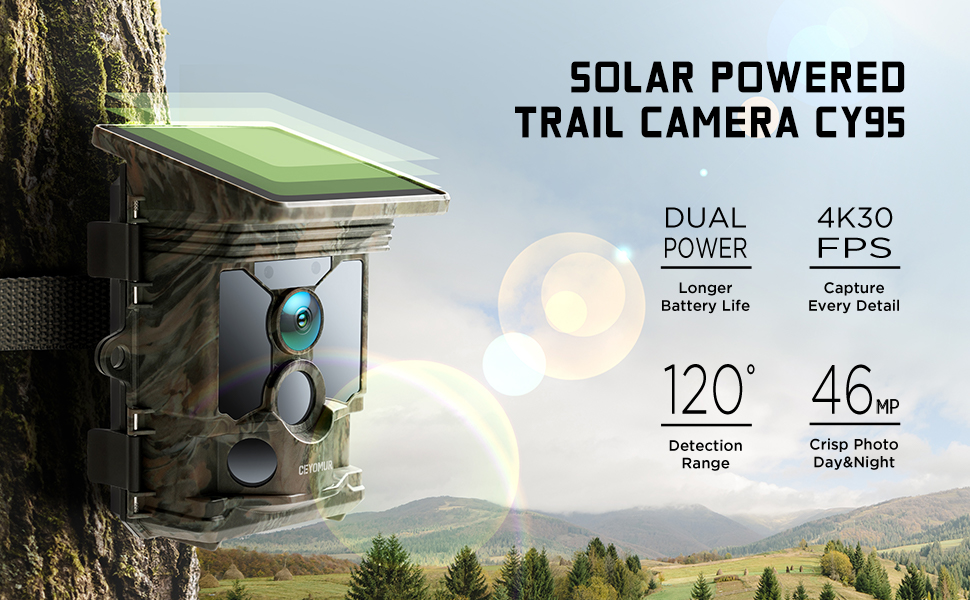
Image: Dual power sources ensure long-lasting performance in the field.
2. Inserting the Memory Card
A U3 32GB Micro SD Card is pre-installed in the card slot. Ensure it is properly seated before use. The camera supports micro memory cards up to 256GB. It is recommended to format the memory card via the camera's MENU settings before first use to ensure compatibility and optimal performance.

Image: The camera comes with a pre-installed 32GB Micro SD card.
3. Initial Configuration and App Connection
The camera features a 2.0-inch LCD color screen for direct preview of footage and basic settings adjustment. For more advanced control and wireless file transfer, download the "WILDLIFE CAM" app on your smartphone. The app allows you to:
- Preview footage and download it to your phone.
- Adjust camera settings remotely.
- Check the lens angle for optimal placement.
Note: The Wi-Fi connection range is limited to approximately 33 feet (10 meters).

Image: Seamless control and file transfer via the dedicated smartphone app.
4. Mounting the Camera
Use the included strap or mount to secure the camera to a tree or other suitable surface. Ensure the camera is positioned to capture the desired area, taking into account the 120° detection angle and the solar panel's need for sunlight exposure.

Image: The camera's wide detection angle ensures comprehensive coverage of animal activity.
Operation
1. Photo and Video Capture
The CY95 camera is designed to automatically capture high-quality images and videos when motion is detected. Its ultra-fast 0.1s trigger speed ensures that no movement is missed. You can configure the camera to take 1-10 shot bursts for photos, guaranteeing you capture the perfect moment.

Image: Experience stunning detail with 46MP photos and 4K 30fps videos.

Image: The 0.1s trigger speed ensures you never miss a moment.
2. Night Vision
Equipped with two high-power 850nm LEDs, the camera provides superior night vision capabilities. These LEDs offer more uniform illumination and reduce image noise, resulting in sharper and clearer footage in low-light conditions. The video format is MP4, compatible with various devices.

Image: Superb night vision with reduced noise and vignetting.
3. Sample Footage
See the CEYOMUR CY95 trail camera in action, capturing wildlife in their natural habitat:
Video: Two playful deer captured by the CEYOMUR CY95 trail camera.
Maintenance
1. Battery Management
To ensure continuous operation, regularly check the camera's battery level. The solar panel will help maintain the charge of the built-in rechargeable battery. If using AA batteries as backup, replace them when their power level drops below 30%.
2. Memory Card Management
Periodically review and transfer captured footage from the micro SD card to your computer or other storage devices. To maintain optimal performance and prevent data corruption, it is recommended to format the memory card within the camera's settings periodically.
3. Cleaning and Care
The CEYOMUR CY95 is IP66 waterproof, designed to withstand various weather conditions. However, to ensure longevity and clear imaging, regularly clean the lens, IR LEDs, and PIR sensors. Use a soft, dry cloth to gently wipe away any dust, dirt, or moisture. Avoid using abrasive cleaners or harsh chemicals.

Image: The IP66 waterproof design ensures durability in all weather conditions.
Troubleshooting
- Camera not turning on: Ensure the internal rechargeable battery is fully charged or that backup AA batteries are installed and have sufficient power. Check the power switch is in the "ON" or "SETUP" position.
- Poor image/video quality: Ensure the protective films on the IR LEDs, lens, and PIR sensors are removed. Clean the lens and sensors. Check that the memory card is formatted correctly.
- Wi-Fi connection issues: Ensure your smartphone is within the 33ft (10m) Wi-Fi signal range of the camera. Restart both the camera and your phone's Wi-Fi.
- No motion detection: Verify that the PIR sensors are clear of obstructions. Adjust the camera's sensitivity settings in the menu or app. Ensure the camera is positioned correctly within the 120° detection angle.
- Memory card full: Transfer files to another device and format the memory card. Consider using a higher capacity micro SD card (up to 256GB).
Specifications
| Feature | Detail |
|---|---|
| Model Name | CY95 |
| Effective Still Resolution | 46 MP |
| Video Capture Resolution | 4K (2160p) |
| Frame Rate | 30 frames_per_second |
| Trigger Speed | 0.1s |
| Detection Angle | 120° |
| Night Vision Range | 20 Meters |
| Power Source | Solar Powered; Battery Powered (Built-in rechargeable + 4xAA backup) |
| Water Resistance Level | IP66 Waterproof |
| Connectivity Technology | Wireless (Bluetooth; Built-in WiFi) |
| Included Components | 1 x Trail Camera CY95, 1 x U3 32GB Micro SD Card, 1 x USB Cable, 1 x Strap, 1 x Mount, 1 x User Manual |
| Product Dimensions | 5.63 x 4.21 x 3.74 inches |
| Item Weight | 1.54 pounds |
Warranty and Support
CEYOMUR is committed to providing excellent customer support. If you encounter any difficulties or have questions regarding your CY95 trail camera, please do not hesitate to contact our professional service team. We are dedicated to providing timely and effective assistance to ensure a positive user experience.
For support, please refer to the contact information provided in your user manual or visit the official CEYOMUR website.
Ask a question about this manual
Ask about setup, troubleshooting, compatibility, parts, safety, or missing instructions. Manuals+ will review the question and use this page’s manual context to help answer it.