1. Introduction
This manual provides essential information for the safe and efficient operation of your JARXIOKE 600W Pure Sine Wave Inverter. Please read this manual thoroughly before installation and use, and retain it for future reference.
The JARXIOKE 600W Pure Sine Wave Inverter converts 12V DC power from a battery into 230V AC power, suitable for various household appliances and sensitive electronics. Its pure sine wave output ensures clean, stable, and reliable power, minimizing noise and protecting your devices.
2. Important Safety Instructions
Failure to follow these instructions may result in serious injury or property damage.
- Ventilation: Ensure adequate ventilation around the inverter. Do not block ventilation openings.
- Environment: Operate the inverter in a dry, cool, and well-ventilated area. Avoid direct sunlight, heat sources, and moisture.
- Flammable Materials: Do not operate the inverter near flammable materials, gases, or liquids.
- Connection: Connect the inverter only to a 12V DC power source. Incorrect voltage can damage the unit.
- Grounding: Always ensure the inverter is properly grounded to prevent electrical shock.
- Overload: Do not exceed the inverter's rated power output (600W). Overloading can cause damage to the inverter and connected devices.
- Maintenance: Do not attempt to open or modify the inverter. Refer all servicing to qualified personnel.
- Children: Keep the inverter out of reach of children.
- Emergency: In case of smoke, unusual odors, or abnormal operation, immediately disconnect the inverter from the power source.
3. Package Contents
Verify that all items are present in the package:
- 1 x JARXIOKE 600W Pure Sine Wave Inverter
- 1 x Battery Clamp Cable (Red/Black)
- 1 x Car Cigarette Lighter Adapter Cable (for loads ≤ 150W)
- 2 x Replacement Fuses (30A)
- 1 x User Manual
- 1 x Grounding Cable

Image: Contents of the JARXIOKE 600W Inverter package, including the inverter unit, battery cables, cigarette lighter cable, replacement fuses, and user manual.
4. Product Overview
4.1 Front Panel

Image: Detailed view of the inverter's front panel, showing the LCD display, power switch, USB ports, Type-C port, and AC outlet.
- LCD Display: Shows input voltage, output voltage, battery level, output frequency, protection indicators, fan status, and output power.
- Power Switch: ON/OFF button for the inverter.
- USB-A Ports (x2): For charging USB-powered devices (0-3.4A).
- USB Type-C Port: For charging Type-C compatible devices.
- 230V AC Socket: Standard EU outlet for connecting AC appliances.
- Grounding Terminal: For connecting a grounding wire.
4.2 Rear Panel

Image: Detailed view of the inverter's rear panel, showing the intelligent cooling fan, positive DC input terminal (red), and negative DC input terminal (black).
- Positive DC Input Terminal (+): Red terminal for connecting the positive battery cable.
- Negative DC Input Terminal (-): Black terminal for connecting the negative battery cable.
- Intelligent Cooling Fan: Operates automatically based on load and temperature to dissipate heat and reduce noise.
4.3 LCD Display Information

Image: Close-up of the inverter's intelligent LCD display, highlighting the various parameters shown, including input voltage, output voltage, battery level, output frequency, protection status, fan status, and output power.
The intelligent LCD display provides real-time monitoring of the inverter's operational status:
- Input Voltage (VDC)
- Output Voltage (VAC)
- Battery Level Indicator
- Output Frequency (Hz)
- Protection Indication (e.g., overload, low voltage)
- Fan Status
- Output Power (W)
5. Setup and Installation
5.1 Choosing a Location
- Place the inverter on a flat, stable surface.
- Ensure the area is dry, cool, and well-ventilated.
- Avoid areas with direct sunlight, high temperatures, or excessive dust.
- Maintain at least 10 cm (4 inches) of clear space around the inverter for proper airflow.
5.2 Connecting to a 12V DC Power Source
The inverter requires a 12V DC power source, such as a car battery or a deep-cycle battery. Ensure the battery is fully charged before use.
- Turn off the inverter: Ensure the inverter's power switch is in the "OFF" position.
- Connect Grounding Wire: Connect one end of the grounding cable to the grounding terminal on the inverter and the other end to a suitable ground point (e.g., vehicle chassis, earth ground).
- Connect Battery Cables:
- Connect the red battery clamp cable to the positive (+) terminal of the inverter and then to the positive (+) terminal of the 12V battery.
- Connect the black battery clamp cable to the negative (-) terminal of the inverter and then to the negative (-) terminal of the 12V battery.
Warning: Ensure correct polarity. Reversing polarity will damage the inverter and void the warranty.
- Cigarette Lighter Connection (for loads ≤ 150W): For lower power applications (up to 150W), you can use the car cigarette lighter adapter cable. Connect the adapter to the inverter's DC input and then plug it into your vehicle's cigarette lighter socket.

Image: Diagram showing the connection of the JARXIOKE 600W Inverter to a 12V DC battery, illustrating the input and output flow. The inverter does not include the battery; a 12V battery must be connected separately.
6. Operating Instructions
6.1 Turning On the Inverter
- After connecting the inverter to the 12V DC power source, press the "ON" side of the power switch on the front panel.
- The LCD display will illuminate, showing the input voltage and other parameters.
- The intelligent cooling fan may briefly activate during startup or when under load.
6.2 Connecting AC Appliances
- Ensure the total power consumption of your AC appliances does not exceed 600W.
- Plug your 230V AC appliance into the AC socket on the inverter's front panel.
- Turn on your appliance. The LCD display will show the output power being drawn.
Note: The pure sine wave output is ideal for sensitive electronics such as laptops, medical equipment, and audio systems, as it provides clean and stable power comparable to grid electricity.
6.3 Using USB and Type-C Ports
The inverter features two USB-A ports and one USB Type-C port for charging compatible devices directly.
- Connect your USB or Type-C device to the respective port on the inverter.
- The inverter must be powered on for these ports to function.
6.4 Turning Off the Inverter
- Turn off all connected AC and USB devices.
- Press the "OFF" side of the power switch on the inverter's front panel.
- Disconnect the inverter from the 12V DC power source if not in use for an extended period.
7. Maintenance
- Cleaning: Regularly clean the exterior of the inverter with a soft, dry cloth. Do not use liquid cleaners or solvents.
- Ventilation: Ensure the cooling fan and ventilation openings are free from dust and debris. Use compressed air to clear blockages if necessary.
- Connections: Periodically check all electrical connections (battery terminals, grounding wire) to ensure they are secure and free from corrosion.
- Storage: When not in use, store the inverter in a cool, dry place, away from direct sunlight and moisture.
- Fuse Replacement: If the inverter stops working due to an internal fuse blow, replace it with a fuse of the same rating (30A). Refer to the product diagram for fuse location.
8. Troubleshooting
If you encounter issues with your inverter, refer to the table below for common problems and solutions.
| Problem | Possible Cause | Solution |
|---|---|---|
| Inverter does not turn on. |
|
|
| No AC output. |
|
|
| Fan runs constantly or loudly. |
|
|
| LCD display shows error code/indicator. |
|
|
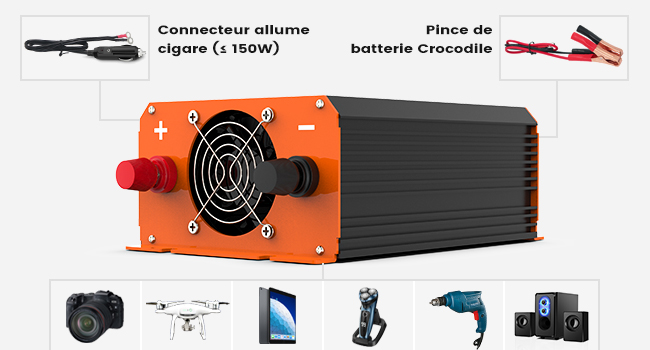
Image: Diagram illustrating the comprehensive safety protections of the JARXIOKE 600W Inverter, including short-circuit, low voltage, overload, high voltage, over-current, high temperature, and grounding protection, along with soft start technology and automatic recovery.
9. Specifications
| Feature | Specification |
|---|---|
| Brand | JARXIOKE |
| Model Number | JARXIOKE-600 |
| Rated Output Power | 600 Watts |
| Input Voltage | 12 Volts DC |
| Output Voltage | 230 Volts AC |
| Output Waveform | Pure Sine Wave |
| Output Frequency | 50 Hz |
| Conversion Efficiency | > 90% |
| AC Outlets | 1 x EU Standard Socket |
| USB Ports | 2 x USB-A (0-3.4A), 1 x USB Type-C |
| Cooling | Intelligent Cooling Fan |
| Protections | Overvoltage, Overload, Overcurrent, Undervoltage, Overtemperature, Short-circuit, Grounding |
| Recommended Uses | Cars, vehicles, trucks, outdoor, boats, RVs, power outages, travel, home |
| Dimensions (Approx.) | 170mm (L) x 126mm (W) x 68mm (H) |

Image: Overview of the JARXIOKE 600W Inverter's wide application compatibility and approximate dimensions. It is suitable for various uses including camping, RVs, and powering small appliances.
10. Warranty and Support
Your JARXIOKE 600W Pure Sine Wave Inverter comes with:
- 1-year free replacement
- 24-month warranty
- Lifetime customer service
For any questions, technical support, or warranty claims, please contact JARXIOKE customer service through the retailer where you purchased the product.


