Product Overview
The Mercury Security MUX8 is an 8-port multi-device interface panel designed to expand a single data line into multiple data lines. This panel facilitates system design and installation in various access control applications, particularly where wiring distances exceed standard RS-485 limits or when implementing star topology, wiring schemes, or home-run wiring configurations.
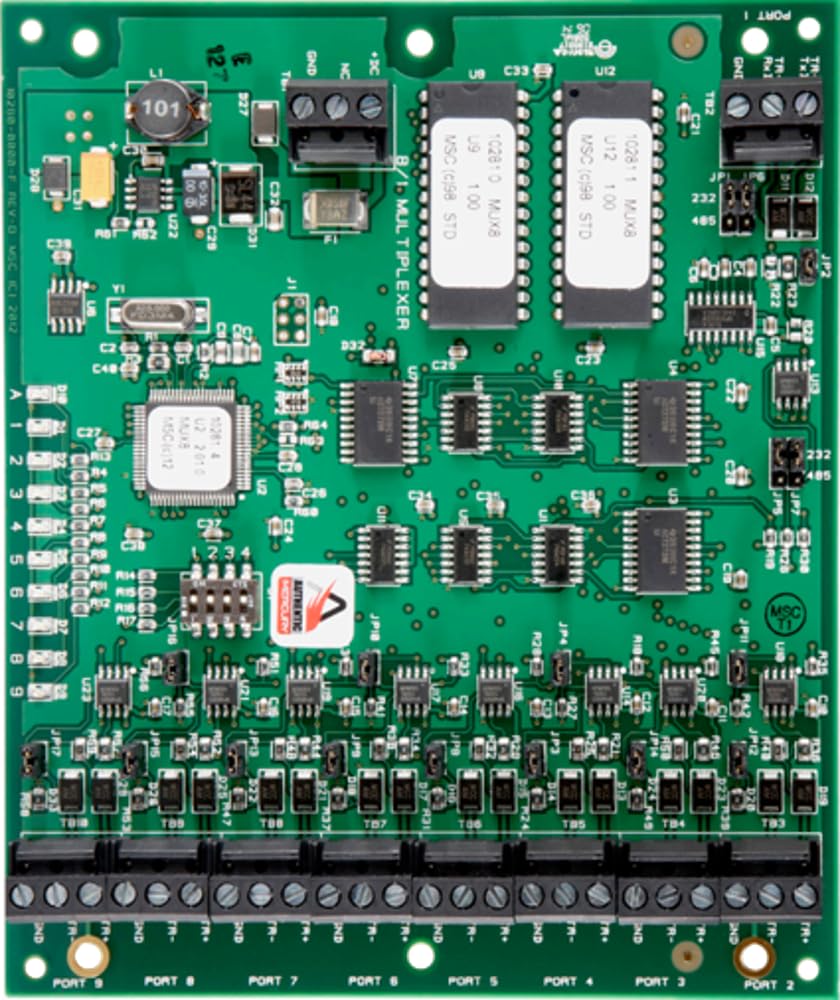
An overhead view of the green MERCURY SECURITY MUX8 8-Port Multi-Device Interface Panel. The board features multiple integrated circuits, connectors, and 8 labeled ports at the bottom for data line expansion.
Setup and Installation
Proper installation of the MUX8 panel is crucial for optimal performance. Follow these general guidelines:
- Mounting: Securely mount the MUX8 panel within an appropriate enclosure, ensuring adequate ventilation and protection from environmental factors.
- Power Connection: Connect the panel to a stable power source as specified in the technical documentation. Ensure correct polarity for all power connections.
- Data Line Input: Connect the primary data line to the designated input terminal. Refer to the board's silk screen for specific input port identification (e.g., PORT 1).
- Multi-Device Connections: Connect individual devices or sub-systems to the 8 output ports (PORT 2 through PORT 9) located at the bottom of the panel. Each port provides a separate data line output.
- Grounding: Ensure proper grounding of the panel to prevent electrical interference and ensure safety.
- Verification: After all connections are made, visually inspect all wiring for correctness and security before applying power.
Operating Instructions
The MUX8 panel operates as a passive or active data line multiplexer, depending on the specific configuration and system requirements. Once properly installed and powered, it transparently expands a single data input into multiple isolated or buffered outputs.
- Data Flow: Data received on the input port is distributed to the connected devices on the output ports.
- System Integration: The MUX8 integrates with Mercury hardware and other compatible access control components to extend communication reach and simplify complex wiring layouts.
- Status Indicators: Observe any LED indicators on the board (if present) for power status and data activity, as detailed in the full technical manual.
Maintenance
The MUX8 is designed for reliable operation with minimal maintenance. Adhere to the following recommendations:
- Regular Inspection: Periodically inspect the panel and its connections for any signs of wear, damage, or loose wiring.
- Cleaning: Keep the panel free from dust and debris. Use a soft, dry cloth for cleaning. Avoid liquid cleaners or solvents.
- Environmental Control: Ensure the operating environment remains within specified temperature and humidity ranges to prevent component degradation.
- Firmware Updates: If applicable, consult Mercury Security documentation for any recommended firmware updates and follow their procedures carefully.
Troubleshooting
If the MUX8 panel is not functioning as expected, consider the following troubleshooting steps:
- No Power: Verify that the power supply is connected correctly and providing the specified voltage. Check power indicator LEDs.
- No Data Communication:
- Check all data line connections for proper seating and continuity.
- Ensure correct wiring polarity for RS-485 connections (A/B or +/-, GND).
- Confirm that the primary data source is active and transmitting data.
- Test connected devices individually to rule out device-specific issues.
- Intermittent Connectivity: Inspect for loose connections, damaged cables, or sources of electromagnetic interference.
- System Compatibility: Ensure that the MUX8 is compatible with all connected access control hardware and software.
If issues persist after basic troubleshooting, consult the Mercury Security technical support or a qualified technician.
Specifications
| Feature | Specification |
|---|---|
| Brand | Mercury Security |
| Model Name | MUX8 |
| Item Model Number | MUX8 |
| Manufacturer | MERCURY SECURITY |
| Number of Ports | 8 |
| Package Dimensions | 9 x 6 x 2 inches |
| Item Weight | 8 ounces |
| ASIN | B0DBJ94VKT |
Warranty and Support
For detailed warranty information, please refer to the documentation provided with your purchase or contact Mercury Security directly. Support resources, including technical documentation and contact information, can typically be found on the official Mercury Security website or through your authorized reseller.


