
Introduction
This manual provides instructions for the installation, operation, and maintenance of the Generic 69357000 Motor Exhaust Side Assembly. This motor is designed as a direct replacement for the vent/exhaust side of specific Nutone models, including 9605, 9665, 9605N, 9665N, and H965. It is important to ensure compatibility with your existing unit before proceeding with installation. This assembly includes the motor, blower wheel, and a round mounting plate, offering a straightforward replacement solution.
Safety Information
Please read all safety instructions carefully before installation or operation. Failure to follow these instructions may result in electric shock, fire, or personal injury.
- Disconnect Power: Always ensure that the power supply to the ventilation unit is completely disconnected at the circuit breaker or fuse box before attempting any installation, maintenance, or repair.
- Qualified Personnel: Installation and servicing should be performed by qualified personnel only.
- Proper Grounding: Ensure the motor is properly grounded according to local electrical codes.
- Inspect Components: Before installation, inspect all components for any damage. Do not install damaged parts.
- Electrical Specifications: Verify that the electrical specifications of the motor (120-Volt, 60HZ, 0.9-Amps) match your electrical supply.
Package Contents
Verify that all components are present and undamaged before beginning installation:
- 1 x Motor
- 1 x Metal Blower Wheel
- 1 x Round Mounting Plate
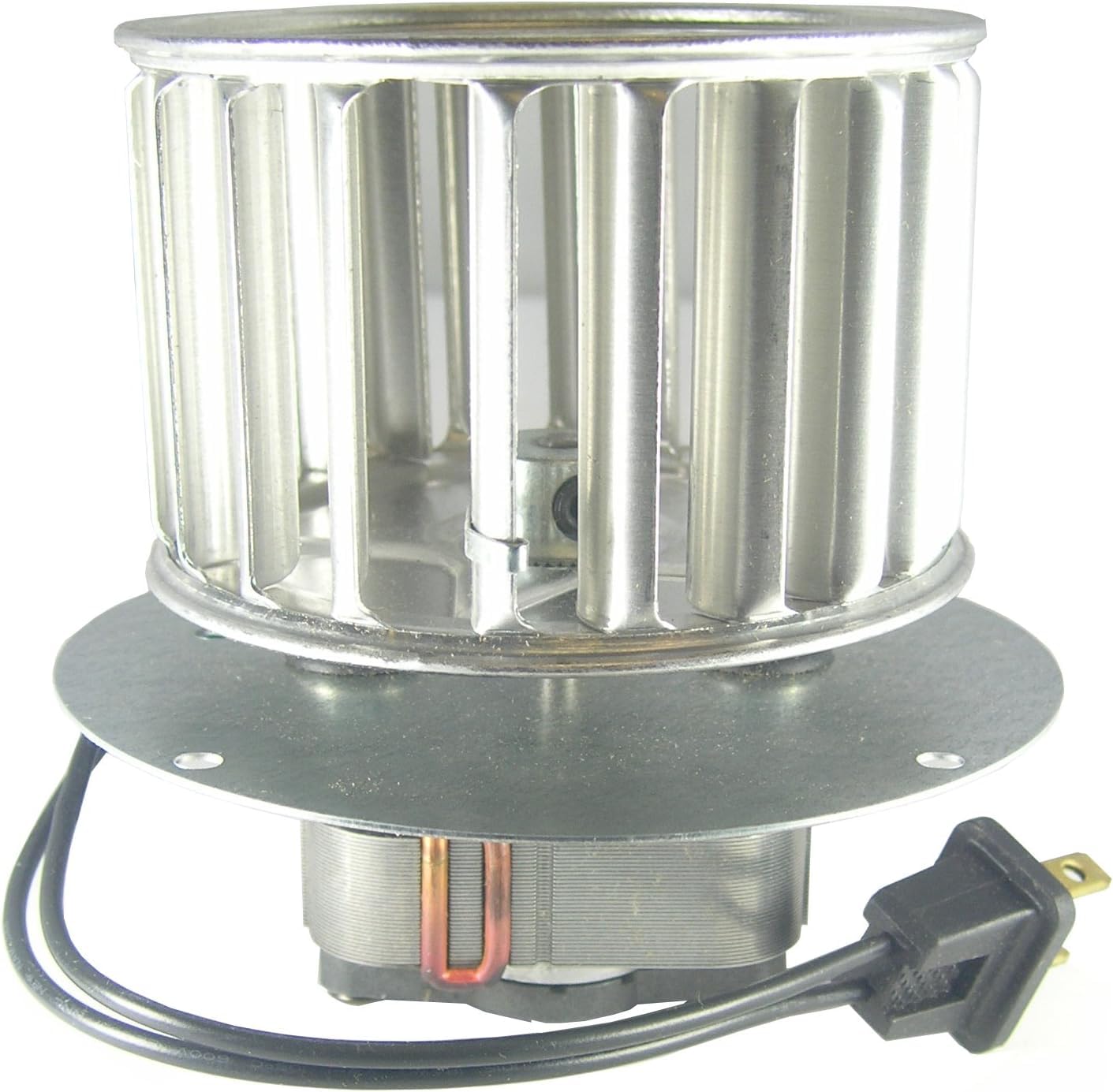
Figure 1: Generic 69357000 Motor Exhaust Side Assembly. This image displays the Generic 69357000 motor exhaust side assembly. It features a metal blower wheel, a round mounting plate, and electrical wiring with a standard two-prong plug and a ground wire. The motor is designed for replacement in compatible Nutone ventilation units.
Setup and Installation
This motor assembly is designed for easy installation, typically taking only a few minutes. Follow these steps carefully:
- Disconnect Power: Before starting, ensure the power to the ventilation unit is turned off at the main circuit breaker.
- Access the Unit: Remove the grille and any necessary housing covers to access the existing motor assembly within your Nutone ventilation unit.
- Remove Old Motor: Carefully unplug the old motor's electrical connector. Unscrew or unclip the old motor assembly from its mounting position. Note how the old motor was oriented for correct installation of the new one.
- Install New Motor: Position the new Generic 69357000 motor assembly into the housing. Secure it using the existing screws or clips. Ensure the round mounting plate is flush and stable.
- Connect Electrical Plug: Plug the new motor's standard two-prong connector into the corresponding receptacle in the ventilation unit. Ensure the ground wire (if present and separate) is securely connected to the unit's ground terminal.
- Reassemble Unit: Replace any housing covers and the grille that were removed.
- Restore Power: Turn the power back on at the circuit breaker and test the ventilation unit to ensure proper operation.
Note: This motor is specifically for the exhaust/vent side. If you require a motor for the heater side, please refer to model 69355000.
Operating Instructions
Once correctly installed, the Generic 69357000 Motor Exhaust Side Assembly operates automatically as part of your ventilation unit. Simply activate your fan unit using its standard controls (e.g., wall switch) to engage the motor and blower wheel for exhaust ventilation.
Maintenance
Regular maintenance helps ensure optimal performance and longevity of your motor assembly.
- Power Disconnection: Always disconnect power before performing any maintenance.
- Clean Blower Wheel: Periodically remove the grille and gently clean any dust or debris from the metal blower wheel using a soft brush or vacuum cleaner. Accumulation of dust can reduce efficiency and increase noise.
- Inspect Wiring: Annually, inspect the electrical wiring and connections for any signs of wear, fraying, or loose connections.
- Lubrication: This motor is typically sealed and does not require lubrication. Do not attempt to lubricate the motor unless specifically instructed by the manufacturer.
Troubleshooting
If you encounter issues with your motor assembly, refer to the following common troubleshooting steps:
| Problem | Possible Cause | Solution |
|---|---|---|
| Motor does not turn on. | No power supply. Loose electrical connection. Faulty motor. | Check circuit breaker/fuse. Ensure motor is securely plugged in. If power is present and connections are secure, the motor may need replacement. |
| Motor runs but is noisy. | Dust/debris on blower wheel. Blower wheel unbalanced. Motor bearings worn. | Disconnect power and clean blower wheel. Inspect blower wheel for damage or imbalance. If noise persists after cleaning, motor may need replacement. |
| Reduced airflow. | Clogged blower wheel. Blocked exhaust duct. | Disconnect power and clean blower wheel. Check exhaust ducting for obstructions. |
If troubleshooting steps do not resolve the issue, contact customer support or a qualified electrician.
Specifications
| Feature | Specification |
|---|---|
| Model Number | 69357 |
| Compatibility | Nutone 9605, 9605N, 9665, 9665N, H965 (Exhaust Side) |
| Voltage | 120 Volts |
| Frequency | 60 HZ |
| Amperage | 0.9 Amps |
| Material | Aluminum, Metal |
| Blower Wheel Dimensions | 3-3/4" x 2-7/16" with 7/32" bore |
| Included Components | Motor, mounting bracket, metal blower wheel |
| Item Weight | 0.95 Kilograms |
Warranty Information
This product is covered by a standard manufacturer's warranty against defects in materials and workmanship. For specific warranty terms and conditions, please refer to the product packaging or contact the retailer where the product was purchased. Keep your proof of purchase for warranty claims.
Support
For technical assistance, questions regarding installation, or to report a defective product, please contact the retailer or manufacturer directly. Provide your product model number (69357) and a detailed description of the issue to facilitate support.


