1. Introduction
Welcome to the user manual for your King Lucky i21 Open Ear Clip On Earbuds. These wireless Bluetooth headphones are designed for comfort, stability, and high-quality audio, perfect for various activities including running, sports, and daily use. Their unique clip-on, open-ear design ensures a secure fit without discomfort, making them ideal for small ears and glasses wearers. This manual provides essential information on setting up, operating, maintaining, and troubleshooting your earbuds.

Figure 1.1: King Lucky i21 Open Ear Clip On Earbuds and Charging Case (Black)
Product Overview Video
Video 1.1: An overview of the King Lucky i21 Open Ear Clip Earbuds, highlighting their design, features, and benefits. This video demonstrates the product's key functionalities and appearance.
2. Key Features
2.1 Design and Comfort
- Clip-on Design: Crafted for a secure and snug fit, ensuring stability during any activity.
- Open Ear Comfort: Provides clean ears without the discomfort of in-ear insertion, eliminating ear pain and promoting hours of comfort.
- Lightweight: Weighing only 4.7g, these earbuds are designed for all-day wear without feeling weighed down.
- Glasses Wearer Friendly: Perfect for individuals who wear glasses, offering wide compatibility and no interference.

Figure 2.1: Demonstrating the comfortable and stylish clip-on design.

Figure 2.2: Earring-style design highlighting light, comfortable, stylish, and painless wear compared to other earbud types.

Figure 2.3: Visual representation of the earbuds' ultra-lightweight design (4.7g).
2.2 Audio and Connectivity
- Advanced Bluetooth 5.3: Ensures zero latency, robust processing power, efficient energy use, more stable connections, longer transmission ranges, and faster data transfers.
- 13mm Dynamic Driver: Features a bass algorithm and large driver for a concert-like audio experience.
- Directional Sound Design: Reduces sound scatter and loss, making audio clearer while allowing awareness of surroundings.
- Noise Cancelling Microphone: Clearly picks up your voice even in windy conditions, ensuring crystal-clear calls.

Figure 2.4: Advanced Bluetooth 5.3 technology for superior connection.
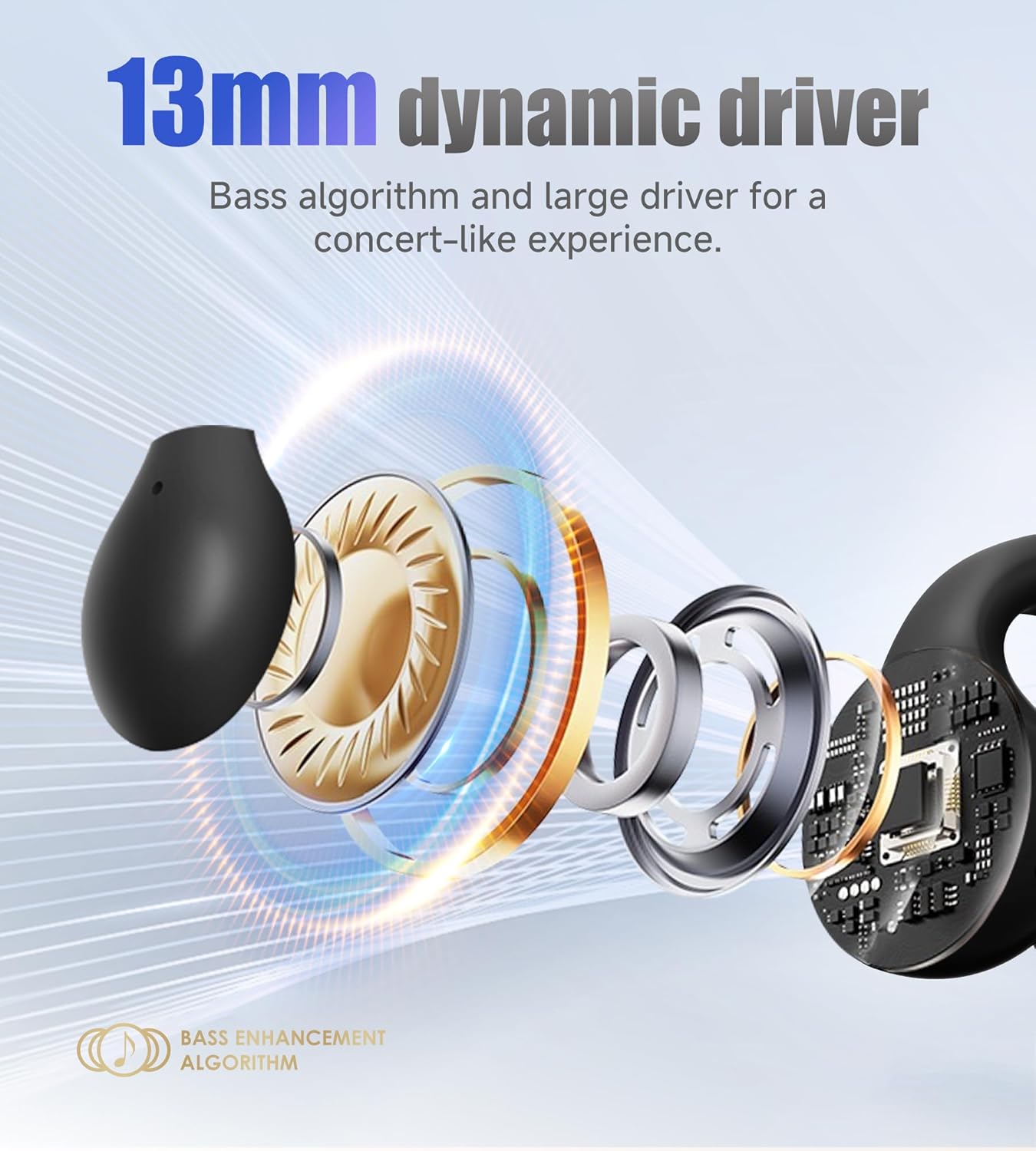
Figure 2.5: Illustration of the 13mm dynamic driver for enhanced bass.

Figure 2.6: Earring-style directional sound design for clearer audio.
2.3 Battery Life and Durability
- Extended Playtime: Enjoy 6 hours of continuous playtime on a single charge, extended to 45 hours with the charging case.
- Long Standby Time: Features a 90-hour standby time.
- IPX4 Waterproof: Built with a nano hydrophobic coating for IPX4 waterproof protection, making them resistant to rain and sweat.

Figure 2.7: Battery life details for the King Lucky i21 earbuds.

Figure 2.8: IPX4 waterproof and sweat-proof design for active use.
3. Setup Guide
3.1 What's in the Box
Before you begin, ensure all components are present:
- Open Ear Earbuds x 2
- Charging Case x 1
- User Manual x 1
- Type-C Charging Cable x 1

Figure 3.1: Package Contents.
3.2 Initial Charging
For first-time use, fully charge the earbuds and the charging case. Connect the Type-C charging cable to the charging case and a power source. The charging time for both the earbuds and the carrying case is approximately 1.5 hours.
3.3 Pairing with Your Device
The King Lucky i21 earbuds are compatible with all Bluetooth devices, including cellphones and telephones. Follow these steps to pair:
- Ensure the earbuds are in the charging case and the case has power.
- Open the charging case. The earbuds will automatically enter pairing mode.
- On your device (smartphone, tablet, laptop), go to Bluetooth settings.
- Search for available devices and select "i21" from the list.
- Once connected, you will hear a confirmation tone, and the earbuds will be ready for use.

Figure 3.2: Wide device compatibility and pairing process.
4. Operating Instructions
The King Lucky i21 earbuds feature intuitive touch controls for easy management of calls and music playback.

Figure 4.1: Earphone Operation Guide.
4.1 Music Control
- Play/Pause Music: Tap x2 on either the Left (L) or Right (R) earbud.
- Previous Track: Tap x3 on the Left (L) earbud.
- Next Track: Tap x3 on the Right (R) earbud.
4.2 Call Control
- Answer Call: Tap x2 on either the Left (L) or Right (R) earbud.
- End Call: Tap x2 on either the Left (L) or Right (R) earbud.
- Reject Call: Long Press 2" on either the Left (L) or Right (R) earbud.
4.3 Voice Assistant
- Activate Voice Assistant: Long Press 2" on either the Left (L) or Right (R) earbud.
4.4 Clear Pairing
- Clear Pairing: Long Press 3" on the Charging case button. This can be useful for troubleshooting connection issues.
5. Maintenance
5.1 Cleaning
To ensure optimal performance and longevity of your earbuds, regular cleaning is recommended:
- Wipe the earbuds and charging case with a soft, dry, lint-free cloth.
- For stubborn dirt, slightly dampen the cloth with water. Avoid using harsh chemicals or abrasive materials.
- Ensure the charging contacts on both the earbuds and the case are clean and free of debris.
- While the earbuds are IPX4 waterproof (resistant to splashes and sweat), do not submerge them in water or expose them to running water.
5.2 Storage
When not in use, store the earbuds in their charging case to protect them from dust, damage, and to keep them charged.
5.3 Battery Care
- Avoid fully draining the battery frequently.
- Store the earbuds with some charge if not used for extended periods.
- Use the provided Type-C charging cable for optimal charging.
6. Troubleshooting
If you encounter any issues with your King Lucky i21 earbuds, please refer to the following common solutions:
| Problem | Possible Cause | Solution |
|---|---|---|
| Earbuds not pairing | Low battery; Bluetooth off; Earbuds not in pairing mode; Previous pairing conflict. | Charge earbuds and case; Ensure device Bluetooth is on; Place earbuds in case, open lid to activate pairing; Use 'Clear Pairing' function (Long Press 3" on case button). |
| No sound or low volume | Volume too low on device; Earbuds not properly connected; Earbuds dirty. | Increase device volume; Re-pair earbuds; Clean earbuds and charging contacts. |
| Charging issues | Cable not connected properly; Dirty charging contacts; Faulty cable/adapter. | Ensure secure connection; Clean charging contacts; Try a different Type-C cable or power adapter. |
| Intermittent connection | Distance from device; Interference; Low battery. | Stay within Bluetooth range (10 meters); Move away from sources of interference; Charge earbuds. |
7. Specifications
| Feature | Detail |
|---|---|
| Model Name | i21 |
| Brand | King Lucky |
| Connectivity Technology | Wireless (Bluetooth) |
| Bluetooth Version | 5.3 |
| Bluetooth Range | 10 meters |
| Ear Placement | Open Ear / Clip On |
| Item Weight | 2.89 ounces (earbuds: 4.7g each) |
| Battery Life (Single Charge) | 6 Hours |
| Total Playtime (with Charging Case) | 45 Hours |
| Standby Time | 90 Hours |
| Charging Time (Earbuds & Case) | 1.5 Hours |
| Waterproof Rating | IPX4 |
| Audio Driver Type | Dynamic Driver (13mm) |
| Control Type | Touch Control |
| Included Components | Cable, User Manual, Charging Station |
| Material | Plastic, Metal |
| Package Dimensions | 4.8 x 4.09 x 1.26 inches |
8. Warranty and Support
For detailed warranty information, please refer to the warranty card or specific documentation included with your King Lucky i21 earbuds package. King Lucky is committed to providing high-quality products and customer satisfaction.
If you require further assistance or have questions not covered in this manual, please contact King Lucky customer support through the contact information provided on the product packaging or the official King Lucky website.


