
BAOFENG UV-25
Contents
BAOFENG UV-25 Tri-Power Ham Radio Handheld Instruction Manual
Model: UV-25 | Brand: BAOFENG
1. Introduction
This manual provides comprehensive instructions for the safe and effective use of your BAOFENG UV-25 Tri-Power Ham Radio Handheld. Please read this manual thoroughly before operating the device to ensure optimal performance and longevity.
The BAOFENG UV-25 is a versatile two-way radio designed for long-range communication, featuring multi-band reception (UHF, VHF, AM, FM, Air, NOAA) and adjustable power output up to 10 Watts. It is equipped with a high-capacity 5200mAh battery and user-friendly features for reliable operation in various environments.
2. Package Contents and Setup
Upon unboxing, verify that all components are present and in good condition. The standard package includes the following items:
- BAOFENG UV-25 Radio Unit (x2)
- 5200mAh Rechargeable Battery (x2)
- Flexible Gooseneck Antenna (x2)
- Foldable Tactical Antenna (x2)
- Tactical Speaker Mic (x2)
- USB Type-C Charging Cable (x2)
- Wall Adapter (x2)
- Owner's Manual

Figure 2.1: Complete package contents of the BAOFENG UV-25 Tri-Power Ham Radio Handheld.
2.1 Initial Setup
- Battery Installation: Align the 5200mAh battery with the back of the radio unit and slide it into place until it clicks securely.

Figure 2.2: The 5200mAh battery and Type-C charging port on the BAOFENG UV-25.
- Antenna Attachment: Screw the desired antenna (Gooseneck or Tactical) clockwise onto the antenna connector at the top of the radio until it is finger-tight. Do not overtighten.
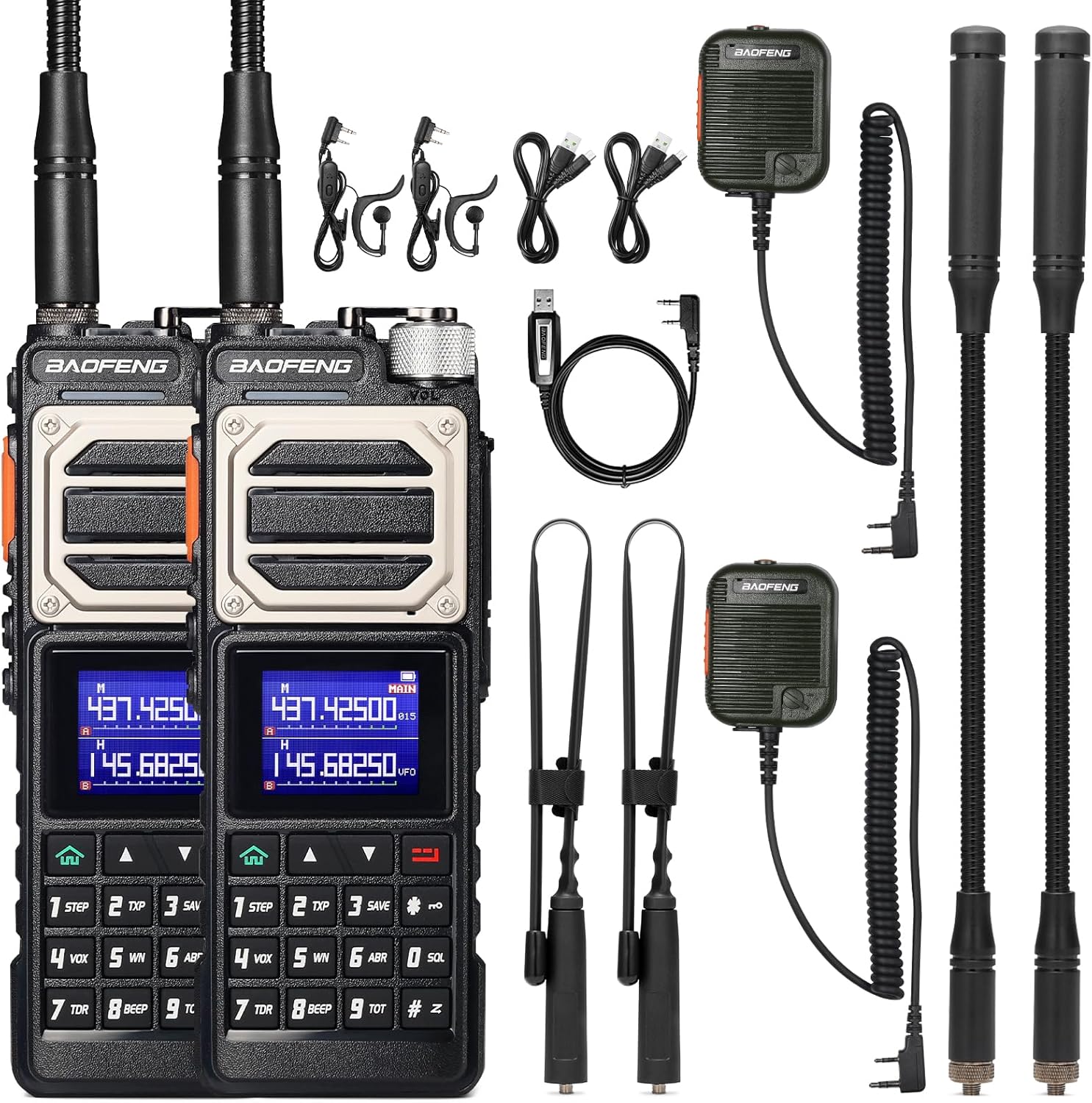
Figure 2.3: BAOFENG UV-25 radios with attached antennas and accessories.
- Initial Charging: Connect the Type-C charging cable to the port on the side of the radio (under the protective cover) and plug the other end into the wall adapter or a compatible USB power source (e.g., laptop, power bank, car charger). Charge the battery fully before first use. The charging indicator light will typically change color when charging is complete.
- Power On/Off: Rotate the power/volume knob clockwise to turn on the radio. Rotate counter-clockwise until a click is heard to turn off.
2.2 Unboxing and Assembly Video
Video 2.1: This video demonstrates the unboxing process, assembly of the battery and antenna, and initial power-on of the BAOFENG UV-25 radio.
3. Operating Instructions
3.1 Power Settings
The UV-25 offers three adjustable power settings to optimize battery life and signal strength based on your communication needs:
- High Power: 10 Watts (for maximum range and obstacle penetration)
- Medium Power: 8 Watts
- Low Power: 5 Watts (for shorter distances and extended battery life)

Figure 3.1: Visual representation of the adjustable power settings on the UV-25.
3.2 Frequency Range and Channels
The UV-25 supports a broad range of frequencies for both transmission and reception, and can store up to 999 channels.
- Transmission (TX): 136-174MHz (VHF), 400-520MHz (UHF)
- Reception (RX): 136-174MHz (VHF), 400-520MHz (UHF), 76-108MHz (FM), 108-136MHz (AM Airband), 200-260MHz, 350-390MHz, NOAA Weather Channels.

Figure 3.2: Multi-band reception capabilities of the BAOFENG UV-25.
3.3 One-Touch Frequency Search (Cloning)
The [SK1] key allows for quick frequency cloning between devices, simplifying setup for multiple radios.
- Ensure both radios are powered on and within close proximity.
- On the source radio, navigate to the desired frequency.
- On the target radio, press and hold the [SK1] key to initiate the frequency search and copy process.
- The target radio will automatically detect and set its frequency to match the source.

Figure 3.3: One-Touch Frequency Search in action, copying frequencies between two radios.
3.4 Programming
The UV-25 can be programmed using both BAOFENG CPS software and CHIRP. For CHIRP programming, select "UV-17PRO" or "5RM" as the model. Note that Airband frequencies can only be programmed via BAOFENG CPS or directly through the keypad.
For the latest BAOFENG CPS software, please visit the official baofengradio website and locate the CPS file on the download page.
3.5 User-Friendly Design Features
The radio is designed for ease of use and durability:
- Large Buttons: Facilitate easy operation, even with gloves.
- Friction-Enhanced Power-On Knob: Provides tactile feedback for precise control.
- Metal Construction: Ensures sturdiness and resistance to falls and impacts.
- Top Flashlight: Can be used for illumination or as an SOS signal in emergencies.

Figure 3.4: Detailed view of the UV-25's robust design and features.

Figure 3.5: The durable metal design of the BAOFENG UV-25, built for challenging environments.
4. Maintenance
Proper maintenance ensures the longevity and optimal performance of your BAOFENG UV-25 radio.
4.1 Battery Care
- Always use the provided charging cable and adapter.
- Avoid overcharging or completely draining the battery.
- If storing the radio for an extended period, charge the battery to approximately 50% capacity.
- Store the battery in a cool, dry place away from direct sunlight.
4.2 Cleaning
- Wipe the radio's exterior with a soft, damp cloth.
- Do not use harsh chemicals, solvents, or abrasive cleaners.
- Ensure the Type-C port cover is securely closed to prevent dust and moisture ingress.
4.3 Storage
When not in use, store the radio in a dry, dust-free environment. Detach the antenna if storing for long periods to prevent damage.
5. Troubleshooting
If you encounter issues with your BAOFENG UV-25, refer to the following common troubleshooting steps:
| Problem | Possible Cause | Solution |
|---|---|---|
| Radio does not power on. | Battery is not installed correctly or is depleted. | Ensure battery is securely attached. Charge the battery fully. |
| No signal reception or poor audio. | Antenna not properly attached; out of range; incorrect frequency/channel. | Check antenna connection. Move closer to transmitting station. Verify frequency settings. |
| Cannot transmit. | Incorrect frequency; low battery; PTT button malfunction. | Confirm you are on a valid transmit frequency. Charge battery. Test PTT button. |
| Programming issues with CHIRP. | Incorrect model selected in CHIRP; driver issues. | Ensure "UV-17PRO" or "5RM" is selected. Install correct USB drivers. Use BAOFENG CPS if issues persist. |
For more detailed troubleshooting or issues not listed here, please refer to the comprehensive owner's manual included in your package or contact BAOFENG customer support.
6. Specifications
| Feature | Detail |
|---|---|
| Model Number | UV-25 |
| Brand | BAOFENG |
| Power Output | 10W (High), 8W (Medium), 5W (Low) |
| Frequency Range (TX) | 136-174MHz, 400-520MHz |
| Frequency Range (RX) | 136-174MHz, 400-520MHz, 76-108MHz (FM), 108-136MHz (AM Airband), 200-260MHz, 350-390MHz, NOAA Weather Channels |
| Number of Channels | 999 |
| Battery Capacity | 5200mAh |
| Charging Port | Type-C |
| Special Features | Long Range, Digital Display, Dual Band, Rechargeable with Type-C Port, Shockproof, One-Touch Frequency Search |
| Construction | Durable Metal Design |
| Water Resistance Level | Not Water Resistant |
| FCC ID | 2AJGM-UV25 |
| Item Weight | 4.86 pounds (approx. 2.2 kg) |
| Package Dimensions | 12.8 x 9.8 x 3.15 inches |
7. Warranty and Support
Your BAOFENG UV-25 Tri-Power Ham Radio Handheld comes with an 18 Months Warranty and Lifetime Support from BAOFENG.
For warranty claims, technical assistance, or any product-related inquiries, please refer to the contact information provided in your product packaging or visit the official BAOFENG website.
Always ensure you are using official BAOFENG resources for support to guarantee authentic assistance.
Documents and downloads
Ask a question about this manual
Ask about setup, troubleshooting, compatibility, parts, safety, or missing instructions. Manuals+ will review the question and use this page’s manual context to help answer it.