
OFFSIR CO713
OFFSIR PC Gaming Speakers User Manual
Model: CO713
Brand: OFFSIR
1. Introduction
Thank you for purchasing the OFFSIR PC Gaming Speakers. These speakers are designed to provide an immersive audio experience for your gaming, movie, and music needs. Featuring powerful sound, dynamic RGB lighting, and versatile connectivity, this manual will guide you through the setup, operation, and maintenance of your new speakers to ensure optimal performance.

Figure 1.1: OFFSIR PC Gaming Speakers
This image displays the OFFSIR PC Gaming Speakers, showcasing their sleek black design with vibrant RGB lighting strips on the sides and a mesh grille covering the speaker drivers. One speaker features a prominent volume knob at its base.
2. Safety Information
- Do not expose the speakers to water or excessive moisture.
- Avoid placing the speakers near heat sources or in direct sunlight.
- Do not attempt to disassemble or repair the speakers yourself. Refer to qualified service personnel.
- Keep out of reach of children.
- Use only the provided cables and power sources.
3. Package Contents
Please check the package for the following items:
- OFFSIR PC Gaming Speakers (2 units)
- Integrated USB Power Cable
- Integrated 3.5mm Audio Cable
- User Manual (this document)
4. Product Overview
The OFFSIR PC Gaming Speakers feature a versatile design allowing them to be used as two independent stereo speakers or combined into a single soundbar. Key components include:
- Speaker Units: Two φ50mm full-range speaker units for clear and powerful sound.
- RGB Lighting: Dynamic breathing cycle RGB lights on the front and sides.
- Volume Knob: Multi-function knob for power and volume control.
- Touch Sensor: Located on top of the main speaker for RGB light mode changes.
- Connectivity Cables: Integrated USB cable for power and 3.5mm audio cable for sound input.

Figure 4.1: Speaker Internal Components
This image provides an exploded view of the speaker's internal components, highlighting the φ50mm full-range speaker drivers and the internal structure designed for 3D surround sound and 5W×2 powerful output, emphasizing its 2.0 channel stereo capabilities.

Figure 4.2: RGB Light Control
This image shows the top of one speaker with a touch sensor icon, indicating that the RGB light mode can be changed with a 3-second touch. A legend next to it illustrates the available light modes: RGB cycle, Red, Green, Blue, and Off.

Figure 4.3: Volume and Power Control Knob
This image focuses on the multi-function knob located at the base of one speaker, illustrating its dual purpose for turning the speakers ON/OFF and adjusting the volume (+/-).
5. Setup
The OFFSIR PC Gaming Speakers are designed for simple plug-and-play setup.
5.1 Connecting the Speakers
- Positioning: Place the two speaker units in your desired configuration. They can be separated for a stereo effect or combined into a single soundbar. The cable connecting the two speakers is 130cm long, allowing for flexible placement around monitors up to 23 inches.
- Power Connection: Connect the USB power cable to a USB port on your computer, a USB wall adapter (not included), or a power bank.
- Audio Connection: Connect the 3.5mm audio cable to the audio output jack (headphone jack) of your computer, laptop, phone, tablet, or TV.

Figure 5.1: Plug and Play Connectivity
This diagram illustrates the plug-and-play nature of the speakers. It shows the USB cable connecting to various power sources like an adapter, mobile battery, laptop, or PC. The 3.5mm audio cable connects to devices such as PCs, tablets, laptops, and smartphones, highlighting wide compatibility.

Figure 5.2: Detachable Design for Space Saving
This image demonstrates the 2-in-1 space-saving design, showing the speakers both separated on either side of a monitor and combined into a single soundbar unit, suitable for personal spaces or PC desktops.
6. Operating Instructions
6.1 Power On/Off and Volume Control
- To turn the speakers ON, rotate the volume knob clockwise until you hear a click.
- To turn the speakers OFF, rotate the volume knob counter-clockwise until you hear a click.
- To increase volume, rotate the knob clockwise.
- To decrease volume, rotate the knob counter-clockwise.
6.2 RGB Lighting Control
- The speakers feature dynamic breathing cycle RGB lights.
- To change the RGB lighting mode, gently touch and hold the touch sensor located on the top of the main speaker for approximately 3 seconds.
- Available modes include RGB cycle, solid Red, solid Green, solid Blue, and Off.
7. Maintenance
- Cleaning: Use a soft, dry cloth to clean the speaker surfaces. Do not use abrasive cleaners or solvents.
- Storage: When not in use for extended periods, store the speakers in a cool, dry place away from direct sunlight and extreme temperatures.
- Cable Care: Avoid bending or crimping the cables excessively to prevent damage.
8. Troubleshooting
| Problem | Possible Cause | Solution |
|---|---|---|
| No sound | Speakers are off Volume is too low Audio cable not connected properly Incorrect audio output selected on device | Turn on speakers using the knob Increase volume Ensure 3.5mm audio cable is fully inserted Check your device's sound settings and select the correct output |
| Distorted sound | Volume too high Audio source quality is poor | Lower the volume Try a different audio source or file |
| RGB lights not working | Lights are turned off USB power not connected | Touch and hold the sensor to cycle through modes, including ON Ensure USB power cable is connected to a working USB port |
| Speakers not recognized by PC | USB power or 3.5mm audio cable loose | Ensure both USB and 3.5mm cables are securely connected. No drivers are required for these speakers. |
9. Specifications
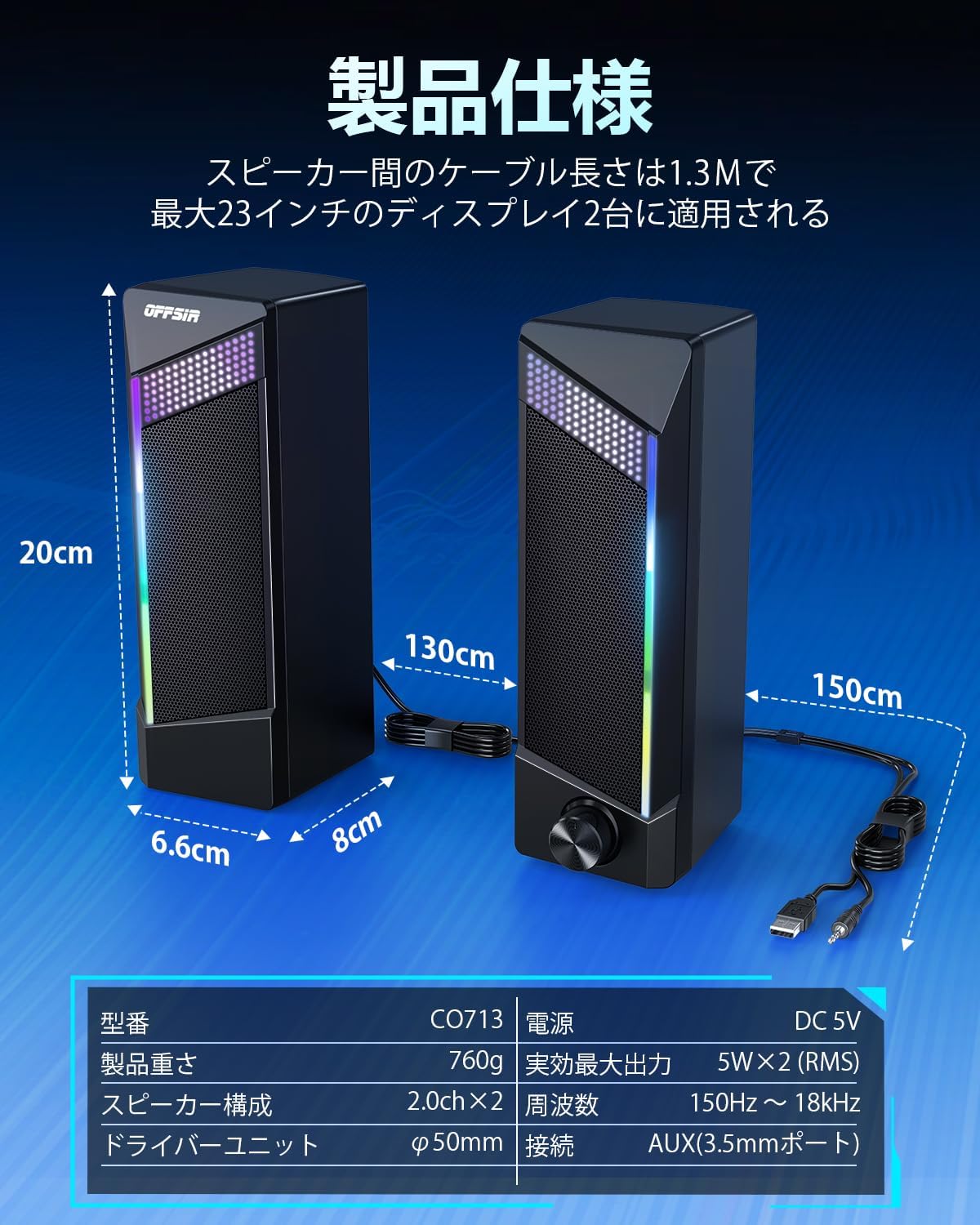
Figure 9.1: Product Dimensions and Specifications
This image provides a detailed diagram of the speaker dimensions (20cm height, 6.6cm depth, 8cm width for a single unit) and the 130cm cable length between speakers. It also includes a table of specifications.
| Feature | Detail |
|---|---|
| Model Name | CO713 |
| Speaker Type | 2.0 Channel Stereo, 3D Surround Sound |
| Driver Unit | φ50mm x 2 Full-Range |
| Max Output Power | 5W x 2 (RMS), Total 10W |
| Frequency Response | 150Hz ~ 18kHz |
| Connectivity Technology | AUX (3.5mm port), USB (for power) |
| Power Supply | DC 5V (USB Powered) |
| Features | RGB LED Lighting, Detachable Design, Plug & Play |
| Dimensions (Single Speaker) | Approx. 6.6cm (D) x 8cm (W) x 20cm (H) |
| Cable Length (between speakers) | 130cm |
| Weight (approx.) | 760g |
10. Warranty and Support
OFFSIR products are manufactured to the highest quality standards. For warranty information or technical support, please refer to the warranty card included in your package or contact OFFSIR customer service through the retailer where you purchased the product. Please retain your proof of purchase for warranty claims.
Related documentsCO713


Ask a question about this manual
Ask about setup, troubleshooting, compatibility, parts, safety, or missing instructions. Manuals+ will review the question and use this page’s manual context to help answer it.