
BILITOK 603darkblack
BILITOK Full Body Massage Chair Instruction Manual
Model: 603darkblack | Brand: BILITOK
1. Introduction
This manual provides detailed instructions for the safe and effective operation, assembly, and maintenance of your BILITOK Full Body Massage Chair. Designed for ultimate relaxation, this chair features Zero Gravity recline, comprehensive full-body massage with heating and airbags, a foot roller, Bluetooth connectivity, and a user-friendly touch screen.

Image 1.1: The BILITOK Full Body Massage Chair, highlighting its modern design and comfortable seating.
2. Important Safety Information
Please read all safety warnings and instructions carefully before using the massage chair to prevent injury or damage.
- This massage chair has a maximum weight capacity of 180 pounds and is suitable for individuals up to 6 feet tall.
- Ensure the chair is placed on hard floor surfaces for stability and proper movement.
- Always ensure proper assembly according to the instructions provided.
- Do not obstruct the chair's movement during operation.
- Avoid using the chair near water or in wet areas to prevent electrical hazards.
- Unplug the chair from the power outlet when not in use or before cleaning.
- Regularly inspect the chair for any signs of wear, damage, or loose connections. Discontinue use if any damage is found and contact customer support.
- Keep children and pets away from the chair, especially during operation.
3. Product Dimensions and Requirements
Understanding the chair's dimensions and space requirements is crucial for proper placement and use.
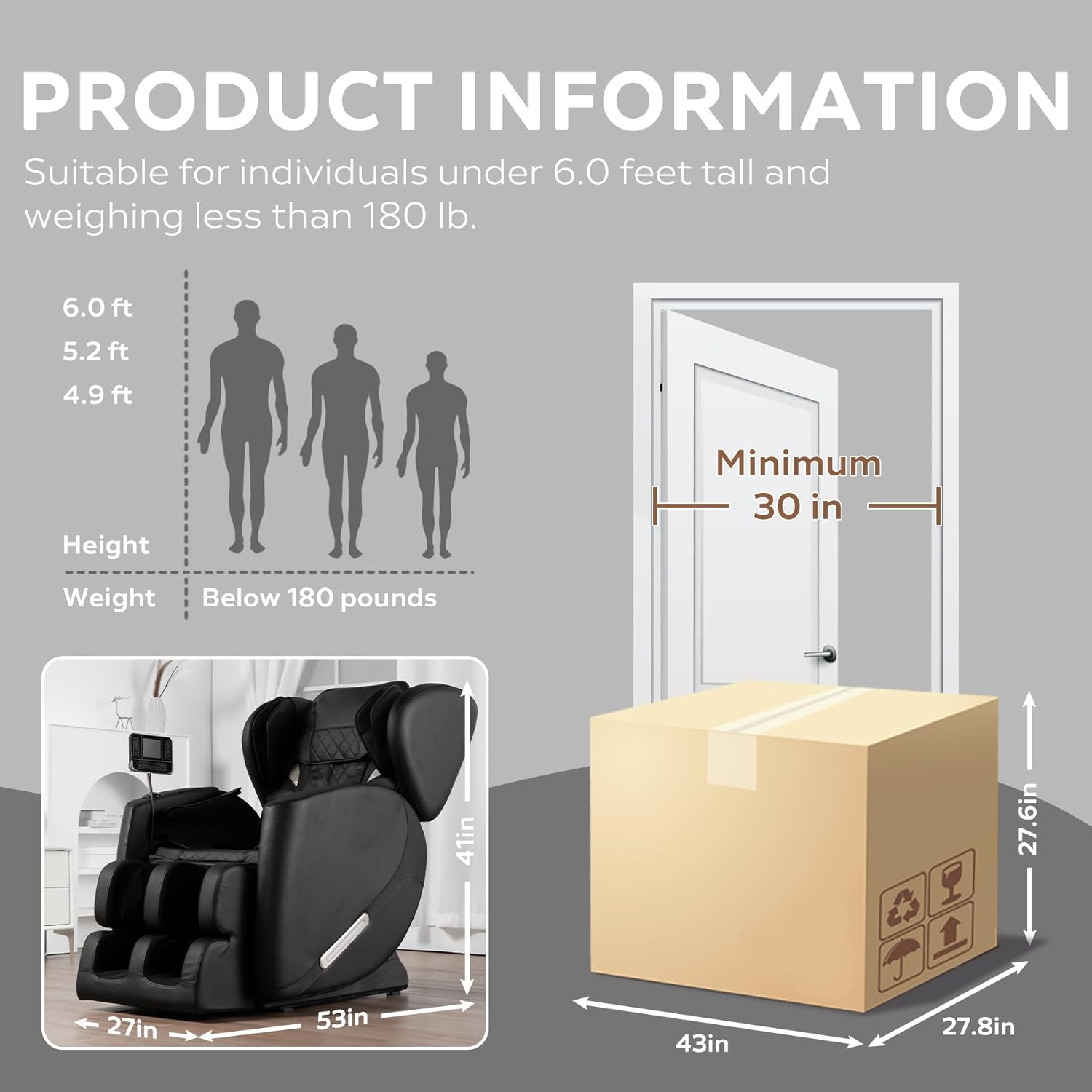
Image 3.1: Product dimensions and user suitability guidelines.
- Product Dimensions (D x W x H): 53" x 27" x 41"
- Item Weight: 100 pounds
- Maximum User Weight: 180 pounds
- Maximum User Height: 6 feet
- Minimum Doorway Clearance: 30 inches (for package delivery)
4. Setup and Assembly
The BILITOK massage chair is designed for straightforward assembly. While specific steps are not detailed here, general guidance is provided.
- Unpacking: Carefully remove all components from the packaging. Retain packaging materials for future transport or returns if necessary.
- Component Identification: Identify all parts as per the included assembly guide (not provided in this manual).
- Main Body Assembly: Connect the main sections of the chair, typically involving attaching the backrest and leg rest to the base.
- Accessory Attachment: Install any accessories such as the arm pads and the touch screen control panel.
- Power Connection: Once fully assembled, connect the power cord to the chair and then to a suitable power outlet.
Note: For detailed, step-by-step assembly instructions, please refer to the separate assembly guide included with your product packaging.
5. Operating Instructions and Features
Your massage chair offers a variety of functions for a personalized massage experience. All functions are controlled via the integrated touch screen panel.
5.1 Zero Gravity Mode
The Zero Gravity mode elevates your feet above your heart, reducing pressure on the spine and promoting circulation. This position is designed to maximize the effectiveness of the massage.

Image 5.1: Zero Gravity recline positions.
- Press the "Zero Gravity" button on the touch screen to activate.
- The chair will recline to an optimal position, with the armrest and body tilting simultaneously.
- The chair maintains the Zero Gravity mode after the massage program concludes for continued relaxation.
5.2 Full-Body Massage Programs
The chair features 6 fixed rollers for targeted massage and 5 preset automatic modes for a comprehensive full-body experience.

Image 5.2: Massage roller coverage and program types.
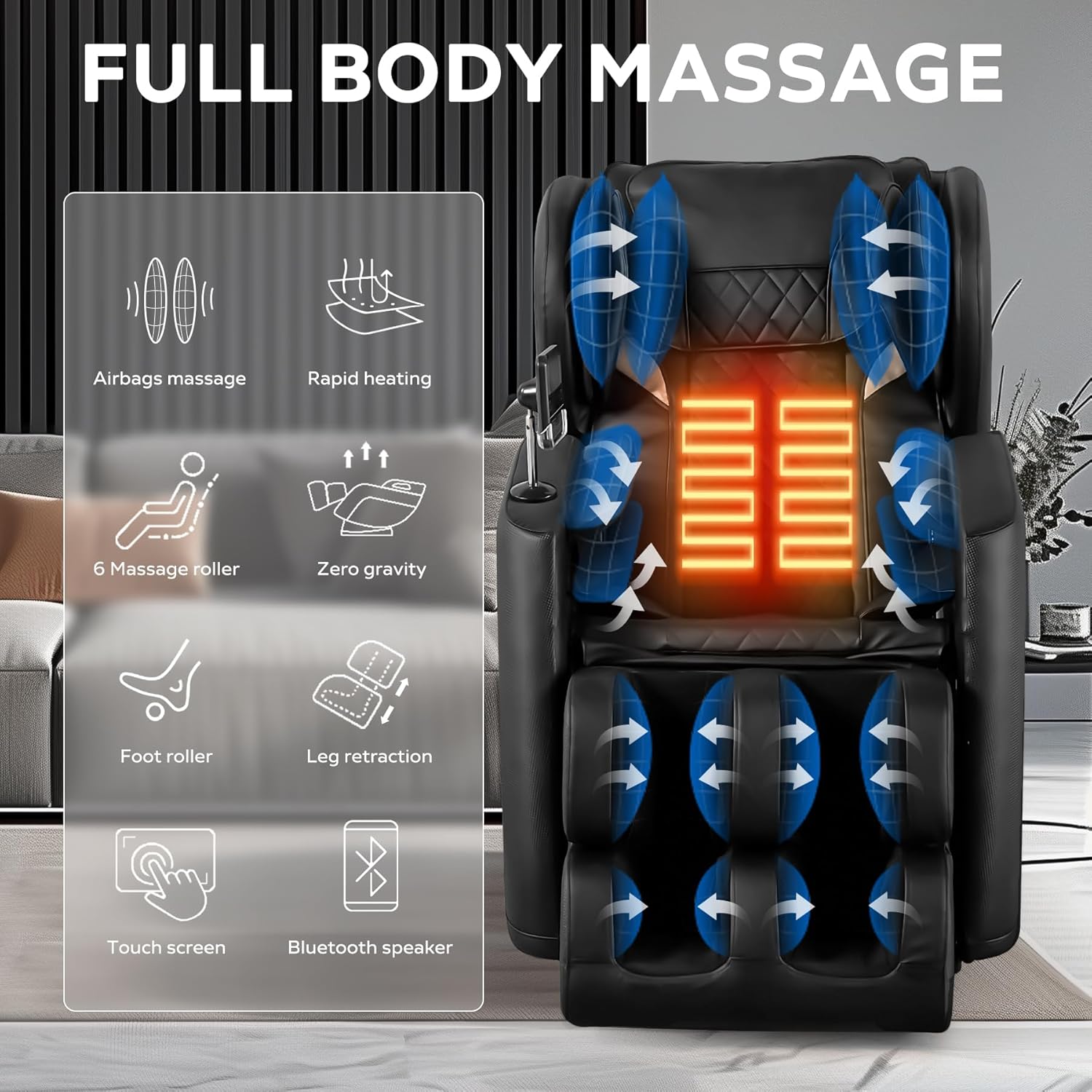
Image 5.3: Overview of full body massage capabilities.
- Roller Massage: 6 fixed rollers target the neck, back, and waist.
- Preset Modes: Select from 5 automatic modes (Full-Body, Fast, Relax, Comfort, Stretch) for varied massage experiences.
- Heating Function: Heating elements in the waist and legs promote blood circulation and muscle relief. Activate via the touch screen.
- Airbag Compression: Airbags provide compression massage to shoulders, arms, and calves. Adjust strength with three-gear adjustment.
5.3 Foot Relaxation
The chair includes a retractable footrest and a foot roller for comprehensive leg and foot massage.

Image 5.4: Leg and foot massage features.
- Retractable Footrest: Adjust the footrest to accommodate different user heights.
- Foot Roller: Rollers at the base of the foot stimulate acupuncture points, combined with leg heating for enhanced circulation and muscle tension relief.
- Leg Stretch: The leg rest can stretch up to 5 inches for extended leg comfort.
5.4 Bluetooth Audio and Ambient Lighting
Enhance your massage experience with integrated Bluetooth audio and ambient lighting.

Image 5.5: Bluetooth and ambient lighting features.
- Bluetooth Connection: Pair your mobile device via Bluetooth to play music through the chair's integrated speakers.
- Atmosphere Lights: Breathing blue atmosphere lights on both sides of the chair create a relaxing environment.
6. Maintenance
Proper maintenance ensures the longevity and optimal performance of your massage chair.
- Cleaning: Wipe clean the chair's surfaces with a soft, damp cloth. Avoid using harsh chemicals or abrasive cleaners.
- Power Cord: Regularly check the power cord for any damage or fraying. If damaged, contact customer support for replacement.
- Storage: When not in use for extended periods, unplug the chair and store it in a dry, cool place away from direct sunlight.
7. Troubleshooting
This section addresses common issues you might encounter. For problems not listed here, please contact customer support.
| Problem | Possible Cause | Solution |
|---|---|---|
| Chair does not power on. | Power cord not properly connected; power outlet issue. | Ensure the power cord is securely plugged into both the chair and a working electrical outlet. Test the outlet with another device. |
| Massage rollers are not moving. | Program not selected; safety feature activated. | Select a massage program from the touch screen. Check for any obstructions or if the chair is in an unusual position. Restart the chair. |
| Bluetooth connection fails. | Device not in pairing mode; interference. | Ensure your device's Bluetooth is on and in pairing mode. Move closer to the chair. Try restarting both the chair and your device. |
| Heating function not working. | Heating function not activated; internal issue. | Verify the heating function is turned on via the touch screen. Allow a few minutes for the heating elements to warm up. |
If troubleshooting steps do not resolve the issue, please contact BILITOK customer support for assistance.
8. Specifications
Detailed technical specifications for the BILITOK Full Body Massage Chair.
| Feature | Detail |
|---|---|
| Brand | BILITOK |
| Model Name | 603darkblack |
| Color | Dark Black |
| Product Dimensions (D x W x H) | 53"D x 27"W x 41"H |
| Item Weight | 100 pounds |
| Maximum Weight Recommendation | 180 Pounds |
| Recommended Uses | Relaxing, Massage |
| Special Feature | Reclining, Zero Gravity, Heating, Airbags, Bluetooth Speaker, Foot Roller, Touch Screen |
| Product Care Instructions | Wipe Clean |
| Surface Recommendation | Hard Floor |
| UPC | 733506416685 |
9. Warranty and Support
For warranty information and customer support, please refer to the details below.
- Protection Plans: Optional 2-Year and 3-Year Protection Plans are available for purchase to extend coverage beyond the standard warranty.
- Returns: The product typically comes with a 30-day easy returns policy. Please check your purchase details for specific return conditions.
- Customer Support: For any inquiries, technical assistance, or warranty claims, please contact BILITOK customer service. Contact information can usually be found on the product packaging or the seller's page on the platform where the product was purchased.
Ask a question about this manual
Ask about setup, troubleshooting, compatibility, parts, safety, or missing instructions. Manuals+ will review the question and use this page’s manual context to help answer it.