
NICREW HyperReef 200 Gen 2
NICREW HyperReef 200 Gen 2 Reef LED Light
User Manual
Product Overview
The NICREW HyperReef 200 Gen 2 is a 200W reef aquarium LED light engineered to provide optimal lighting conditions for SPS (Small Polyp Stony) and LPS (Large Polyp Stony) corals, as well as saltwater fish tanks. This advanced lighting system features an enhanced violet and blue spectrum, a custom-designed wide-angle optical system for extensive coverage, and efficient heat management for reliable performance.

The NICREW HyperReef 200 Gen 2 LED Light, shown mounted on an aquarium, features three light pucks with visible LEDs, designed for optimal reef tank illumination.
Key Features:
- Enhanced Violet and Blue Spectrum: Offers ideal wavelengths and intensity for superior coral growth and fluorescence.
- Wide-Angle Optical System: Custom-designed optics ensure extensive coverage, even PAR distribution, and elimination of hotspots.
- Advanced Heat Management: Features a new fan and redesigned heatsink for superior heat dispersion with minimal noise.
- 5 Channels Fully Programmable: Allows for endless customization of lighting schedules and intensity.
- Versatile Mounting Options: Supports multiple light mounting systems, single light mounting arms, and hanging kits (accessories sold separately).
Features and Improvements
The HyperReef Gen 2 light incorporates several improvements over its predecessor, focusing on enhanced performance, broader light spread, and improved cooling.

An exploded diagram of the HyperReef Gen 2 light, illustrating its internal components and highlighting key improvements such as a redesigned optic system, super-wide 120° spread, even PAR & high output, enhanced fluorescence, proven AB+ spectrum, advanced cooling system, and an upgraded mount system. It also notes the 5-channel controller is sold separately.

This diagram visually represents the super wide light spread of the HyperReef Gen 2, emphasizing extensive coverage, even PAR distribution, and the elimination of hotspots, with an approximate 120° beam angle.
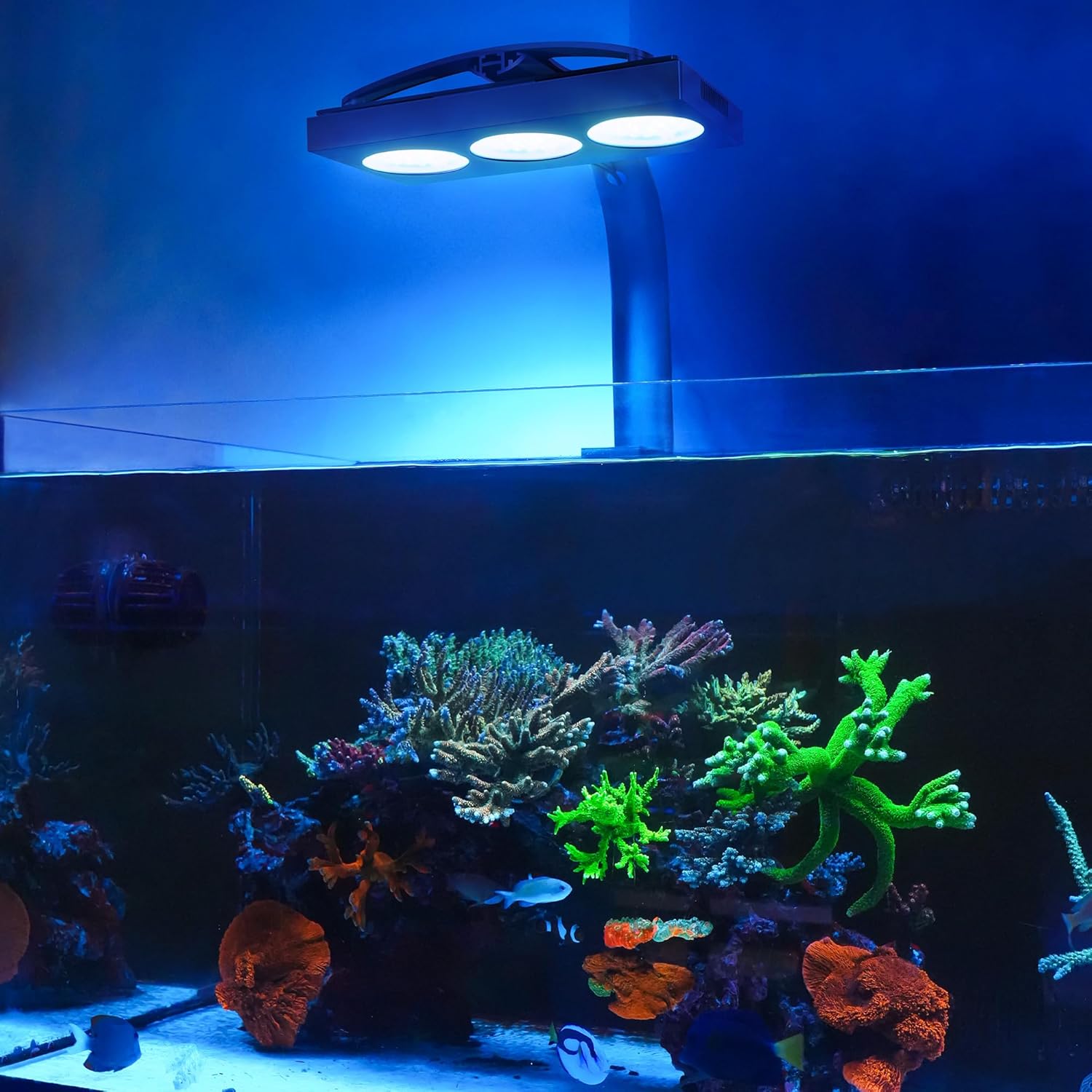
A banner image showcasing the NICREW HyperReef Gen 2 light illuminating a vibrant reef aquarium, with the tagline "Make High-End Technology More Accessible."
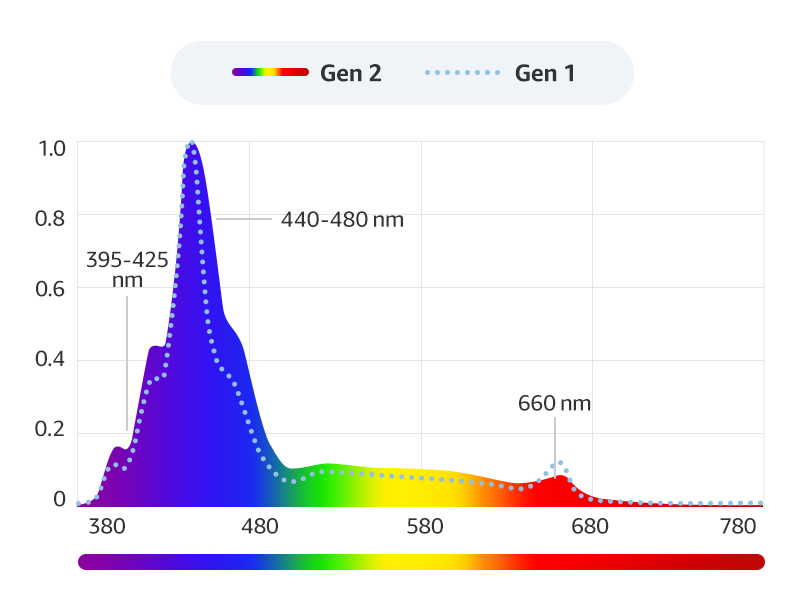
A graph illustrating the spectral output comparison between HyperReef Gen 1 and Gen 2, showing enhanced blue and violet wavelengths (395-425 nm and 440-480 nm) in Gen 2, along with a peak at 660 nm.

Two graphs comparing the light distribution curves of HyperReef Gen 1 and Gen 2, demonstrating that Gen 2 achieves a more optimal and even PAR distribution across a wider area compared to Gen 1's more concentrated central beam.

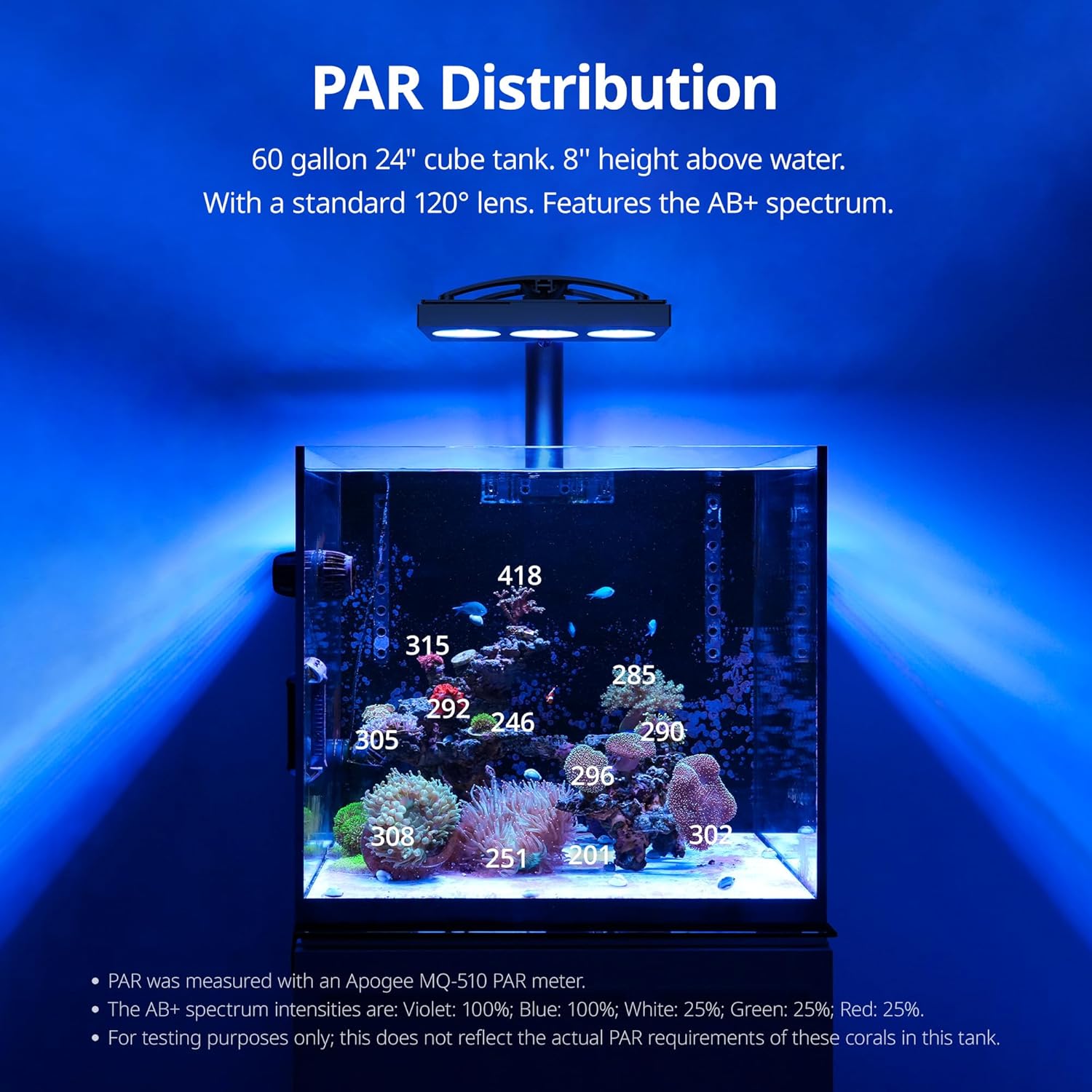
Two diagrams showing the PAR distribution charts for HyperReef Gen 1 and Gen 2 over a 36" x 36" area, visually confirming Gen 2's improved and more uniform PAR spread.
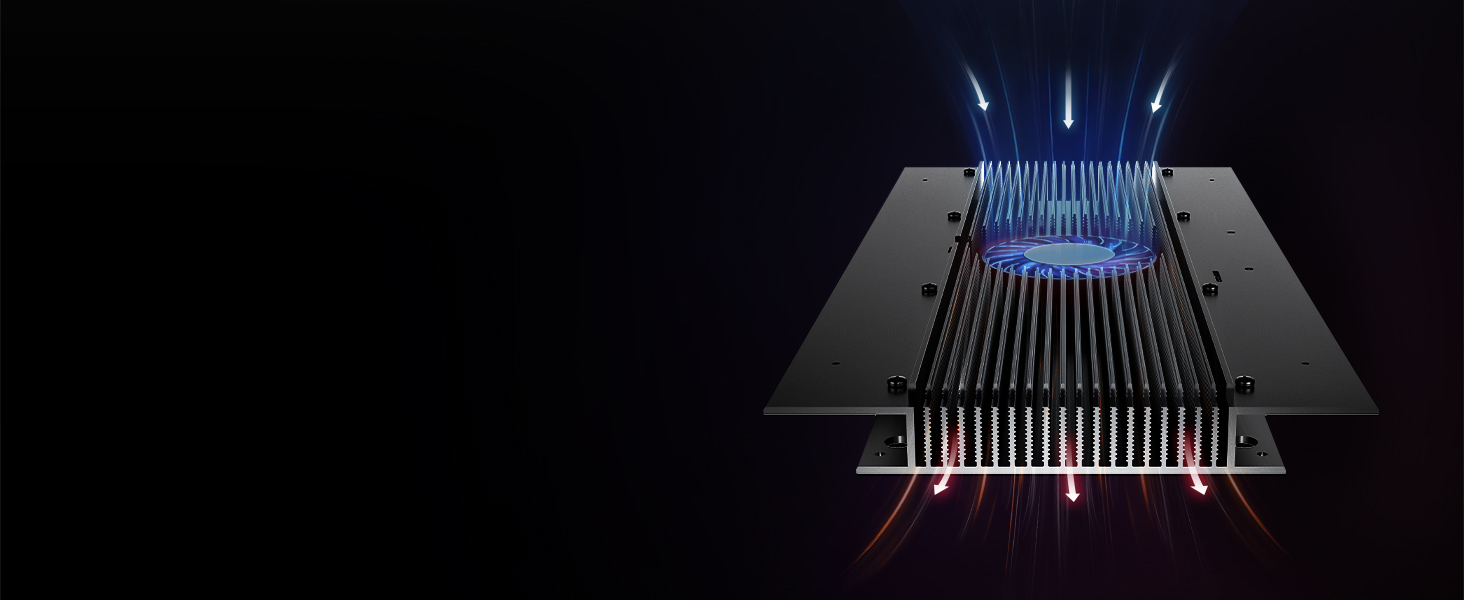
A diagram illustrating the advanced heat management system of the HyperReef Gen 2, showing airflow through the fan and heatsink for efficient cooling.
Specifications

A visual representation of the specifications for the HyperReef 200 Gen 2, including dimensions, power consumption, maximum coverage, and detailed LED spectrum breakdown by color and quantity.
| Attribute | Value |
|---|---|
| Model Name | HyperReef 200 Gen 2 |
| Power Consumption | 200 Watts (at full power) |
| Product Dimensions (LxWxH) | 16.14 x 12.6 x 7.09 inches |
| Item Weight | 9.7 pounds |
| Maximum Coverage | 36 in x 36 in / 90 cm x 90 cm |
| Light Source Type | Light Emitting Diode (LED) |
| LED Colors & Quantity | Cool White (15), Royal Blue (30), Blue (30), Violet (9), UV (9), Green (3), Red (3), Warm White (9) |
| Beam Angle | 120 Degrees |
| Material | Acrylic, ABS, Aluminum, Polycarbonate (PC) |
| Mounting Type | Floor Mount (various options available) |
Setup
Unboxing and Components:
Official NICREW HyperReef Gen 2 Unboxing Video: This video demonstrates the unboxing process of the HyperReef Gen 2 LED light, showcasing the contents of the package including the light fixture, power adapter, power cord, HyperReef Mount System components, and quick start guides. It also highlights the LED clusters and the heat sink with active cooling.

An overview of all components included with the HyperReef 200 Gen 2: the LED light fixture, power adapter, AC power cord (4 ft), HyperReef Mount System, and Quick Start Guide.
Mounting the Light:
The HyperReef 200 Gen 2 comes with a versatile mounting system. Choose the appropriate edge clamp combination for your aquarium setup:
- Default (Combo 1): For rimless/rimmed aquariums.
- Combo 2: For rimless aquariums.
- Combo 3: For Euro-braced aquariums.
- Combo 4: For flush mounting against a wall or to increase height.
- Combo 5: For aquariums with a narrow internal overflow box.
Refer to the included HyperReef Mount System Mounting Instruction manual for detailed assembly steps for your chosen configuration. Ensure the light is fixed at approximately 8-10 inches above the water surface for optimal performance.
This image displays the extensive mounting options available for the HyperReef Gen 2, including Single Arm Kit, Single Hanging Kit, Multi-Light Arm Kit, and Multi-Light Hanging Kit, illustrating how the light can be adapted to various aquarium setups.
Power Connection:
After mounting, connect the power supply to the HyperReef power cable and plug it into an outlet. Ensure a drip loop is created to prevent water from traveling along the cord to the outlet. The light can be controlled either manually using the built-in buttons or with a HyperReef Controller (sold separately).
Operating Instructions
Button Control:
Your HyperReef light is ready for use with button control out of the box. In this mode, the HyperReef operates continuously until you turn it off. Your current settings are preserved and remain intact even after the device is powered down.
| Action | Result |
|---|---|
| PRESS ▲ | Turn On the HyperReef / Cycle through preset color settings |
| HOLD ▲ | Turn Off the HyperReef |
| PRESS ▲ | Increase light intensity by 5% |
| PRESS ▼ | Decrease light intensity by 5% |
| HOLD ▲ | Increase light intensity rapidly |
| HOLD ▼ | Decrease light intensity rapidly |
| HOLD ▲ & ▼ | Factory Reset the HyperReef |
Light Schedule for Corals:
The AB+ spectrum closely emulates the mix of ATI Aquablue Special and ATI Blue Plus, offering ideal wavelengths and intensity for coral growth and vibrant color. For your reef tank, we recommend the following which closely mimics the AB+ spectrum:
- Violet: 100%
- Blue: 100%
- White: 25%
- Green: 25%
- Red: 25%
Typically, aquariums need 8-12 hours of light daily. We recommend a 1-hour ramp-up, followed by 8 hours of steady light, and 1 hour of dim-down, totaling a 10-hour lighting schedule.
Recommended PAR Intensity for Coral Types:
- Soft Corals: 75-150 PAR
- LPS (Large Polyp Stony) Corals: 75-150 PAR
- SPS (Small Polyp Stony) Corals: 200-350 PAR
It is crucial to find the right balance of light intensity, because both too low and too high will harm your corals. The ideal for precisely assessing light intensity in aquariums is to use a PAR meter, which measures photosynthetic active radiation. If you don't have a PAR meter, start with a lower intensity and gradually increase it to allow corals to acclimate.
HyperReef Controller (Sold Separately):
For endless customization and advanced programming options, the HyperReef can be connected to an external controller (sold separately). This allows for precise management of your lighting schedule and intensity.

The HyperReef Gen 2 Controller, shown in hand, provides a user interface for managing lighting with endless customization options. This accessory is sold separately.
Maintenance
To ensure the ongoing optimal performance of the HyperReef, it is advised to ensure it is clean, dry, and free of any buildup of salt deposits regularly. Before doing any maintenance, disconnect the unit, allow the lens to cool down, and allow it to dry completely before reconnecting.
- Maintain the Cooling Fan (Air Inlet) and Heat Sink (Air Outlet) free of dust by removing the top cover and gently wiping them with a damp cloth. Reassemble once dry.
- If the lens becomes contaminated with water, dust, or other particles, clean it with isopropyl alcohol.
- Keep silicone covers for USB-C ports plugged in when the ports are not in use. Keep the ports clean at all times.
Troubleshooting
Please make sure to perform maintenance before doing any troubleshooting.
| Issue | Resolution |
|---|---|
| Light fails to turn on or flickers | Check the power supply's constant indicator light to ensure proper functionality. Ensure the power outlet is working properly. |
| Buttons are unresponsive | Ensure the light is disconnected from HyperReef Controller. Unplug the power cord from the outlet, wait 15 seconds, then power back on. |
| Indicator light blinks red | Ensure the fan is running. Ensure the light has sufficient airflow/clearance. |
| Fan does not run | Fan only activates when the temperature sensor detects 105°F/40°C or higher. |
If you have followed the above troubleshooting steps and the issue persists, please reach out to support@nicrew.com for further assistance.
Warranty and Support
NICREW products carry a 1-year limited warranty from the date of purchase. NICREW's limited warranty is restricted to the country of purchase. The limited warranty is valid on items taken outside the country they were originally bought in or shipped to directly from an authorized online purchase.
NICREW is not responsible for and makes no warranties as to the following: 1) product failures or damage due to normal wear and tear, exposure to excessive heat or moisture, corrosive chemicals or substances, improper installation, defects or conditions of the aquarium, misuse, abuse, modifications, and alterations; and 2) minor imperfections that do not affect the product's structural integrity or use.
To obtain warranty service or technical support, please reach out to support@nicrew.com. Please state the reason and provide an invoice or screenshot to confirm the order number.
Warranties on all replacements follow the same warranty timeframe of the original defective item or 3 months after being replaced, whichever is longer. Warranties on products are void after having been fully refunded.
For more information, please visit www.nicrew.com/support/warranty.
Related documentsHyperReef 200 Gen 2

Ask a question about this manual
Ask about setup, troubleshooting, compatibility, parts, safety, or missing instructions. Manuals+ will review the question and use this page’s manual context to help answer it.