1. Introduction
Thank you for choosing the AutoBora Plug and Play Car Video Recorder. This dash cam is designed to seamlessly integrate into your vehicle, providing high-quality video recording for enhanced safety and peace of mind. Its OEM built-in look ensures no extra camera is stuck on the windshield, and no hard wiring is required for installation.
1.1 Product Compatibility
This dash cam is compatible with the following Bentley models:
- Bentley Continental GT 2018–present
- Bentley Bentayga 2016–present
- Bentley Flying Spur 2019–present
Important: Please check your car's rearview mirror and installation area to confirm compatibility before purchase. If unsure, provide photos of your rear mirror (left, right, and rear sides) for assistance.
2. Package Contents
Please verify that all items listed below are included in your package:
- AutoBora Dash Cam (Front 4K 2160P Camera)
- Rear 1080P Camera
- Plug and Play Power Cable
- Plastic Pry Bar
- User Manual

Figure 2.1: Package Contents Overview
3. Setup & Installation
3.1 Front Camera Installation
The AutoBora dash cam is designed for an OEM built-in look, integrating neatly without obstructing your view or requiring complex wiring.

Figure 3.1: Before Installation

Figure 3.2: After Installation
The dash cam is designed to fit precisely into the designated area near your car's rearview mirror. Use the provided plastic pry bar to gently open panels if necessary, ensuring a snug and secure fit.
3.2 Power Connection (Plug and Play)
The plug and play cables simplify the power connection process. These cables typically draw power from existing sources like rain sensors, reading light panels, anti-glare mirrors, or other reserved ports in your vehicle.
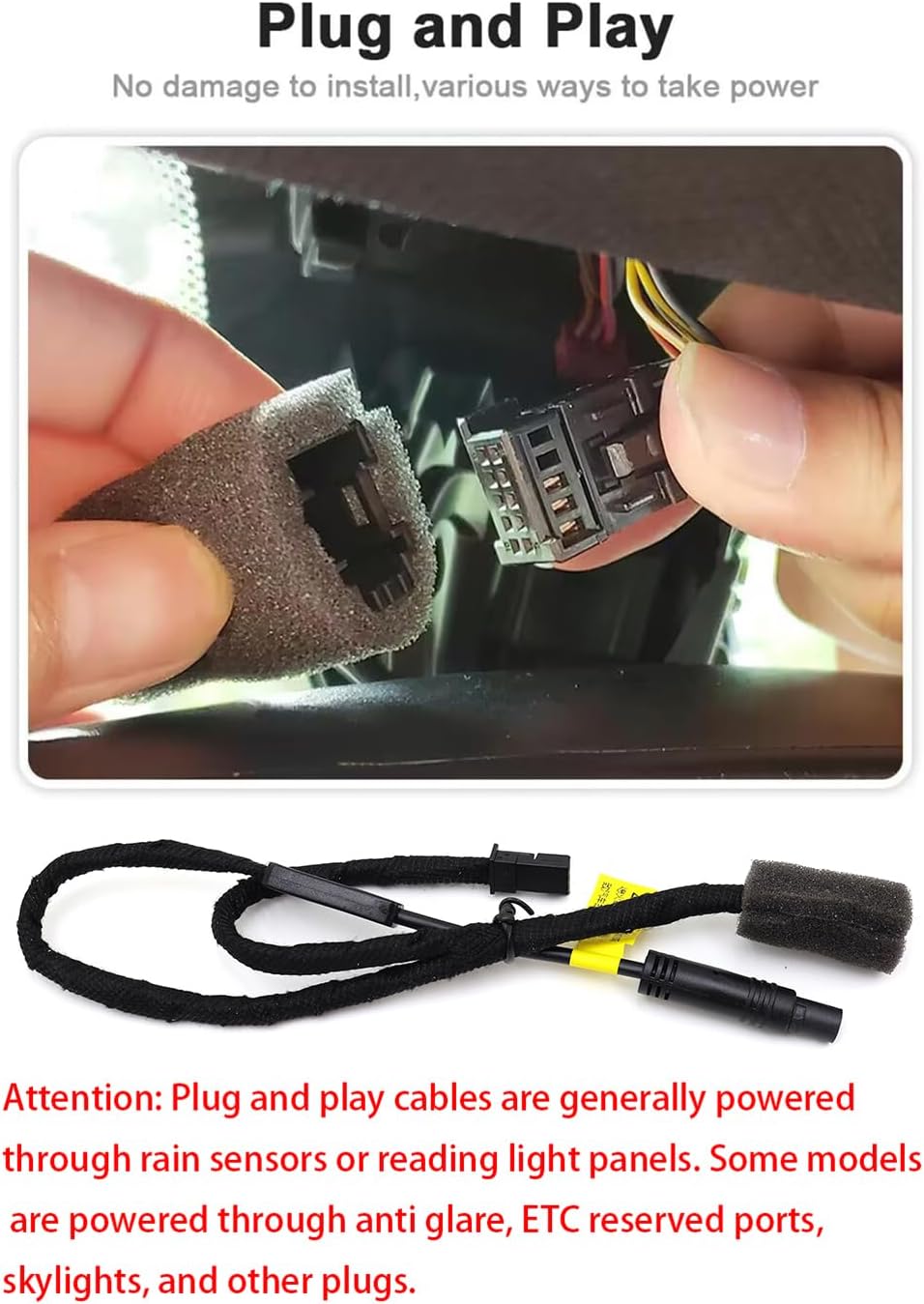
Figure 3.3: Plug and Play Power Connection
Attention: Ensure the connection is secure and does not interfere with any existing vehicle functions.
3.3 Rear Camera Installation & Wiring
The rear camera can be mounted on the rear windshield or positioned to face the cabin, depending on your recording needs.

Figure 3.4: Rear Camera Wiring and Mounting Options
Route the rear camera cable neatly along the vehicle's interior trim to the desired mounting location. Ensure the cable does not interfere with airbags or other safety features.
3.4 Rear Lens Rotation
The rear lens offers 360-degree rotation, providing double security for front and rear dual recording. This allows you to capture the exterior view behind your car or manually rotate the lens to record the interior of the car.
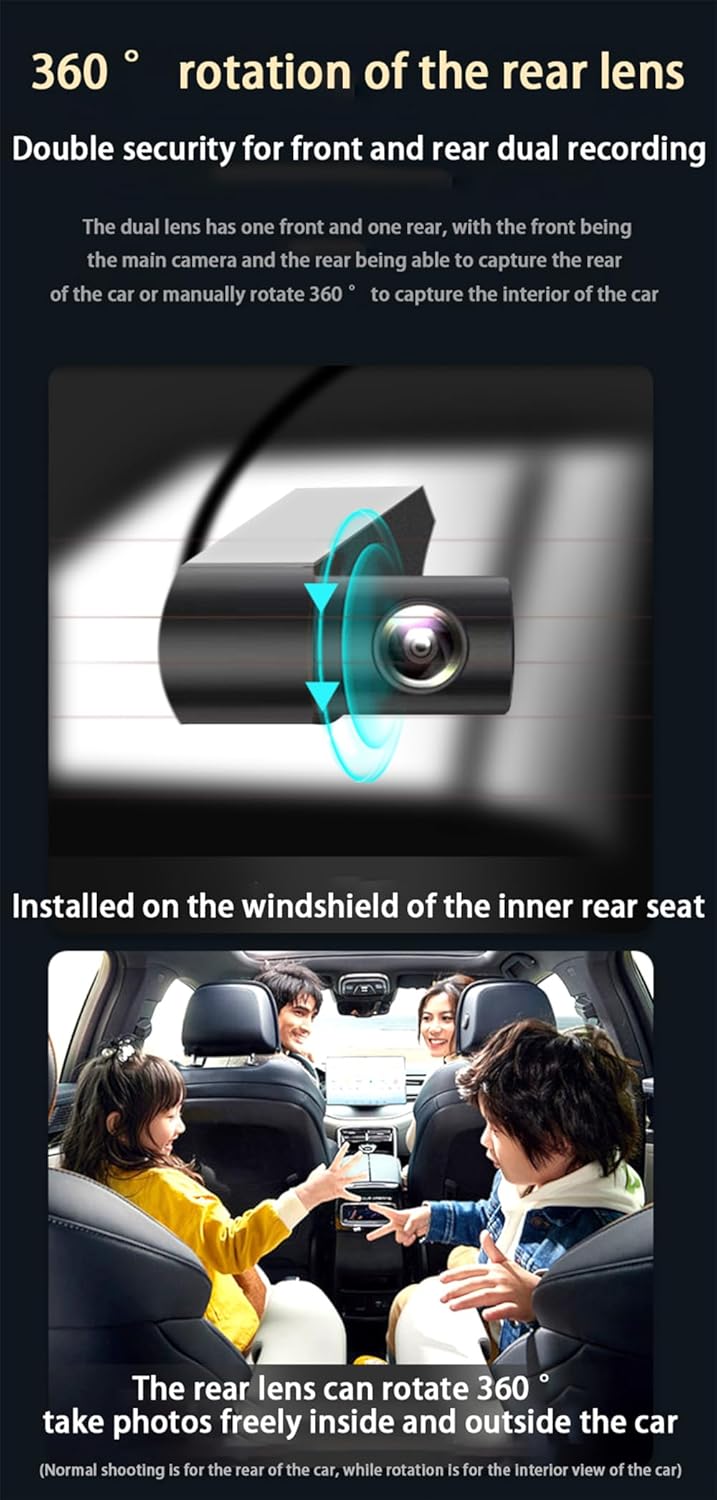
Figure 3.5: 360° Rotation of the Rear Lens

Figure 3.6: Rear Lens Capturing Interior View
4. Operation
4.1 Wi-Fi Connectivity & App Control
The dash cam features built-in Wi-Fi for seamless connection to the Viidure APP on your smartphone. This allows you to:
- View live video feed.
- Download important video clips directly to your phone.
- Adjust dash cam settings.
- Playback or share videos conveniently.
Note: Turn off Cellular Data/Bluetooth on your phone if you experience issues with video preview in the app.

Figure 4.1: App Control and Live View
4.2 Loop Recording
The loop recording function ensures continuous recording by overwriting the oldest footage when the memory card is full. The dash cam supports memory cards up to 256GB (not included).
4.3 Emergency Accident Locks (G-Sensor)
Equipped with a G-Sensor, the dash cam automatically detects sudden collisions or impacts. In such an event, it immediately saves the relevant footage to a specified, protected folder, preventing it from being overwritten by loop recording. This feature provides crucial evidence in case of an accident.
4.4 Video Quality and Night Vision
The AutoBora dash cam records 4K (2160P) video for the front camera and 1080P for the rear camera, both at 30 frames per second. With an f/1.6 large aperture and WDR (Wide Dynamic Range) technology, it delivers excellent picture quality and clarity, even in low-light conditions, ensuring superior night vision.
5. Maintenance
To ensure optimal performance and longevity of your AutoBora Dash Cam, follow these maintenance guidelines:
- Cleaning: Gently wipe the camera lenses with a soft, lint-free cloth. Avoid using abrasive cleaners that could scratch the lens.
- Firmware Updates: Periodically check the AutoBora official website or the Viidure APP for any available firmware updates. Keeping your dash cam's firmware up-to-date can improve performance and add new features.
- Memory Card: Format your memory card regularly (e.g., once a month) through the dash cam's settings or the app. This helps maintain card health and prevents data corruption.
- Temperature: Avoid exposing the dash cam to extreme temperatures for prolonged periods, as this can affect its components and battery life.
6. Troubleshooting
If you encounter any issues with your AutoBora Dash Cam, please refer to the following common troubleshooting steps:
| Problem | Possible Cause | Solution |
|---|---|---|
| Dash cam does not power on. | Loose power connection; vehicle power issue. | Ensure the plug and play cable is securely connected. Check your car's fuse box if necessary. |
| Wi-Fi connection issues / No live preview in app. | Interference from other wireless signals; app settings. | Turn off cellular data and Bluetooth on your phone before connecting to the dash cam's Wi-Fi. Restart the app and dash cam. |
| Recording stops or footage is corrupted. | Memory card issue; card full; faulty card. | Format the memory card. Try a different, high-quality memory card (Class 10 or higher). Ensure sufficient storage. |
| Poor video quality at night. | Dirty lens; extreme low light conditions. | Clean the camera lens. Ensure WDR is enabled in settings if applicable. |
| G-Sensor not triggering or too sensitive. | G-Sensor sensitivity setting. | Adjust the G-Sensor sensitivity in the Viidure APP settings. |
If the problem persists after trying these solutions, please contact AutoBora customer service for further assistance.
7. Specifications
| Feature | Detail |
|---|---|
| Model Name | Dash Cam |
| Video Capture Resolution | Front: 2160p (4K UHD), Rear: 1080p |
| Connectivity Technology | Wi-Fi |
| Special Features | App Control, Built-In Microphone, Built-In WiFi, G-Sensor, Loop Recording, WDR (Wide Dynamic Range) |
| Orientation | Front & Rear |
| Mounting Type | Rearview Mirror Mount (OEM Style) |
| Supported Storage | Up to 256GB (Micro SD Card, not included) |
| Product Dimensions | 8 x 8 x 8 inches (Approximate) |
| Manufacturer | AutoBora |
8. Warranty & Support
AutoBora is committed to providing innovative and reliable products for safe driving. All integrated dash cams undergo strict quality inspection.
8.1 Warranty
This product comes with a 12-month warranty from the date of purchase, covering manufacturing defects and malfunctions under normal use.
8.2 Customer Support
For any usage or installation problems, or to claim warranty service, please reach out to AutoBora customer service. We offer prompt response technical support to assist you.
Please refer to your purchase documentation or the AutoBora official website for specific contact information.


