
Crenova 606C+
Crenova Digital Clamp Meter Multimeter User Manual
Brand: Crenova | Model: 606C+
1. Introduction
The Crenova 606C+ Digital Clamp Meter is a versatile and reliable tool designed for professional electricians and DIY enthusiasts alike. This handheld, battery-operated digital multimeter is double insulated and engineered to meet safety standard IEC61010-1 CAT II 600V, ensuring safe operation across various applications.
Its auto-ranging design simplifies measurements by automatically selecting the correct range for different circuits and appliances. With a comprehensive set of practical modes and user-oriented features, the 606C+ is suitable for use in homes, schools, laboratories, and industrial settings.

Figure 1.1: The Crenova 606C+ Digital Clamp Meter and included accessories.
2. Safety Information
WARNING: Always read and understand all safety warnings and instructions before operating this device. Failure to do so may result in electric shock, fire, or serious injury.
- This device conforms to IEC61010, double insulation, and CAT III 600V safety standards.
- Always ensure the device is set to the correct measurement function and range before connecting to a circuit.
- Do not attempt to measure current on both live and neutral wires simultaneously with the clamp jaw, as this will result in a zero reading. Only clamp around a single conductor.
- Avoid contact with live circuits. Use appropriate personal protective equipment (PPE).
- Do not operate the meter if it appears damaged or if the test leads are damaged.
- Refer to the full user manual for complete safety guidelines and warnings.
3. Setup
3.1. Unpacking and Contents
Carefully unpack all items from the product packaging. Verify that all components listed below are present and undamaged.
- 1 x Crenova Clamp Meter (Model 606C+)
- 1 Pair of Probe Test Leads (Red and Black)
- 1 Pair of Alligator Clip Test Leads (Red and Black)
- 1 x K-type Thermocouple
- 2 x LR03 AAA Batteries (1.5V each)
- 1 x Carrying Pouch
- 1 x User Manual (this document)
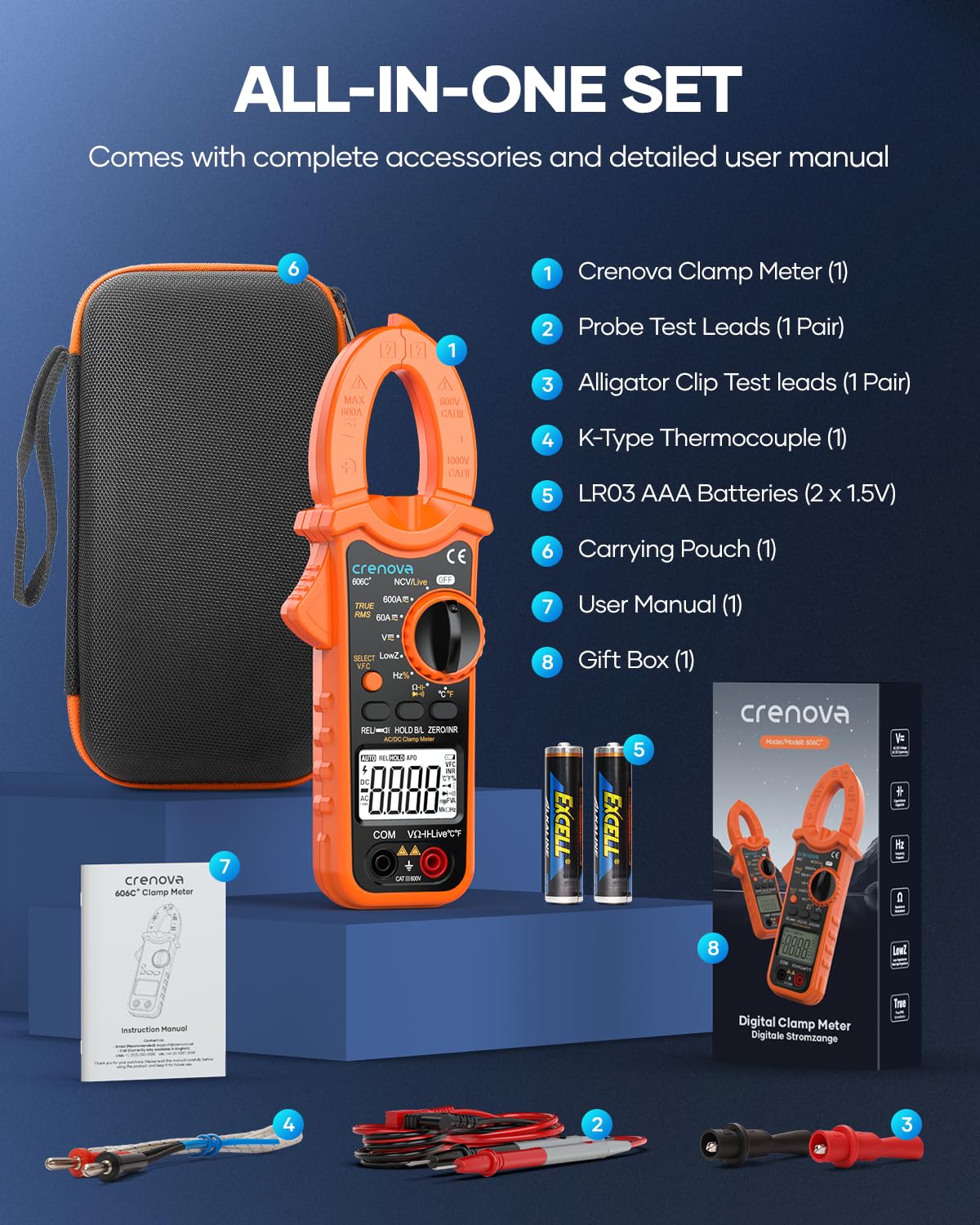
Figure 3.1: All components included in the Crenova 606C+ set, neatly organized.
3.2. Battery Installation
The Crenova 606C+ requires 2 AAA batteries (1.5V each), which are included in the package. To install or replace batteries:
- Locate the battery compartment on the back of the meter.
- Use a screwdriver to open the battery compartment cover.
- Insert the 2 AAA batteries, ensuring correct polarity (+ and -).
- Replace the battery compartment cover and secure it with the screw.
A low battery indicator will appear on the LCD when batteries need replacement.
4. Operating Instructions
The Crenova 606C+ offers a wide range of measurement capabilities. Familiarize yourself with the function dial and buttons for optimal use.
4.1. Function Overview

Figure 4.1: Overview of the multipurpose functions available on the Crenova 606C+.
The meter features a 6000-count large LCD with backlight for clear readings, even in dark environments. A built-in torch further aids visibility. Key functions include:
- AC/DC Current (up to 600A): Measured using the clamp jaw.
- AC/DC Voltage (up to 600V): Measured using test leads.
- Resistance (up to 60MΩ): Measured using test leads.
- Capacitance (up to 6mF): Measured using test leads.
- Frequency (up to 10MHz): Measured using test leads.
- Duty Cycle: Measured using test leads.
- Continuity Test: Audible alarm for continuous circuits.
- Diode Test: For checking diode functionality.
- Non-Contact Voltage (NCV) Detection (48V to 250V AC): Detects AC voltage without direct contact.
- Live Wire Test (110V to 380V AC): Identifies live wires with an audible alarm.
- Inrush (INR) Current Measurement: Measures the initial surge of current when a device is turned on.
- Temperature Measurement (-4°F to 1832°F / -20°C to 1000°C): Requires the K-type thermocouple.
- LowZ Mode: Tests AC voltage with low impedance to reduce false readings from ghost voltage.
- V.F.C Button: Long press to enable the low pass filter for specific requirements.
- REL (Relative) Mode: Measures the difference from a reference value.
- HOLD (Data Hold) Mode: Freezes the current reading on the display.
- ZERO Mode: Zeros the meter for accurate readings.
4.2. Current Measurement (Clamp Jaw)
The clamp jaw allows for non-contact measurement of AC/DC current up to 600A. The maximum allowed diameter of the measured wire is 25mm (1.38 inches).
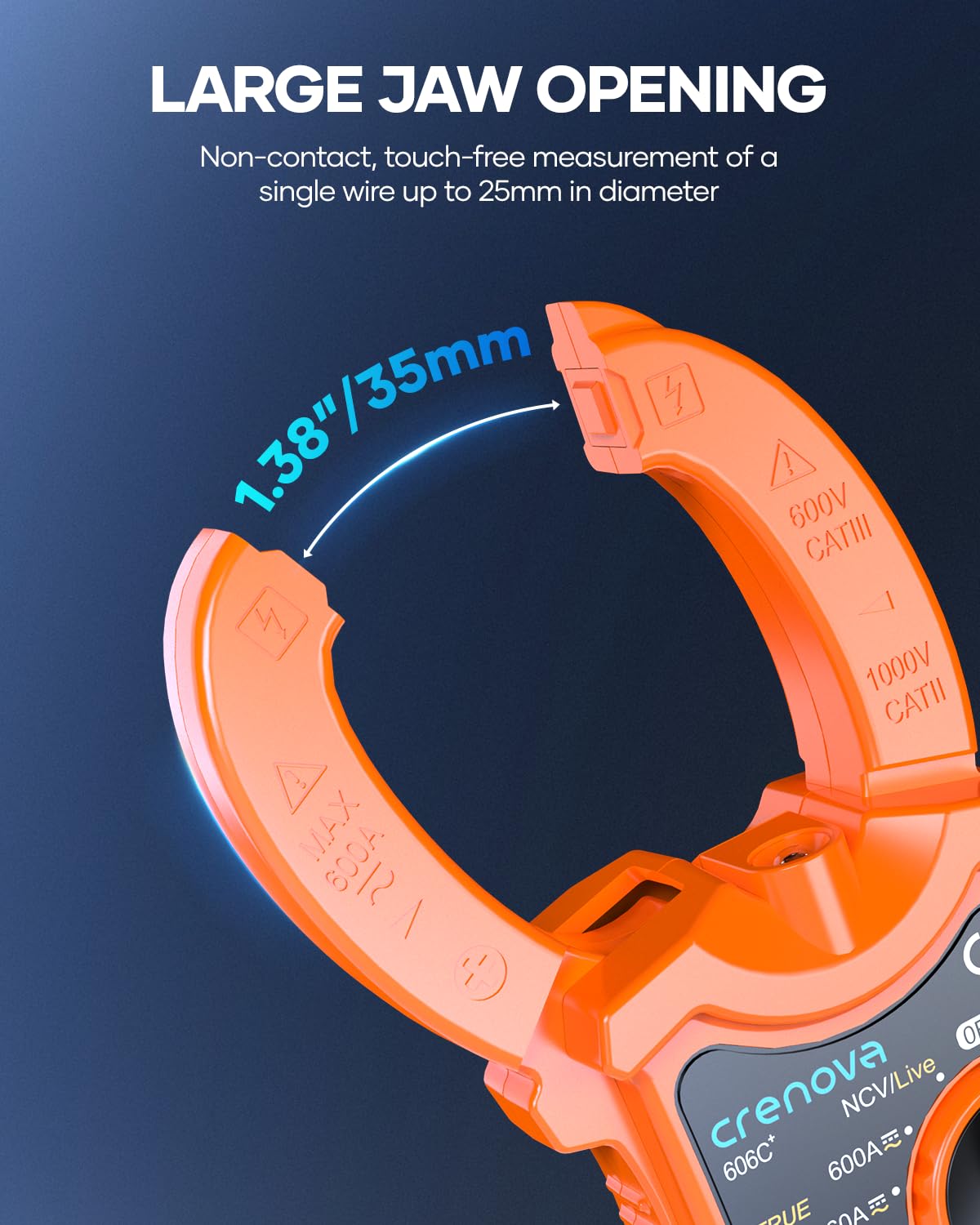
Figure 4.2: The large jaw opening (1.38"/35mm) for non-contact measurements.
To measure current:
- Turn the function dial to the appropriate AC A or DC A range (e.g., 600A). If unsure, start with the higher range.
- Open the clamp jaw by pressing the trigger.
- Place the clamp jaw around a single conductor of the circuit you wish to measure. Ensure the jaw is fully closed. Note: Clamping around both live and neutral wires will result in a zero reading as the currents cancel each other out.
- Read the current value displayed on the LCD.
- Use the "HOLD" button to freeze the reading if needed.

Figure 4.3: Measuring AC/DC current by clamping around a single wire.
4.3. Non-Contact Voltage (NCV) and Live Wire Test
The NCV function allows for quick detection of AC voltage without direct contact, providing an audible alarm. The Live Wire Test identifies live wires within a specific voltage range.

Figure 4.4: NCV detection range is AC 48V ~ 250V. Higher voltage results in louder, faster beeps.
4.4. Temperature Measurement
Utilize the included K-type thermocouple to measure temperature across a wide range.

Figure 4.5: The meter can measure temperature from -4°F to 1832°F (-20°C to 1000°C).
4.5. User-Friendly Features
The 606C+ is designed for ease of use, featuring a bright torch and backlight for working in dimly lit areas, and an auto power-off function to conserve battery life.

Figure 4.6: The torch and backlight features ensure easy readability in dark conditions.
5. Maintenance
- Cleaning: Wipe the meter with a dry, clean cloth. Do not use abrasive cleaners or solvents.
- Battery Replacement: Replace batteries promptly when the low battery indicator appears to ensure accurate readings and proper operation.
- Storage: Store the meter in its carrying pouch in a cool, dry place away from direct sunlight and extreme temperatures. Remove batteries if storing for extended periods.
- Calibration: For professional use, periodic calibration by a qualified technician is recommended to maintain accuracy.
6. Troubleshooting
- No Display/Power: Check battery installation and ensure batteries are not depleted. Replace if necessary.
- Inaccurate Readings:
- Ensure the correct function and range are selected.
- For current measurements, ensure the clamp is around a single conductor only.
- Check test lead connections for proper seating.
- Consider external interference if readings are erratic.
- "OL" or Overload Indication: The measured value exceeds the selected range. Switch to a higher range or verify the circuit.
- No Continuity Beep: Ensure the circuit is de-energized and the test leads are making good contact.
If issues persist, refer to the detailed troubleshooting section in the complete user manual or contact Crenova customer support.
7. Specifications
| Feature | Value |
|---|---|
| Product Dimensions | 8.07 x 2.95 x 1.38 inches |
| Item Weight | 1.3 Pounds |
| Model Number | 606C+ |
| Batteries | 2 AAA batteries (included) |
| Brand | Crenova |
| Power Source | Battery Powered |
| Color | Orange |
| Max AC/DC Current | 600A |
| Max AC/DC Voltage | 600V |
| Max Resistance | 60MΩ |
| Max Capacitance | 6mF |
| Max Frequency | 10MHz |
| Temperature Range | -4°F to 1832°F (-20°C to 1000°C) |
| Jaw Opening Diameter | 25mm (1.38 inches) |
| Safety Standards | IEC61010, CAT III 600V |
8. Warranty and Support
For warranty information and technical support, please refer to the official Crenova website or contact the seller directly through your purchase platform. Keep your proof of purchase for any warranty claims.
For further assistance, you may visit the official Crenova Store: Crenova Store on Amazon.
Related documents606C+

Ask a question about this manual
Ask about setup, troubleshooting, compatibility, parts, safety, or missing instructions. Manuals+ will review the question and use this page’s manual context to help answer it.