
1. Introduction
The ARPHA D289H is a state-of-the-art smart lock system designed to enhance your home security and convenience. This 5-in-1 device integrates a WiFi-enabled deadbolt, a video camera, a doorbell, a fingerprint reader, and multiple unlocking methods. It offers seamless control via a mobile application, ensuring you can manage access to your home from anywhere.

Figure 1: ARPHA D289H Smart Lock System Overview
2. What's in the Box
Carefully unpack your ARPHA D289H Smart Lock and verify that all components are present and in good condition. The package includes:
- Front and rear lock mechanism
- Handle set (interior/exterior)
- Step-by-step installation guide
- All necessary mounting screws
- Keys (x2)
- Dingdong machine (chime)

Figure 2: Package Contents
3. Setup & Installation
Follow these steps to install your ARPHA D289H Smart Lock. Ensure your door meets the specified dimensions for proper fit (6 x 4.5 x 4 inches, suitable for 2-1/8 inch (54mm) door holes, backset 60mm or 70mm).
- Prepare the door: Remove your existing lock and ensure the door is clean and ready for installation.
- Install the deadbolt mechanism: Insert the deadbolt into the door edge, ensuring the 'UP' indicator faces upwards. Secure it with the provided screws.
- Install the exterior assembly: Thread the power and antenna cables through the bottom-right hole of the mounting plate. Align the protruding position of the latch with the concave part of the lock body and insert.
- Secure the exterior assembly: Pass the two 30mm screws through the mounting plate and tighten to secure the exterior assembly to the door.
- Connect interior wiring: Connect the front and rear power communication link cables.
- Install the interior assembly: Attach the interior assembly, ensuring all cables are neatly tucked away.
- Install batteries: Insert 4 AA batteries (not included) into the battery pack.
- Install the handle set: Attach the handle set to the door, ensuring it is properly aligned and secured.
- Test the lock: Manually test the latch and deadbolt for smooth operation.

Figure 3: Smart Lock Installation Process

Figure 4: Door Size Compatibility
Installation Video Guide
Video 1: D289H Installation Tutorial (Seller Video)
This video provides a comprehensive visual guide for installing the ARPHA D289H Smart Lock, covering all steps from preparing the door to securing the components. It demonstrates the process clearly for both the main lock and the handle set.
4. Operating Instructions
The ARPHA D289H Smart Lock offers multiple ways to unlock and manage access.
4.1 Unlocking Methods
- APP Access: Unlock your door remotely via the Tuya app on your smartphone.
- Fingerprint: Use the AI fingerprint sensor for quick and secure entry.
- Keypad Code: Enter a personalized code on the illuminated keypad.
- Traditional Keys: Use physical keys as a backup.
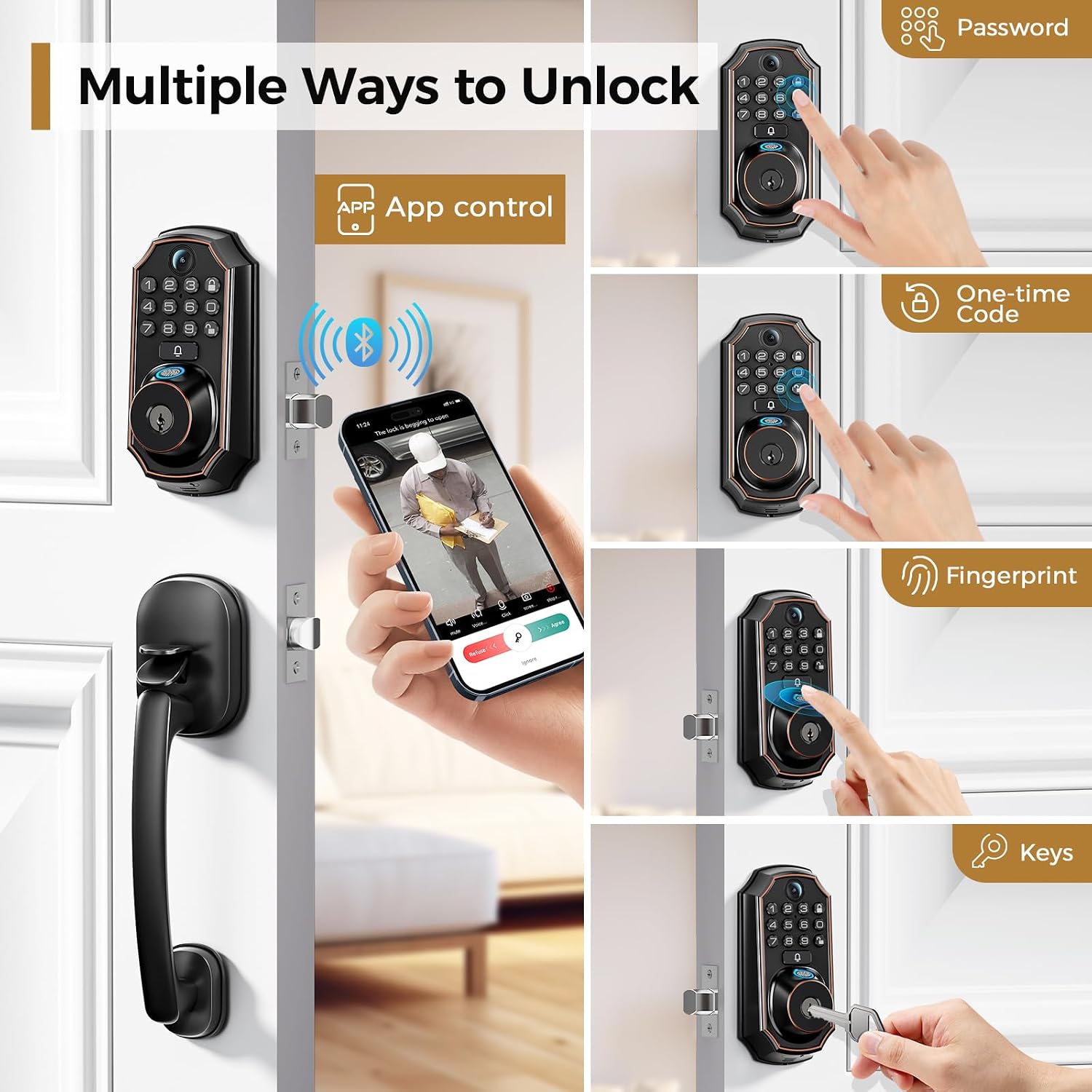
Figure 5: Multiple Ways to Unlock
4.2 App Control & Two-Way Audio
The built-in WiFi allows real-time notifications and remote control via the Tuya app. When a visitor presses the doorbell button, you receive an instant notification on your smartphone. You can then:
- Unlock your door remotely.
- Check the live video feed (4:3 aspect ratio, 130-degree wide-angle lens).
- Communicate with visitors using the built-in two-way microphone and speaker.

Figure 6: Two-Way Audio & App Control
Video 2: D289H Remote Unlock (Seller Video)
This video demonstrates how to remotely unlock the door using the mobile application after a visitor presses the doorbell, showcasing the two-way communication feature.
Video 3: D289H App Connection Settings (Seller Video)
This video guides you through the process of connecting your ARPHA D289H Smart Lock to the mobile application, including Wi-Fi and Bluetooth setup, and adding the device.
4.3 Fingerprint & Keypad Settings
The smart lock allows you to add and manage multiple user fingerprints and keypad codes.

Figure 7: Biometric Fingerprint Unlocking
Video 4: D289H Adding Users (Seller Video)
This video provides detailed instructions on how to add new users, including administrator and regular users, and how to register their fingerprints and keypad codes.
4.4 Auto-Lock & One-Touch Lock
The lock features an auto-lock function that can be set from 10 seconds to 30 minutes, ensuring your door is always secured. It also has a convenient one-touch lock feature.

Figure 8: Auto Lock & One-touch Lock
Video 5: D289H Constant Open Setting (Seller Video)
This video explains how to configure the constant open setting, which allows the door to remain unlocked for extended periods, overriding the auto-lock function.
5. Maintenance
5.1 Battery Replacement
The lock operates on 4 AA batteries. Replace them when the low battery alert is triggered to ensure continuous functionality. Battery life is up to 180 days.
5.2 Cleaning
Wipe the lock's exterior with a soft, damp cloth. Avoid abrasive cleaners or solvents that could damage the finish or electronic components.
6. Troubleshooting
- Camera not working: Ensure the lock is properly connected to your WiFi network. Check app settings for camera access.
- Battery drains quickly: Verify that you are using high-quality AA batteries. Extreme temperatures (-31°F to 158°F) can affect battery performance.
- Latch slips or doesn't engage: Ensure the lock is installed correctly and the latch mechanism is properly aligned with the strike plate. Refer to the installation video for precise alignment.
- Cannot manually turn the lock from inside: Check if the installation is incorrect. The latch should have minimal pressure against the weather seal.
- App connection issues: Ensure Bluetooth and 2.4GHz Wi-Fi are enabled on your phone. The lock only supports 2.4GHz Wi-Fi.

Figure 9: Durability and Weather Resistance
7. Specifications
| Feature | Description |
|---|---|
| Brand | ARPHA |
| Model Name | D289H |
| Lock Type | Biometric, WiFi |
| Special Features | Fingerprint, Camera, WiFi, App Unlock |
| Connectivity Protocol | Wi-Fi (2.4GHz), Bluetooth |
| Control Method | App, Hand Control, Mechanical knob, Android |
| Material | Zinc |
| Color | Bronze |
| Item Dimensions (L x W x H) | 6 x 4.5 x 4 inches |
| Item Weight | 4 Pounds |
| Power Source | 4 AA Batteries (not included) |
| Operating Temperature | -31°F to 158°F (-35°C to 70°C) |
| Certifications | ANSI Grade 3 certified |

Figure 10: ANSI Grade 3 Certification Details
8. Warranty & Support
ARPHA offers a 30-day money-back guarantee, an 18-month assurance, and lifetime technical support for your smart lock. Our dedicated support team is available 24/7 via email to assist you with any questions or issues.
Please do not hesitate to contact us if you need assistance.
Email Support: support@arpha.com


