
1. Introduction
This manual provides essential information for the POLAR Vantage V3 Sport Watch and the accompanying POLAR H10 Heart Rate Sensor. The Vantage V3 is a high-performance smartwatch designed for athletes, featuring GPS, heart rate monitoring, offline maps, and extensive training and recovery tools. The H10 sensor offers precise heart rate measurement for enhanced training accuracy.
For optimal performance and longevity of your devices, please read these instructions carefully before use.
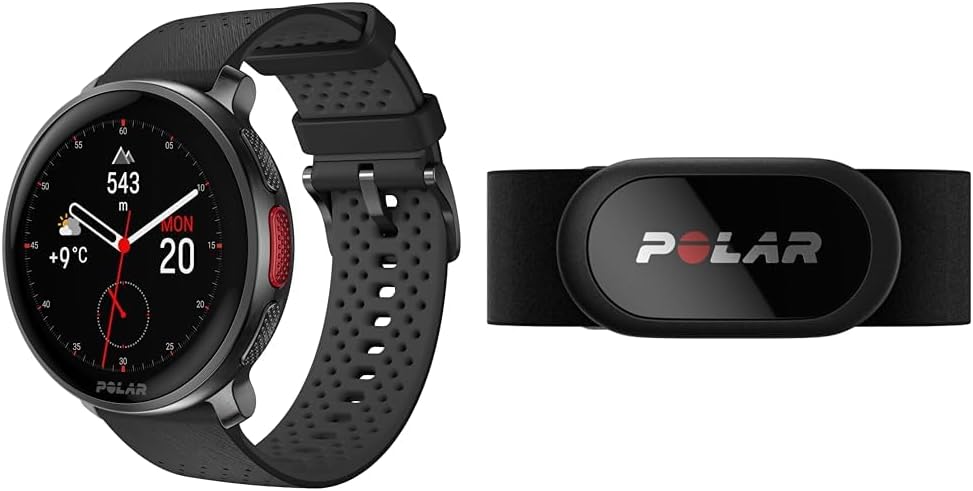
Image 1.1: The POLAR Vantage V3 Sport Watch (left) and the POLAR H10 Heart Rate Sensor (right).
2. Setup
2.1. POLAR Vantage V3 Sport Watch
- Charging the Watch: Connect the charging cable to the watch's charging port and a USB power source. The watch display will show charging progress. Ensure the watch is fully charged before first use. A full charge provides up to 140 hours of training time or 8 days of regular use.
- Initial Setup: Power on the watch by pressing and holding the top right button. Follow the on-screen instructions to select language, time, and personal settings.
- Pairing with Polar Flow App: Download the Polar Flow app on your smartphone. Create a Polar account or log in. Follow the app's instructions to pair your Vantage V3. This enables data synchronization and further customization.
- Wearing the Watch: Wear the watch snugly above your wrist bone, ensuring the optical heart rate sensor on the back makes good contact with your skin. Avoid wearing it too tightly or too loosely.

Image 2.1: The Vantage V3 display showing the charging status.

Image 2.2: Proper placement of the Vantage V3 watch on the wrist for accurate heart rate monitoring.
2.2. POLAR H10 Heart Rate Sensor
- Attaching the Strap: Snap the H10 sensor to the connector on the chest strap.
- Wetting Electrodes: Moisten the electrode areas on the back of the strap with water or electrode gel. This ensures good contact and accurate heart rate readings.
- Wearing the Sensor: Wrap the strap around your chest, just below your pectoral muscles. Adjust the strap length for a snug but comfortable fit. The POLAR logo on the connector should be centered and facing up.
- Pairing the Sensor: The H10 sensor can be paired with your Vantage V3 watch or directly with the Polar Flow app via Bluetooth. On your watch, navigate to Settings > General settings > Pair and sync > Pair sensor or other device. Select your H10 sensor from the list.
3. Operating the Vantage V3 Sport Watch
3.1. Display and Navigation
- The Vantage V3 features a sharp AMOLED touchscreen display. Swipe left/right or up/down to navigate through different views and menus.
- Use the side buttons for quick access to functions or to confirm selections.
- Customize your dashboards and widgets via the Polar Flow app to display the information most relevant to you.
3.2. GPS and Maps
- The watch uses dual-frequency GPS for accurate location tracking during outdoor activities.
- Download detailed offline maps through the Polar Flow app to navigate without a phone connection.

Image 3.1: The Vantage V3 display showing map navigation during an activity.
3.3. Training Features
- Access over 150 sports profiles. Select your activity before starting a training session.
- Utilize various training tools for structured workouts, interval training, and performance tracking.

Image 3.2: The Vantage V3 display showing a summary of weekly training activity.
3.4. Heart Rate Monitoring
- The Vantage V3 features integrated optical heart rate monitoring.
- For the highest precision, especially during intense activities or in challenging conditions, use the paired H10 Heart Rate Sensor.

Image 3.3: The Vantage V3 display showing real-time heart rate data and a heart rate graph.
3.5. Sleep and Recovery
- The watch automatically tracks your sleep patterns and provides insights into sleep quality and recovery.
- Utilize Polar's recovery tools to understand your body's readiness for training.
3.6. Polar Flow App Integration
- Sync your watch data regularly with the Polar Flow app to view detailed training summaries, track progress, and plan future workouts.
- The app allows for extensive customization of watch settings and sports profiles.
4. Operating the H10 Heart Rate Sensor
- The H10 sensor provides highly accurate heart rate data, often preferred for its responsiveness and reliability compared to optical sensors during certain activities.
- It supports Bluetooth, ANT+, and 5 kHz connections, allowing compatibility with a wide range of devices, including other sports watches, fitness apps, and gym equipment.
- The H10 has internal memory to store one training session, useful if you train without your watch or phone. Data can be transferred to the Polar Flow app later.
- The sensor is fully waterproof, making it suitable for swimming.
5. Maintenance
5.1. Cleaning
- Vantage V3 Watch: Rinse the watch under running water after each workout. Gently wipe the display and casing with a soft, damp cloth. Ensure the charging contacts are clean and dry.
- H10 Sensor and Strap: Detach the sensor from the strap after each use. Rinse the strap under running water and hang it to dry. Wash the strap regularly (e.g., weekly) in a washing machine at 40°C (104°F) in a laundry bag. Do not use bleach or fabric softener.
5.2. Battery Care
- Charge your Vantage V3 regularly, but avoid letting the battery completely drain frequently.
- For long-term storage, charge the watch to about 50% and store it in a cool, dry place.
- The H10 sensor uses a user-replaceable CR2025 coin cell battery. Replace it when the Polar Flow app indicates low battery.
5.3. Storage
- Store both devices in a dry, dust-free environment away from extreme temperatures.
6. Troubleshooting
- Watch not turning on or charging: Ensure the charging cable is securely connected to both the watch and a working USB power source. Clean the charging contacts on the watch. Try a different USB port or charger.
- GPS not connecting: Ensure you are in an open outdoor area with a clear view of the sky. Wait a few minutes for the watch to acquire a GPS signal. Sync your watch with Polar Flow to update GPS satellite data.
- Heart rate not accurate or connecting (H10): Ensure the electrodes on the strap are sufficiently moistened. Adjust the strap for a snug fit. Check that the H10 sensor is correctly paired with your watch or app. Replace the H10 battery if necessary.
- Data synchronization issues: Ensure Bluetooth is enabled on your smartphone and the Polar Flow app is open. Restart both your watch and smartphone. Try unpairing and re-pairing the devices.
- Watch freezing or unresponsive: Perform a soft reset by pressing and holding all five buttons on the watch simultaneously until the Polar logo appears.
7. Specifications
| Feature | Specification |
|---|---|
| Brand | POLAR |
| Model | Vantage V3 with H10 Sensor |
| Color | Black |
| Operating System | Proprietary OS |
| Connectivity Technology | Bluetooth |
| Wireless Communication Standard | Bluetooth |
| Battery Cell Composition | Lithium Polymer |
| GPS | Built-in GPS (Dual-frequency) |
| Shape | Round |
| Included Components | Heart Rate Sensor H10 |
| Date First Available | July 26, 2024 |
8. Warranty and Support
Your POLAR Vantage V3 Sport Watch and H10 Heart Rate Sensor are covered by a limited warranty. Please refer to the warranty information provided with your product packaging or visit the official POLAR website for details on warranty terms and conditions.
For technical support, product registration, or further assistance, please visit the official POLAR support website or contact their customer service. Keeping your device's software updated via the Polar Flow app is recommended for optimal performance and access to the latest features.
For more information, visit: www.polar.com/en/support


