
Introduction
This manual provides detailed instructions for the setup, operation, and maintenance of your HELESIN Smart Christmas Cone Tree Lights. This 3-pack includes cone trees of 4 feet, 5 feet, and 6 feet in height, each featuring multi-functional, color-changing LED lights with app and remote control capabilities, including music synchronization. Designed for both indoor and outdoor use, these lights offer a versatile solution for holiday decoration.

Image: The HELESIN Smart Christmas Cone Tree Lights set, showcasing their vibrant colors and control options.
Safety Information
Please read and understand all safety instructions before installation and use. Failure to follow these instructions may result in electric shock, fire, or other hazards.
- Outdoor use with caution. Do not leave in heavy rain or snow.
- Unplug during severe weather conditions.
- Keep away from flammable materials.
- Follow installation instructions carefully.
- Keep out of reach of children.
- Ensure all connections are secure and waterproof for outdoor use.

Image: All-weather design features, highlighting IP44 waterproof rating and USB connection.
Package Contents
Verify that all components are present before beginning assembly:
- 3 x Smart Christmas Cone Tree Lights (4ft, 5ft, 6ft)
- 3 x Star Toppers
- 3 x USB Power Adapters (Note: Some packages may require separate USB power supplies as per customer feedback)
- 1 x Remote Control
- Assembly Poles and Bases
- Ground Stakes (for outdoor stability)
- User Manual
Specifications
| Feature | Detail |
|---|---|
| Light Color | Color Changing (RGB, 16 Million Colors) |
| Voltage | 5 Volts |
| Item Model Number | HX-ZXS-CS |
| Item Weight | 9.24 pounds (for the 3-pack) |
| Product Dimensions | Varies by height (4ft, 5ft, 6ft); Packaged: 1 x 1 x 1 inches |
| Material | Metal+Copper+PVC |
| Frame Material | Metal |
| Waterproof Rating | IP44 |

Image: Size information for the 4ft, 5ft, and 6ft cone trees.
Setup and Installation
Follow these steps to assemble your Smart Christmas Cone Tree Lights. Assembly is quick and requires no additional tools.
- Assemble the Base: Connect the base segments together to form a stable circular base.
- Insert the Center Pole: Securely insert the main center pole into the assembled base.
- Attach LED Strings: Carefully drape the LED light strings from the top of the center pole down to the outer edge of the base, ensuring even distribution.
- Install Star Topper: Place the star topper onto the top of the center pole.
- Secure to Ground (Outdoor Use): Use the provided ground stakes to firmly anchor the base of each tree to the ground, preventing tipping in windy conditions.
- Connect Power: Plug the USB connector into a suitable USB power adapter (not always included, 3A recommended) and then into a power outlet. Ensure outdoor outlets are weather-protected.

Image: Visual guide illustrating the easy installation steps for the cone trees.
Installation Video Guide
Watch this video for a visual demonstration of the assembly process:
Video: Assembly and demonstration of the 3-pack Christmas Cone Tree Lights.
Operating Instructions
1. App Control
Download the companion smart app (e.g., "Hello Fairy" or similar, refer to packaging for exact app name) to unlock the full potential of your lights. The app allows for extensive customization and control.
- Color Selection: Choose from 16 million colors for each individual LED bead.
- Multiple Lighting Modes & Scenes: Access a variety of preset lighting effects and dynamic scenes.
- DIY Customization: Create and save your own unique lighting patterns and color combinations.
- Group Control: Connect multiple HELESIN Smart Christmas Cone Trees to the app for synchronized lighting effects or coordinated transitions.
- Adjustable Brightness: Fine-tune the brightness levels from 1% to 100%.
- Scheduled Timer Function: Set specific times for the lights to turn on and off automatically.

Image: App interface demonstrating multiple functions and modes for light control.

Image: Examples of multiple scene modes available through the app.
2. Remote Control
The included remote control provides convenient access to essential functions without needing your smartphone.
- ON/OFF: Power the lights on or off.
- Speed/Brightness: Adjust the speed of dynamic effects and the overall brightness.
- Static Colors: Switch between various static color options.
- Dynamic Modes: Select from pre-programmed lighting patterns like loop mode, fading, and flowing effects.
- Timer: Set 30-minute or 1-hour delay off timers.
- Music Modes: Activate music synchronization modes.
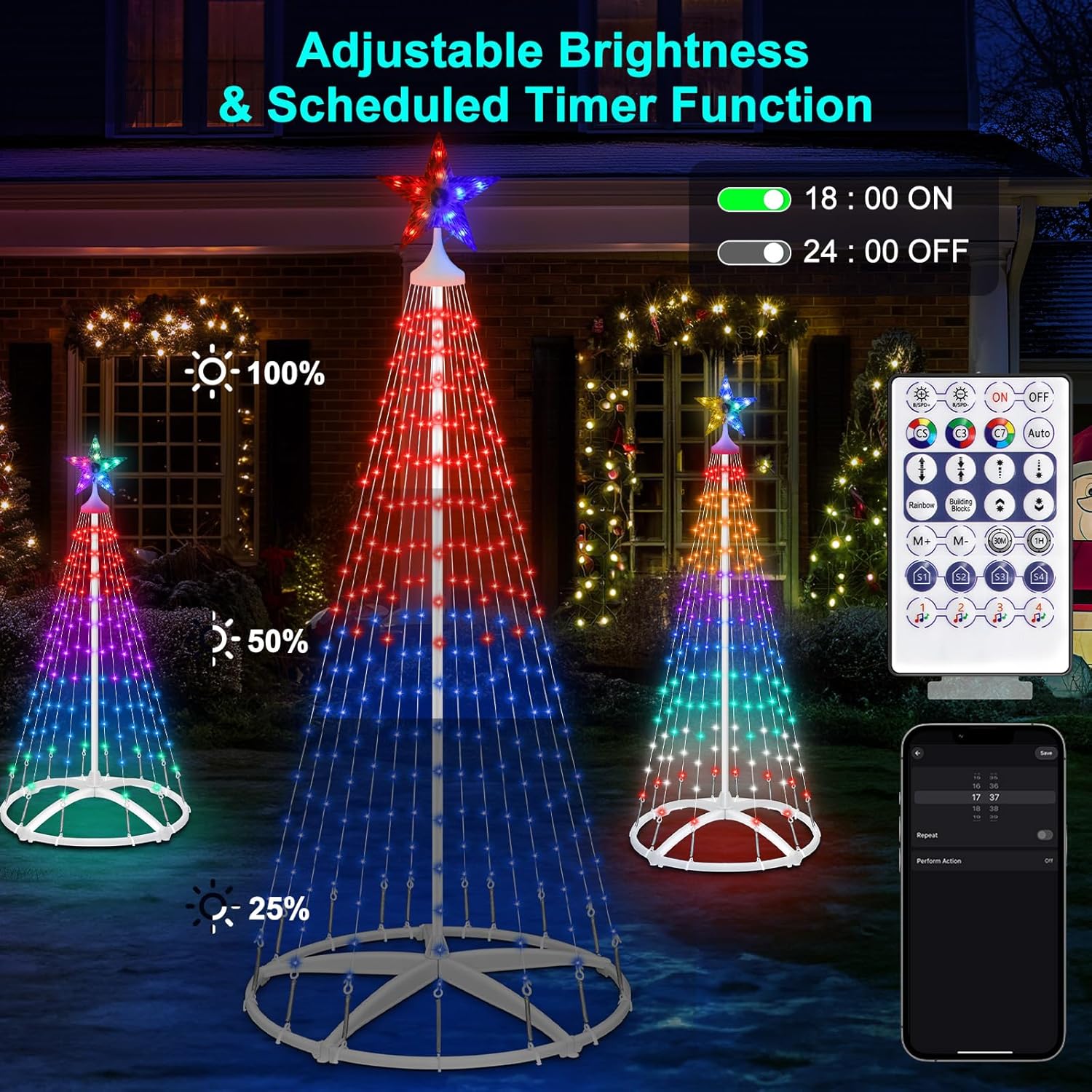
Image: The remote controller with key instructions for various functions.
3. Music Sync
The lights are equipped with music modes that allow the colors and patterns to synchronize with the rhythm of your music, creating an immersive light show.

Image: Christmas cone trees displaying music-synchronized lighting effects.
4. Timer Function
Utilize the scheduled timer function via the app or remote to automate the operation of your lights, ensuring they turn on and off at desired times.
Operation Videos
Explore the dynamic lighting effects and app control features through these videos:
Video: Demonstration of various LED light patterns and music synchronization for outdoor Christmas trees.
Video: Overview of smart outdoor Christmas tree features, including app control and diverse lighting options.
Video: Showcase of Esfos LED Christmas trees with various light effects and app integration.
Maintenance
- Cleaning: Gently wipe the LED strings and frame with a soft, damp cloth. Avoid using harsh chemicals or abrasive cleaners.
- Storage: After the holiday season, disassemble the trees by reversing the installation steps. Store all components in their original packaging or a dry, protected area to prevent damage and prolong product life.
- Inspection: Before each use, inspect the power cord, LED strings, and all connections for any signs of damage. Do not use if any part is damaged.
Troubleshooting
| Problem | Possible Cause | Solution |
|---|---|---|
| Lights do not turn on. | No power, loose connection, faulty adapter. | Check power outlet, ensure all connections are secure, try a different USB power adapter. |
| Remote control not working. | Battery depleted, obstruction, remote out of range. | Replace remote battery, ensure clear line of sight to the receiver, move closer to the tree. |
| App cannot connect to lights. | Bluetooth/Wi-Fi off, app not updated, interference. | Ensure Bluetooth/Wi-Fi is enabled on your device, update the app, restart the lights and your device. |
| Lights are dim or flickering. | Insufficient power, damaged LED string. | Ensure power adapter meets specifications (5V, 3A recommended), inspect for damaged wires. |
Warranty and Support
HELESIN products are designed for quality and durability. For warranty information, technical support, or any questions regarding your Smart Christmas Cone Tree Lights, please contact HELESIN customer service through the retailer where the product was purchased or visit the official HELESIN brand store on Amazon: HELESIN Store.