1. Introduction
This manual provides instructions for the assembly, operation, and maintenance of your HOMCOM Vanity Desk with Mirror and Lights. Please read this manual thoroughly before assembly and use to ensure safe and correct operation. Keep this manual for future reference.

Image 1.1: The HOMCOM Vanity Desk with Mirror and Lights, featuring a white finish, two drawers, and a matching stool.
2. Safety Information
WARNING: Failure to follow these safety instructions may result in injury or damage to the product.
- Assembly required. Be cautious of sharp edges and pinch points during assembly and usage.
- Keep electrical components away from water and ensure proper maintenance.
- Do not exceed the weight capacity of the vanity and stool.
- Ensure all connections are secure before use.
- Place the vanity on a flat, stable surface to prevent tipping.
3. Package Contents
Verify that all components are present and undamaged before beginning assembly. If any parts are missing or damaged, contact customer support.
- Vanity Desk Frame
- Mirror with 10 LED Bulbs
- Stool
- 2 Drawers
- Assembly Hardware (screws, dowels, etc.)
- Instruction Manual

Image 3.1: The vanity desk is typically shipped in two packages.
4. Setup and Assembly
Assembly of the HOMCOM Vanity Desk is required. Please follow the detailed instructions provided in the separate assembly guide included with your product. Ensure you have all necessary tools and a clear workspace before starting.
- Unpack all components and verify against the parts list.
- Assemble the main desk frame according to the diagrams.
- Install the drawers into their respective slots, ensuring smooth operation.
- Attach the mirror unit to the desk, securing it firmly.
- Install the LED bulbs into the mirror frame.
- Assemble the stool.
- Connect the power cord for the LED lights to a suitable power outlet.
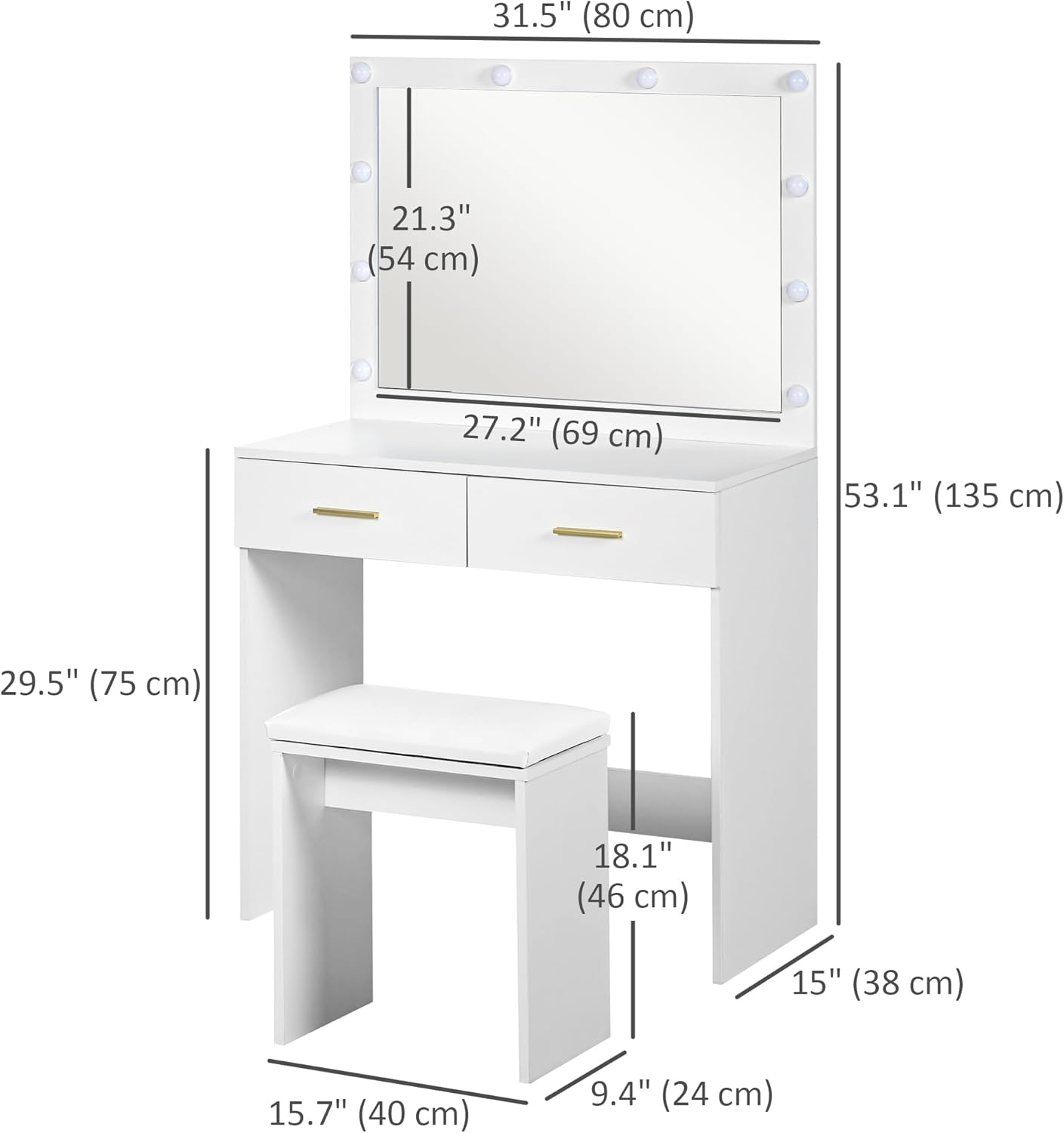
Image 4.1: Dimensions of the vanity desk and stool for planning placement.
5. Operating Instructions
5.1 LED Mirror Lights
The vanity mirror is equipped with 10 LED bulbs to provide optimal lighting for makeup application and skincare.
- Power On/Off: Press the touch switch on the mirror to turn the lights on or off.
- Adjust Lightness Mode: Short-press the touch switch to cycle through different lightness modes (e.g., warm white, cool white). The product description specifies warm white light (6500K).
- Adjust Brightness: Long-press the touch switch to adjust the brightness level of the lights.

Image 5.1: The vanity desk with its LED lights providing illumination.

Image 5.2: Detail of an individual LED bulb on the mirror frame.
5.2 Drawers
The two drawers provide convenient storage for cosmetics and accessories. They feature smooth-sliding rails for easy access.

Image 5.3: An open drawer demonstrating the spacious storage capacity.

Image 5.4: Detail of the smooth sliding drawer rails.
5.3 Built-in Charging Station (if applicable)
Some models may include a built-in charging station with power outlets and USB ports. Refer to your specific product for this feature.
Video 5.5: Demonstration of a similar vanity desk's features, including a built-in charging station and drawer functionality. This video is provided by Fioneso, a seller of similar products.
Video 5.6: Overview of a similar vanity desk's appearance and features, including lighting adjustments. This video is provided by Hzuaneri, a seller of similar products.
6. Maintenance
- Cleaning: Wipe clean with a soft, damp cloth. Avoid harsh chemicals or abrasive cleaners that could damage the finish.
- Bulb Replacement: The LED light source is replaceable. Refer to the assembly guide for specific instructions on how to safely replace bulbs.
- General Care: Regularly check all screws and fasteners to ensure they remain tight. Avoid placing hot items directly on the surface.
7. Troubleshooting
If you encounter any issues with your vanity desk, please refer to the following common solutions:
- Lights not working:
- Ensure the power cord is securely plugged into both the vanity and a working electrical outlet.
- Check if the outlet is receiving power.
- Verify that the LED bulbs are correctly installed and tightened.
- If individual bulbs are out, they may need replacement.
- Drawers sticking or not sliding smoothly:
- Check for any obstructions in the drawer slides.
- Ensure the drawer rails are properly aligned and secured.
- Lightly lubricate the drawer slides if necessary.
- Vanity feels unstable:
- Confirm all assembly hardware is tightened.
- Ensure the vanity is placed on a level surface.
- Verify that the anti-slip feet are properly installed.
For further assistance, please contact HOMCOM customer support.
8. Specifications
| Feature | Detail |
|---|---|
| Brand | HOMCOM |
| Model Number | CA831-753V80WT0231 |
| Table Dimensions | 31.5"L x 15"W x 53.1"H (80W x 38D x 135H cm) |
| Stool Dimensions | 15.7"L x 9.4"W x 18.1"H (40L x 24W x 46H cm) |
| Weight Capacity (Total) | 88 lbs (40 kg) |
| Weight Capacity (Drawer) | 13.2 lbs (6 kg) |
| Weight Capacity (Stool) | 265 lbs (120 kg) |
| Material | Melamine-coated Particleboard, PU Leather (stool) |
| LED Light Color Temperature | Warm white (6500K) |
| Number of Drawers | 2 |
| Assembly Required | Yes |
| Product Care | Wipe Clean |
9. Customer Support
For any questions, missing parts, or assistance with your HOMCOM Vanity Desk, please contact HOMCOM customer support.
You can visit the official HOMCOM store for more information and support: HOMCOM Store on Amazon
Manufacturer: Aosom Canada
Place of Business: Markham, Ontario, CA Tel.1-416-792-6088


